پیژندنه
Welcome to the user manual for your new Astro Men's Digital Watch, model A9916-PPHB. This guide provides comprehensive instructions on how to set up, operate, and maintain your watch to ensure optimal performance and longevity. Please read this manual carefully before using your watch.
محصول پای ته ورسیدview او د تڼۍ دندې
Your Astro digital watch features a clear display and intuitive button controls for various functions.
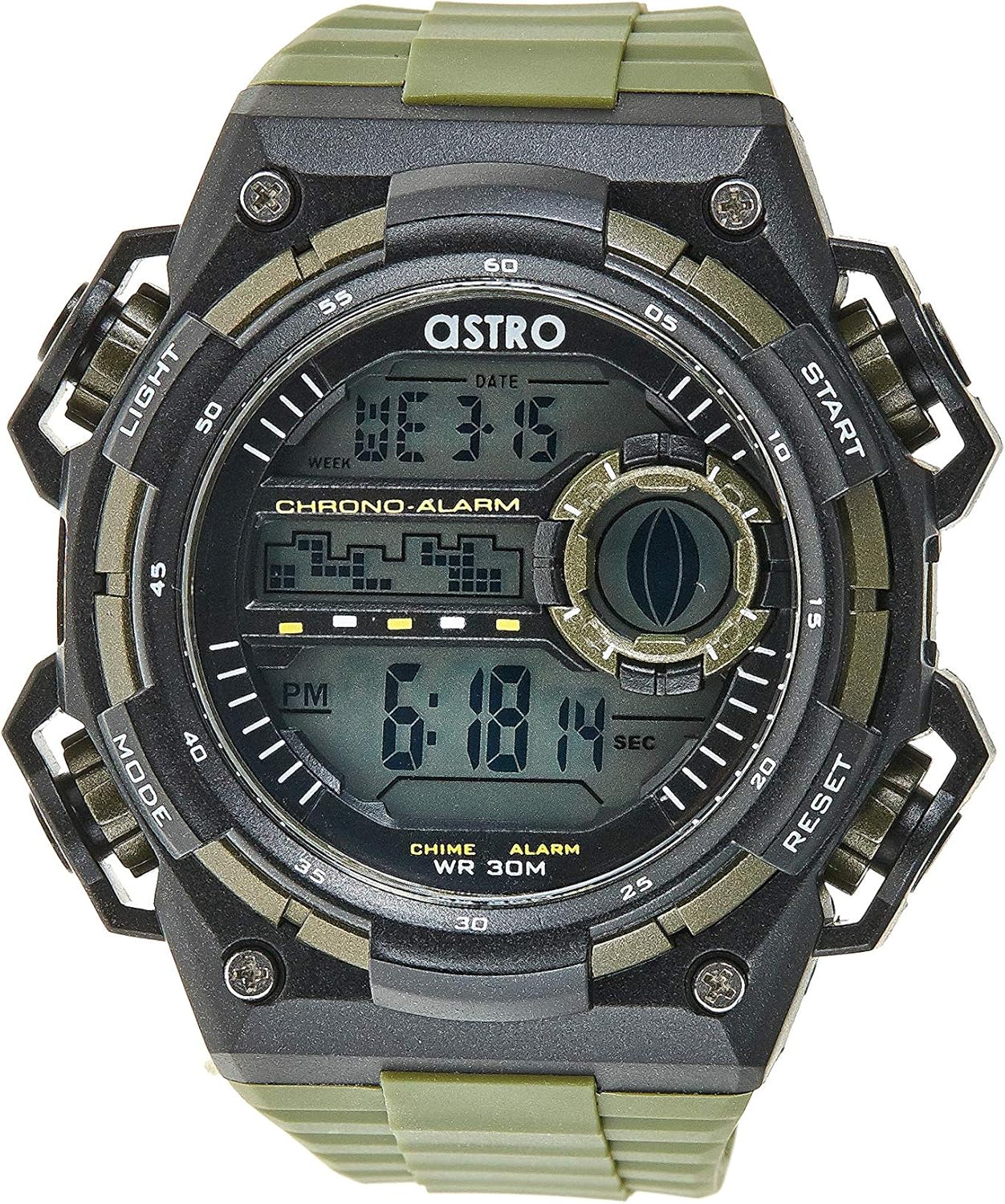
شکل 1: مخکی View د څار. This image displays the watch face, highlighting the digital display and the four primary control buttons: LIGHT (top left), MODE (bottom left), START (top right), and RESET (bottom right). The display shows the time, day of the week, and date, along with indicators for chronograph and alarm functions.

شکل 2: اړخ View د څار. This image provides a profile view of the watch, clearly showing the placement and design of the "LIGHT" and "MODE" buttons on the left side of the watch case. These buttons are essential for navigating through the watch's functions and activating the backlight.

شکل 3: شاته View د څار. This image shows the reverse side of the watch, featuring the stainless steel case back secured by four screws. The durable olive green plastic strap, with its buckle closure, is also visible, indicating the watch's robust construction.
د تڼۍ دندې:
- د رڼا تڼۍ (پورته کیڼ اړخ): Activates the backlight for viewing the display in low-light conditions.
- د موډ تڼۍ (لاندې کیڼ اړخ ته): Cycles through different modes: Time Display, Alarm Setting, Chronograph (Stopwatch), and Date Setting.
- د پیل تڼۍ (پورته ښۍ خوا): Used to start/stop the chronograph, adjust values during setting, or activate the alarm.
- د بیا تنظیم کولو تڼۍ (لاندې ښیې): Used to reset the chronograph, confirm settings, or switch between 12/24-hour format.
تنظیم او ابتدايي ترتیب
۱. د بکس خلاصول او تفتیش
Upon receiving your watch, carefully unbox it and inspect for any visible damage. Ensure all components, including the watch and any accompanying documentation (like the guarantee card), are present.

Figure 4: Watch Packaging and Guarantee Card. This image shows the watch's protective tin packaging and the included guarantee card, which is important for warranty claims.
2. د وخت او نیټې ټاکل
- د نورمال وخت ښودلو حالت څخه، فشار ورکړئ موډ د وخت تنظیم کولو حالت ته د ننوتلو لپاره درې ځله تڼۍ. د ثانیو عددونه به په فلش کولو پیل وکړي.
- فشار ورکړئ RESET button to cycle through the settings: Seconds → Hour → Minute → Month → Date → Day of the Week.
- While a digit is flashing, press the START button to increase the value. Hold the START button to rapidly advance the digits.
- کله چې ټول ترتیبات تنظیم شي، فشار ورکړئ موډ د تنظیم کولو حالت څخه د وتلو او عادي وخت ښودلو ته د بیرته راستنیدو لپاره تڼۍ.
3. 12/24-Hour Format Selection
په نورمال وخت ښودلو حالت کې، فشار ورکړئ RESET button to toggle between 12-hour (with 'AM'/'PM' indicator) and 24-hour formats.
عملیاتي لارښوونې
1. د الارم فعالیت
- د نورمال وخت ښودنې څخه، فشار ورکړئ موډ button once to enter the Alarm mode. The alarm time will be displayed.
- فشار ورکړئ RESET button to select the hour or minute to set. The selected digit will flash.
- فشار ورکړئ START د چمکۍ عدد تنظیمولو لپاره تڼۍ.
- د الارم فعال/غیر فعالولو لپاره، فشار ورکړئ START د الارم حالت کې تڼۍ (پرته له دې چې کوم عددونه روښانه شي). د الارم آیکون به په نندارتون کې څرګند شي/ورک شي.
- فشار ورکړئ موډ د عادي وخت ښودلو ته د بیرته راستنیدو لپاره تڼۍ.
2. هوurly چیم
د هو فعالولو یا غیر فعالولو لپارهurly chime (which beeps at the top of every hour):
- In Alarm mode, press the RESET د هو بدلولو لپاره تڼۍurly chime on/off. A chime icon will appear/disappear on the display.
۲. کرونوګراف (سټاپ واچ)
- د نورمال وخت ښودنې څخه، فشار ورکړئ موډ button twice to enter the Chronograph mode. The display will show "00:00:00".
- فشار ورکړئ START د وخت پیل کولو لپاره تڼۍ.
- فشار ورکړئ START د وخت د بندولو لپاره بیا تڼۍ.
- فشار ورکړئ RESET button while paused to reset the chronograph to "00:00:00".
- فشار ورکړئ موډ د عادي وخت ښودلو ته د بیرته راستنیدو لپاره تڼۍ.
۶.۹. د شاته رڼا فعالیت
فشار ورکړئ رڼا button (top left) at any time to illuminate the display for a few seconds, making it visible in dark environments.
ساتنه او پالنه
۱. خپل ساعت پاکول
To keep your watch looking its best, wipe it regularly with a soft, dry cloth. For stubborn dirt, a slightly damp ټوکر کارول کیدی شي، او بیا سمدلاسه وچ شي. د سختو کیمیاوي موادو یا کثافاتو موادو کارولو څخه ډډه وکړئ.
2. Water Resistance (WR 30M)
Your Astro watch is water resistant up to 30 meters (3 ATM). This means it is suitable for daily use and can withstand splashes or brief immersion in water, such as during hand washing or light rain. It is NOT suitable for showering, swimming, diving, or any water sports. Do not operate buttons when the watch is wet.
3. د بیټرۍ بدلول
کله چې سکرین تیاره شي یا فعالیتونه بې ثباته شي، نو ممکن د بیټرۍ بدلولو وخت وي. د بیټرۍ بدلول باید په مثالي توګه د وړ ساعت تخنیکین لخوا ترسره شي ترڅو د مناسب مهر کولو او د اوبو مقاومت بشپړتیا ډاډمن شي.
د ستونزو حل کول
| ستونزه | احتمالي لامل | د حل لاره |
|---|---|---|
| ښودنه خالي یا تیاره ده. | ټیټ بیټرۍ. | بیټرۍ بدله کړئ. |
| وخت غلط دی. | وخت په سمه توګه نه دی ټاکل شوی یا په ناڅاپي ډول د تڼۍ فشار. | Refer to "Setting the Time and Date" section to reset the time. |
| تڼۍ بې ځوابه دي. | Watch may be in a frozen state or battery is extremely low. | د بیا تنظیمولو لپاره د څو ثانیو لپاره ټول تڼۍ په یو وخت کې فشارولو هڅه وکړئ. که ستونزه دوام ولري، بیټرۍ بدله کړئ. |
| الارم نه غږېږي. | الارم فعال شوی نه دی. | Ensure the alarm icon is displayed on the screen. Refer to "Alarm Function" section. |
مشخصات
- د ماډل شمیره: A9916-PPHB
- د ښودلو ډول: ډیجیټل
- پټه مواد: پلاستیک
- د قضیې مواد: Plastic / Stainless Steel Back
- د اوبو مقاومت: ۳۰ متره (۳ ATM)
- دندې: Time (12/24-hour), Date, Day, Alarm, Hourly Chime, Chronograph, Backlight
- جوړونکی: اسټرو
تضمین او ملاتړ
Your Astro A9916-PPHB watch comes with a manufacturer's guarantee. Please refer to the included guarantee card (Figure 4) for specific terms and conditions of your warranty. Keep your purchase receipt and guarantee card in a safe place as proof of purchase.
For technical support, warranty claims, or any inquiries not covered in this manual, please contact your retailer or the official Astro customer service channel as indicated on your guarantee card or product packaging.


