پیژندنه
This user manual provides detailed instructions for the installation, operation, and maintenance of your Maxto M3 Bluetooth Motorcycle Helmet Intercom. Please read this manual thoroughly before using the device to ensure proper functionality and safety. The Maxto M3 is designed to provide seamless communication and entertainment while riding, suitable for various helmet types.
محصول پای ته ورسیدview
The Maxto M3 is a dedicated Bluetooth intercom system for motorcycle helmets, offering enhanced communication and multimedia features. Key features include:
- Dedicated Bluetooth intercom for motorcycle helmets.
- 2-in-1 microphone suitable for various helmet types (full-face, open-face, half-face, flip-up, 3/4 helmets).
- Designed for quick installation and transfer between multiple helmets.

انځور: مخکینۍ برخه view of the Maxto M3 Bluetooth intercom unit, showcasing its sleek black design with a blue illuminated ring on the right side and a camera lens on the left.
د بسته محتويات
مهرباني وکړئ د کڅوړې د خلاصولو پر مهال د کڅوړې محتويات وګورئ ترڅو ډاډ ترلاسه کړئ چې ټولې برخې شتون لري:
- Maxto M3 Bluetooth Intercom Unit
- 2-in-1 Microphone (boom mic and soft wire mic)
- Helmet Speakers (pair)
- د USB چارج کیبل
- Mounting Clip (for helmet edge)
- Adhesive Mount (for flat helmet surfaces)
- Velcro Pads for Speakers and Microphone
- Hex Key (for clip installation)
- د کارن لارښود

Image: All components included in the Maxto M3 package, laid out on a white surface. This includes the main unit, speakers, microphones, various mounting options, and cables.
د اجزاوو پیژندنه
Familiarize yourself with the various parts of the Maxto M3 unit and its accessories:

Image: A detailed diagram of the Maxto M3 unit with labels pointing to its various buttons, ports, and features. Key components include the lens, switch (drive recorder), WiFi button, indicator, switch button, multi-function button, knob, USB charging port, earphone jack, card slot, and clip.
- لینز: د ویډیو ثبتولو لپاره.
- Switch (Drive Recorder): Power on/off and control recording functions.
- د وائی فای تڼۍ: Activates Wi-Fi for app connectivity.
- شاخص: LED light showing device status (power, pairing, charging).
- د بدلولو تڼۍ: Controls various functions depending on context.
- ملټي فنکشن بټن: Primary control for calls, music, and intercom.
- غوټۍ: Rotary control for volume adjustment and menu navigation.
- د USB چارج بندر: د وسیله چارج کولو لپاره.
- د ایرفون جیک: Connects to helmet speakers and microphone.
- د کارت سلاټ: For inserting a microSD card for video storage.
- کلیپ: Attachment point for helmet mounting.
تنظیم او نصب کول
Proper installation ensures optimal performance and comfort. The Maxto M3 offers two main mounting options:
1. Helmet Edge Clip Installation
- Loosen the screws on the helmet clip using the provided hex key.
- Slide the clip between the outer shell and the inner padding of your helmet, ensuring it is securely positioned.
- Tighten the screws to firmly secure the clip.
- Slide the Maxto M3 unit onto the clip until it clicks into place.
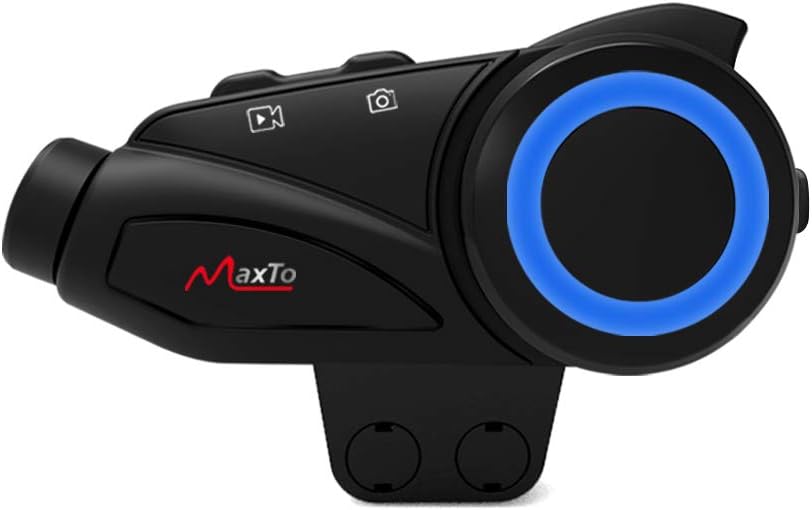
Image: The Maxto M3 unit attached to its helmet clip, demonstrating how it would sit on the side of a helmet.

Image: Two types of mounting clips for the Maxto M3: a screw-on clamp clip and an adhesive base with 3M VHB tape, providing flexible installation options.
2. Adhesive Mount Installation
- Clean the desired flat surface on your helmet where the unit will be mounted. Ensure it is dry and free of dust.
- Peel off the protective film from the 3M VHB adhesive on the mount.
- Firmly press the adhesive mount onto the helmet surface for at least 30 seconds. Allow 24 hours for the adhesive to fully cure before attaching the unit.
- Slide the Maxto M3 unit onto the adhesive mount until it clicks into place.
۳. د سپیکر او مایکروفون نصب کول
- Attach the Velcro pads to the back of the speakers.
- Position the speakers inside the helmet's ear pockets, ensuring they are aligned with your ears for optimal sound.
- Choose the appropriate microphone for your helmet type:
- د بوم مایکروفون: Ideal for open-face or flip-up helmets. Attach the Velcro to the boom mic and position it near your mouth.
- د نرم تار مایکروفون: Suitable for full-face helmets. Attach the Velcro to the mic and place it inside the helmet near your mouth, often along the cheek pad.
- Route the speaker and microphone wires neatly under the helmet padding to the mounting location of the Maxto M3 unit.
- Plug the speaker/microphone cable into the earphone jack on the Maxto M3 unit.
عملیاتي لارښوونې
پاور آن/بند
- پاور آن: Press and hold the Power/Drive Recorder Switch button for approximately 3 seconds until the indicator light turns on.
- بندول: Press and hold the Power/Drive Recorder Switch button for approximately 3 seconds until the indicator light turns off.
Bluetooth Pairing (Mobile Phone)
- With the Maxto M3 powered off, press and hold the Multi-function Button for approximately 5-7 seconds until the indicator light flashes red and blue alternately, indicating pairing mode.
- په خپل ګرځنده تلیفون کې، بلوتوث فعال کړئ او د نویو وسایلو لټون وکړئ.
- Select "Maxto M3" from the list of available devices.
- یوځل چې جوړه شي، د شاخص رڼا به قوي نیلي شي.
Intercom Pairing (Device to Device)
The Maxto M3 supports intercom communication with other Maxto M3 units and can also pair with other brands of Bluetooth intercoms.

Image: Diagram illustrating the Maxto M3's compatibility with various other Bluetooth intercom brands and helmet types, showing its versatility in group communication.
- Ensure both Maxto M3 units are powered on and not connected to any other devices.
- On both units, press and hold the Intercom Button (often integrated with the Multi-function Button or a dedicated button) for approximately 3-5 seconds until the indicator lights flash rapidly.
- One unit will automatically search for the other. Once connected, the indicator lights will change to a steady color (e.g., blue).
- To initiate intercom conversation, briefly press the Intercom Button on either unit.
د غږ غږ
- پلی کول / ودرول: Briefly press the Multi-function Button.
- بله لار: Rotate the Knob clockwise.
- مخکینی لار Rotate the Knob counter-clockwise.
- حجم پورته کول: Briefly press the Volume Up button (if separate) or rotate the Knob clockwise and hold.
- کموالی: Briefly press the Volume Down button (if separate) or rotate the Knob counter-clockwise and hold.
تلیفون زنګونه
- زنګ ووهئ: Briefly press the Multi-function Button.
- ټلیفون پای: Briefly press the Multi-function Button.
- زنګ رد کړئ: د 2 ثانیو لپاره د ملټي فنکشن ت Pressۍ فشار او ونیسئ.
- وروستنۍ شمیره بیا ولیکئ: د ملټي فنکشن تڼۍ دوه ځله فشار ورکړئ.
Video Recording (Drive Recorder)
The Maxto M3 features an integrated drive recorder. Ensure a microSD card (not included) is inserted into the card slot before recording.
- ثبت کول پیل کړئ: Briefly press the Drive Recorder Switch button. The indicator light will change to indicate recording is active.
- ثبتول بند کړئ: Briefly press the Drive Recorder Switch button again.
- د لاسرسي ثبتونه: Connect the device to a computer via USB or remove the microSD card to view ثبت شوی files.
د وائی فای ارتباط
The Maxto M3 can connect to a smartphone app via Wi-Fi for live view, settings adjustment, and file مدیریت
- Wi-Fi فعال کړئ: Press the Wi-Fi Button. The Wi-Fi indicator will light up.
- اپلیکیشن سره وصل کړئ: On your smartphone, connect to the Maxto M3's Wi-Fi network (SSID and password usually found in the quick start guide or on the device). Open the dedicated Maxto app to control and view وسیله
ساتنه
- پاکول: یو نرم استعمال کړئ، دamp د واحد بهرنۍ برخه پاکولو لپاره ټوکر. سخت کیمیاوي توکي یا د کثافاتو پاکونکي مه کاروئ.
- ذخیره کول: کله چې د اوږدې مودې لپاره نه کارول کیږي، وسیله په یخ او وچ ځای کې وساتئ.
- د بیټرۍ پاملرنه: To prolong battery life, charge the device fully before long-term storage and recharge it every few months.
- د اوبو مقاومت: The Maxto M3 is designed to be weather-resistant, but avoid submerging it in water. Ensure the USB port cover is securely closed.
د ستونزو حل کول
| ستونزه | احتمالي لامل | د حل لاره |
|---|---|---|
| وسیله فعاله نه ده. | ټیټ بیټرۍ. | وسیله په بشپړ ډول چارج کړئ. |
| د تلیفون/انټرکام سره جوړه نشي کیدی. | د جوړې په حالت کې نه؛ ډېر لرې واټن؛ مداخله. | Ensure device is in pairing mode (flashing red/blue). Move closer. Restart both devices. |
| د سپیکرو څخه هیڅ غږ نشته. | Speakers not connected; volume too low; faulty speakers. | Check speaker connection to the unit. Increase volume. Test with another audio source if possible. |
| Video recording not working. | No microSD card; card full; card error. | Insert a microSD card. Format the card. Use a compatible card (Class 10 or higher). |
| Poor intercom range/quality. | Obstructions; too far apart; interference. | Reduce distance between units. Avoid large obstructions. |
مشخصات
| فیچر | تفصیل |
|---|---|
| برانډ | MAXTO |
| د ماډل نوم | M3 |
| د تولید کونکي حواله | M3 هیډسیټ |
| د ارتباط ټیکنالوژي | بېسیم |
| د بې سیمه مخابراتو ټیکنالوژي | بلوتوث |
| مواد | پلاستیک |
| سټایل | Clip M3 |
| د عمر حد (تفصیل) | بالغ |
| ASIN | B08KCQCYSY |
تضمین او ملاتړ
For warranty information and technical support, please refer to the official Maxto webسایټ یا خپل محلي توزیع کونکي سره اړیکه ونیسئ. د هر ډول تضمین ادعا لپاره د پیرود ثبوت په توګه د پیرود رسید وساتئ.
For further assistance, you may also refer to the manufacturer's contact information provided with your product packaging.


