پیژندنه
This manual provides essential instructions for the setup, operation, maintenance, and troubleshooting of the Juniper Networks EX3300-24P 24-Port Gigabit PoE+ Network Switch. This device is designed for reliable network connectivity and Power over Ethernet (PoE+) capabilities, suitable for various network environments.
Please read this manual thoroughly before installing or operating the switch to ensure proper functionality and safety.
1. ترتیب او نصب کول
۵.۲ د بکس خلاصول او تفتیش
Carefully remove the switch from its packaging. Inspect the device for any signs of physical damage that may have occurred during shipping. Verify that all components listed in the packing slip are present. If any items are missing or damaged, contact your supplier immediately.
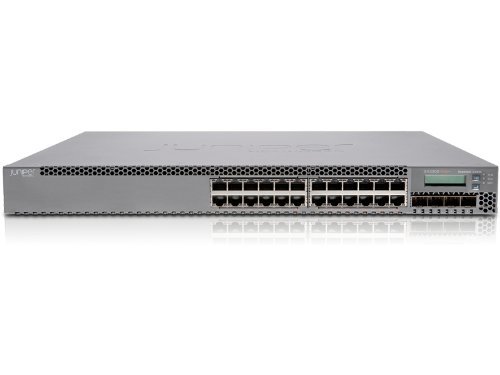
شکل 1: مخکی view of the Juniper Networks EX3300-24P 24-Port Gigabit PoE+ Network Switch. The image shows the grey metal casing with 24 RJ45 ports and an LCD display on the right side.
1.2 فزیکي نصب کول
The EX3300-24P switch can be installed on a desktop or mounted in a standard 19-inch equipment rack. Ensure adequate ventilation around the switch to prevent overheating. Maintain a minimum clearance of 5 cm (2 inches) on all sides for proper airflow.
- د ریک نصبول: Attach the provided rack-mount brackets to the sides of the switch using the included screws. Secure the switch into the rack using appropriate rack screws.
- د ډیسټاپ ځای په ځای کول: Place the switch on a flat, stable surface. Ensure the rubber feet are attached to prevent slipping and provide minor elevation for airflow.
1.3 د بریښنا نښلول
Connect the power cord to the AC power inlet on the rear of the switch and then to a grounded electrical outlet. The switch supports 240 Volts AC. Ensure the power source meets the switch's requirements.
1.4 ابتدايي پاور آن
After connecting the power, the switch will automatically power on. Observe the system status LEDs on the front panel. The Power LED should illuminate, indicating that the switch is receiving power. Allow a few minutes for the switch to complete its boot sequence.
2. عملیات
2.1 د شبکې اړیکې
Connect network devices (computers, servers, access points) to the RJ45 ports on the front panel using standard Ethernet cables. The EX3300-24P supports Gigabit Ethernet speeds. For devices requiring power, connect them to the PoE+ enabled ports. The switch will automatically detect and provide power to compatible devices.
۱۳.۱ د مدیریت لاسرسی
The switch can be managed via a console port, a web-based interface (J-Web), or a command-line interface (CLI) using SSH or Telnet. Refer to the Juniper Networks documentation for detailed instructions on initial configuration and management access.
- کنسول پورټ: Connect a serial cable from your management workstation to the console port on the switch.
- Web Interface (J-Web): Access the switch's IP address through a web browser. The default IP address and login credentials can be found in the official Juniper documentation.
- CLI (SSH/Telnet): Use an SSH or Telnet client to connect to the switch's IP address.
2.3 بنسټیز ترتیب
Upon first access, it is recommended to configure basic network settings such as the management IP address, subnet mask, default gateway, and administrative passwords. Further configurations may include VLANs, port security, QoS, and other advanced features as required by your network design.
3. ساتنه
3.1 پاکول
Regularly inspect the switch for dust accumulation, especially around ventilation openings. Use a soft, dry cloth to clean the exterior. For internal cleaning, if necessary, consult a qualified technician. Ensure the switch is powered off and disconnected from the power source before any cleaning procedures.
3.2 د فرم ویئر تازه معلومات
Keeping the switch's firmware up-to-date is crucial for optimal performance, security, and access to new features. Periodically check the Juniper Networks support website for the latest firmware releases for the EX3300-24P model. Follow the provided instructions carefully when performing firmware upgrades.
4. ستونزه حل کول
This section provides solutions to common issues you might encounter with your EX3300-24P switch.
۱ برېښنا نشته
- د بریښنا تار چیک کړئ: ډاډ ترلاسه کړئ چې د بریښنا تار په خوندي ډول د سویچ او بریښنایی آوټ لیټ دواړو سره وصل دی.
- د بریښنا رسولو تایید کړئ: د بریښنایی آوټ لیټ د بل وسیلې سره ازموینه وکړئ ترڅو تایید کړئ چې دا کار کوي.
- د بریښنا رسول: If the Power LED remains off after verifying connections and outlet, the internal power supply may be faulty. Contact support.
۶.۲ د شبکې اتصال نشته
- د کیبل پیوستون: Ensure Ethernet cables are securely connected to both the switch port and the connected device. Check for damaged cables.
- لینک / فعالیت LEDs: Verify that the Link/Activity LEDs on the switch ports are illuminated, indicating a valid connection and data activity.
- د بندر ترتیب: Check the switch's configuration to ensure the ports are enabled and correctly configured (e.g., VLAN assignments).
- د وسایلو ترتیب: Ensure the connected device's network settings (IP address, subnet mask) are correct.
4.3 PoE+ Issues
- د وسیله مطابقت: Ensure the connected device is PoE+ compatible (IEEE 802.3at or 802.3af).
- د بریښنا بودیجه: Verify that the switch's total PoE power budget is not exceeded. The EX3300-24P has a specific power budget for all PoE+ ports.
- د کابل کیفیت: Use high-quality Ethernet cables (Cat5e or higher) for PoE+ connections.
5. د محصول مشخصات
| فیچر | مشخصات |
|---|---|
| برانډ | د جونیپر شبکې |
| ماډل | EX3300-24P |
| د بندرونو شمیر | 24 |
| د انٹرفیس ډول | RJ45 |
| د توکي وزن | 12 پونډه (5.44 kg) |
| د محصول ابعاد | 17 x 2 x 12 انچه (43.18 x 5.08 x 30.48 سانتي متره) |
| والیtage | 240 ولټه |
| د قضیې مواد | فلزي |
| د لوړ حرارت درجه درجه | ۶۸ درجې فارنهایټ (۲۰ درجې سیلسیس) |
| رنګ | خړ |
| ASIN | B085PQV5RW |
| GTIN/UPC | 751889050401 |
6. تضمین او ملاتړ
دا محصول د ایمیزون نوي شوي توکي په توګه وړاندې کیږي. د ایمیزون نوي شوي محصولات په مسلکي توګه معاینه شوي او ازمول شوي ترڅو کار وکړي او د نوي په څیر ښکاري. دوی د ایمیزون نوي شوي تضمین لاندې د بدیل یا بیرته ورکولو وړ دي که تاسو له خپلې پیرود څخه راضي نه یاست.
The return policy for this item specifies a duration of 90 days for refund/replacement.
For specific support inquiries or issues, please contact the seller, Network Hardware Depot, directly through the Amazon platform. Additional warranty length options may be available; contact the seller for more details.
Please note that this product may be End-of-Life (EOL) from Juniper Networks, meaning direct support from Juniper may be limited. However, the device is confirmed to be functional and can be updated to the newest released firmware for this model.


