1. محصول ختم شوview
The Baseus W09 TWS Wireless Earphones (Model: Encok W09) are designed for convenient audio playback and communication. These in-ear earphones feature touch control and connect wirelessly via Bluetooth, offering a stereo bass sound experience.

Image 1: The Baseus W09 TWS Wireless Earphones securely placed within their charging case. The case is open, revealing both earbuds.
2. ترتیب کول
۴.۱ د غوږونو او کیس چارج کول
Before initial use, ensure both the earphones and the charging case are fully charged. The charging case contains a built-in Lithium Ion battery.
- اییرفونونه د چارج کولو قضیه کې ځای په ځای کړئ.
- Connect the charging case to a power source using a compatible charging cable (not specified, assume USB).
- بشپړ چارج معمولا شاوخوا ۱.۵ ساعته وخت نیسي.
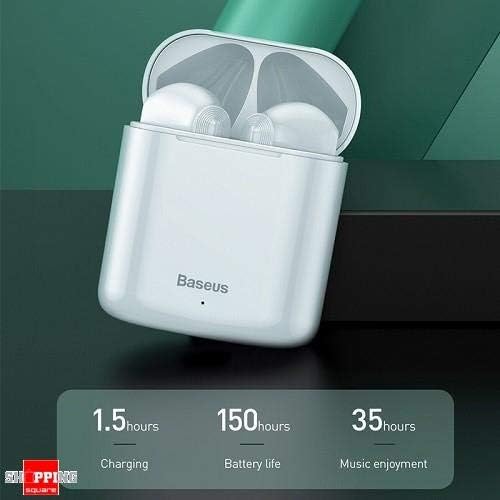
Image 2: The Baseus W09 charging case, illustrating its charging time of 1.5 hours, a standby battery life of 150 hours, and 35 hours of music enjoyment.
2.2 د بلوتوټ جوړه کول
The Baseus W09 earphones are designed for quick and instant connection.
- ډاډ ترلاسه کړئ چې اییرفونونه چارج شوي دي.
- د چارج کولو قضیه پرانیزئ.
- د چارج کولو کیس څخه اییرفونونه لرې کړئ. دوی به په اتوماتيک ډول د جوړه کولو حالت ته ننوځي.
- په خپل وسیله (سمارټ فون، ټابلیټ، او نور) کې، بلوتوټ فعال کړئ او د شته وسایلو لټون وکړئ.
- Select "Baseus Encok W09" or a similar name from the list to connect.
- یوځل چې وصل شو، تاسو به د آډیو غږ واورئ، او اییرفونونه به د کارونې لپاره چمتو وي.

Image 3: A hand demonstrating the "Pick up and Connect" feature, showing an earphone being removed from its charging case, initiating quick Bluetooth connection.
3. عملیاتي لارښوونې
۴.۱ د غوږونو اغوستل
Gently insert each earphone into the corresponding ear canal (L for left, R for right). Adjust them for a comfortable and secure fit to ensure optimal sound quality and stability.
۵.۱ د لمس کنټرول دندې
The Baseus W09 earphones feature intelligent touch controls for various functions. Specific gestures may vary; please refer to the product packaging or the official Baseus website for detailed touch control instructions.
- پلی کول / ودرول: Typically a single tap on either earphone.
- ځواب / پای کال: Usually a single tap during an incoming call.
- راتلونکی / مخکینی لار: Often a double or triple tap on a specific earphone.
- د غږ همکار فعاله کړئ: May involve a long press or specific tap sequence.
3.3 د بیټرۍ ژوند
The Baseus W09 earphones and charging case offer extended usage times:
- Music Enjoyment: Up to 35 hours (with charging case).
- ولاړ وخت: تر 150 ساعتونو پورې.
4. ساتنه
4.1 پاکول
- د غوږونو او چارج کولو کیس پاکولو لپاره نرم، وچ، له لینټ څخه پاک ټوکر وکاروئ.
- د کثافاتو پاکوونکي، الکول، یا کیمیاوي محلولونه مه کاروئ.
- Ensure no moisture enters the earphone speakers or charging ports.
4.2 ذخیره کول
- کله چې په کارولو کې نه وي، نو اییرفونونه د چارج کولو په قضیه کې وساتئ ترڅو یې ساتنه وشي او چارج یې وساتل شي.
- په یخ او وچ ځای کې د مستقیم لمر وړانګو او خورا تودوخې څخه لرې وساتئ.
5. ستونزه حل کول
If you encounter issues with your Baseus W09 earphones, try the following steps:
- غږ نشته: Ensure earphones are charged, connected to your device, and volume is up on both the earphones and your device.
- جوړه نشي کیدی: Make sure Bluetooth is enabled on your device and the earphones are in pairing mode. Try turning Bluetooth off and on again on your device.
- موقتي اړیکه: Ensure there are no obstructions between the earphones and your device. Try moving closer to your device.
- د چارج کولو مسلې: Check the charging cable and power adapter. Ensure the charging contacts on the earphones and case are clean.
- بیا تنظیمول: If issues persist, try resetting the earphones. Refer to the official Baseus website or product packaging for specific reset instructions.
6. مشخصات
| فیچر | تفصیل |
|---|---|
| برانډ | بیسوس |
| د ماډل شمیره | انکوک W09 |
| ډول | په غوږ کې |
| د ارتباط ټیکنالوژي | بې سیم (بلوتوث) |
| د کنټرول طریقه | لمس |
| مایکروفون شامل دی | هو |
| شور لغوه کول | نه |
| د بیټرۍ ډول | لیتیم ایون (شامل) |
| د چارج کولو وخت | نږدې 1.5 ساعته |
| Music Enjoyment Time | تر 35 ساعتونو پورې (د چارج کولو قضیې سره) |
| ولاړ وخت | تر 150 ساعتونو پورې |
| سره مطابقت لري | ټول بلوتوث فعال شوي وسایل |
| رنګ | سپین |
| د کڅوړې ابعاد | 14.6 x 11 x 4 سانتي متره |
| د توکي وزن | 170 ګرامه |
7. تضمین او ملاتړ
For warranty information, technical support, or further assistance, please refer to the documentation included with your product or visit the official Baseus webسایټ. د تضمین ادعاوو لپاره د پیرود ثبوت وساتئ.


