1. پیژندنه
The Samsung QMR series provides 4K UHD non-glare picture quality with up to a billion colors, delivering crystal clear, lifelike color and exceptional detail. Featuring an elegant, slim design and a clean cable management solution, these displays are designed for easy installation in various environments. The integrated Samsung Smart Signage Platform 6.0 and embedded MagicInfo player S6 media player facilitate efficient content management and playback, eliminating the need for an external set-back box or PC.
2. کلیدي ځانګړتیاوې
- ښکاره کول: 75-inch, 4K UHD (3840 x 2160 resolution), 500 nits brightness, non-glare panel, rated for 24/7 operation, IP5X rating.
- ارتباط: HDMI, DVI, DisplayPort 1.2; built-in Wi-Fi and Bluetooth for remote control and content sharing.
- د انځور لوړول: Intelligent UHD upscaling for standard and high-definition content, intelligent HDR+ to convert SDR to HDR.
- ډیزاین: Slim, elegant design for easy mounting, clean cable management, 9.2 mm bezel width, VESA 200 x 200 wall mountable in portrait or landscape mode.
- همکاري: سیسکو WebEx room kit compatible for conferencing solutions.
- Smart Signage: System-on-chip (SoC) technology and embedded media player for an all-in-one digital signage solution.

شکل 2.1: مخکی view of the Samsung QM75R display, showcasing its slim bezel and vibrant picture quality.
3. ترتیب کول
۲.۱ د بسته بندۍ خلاصول او لومړنۍ تفتیش
Carefully remove the display from its packaging. Inspect the unit for any signs of damage. Ensure all components listed in the packing list are present.
۴.۱ د ښودنې نصبول
The QM75R display supports VESA 200 x 200 wall mounting, allowing for installation in both portrait and landscape orientations. Its slim design and 9.2 mm bezel facilitate easy integration into various spaces. For optimal aesthetics, utilize the integrated cable management system to keep connections tidy.

شکل 3.1: اړخ view of the Samsung QM75R, illustrating its slim profile and accessible ports for easy installation.

Figure 3.2: The QMR series features a clean cable management system, ensuring a tidy installation by routing cables discreetly.
3.3 د پردیو سره نښلول
Connect your source devices (e.g., media players, computers) to the display using the available HDMI, DVI, or DisplayPort 1.2 inputs. The built-in Wi-Fi and Bluetooth allow for wireless connectivity and content sharing.
4. عملیاتي لارښوونې
4.1 بریښنا کول / بندول
Press the power button on the remote control or the display to turn the unit on or off. The display is rated for 24/7 operation, making it suitable for continuous commercial use.
4.2 Content Management and Playback
The integrated Samsung Smart Signage Platform 6.0 and embedded MagicInfo player S6 media player provide comprehensive tools for content creation, scheduling, and playback. Utilize the built-in Wi-Fi and Bluetooth for remote content updates and control via compatible devices.
Video 4.1: Samsung UHD Commercial Signage. This video demonstrates the advanced features of Samsung's UHD commercial displays, including intelligent upscaling, color accuracy, and design elements.
۴.۲ د انځور کیفیت ښه والی
The display features intelligent UHD upscaling, which automatically converts lower-resolution content to stunning 4K quality. Intelligent HDR+ technology enhances standard dynamic range (SDR) content to high dynamic range (HDR), revealing greater detail in both bright and dark scenes.

Figure 4.2: Intelligent UHD Upscaling processes content to deliver enhanced 4K resolution, improving clarity and detail.

Figure 4.3: UHD Noise Reduction minimizes visual noise in content, resulting in a cleaner and sharper image.
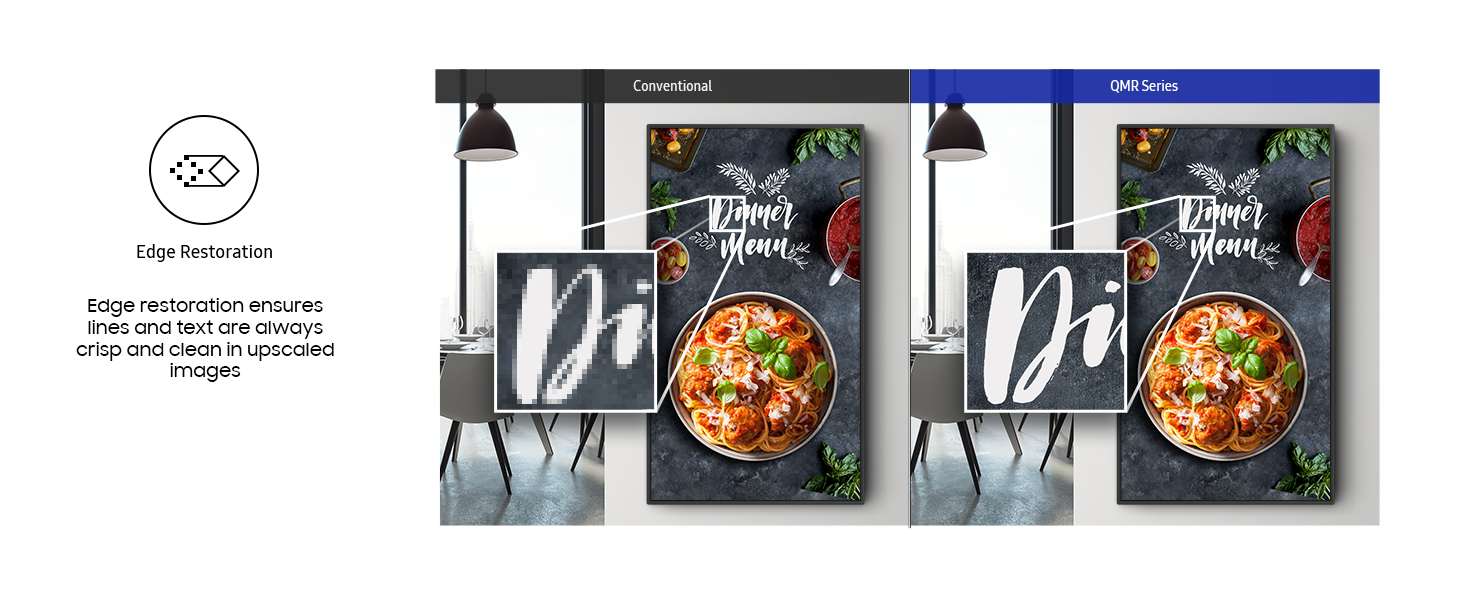
Figure 4.4: UHD Edge Restoration enhances the sharpness of image edges, making details more pronounced.
4.4 Cisco WebEx Compatibility
The QM75R is compatible with Cisco WebEx room kits, offering a powerful solution for seamless video conferencing and collaboration in business environments.
Video 4.5: Seamless Integration with Samsung Display Solutions and Cisco Webex. This video highlights the collaborative capabilities when integrating Samsung displays with Cisco Webex for enhanced meeting experiences.
5. ساتنه
5.1 د نندارې پاکول
To clean the display screen, gently wipe it with a soft, lint-free cloth. For stubborn marks, lightly dampen the cloth with water or a non-abrasive screen cleaner. Avoid using harsh chemicals or abrasive materials that could damage the screen surface. Ensure the display is powered off before cleaning.
5.2 عمومي پاملرنه
Avoid placing objects on top of the display or blocking ventilation openings. Ensure the display is installed in a well-ventilated area to prevent overheating. Protect the display from direct sunlight and extreme temperatures.
6. ستونزه حل کول
۱ برېښنا نشته
- Check if the power cable is securely connected to both the display and the power outlet.
- د بل وسیلې په لګولو سره تایید کړئ چې د بریښنا آوټ لیټ فعال دی.
- ډاډ ترلاسه کړئ چې د نندارې د بریښنا سویچ (که شتون ولري) په 'آن' حالت کې دی.
6.2 No Picture/Signal
- Confirm that the correct input source is selected on the display.
- Check all video cables (HDMI, DVI, DisplayPort) for secure connections at both the display and the source device.
- Test with a different video cable or source device to rule out cable or device issues.
۶.۳ د انځور ضعیف کیفیت
- د ښودنې ترتیبات تنظیم کړئ لکه روښانتیا، برعکس، او ګړندیتوب.
- Ensure the source content is of high quality (e.g., 4K content for optimal 4K display).
- Disable or adjust any picture enhancement features if they appear to be causing undesirable effects.
7. مشخصات
| فیچر | مشخصات |
|---|---|
| برانډ | سامسونگ |
| د ماډل شمیره | QM75R |
| د سکرین اندازه | ۷۸۷ انچه |
| د سکرین ریزولوشن | ۳۸۴۰ x ۲۱۶۰ پکسلز (۴K UHD) |
| روښانتیا | 500 نیټ |
| د پینل ډول | غیر روښانه |
| د عملیاتو درجه بندي | ۹/۹۷ |
| د IP درجه بندي | IP5X |
| ارتباط | HDMI, DVI, DisplayPort 1.2, 2x USB 2.0 Ports, Wi-Fi, Bluetooth |
| VESA ماونټ | 200 x 200 mm |
| د محصول ابعاد (LxWxH) | 66.2 x 1.8 x 37.8 انچه |
| د توکي وزن | ۲.۴۵ پونډه |
| رنګ | تور |
| د اړخ نسبت | 16:9 |
| د سکرین سطحې توضیحات | فلیټ |
8. تضمین او ملاتړ
8.1 د محصول تضمین
This Samsung Business QM75R display comes with a 3-Year Warranty, covering manufacturing defects and ensuring reliable performance. Please refer to the warranty card included with your product for full terms and conditions.
8.2 تخنیکي ملاتړ
د تخنیکي مرستې، ستونزې حل کولو، یا خدماتو پوښتنو لپاره، مهرباني وکړئ د سامسنګ پیرودونکي ملاتړ سره اړیکه ونیسئ. تاسو کولی شئ د اړیکو معلومات په رسمي سامسنګ کې ومومئ. webسایټ یا ستاسو د محصول اسنادو کې.


