پیژندنه
This manual provides essential information for the safe and efficient use of your Sony HT-S350 2.1ch Soundbar System. Please read it thoroughly before operating the product and retain it for future reference.
The Sony HT-S350 system enhances your audio experience with a 2.1 channel soundbar and a powerful wireless subwoofer, delivering 320W total output. It features HDMI ARC for simplified connectivity and S-Force Pro Front Surround technology for an immersive soundstage.
په بکس کې څه دي
- د غږ بار واحد
- بې سیم Subwoofer
- ریموټ کمانډر (RMT-AH500U)
- Batteries for Remote Commander (2 AAA)
- آپټیکل کیبل
- وال ماونټ ټیمپلیټ
چمتو کول
1. ځای پرځای کول
Place the soundbar centrally below your TV. The wireless subwoofer can be placed anywhere in the room where a power outlet is available, ideally near the soundbar for optimal bass integration.

Image: Sony HT-S350 Soundbar and Wireless Subwoofer positioned in a living room setup.
2. ارتباطات
د لاندې میتودونو څخه د یوې په کارولو سره ساؤنډ بار خپل تلویزیون سره وصل کړئ:
HDMI ARC (وړاندیز شوی)
For optimal audio and control, connect an HDMI cable (not included) from the HDMI OUT (TV (ARC)) port on the soundbar to the HDMI ARC port on your TV. This allows for one-cable audio and control synchronization.
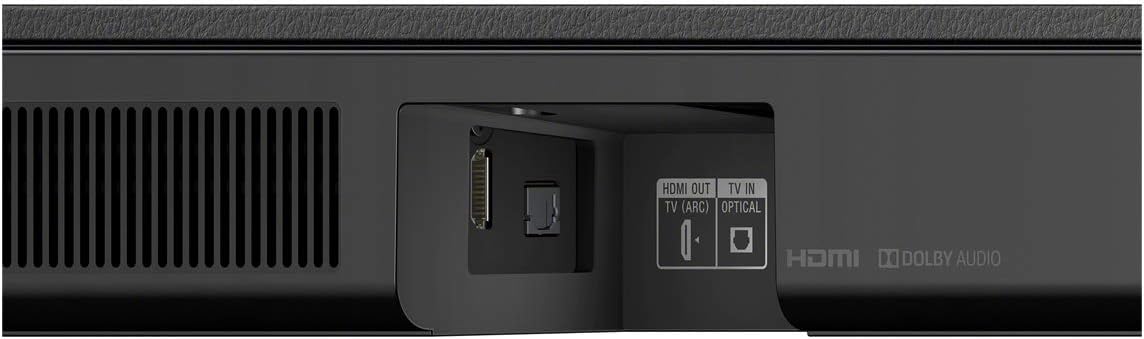
Image: Close-up of the soundbar's rear panel, highlighting the HDMI OUT (TV (ARC)) and TV IN (OPTICAL) ports.
آپټیکل کیبل
If your TV does not support HDMI ARC, connect the supplied optical cable from the TV IN (OPTICAL) port on the soundbar to the optical digital output port on your TV.
3. بریښنا فعاله کړئ
Plug the soundbar and wireless subwoofer into separate AC outlets. The subwoofer will automatically pair with the soundbar upon powering on.
عملیاتي لارښوونې
د ریموټ کنټرول دندې
Use the supplied Remote Commander (RMT-AH500U) to control various settings:
- Power (TV/Soundbar): Turns the TV and soundbar on/off.
- بلوتوث: د بلوتوث جوړه کولو حالت فعالوي.
- سینما: Optimizes sound for movies.
- Auto Sound: د منځپانګې پر بنسټ په اتوماتيک ډول د غږ ترتیبات تنظیموي.
- موسيقي: Enhances audio for music playback.
- غږ: Isolates and amplifies voices for clearer dialogue.
- شپه: Adjusts sound for late-night listening.
- SW +/-: د فرعي ووفر حجم کچه تنظیموي.
- آډیو: Selects audio input.
- لوبه: د لوبو لپاره غږ غوره کوي.
- خبرونه: Enhances dialogue clarity for news programs.
- سپورت: د سپورت خپرونو لپاره غږ غوره کوي.
- معیاري: یو متوازن غږ پرو چمتو کويfile.
- Secure Link Indicators: د پیوستون حالت ښیې.
بلوتوث جریان
To stream audio from your smartphone or tablet:
- Press the Bluetooth button on the remote or soundbar to enter pairing mode.
- On your mobile device, search for and select "HT-S350" from the list of available Bluetooth devices.
- Once paired, audio from your device will play through the soundbar system.
Video: Official Sony Electronics overview of the HT-S350 Soundbar with Wireless Subwoofer, demonstrating its features and connectivity options.
ساتنه
ستاسو د غږ بار سیسټم د اوږد عمر او غوره فعالیت ډاډمن کولو لپاره:
- Keep the units clean by wiping them with a soft, dry cloth. Avoid using abrasive cleaners or solvents.
- Ensure proper ventilation around both the soundbar and subwoofer to prevent overheating.
- Protect the units from direct sunlight, extreme temperatures, and moisture.
د ستونزو حل کول
نه غږ
- Check that both the soundbar and TV are powered on.
- Verify that the correct input source is selected on the soundbar (e.g., TV, Bluetooth).
- ډاډ ترلاسه کړئ چې ټول کیبلونه (HDMI، آپټیکل) په خوندي ډول وصل دي.
- If using HDMI ARC, confirm that ARC is enabled in your TV's audio settings.
سب ووفر نه نښلي
- Ensure the subwoofer is plugged into a working power outlet.
- The subwoofer should automatically pair. If not, refer to the full user manual for manual pairing instructions.
- Check for any obstructions or interference between the soundbar and subwoofer.
د بلوتوث ضعیف اتصال
- Ensure your Bluetooth device is within range (typically 10 meters) of the soundbar.
- د نورو بېسیم وسیلو ته نږدې د غږ بار له ایښودلو څخه ډډه وکړئ چې ممکن د مداخلې لامل شي.
- Try unpairing and re-pairing your device.
مشخصات
| فیچر | تفصیل |
|---|---|
| د ماډل نوم | HTS350 |
| د سپیکر ډول | ساؤنډ بار |
| شاوخوا د غږ چینل ترتیب کول | 2.1 |
| د سپیکر اعظمي تولید ځواک | 320 واټ |
| د Subwoofer قطر | ۷۸۷ انچه |
| د بې سیمه مخابراتو ټیکنالوژي | بلوتوث |
| د ارتباط ټیکنالوژي | Wired, Wireless (HDMI ARC, Optical, Bluetooth) |
| د محصول ابعاد | ۱۶"د x ۲۶"وچ x ۴۷"ح |
| د توکي وزن | ۱۲.۹ پونډه (ټول سیسټم) |
| شاملې برخې | Remote Commander, Batteries, Optical Cable, Wall Mount Template |
تضمین او ملاتړ
This product comes with a limited warranty. For detailed warranty information, please refer to the warranty card included in the product packaging or visit the official Sony support webسایټ
For further assistance, troubleshooting, or product inquiries, please visit the په ایمیزون کې د سوني پلورنځی or contact Sony customer support.


