SERVO 225 Mobile Phone User Manual
Model: SERVO 225
1. پیژندنه
This user manual provides comprehensive instructions for the operation and maintenance of your new SERVO 225 mobile phone. Please read this manual carefully before using the device to ensure proper functionality and to maximize its lifespan. The SERVO 225 is a compact and reliable mobile phone featuring dual SIM capability, a 2.4-inch display, and essential functions for daily communication.

شکل ۱: مخ او شا view of the SERVO 225 mobile phone, showcasinد هغې کمپیکټ ډیزاین او کیپډ.
2. د خوندیتوب معلومات
- وسیله مه جلا کوئ یا ترمیم مه کوئ.
- وسیله د اوبو او رطوبت څخه لرې وساتئ.
- Use only original or approved accessories.
- د سخت تودوخې څخه ډډه وکړئ.
- د موټر چلولو پر مهال تلیفون مه کاروئ.
- د بیټرۍ او وسایلو ضایع کول د ځایی مقرراتو سره سم په مسؤلیت سره ترسره کړئ.
- Before first use, ensure to remove any insulating tape from the battery terminals.
3. د بسته محتويات
مهرباني وکړئ د خپل کڅوړې محتويات وګورئ. که کوم توکي ورک یا خراب وي، نو خپل پرچون پلورونکي سره اړیکه ونیسئ.
- 1 x SERVO 225 Mobile Phone
- 1 x Battery (1400 mAh Li-ion)
- 1 x چارجر
- 1 x محافظتي قضیه
- ۱ x د کارونکي لارښود (دا سند)

Figure 3.1: The SERVO 225 package contents, including the phone, battery, charger, and protective case.
4. محصول ختم شوview
The SERVO 225 features a classic candy bar design with a physical keypad and a 2.4-inch display. It supports dual SIM cards for flexible network usage.
۲.۲. فزیکي ځانګړتیاوې
- ښکاره کول: 2.4-inch VGA screen.
- کیپیډ: Standard alphanumeric keypad with navigation keys.
- کمره: 0.3 Megapixel CMOS camera with flash on the rear.
- شاته پوښ: Features a mechanical back cover, available in various colors like Black, Brown, and Gold.
- ابعاد: Approximately 122 x 52 x 11 mm (4.80 x 2.05 x 0.43 inches).
- وزن: نږدې 80 ګرامه.

Figure 4.1: Close-up of the SERVO 225's rear, highlighting the camera and dual LED flash for improved low-light photography.

Figure 4.2: Various color options for the SERVO 225, demonstrating the 2.4-inch screen size.
5. ترتیب کول
۱. د بیټرۍ نصب او چارج کول
- د تلیفون شاته پوښ په نرمۍ سره د نوچ څخه خلاصولو سره لرې کړئ.
- If present, remove the insulating tape from the battery terminals.
- Insert the 1400 mAh Li-ion battery into the battery compartment, ensuring the gold contacts align with the phone's terminals.
- د شا پوښ بدل کړئ، په ټینګه سره فشار ورکړئ تر هغه چې دا په خپل ځای کې راشي.
- Connect the charger to the phone's charging port and plug it into a power outlet. Charge the battery fully before first use.

Figure 5.1: The 1400 mAh battery and the phone's zinc alloy paint shell design.
۲. د سیم کارتونو او میموري کارتونو داخلول
The SERVO 225 supports dual SIM cards (Dual GSM) and a T-Flash memory card (up to 32GB, not included).
- With the back cover and battery removed, locate the SIM card slots. The phone supports two SIM cards.
- Carefully insert your SIM cards into the designated slots with the gold contacts facing down.
- Locate the T-Flash (microSD) card slot. Insert the memory card until it clicks into place.
- بیټرۍ او د شا پوښ بیا نصب کړئ.
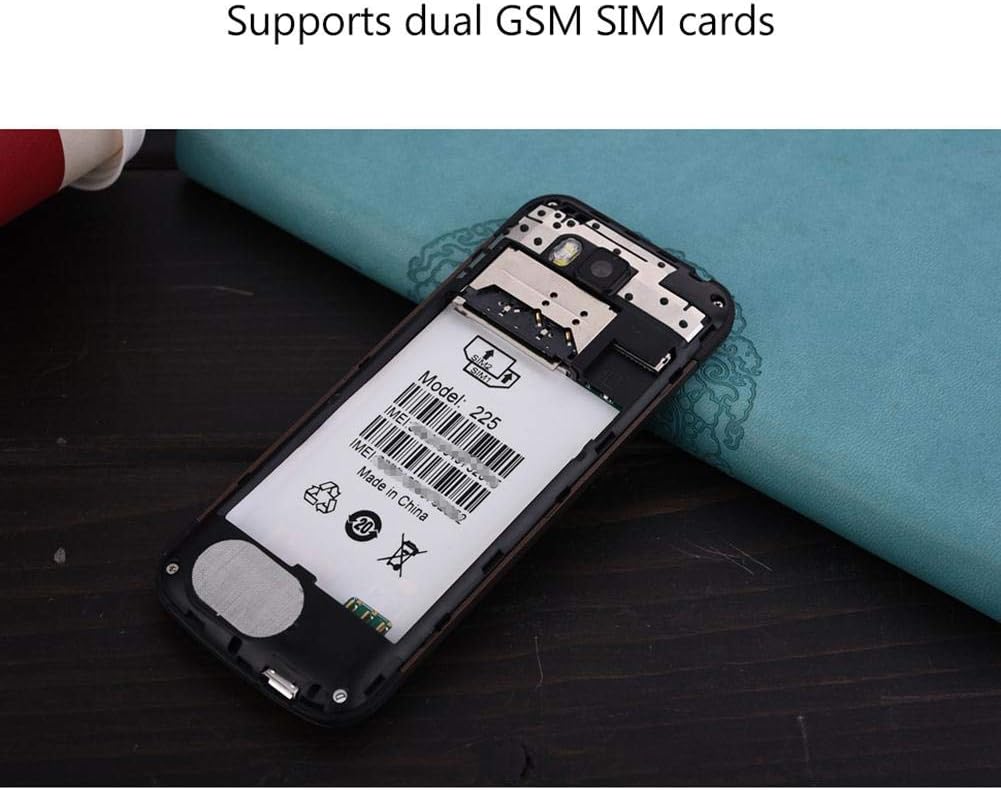
شکل 5.2: داخلي view of the SERVO 225, illustrating the dual SIM card slots and the memory card slot.
6. عملیاتي لارښوونې
6.1. بریښنا فعال/بند
- د فعالولو لپاره: د پاور/پای کال کیلي فشار ورکړئ او ونیسئ تر هغه چې سکرین روښانه شي.
- د بریښنا بندولو لپاره: د بریښنا/پای زنګ کیلي فشار ورکړئ او ونیسئ تر هغه چې د بریښنا بند اختیارونه څرګند شي، بیا "د بریښنا بند" غوره کړئ.
6.2. بنسټیز کارونه
- زنګ وهل: د کیپډ په کارولو سره د تلیفون شمیره دننه کړئ او د زنګ کیلي فشار ورکړئ.
- زنګونو ته ځواب ورکول: کله چې تلیفون زنګ ووهي د زنګ کیلي فشار ورکړئ.
- د پیغام لیږل: Navigate to the "Messages" menu, select "Write message", enter your text, and send to the desired recipient.
- مینو نیویگیشن: Use the navigation keys (up, down, left, right) to browse through menus and the center key to select.
6.3. کلیدي ځانګړتیاوې
- بلوتوث: Connect to other Bluetooth-enabled devices for file transfer or hands-free communication.
- ایف ایم راډیو: Listen to your favorite radio stations. Requires headphones to be plugged in as an antenna.
- MP3/MP4 Player: آډیو او ویډیو غږول fileستاسو په میموري کارت کې ساتل کیږي.
- GPRS/WAP: Access basic internet services and WAP sites.
- کمره: Capture photos with the 0.3MP rear camera.
- اضافي وسیلې: Calendar, Sound Recorder, Calculator, World Clock, Alarm.
7. ساتنه
- پاکول: د تلیفون د سطحې د پاکولو لپاره نرم، وچ ټوکر وکاروئ. مایع پاکوونکي یا ایروسول مه کاروئ.
- ذخیره کول: کله چې د اوږدې مودې لپاره نه کارول کېږي، تلیفون په یخ او وچ ځای کې وساتئ.
- د بیټرۍ پاملرنه: Avoid overcharging or completely draining the battery frequently to prolong its life.
8. ستونزه حل کول
| ستونزه | احتمالي لامل | د حل لاره |
|---|---|---|
| تلیفون نه چالانیږي. | بیټرۍ ټیټه ده یا په سمه توګه نه ده نصب شوې. | Charge the battery. Ensure battery is properly inserted and insulating tape is removed. |
| د شبکې سیګنال نشته. | سیم کارت په سمه توګه نه دی داخل شوی یا د شبکې پوښښ څخه بهر دی. | سیم کارت بیا دننه کړئ. هغه سیمې ته لاړ شئ چې د شبکې پوښښ یې ښه وي. |
| زنګونه نشي وهلی یا یې ترلاسه کولی نشي. | No network, SIM card issue, or call barring enabled. | Check network signal. Verify SIM card. Disable call barring if active. |
| د حافظې کارت ونه موندل شو. | Memory card not inserted correctly or corrupted. | Reinsert memory card. Try a different memory card. |
9. مشخصات
| فیچر | مشخصات |
|---|---|
| برانډ | سرور |
| ماډل | 225 |
| ښودل | 2.4-inch VGA |
| پلیټ فارم | Spreadtrum6531CA |
| د سیم ډول | Dual SIM, Dual Standby (Dual GSM) |
| د شبکې فریکونسی | GSM850/900/1800/1900 MHz (2G) |
| داخلي حافظه | 32MB RAM, 32MB ROM |
| د پراختیا وړ حافظه | Up to 32GB (T-Flash / microSD card, not included) |
| کیمره | 0.3 Megapixel CMOS (Rear) with Flash |
| بیټرۍ | 1400 mAh لی-ion |
| د خبرو وخت | نږدې 6 ساعته |
| ابعاد | 122 x 52 x 11 mm (4.80 x 2.05 x 0.43 انچه) |
| وزن | نږدې 80 ګرامه |
| ارتباط | بلوتوث |
| نور ځانګړتیاوې | FM Radio, MP3/MP4 Player, GPRS, WAP, Calendar, Recorder, Calculator, World Clock, Alarm |
10. تضمین او ملاتړ
Your SERVO 225 mobile phone comes with a standard manufacturer's warranty. Please refer to the warranty card included in your package for specific terms and conditions. For technical support, troubleshooting assistance, or warranty claims, please contact your point of purchase or the official SERVO customer service channels.
د تضمین موخو لپاره د پیرود ثبوت په توګه د پیرود رسید وساتئ.


