1. پیژندنه
This manual provides essential information for the setup, operation, and maintenance of your SMART Board Interactive Whiteboard System SBM685IX3. Please read this manual thoroughly before using the product to ensure proper functionality and to maximize your experience.
2. محصول ختم شوview
The SMART Board Interactive Whiteboard System SBM685IX3 is an advanced interactive display solution designed for collaborative environments such as classrooms and meeting rooms. It combines an 87-inch interactive whiteboard with an ultra-short-throw projector to deliver a large, dynamic display surface.
کلیدي برخې شاملې دي:
- متقابل سپینه تخته: An 87-inch (7.25 feet diagonal viewing angle) touch-sensitive surface for direct interaction.
- Ultra-Short-Throw Projector: Projects large images from a very short distance, minimizing shadows and glare. Features a 16:10 widescreen (WXGA) aspect ratio and a built-in 16W speaker.
- Pen Tray: For storing interactive pens.

Figure 2.1: The SMART Board Interactive Whiteboard System with an ultra-short-throw projector mounted above, displaying a presentation slide.
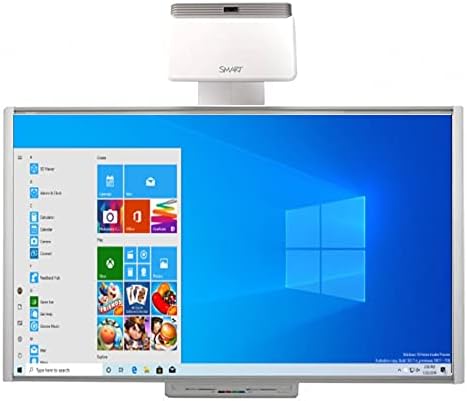
Figure 2.2: The SMART Board interactive whiteboard displaying a Windows 10 desktop interface, highlighting its functionality as a large interactive display.
۲. په بکس کې څه دي؟
د خلاصولو پر مهال، ډاډ ترلاسه کړئ چې لاندې ټولې برخې شتون لري:
- SMART Board M685 (87’’)
- Wall mount for SMART Board
- د قلم ټری
- ۲ قلمونه
- پاکونکی
- Ultra-Short-Throw Projector
- پروجیکټر ماونټ
- USB cable (for SMART Board connectivity)
- HDMI cable (for projector video input)
- Power cables (for projector and SMART Board)
- د چټک پیل لارښود
۴. د تنظیم لارښوونې
Follow these steps to set up your SMART Board Interactive Whiteboard System:
4.1 Mounting the Whiteboard and Projector
- Install Whiteboard Wall Mount: Securely attach the provided wall mount hardware for the SMART Board to a sturdy wall surface according to the quick start guide.
- Mount Whiteboard: Carefully lift and attach the SMART Board M685 to the installed wall mount.
- Install Projector Mount: Attach the projector mount to the wall or ceiling, ensuring it is positioned correctly above the whiteboard. The ultra-short-throw projector is designed to project a 100-inch image from approximately 12 inches away from the edge of the projector to the screen.
- د پروجیکټر غره: Secure the ultra-short-throw projector onto its mount.

Figure 4.1: An installed SMART Board interactive whiteboard system in a room, showing the projector mounted on the wall above the board, displaying a blue Windows background.
۳.۱ د سیسټم نښلول
- Connect SMART Board to Computer: Use the provided USB cable to connect the SMART Board to your computer. This enables touch and pen interaction.
- Connect Projector to Computer: Use the provided HDMI cable to connect the projector to your computer's video output.
- د بریښنا اړیکې: Connect the power cables to the SMART Board and the projector, then plug them into appropriate power outlets.
- پاور آن: Turn on the projector and the SMART Board. Your computer's display should now be projected onto the whiteboard.
5. عملیاتي لارښوونې
The SMART Board SBM685IX3 offers intuitive interaction for various applications.
5.1 Basic Interaction
- Touch and Pen: Use your finger or the provided pens to interact with the projected content. The system supports dual-touch controls, allowing multiple users to interact simultaneously.
- د موږک دندې: Perform standard mouse functions (click, right-click, drag) directly on the board.
- د لمس اشارې: Utilize natural touch gestures such as flicking, rotating, and zooming to manipulate content.
5.2 SMART Ink Functionality
SMART Ink allows you to write and draw directly over various applications and content:
- تبصره: Write over websites, videos, PDF documents, and Microsoft Office files.
- Save Notes: Save your annotations and notes in almost any file type for later reference or sharing.

Figure 5.1: The SMART Board interactive whiteboard displaying a world map with annotations, illustrating interactive teaching or presentation capabilities.

Figure 5.2: Two children interacting with the SMART Board interactive whiteboard, which displays a dinosaur skeleton image, demonstrating its use in educational settings.
۳.۳ د سیسټم مطابقت
The SMART Board SBM685IX3 is compatible with both Windows and Mac OS operating systems, allowing for flexible integration into existing IT infrastructures.

Figure 5.3: The SMART Board interactive whiteboard displaying the Windows Start menu with various applications, emphasizing its computer-like functionality.
6. ځانګړتیاوې
The SMART Board Interactive Whiteboard System SBM685IX3 offers several features to enhance collaboration and presentation:
- Natural Touch Experience: Write, erase, and perform mouse functions using a finger or pen with intuitive touch gestures like flick, rotate, and zoom.
- Simultaneous Touch: Supports multiple simultaneous touches, facilitating collaborative work among students or team members.
- SMART Ink Integration: Allows users to write directly over various digital content, including websites, videos, PDFs, and Microsoft Office files, and save notes in multiple file شکلونه
- Enhanced Presentations: Provides a large, dynamic surface for delivering engaging content, enabling audience interaction with on-screen elements.
- څو اړخیز غوښتنلیکونه: Suitable for diverse uses such as capturing project notes, incorporating client feedback in design processes, and creating training simulators.
7. ساتنه
To ensure the longevity and optimal performance of your SMART Board system, follow these maintenance guidelines:
- Cleaning the Whiteboard: د نرم، لینټ پاک ټوکر څخه په روښانه توګه کار واخلئampened with water or a mild, non-abrasive cleaner specifically designed for interactive whiteboards. Avoid harsh chemicals or abrasive materials.
- Projector Lens Care: Gently clean the projector lens with a lens cleaning cloth or air blower to remove dust. Do not touch the lens directly with your fingers.
- عمومي پاکول: Keep the surrounding area clean and free of dust. Regularly wipe down the projector casing and pen tray.
- د کیبل مدیریت: Ensure all cables are securely connected and not under strain. Avoid bending or kinking cables sharply.
8. ستونزه حل کول
If you encounter issues with your SMART Board system, refer to the following common troubleshooting steps:
8.1 No Display on Whiteboard
- ځواک چیک کړئ: Ensure both the projector and the SMART Board are powered on and their power cables are securely connected.
- Verify HDMI Connection: Confirm the HDMI cable is firmly connected between the computer and the projector.
- Computer Display Settings: Check your computer's display settings to ensure it is configured to extend or duplicate the display to the projector.
- Projector Input: Ensure the projector's input source is set to the correct HDMI port.
8.2 No Touch or Pen Interaction
- د USB اتصال وګورئ: Ensure the USB cable connecting the SMART Board to your computer is securely plugged in.
- د ډرایور نصب کول: Verify that the necessary SMART Board drivers are installed on your computer. Refer to the SMART Technologies webد وروستي چلوونکو لپاره سایټ.
- اندازه کول: If interaction is inaccurate, perform a calibration of the SMART Board. Instructions for calibration are typically found in the SMART software settings.
8.3 د آډیو مسلې
- د حجم کچه: Check the volume settings on your computer and the projector.
- آډیو تولید: Ensure your computer's audio output is directed to the HDMI port connected to the projector.
For further assistance, consult the detailed troubleshooting guides available on the SMART Technologies support webسایټ
9. مشخصات
The following are the technical specifications for the SMART Board Interactive Whiteboard System SBM685IX3:
| فیچر | مشخصات |
|---|---|
| برانډ | سمارټ |
| ماډل | SBM685IX3 |
| جوړونکی | NETCNA |
| د توکي وزن | ۲.۴۵ پونډه |
| د محصول ابعاد | 77.5 x 49.5 x 2 انچه |
| Whiteboard Size | 87 inches (7.25 feet diagonal viewزاویه) |
| د پروجکټور ډول | Ultra-Short-Throw |
| Projector Aspect Ratio | 16:10 Widescreen (WXGA) |
| Projector Audio | جوړ شوی 16W سپیکر |
| ارتباط | USB (for board), HDMI (for projector) |
| رنګ | سپین |
| د موادو ډول | Low friction aluminum |
| د نصب کولو ډول | دیوال غر |
| وړاندیز شوي استعمالونه | School, office, presentation, education, training, classroom, remote learning, workshops, meetings, project management, business presentations |
| ASIN | B01LB9GFKM |
| نیټه لومړی شتون لري | د اګست ۷، ۲۰۲۴ |
10. تضمین او ملاتړ
For information regarding warranty coverage, technical support, and service, please refer to the documentation included with your product or visit the official SMART Technologies webسایټ. د تضمین ځانګړي شرایط ممکن د سیمې او پیرود نیټې پراساس توپیر ولري.
For driver downloads, software updates, and additional support resources, please visit the manufacturer's support portal.


