1. پیژندنه
This manual provides essential information for the safe and efficient installation, operation, and maintenance of the Legrand 048408 Room Controller IP 8Mod. Please read this manual thoroughly before attempting to install or operate the device. Keep this manual for future reference.
The Legrand 048408 is an IP-enabled room controller designed for integrated building management systems, offering control over various room functions. It features 8 modules for flexible configuration within a control panel.
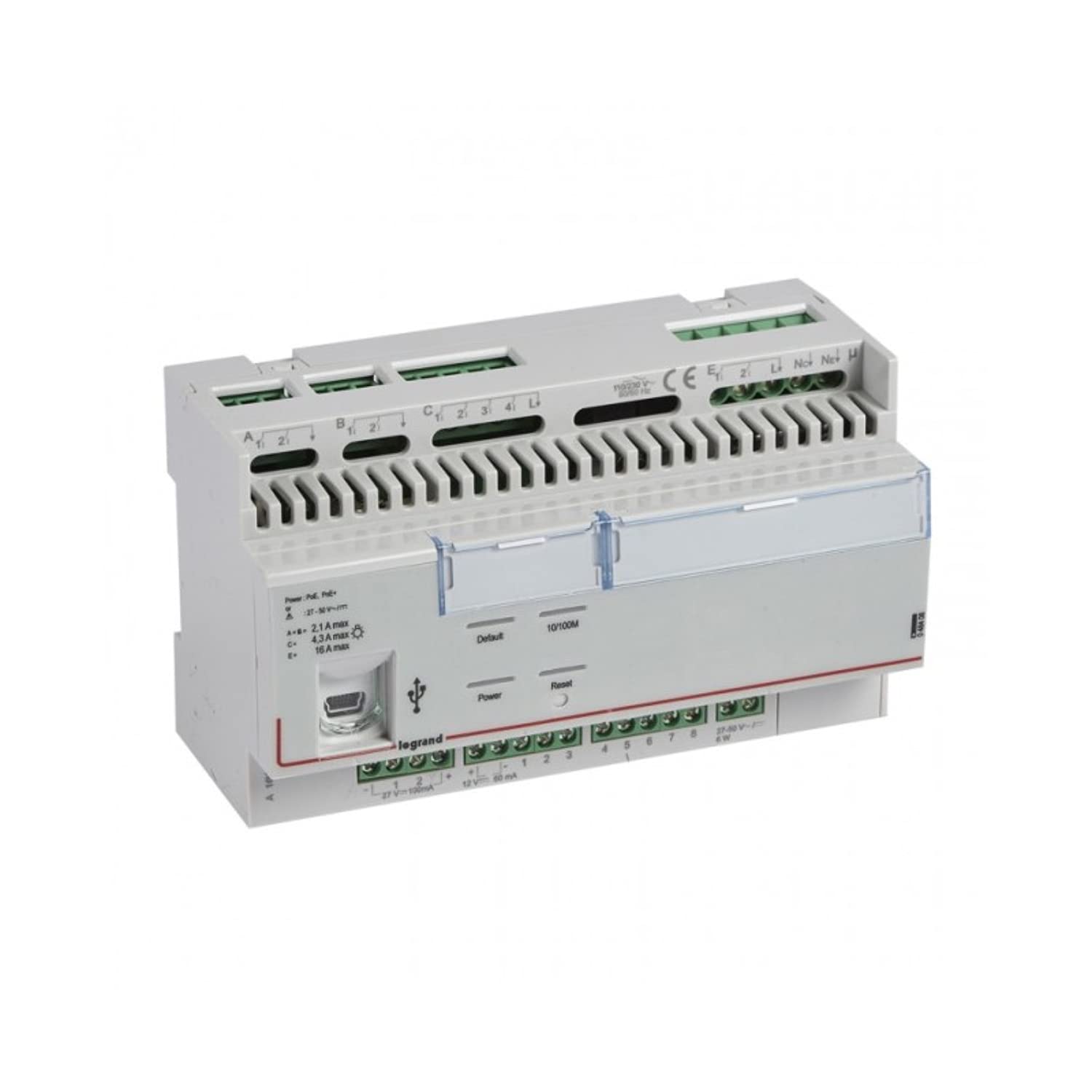
شکل 1: مخکی view of the Legrand 048408 Room Controller IP 8Mod. This image shows the compact design of the 8-module device, typically installed in a control cabinet.
2. د خوندیتوب معلومات
WARNING: Risk of electric shock. Installation and servicing must be performed by qualified personnel only. Disconnect power before installation or maintenance.
- تل محلي او ملي بریښنا کوډونه تعقیب کړئ.
- Ensure the power supply is disconnected before working on the device or its connections.
- وسیله د لندبل یا خورا تودوخې سره مه ښکاره کوئ.
- د نصبولو پرمهال مناسب شخصي محافظتي تجهیزات (PPE) وکاروئ.
- د بریښنا لګولو دمخه ډاډ ترلاسه کړئ چې د تارونو ټولې اړیکې خوندي او سمې دي.
3. ترتیب او نصب کول
The Legrand 048408 Room Controller is designed for DIN rail mounting within an electrical enclosure.
3.1. پورته کول
- Ensure the DIN rail is securely installed within the control panel.
- Align the controller's DIN rail clip with the rail.
- Press the controller firmly onto the DIN rail until it clicks into place.
3.2. د تارونو نښلول
Refer to the wiring diagram provided with the product packaging for specific connection details. General steps include:
- د بریښنا رسول: Connect the appropriate power supply (e.g., 24V DC) to the designated terminals. Observe polarity.
- IP Network: Connect an Ethernet cable from your network switch or router to the RJ45 port on the controller.
- Module Connections: Connect external devices (e.g., sensors, actuators, lighting controls) to the 8 module terminals as per your system design. Ensure correct terminal assignments for inputs and outputs.
۱. لومړنی پاور اپ
- Double-check all wiring connections for correctness and security.
- Restore power to the control panel.
- Observe the status indicator LEDs on the controller. A solid green LED typically indicates normal operation.
4. عملیاتي لارښوونې
The Legrand 048408 Room Controller is primarily managed through a network interface or integrated building management software. Direct manual operation is limited to status indication.
۳. د حالت شاخصونه
- د بریښنا LED: Indicates power supply status. (e.g., Green = On, Off = No Power)
- د شبکې LED: Indicates network connectivity and activity. (e.g., Solid Green = Connected, Blinking = Data Transfer)
- Module Status LEDs: Individual LEDs for each of the 8 modules may indicate their operational status or output state. Refer to the product's technical documentation for specific LED behavior.
4.2. د شبکې تشکیلات
Access the controller's web interface or use the provided configuration software to set up IP addresses, subnet masks, gateway, and other network parameters. Consult the Legrand software documentation for detailed instructions on network setup and device integration into your building management system.
5. ساتنه
The Legrand 048408 Room Controller requires minimal maintenance. Regular checks ensure optimal performance and longevity.
- پاکول: Periodically clean the exterior of the device with a soft, dry cloth. Do not use abrasive cleaners or solvents. Ensure power is disconnected before cleaning.
- د فرم ویئر تازه معلومات: Check the official Legrand website for available firmware updates. Follow the provided instructions carefully to update the device firmware, typically via the network interface.
- د پیوستون چکونه: هر کال د تارونو ټولې اړیکې د ټینګښت او د اغوستلو یا زنګ وهلو نښو لپاره معاینه کړئ.
6. ستونزه حل کول
دا برخه د هغو عامو ستونزو حلونه وړاندې کوي چې تاسو ورسره مخ کیدی شئ.
| ستونزه | احتمالي لامل | د حل لاره |
|---|---|---|
| وسیله نه چلیږي. | د برېښنا نشتوالی؛ ناسم تارونه؛ د برېښنا ناسمه رسونه. | Check power connections and supply voltage. Ensure polarity is correct. Test power supply. |
| د شبکې اتصال نشته. | Ethernet cable disconnected or faulty; incorrect IP settings; network switch issue. | Verify Ethernet cable connection. Check network LED status. Confirm IP settings in the controller's configuration. Test network switch. |
| Module outputs not responding. | Incorrect wiring to external device; software configuration error; faulty module. | Check wiring to the external device. Review software configuration for the specific module. Contact support if module appears faulty. |
If the problem persists after attempting these solutions, contact Legrand technical support.
7. مشخصات
Technical specifications for the Legrand 048408 Room Controller IP 8Mod:
| فیچر | تفصیل |
|---|---|
| د ماډل شمیره | 048408 |
| برانډ | Legrand |
| د محصول ابعاد | 1.97 x 7.87 x 3.15 انچه |
| د توکي وزن | 2.2 pounds (approximately 1 Kilogram) |
| د ماډولونو شمېر | 8 |
| د نصب کولو ډول | DIN ریل |
| ارتباط | IP (ایترنیټ) |
| بیټرۍ ته اړتیا ده | نه |
| نیټه لومړی شتون لري | د ۲۰۲۴ کال د جولای ۹ مه |
8. تضمین او ملاتړ
Legrand products are manufactured to high standards and are backed by a limited warranty. For specific warranty terms and conditions, please refer to the documentation included with your purchase or visit the official Legrand webسایټ
For technical assistance, troubleshooting beyond this manual, or warranty claims, please contact Legrand customer support:
- Webسایټ: www.legrand.us (یا ستاسو سیمه ایز لیګرانډ webسایټ)
- د اړیکو معلومات: Refer to the "Contact Us" section on the Legrand webد تلیفون شمیرو او بریښنالیک ملاتړ لپاره سایټ.


