1. پیژندنه
The Anker AH401 is a compact 4-Port USB 3.0 SuperSpeed Hub designed to expand the connectivity of your computer. It allows you to connect up to four USB devices simultaneously, offering data transfer rates of up to 5 Gigabits per second. This hub features a 3.3-foot integrated cable for flexible placement and is designed for plug-and-play operation without the need for additional drivers.
2. د بسته محتويات
- Anker AH401 4-Port USB 3.0 SuperSpeed Hub (with integrated 3.3-foot USB cable)
3. محصول ختم شوview
The Anker AH401 hub features four USB 3.0 ports arranged for convenient access. Its compact design ensures it occupies minimal desk space.

انځور 1: Anker AH401 USB 3.0 Hub with dimensions. The hub measures approximately 4.2 inches (106mm) in length, 1.6 inches (40mm) in width, and 0.9 inches (22mm) in height.
The ports are designed with sufficient spacing to accommodate various USB devices, including wider flash drives or card readers, without obstructing adjacent ports.

انځور 2: The Anker AH401 USB Hub demonstrating wide berth and vertical positioning, allowing all ports to be used simultaneously with various USB devices like card readers and flash drives.
4. تنظیم او پیوستون
The Anker AH401 hub is designed for simple plug-and-play operation. No software drivers are typically required for most operating systems.
- Locate an available USB 3.0 port on your computer (often identified by a blue interior or a 'SS' SuperSpeed logo).
- Connect the integrated USB cable of the Anker AH401 hub into the USB 3.0 port on your computer.
- The hub will be automatically recognized by your operating system.

انځور 3: The Anker AH401 USB Hub connected to a desktop computer, illustrating how to plug the hub into an available USB port.
5. Operating the USB Hub
Once connected, the hub is ready for use. You can connect various USB devices to its four ports.
- Insert your USB devices (e.g., flash drives, external hard drives, keyboards, mice, printers, scanners) into any of the four available USB 3.0 ports on the hub.
- The hub supports USB 3.0 SuperSpeed data transfer rates, which are significantly faster than USB 2.0. Actual speeds may vary based on the connected device and your computer's capabilities.
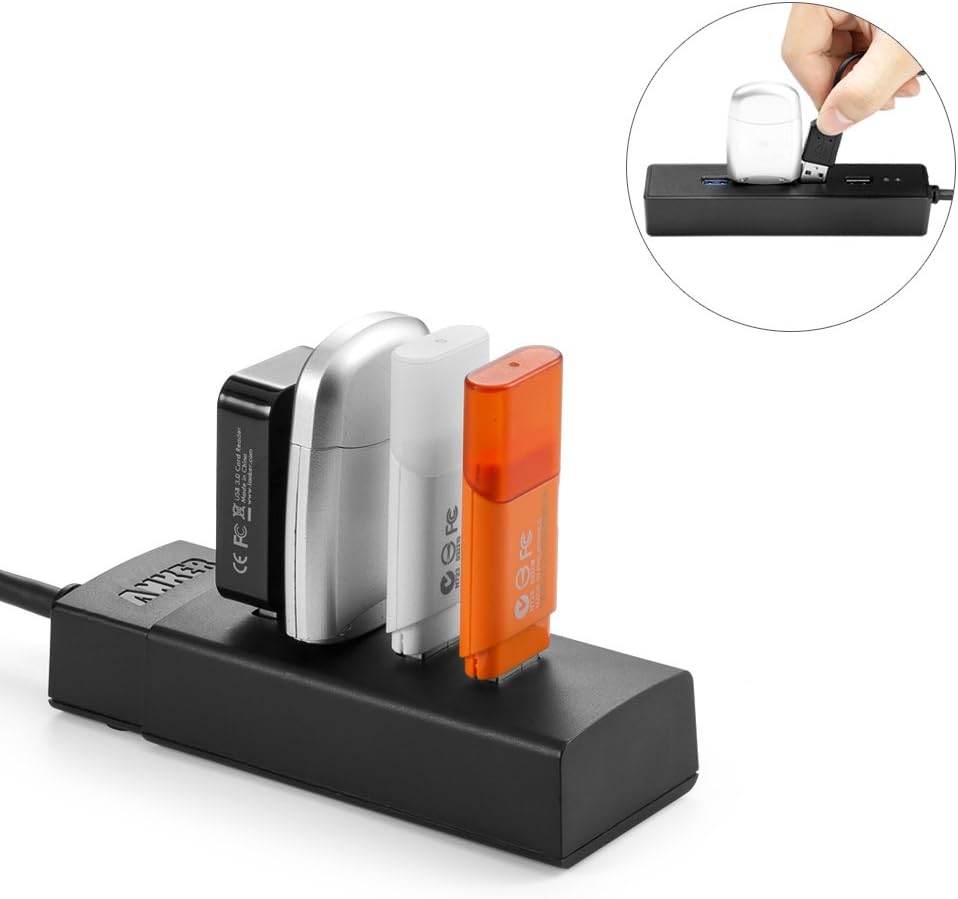
انځور 4: The Anker AH401 USB Hub with multiple USB devices, such as card readers and flash drives, connected and in use.
د بریښنا په پام کې نیولو سره
This is a bus-powered hub, meaning it draws power directly from your computer's USB port. While suitable for most low-power devices like flash drives, keyboards, and mice, it may not provide sufficient power for high-power devices such as certain external spinning hard drives. If you experience issues with high-power devices, consider connecting them directly to your computer's USB port or using a self-powered hub.
6. ساتنه
To ensure optimal performance and longevity of your Anker AH401 USB hub, follow these simple maintenance guidelines:
- Keep the hub clean by wiping it with a soft, dry cloth. Avoid using liquid cleaners or solvents.
- مرکز په یخ او وچ ځای کې د مستقیم لمر وړانګو او سختې تودوخې څخه لرې وساتئ.
- په مرکز باندې د درنو شیانو د ایښودلو یا فزیکي شاک ورکولو څخه ډډه وکړئ.
- Ensure the USB cable is not bent sharply or tangled, which could damage the internal wiring.
7. ستونزه حل کول
If you encounter issues with your Anker AH401 USB hub, please refer to the following common problems and solutions:
- Issue: Devices are not recognized or disconnect randomly.
- حل 1: Ensure the hub's integrated USB cable is securely connected to your computer's USB port.
- حل 2: هب له خپل کمپیوټر څخه جلا او بیا وصل کړئ.
- حل 3: هڅه وکړئ په خپل کمپیوټر کې یو بي بي USB بندر ته حب وصل کړئ.
- حل 4: If using high-power devices (e.g., external hard drives), connect them directly to your computer's USB port or consider a self-powered USB hub.
- حل 5: Update your computer's USB 3.0 host controller drivers. For example, some systems with Renesas USB 3.0 host controllers may require a manual driver update.
- Issue: Data transfer speeds are slower than expected (e.g., USB 2.0 speeds).
- حل 1: Ensure the hub is connected to a USB 3.0 port on your computer. USB 3.0 ports are often blue or marked with 'SS'.
- حل 2: Verify that the connected device itself is a USB 3.0 device. USB 2.0 devices will operate at USB 2.0 speeds even when connected to a USB 3.0 hub.
- حل 3: Update your computer's USB 3.0 host controller drivers.
- Issue: Mouse or keyboard performance becomes choppy when multiple devices are connected.
- حل لاره: This can occur if multiple data-intensive devices are connected to the hub, exceeding the bandwidth of the single USB port it's connected to. Try connecting high-bandwidth devices directly to separate USB ports on your computer.
8. مشخصات
| د ماډل شمیره | AK-68ANHUB-LB4A |
| د محصول ابعاد | 4.13 x 1.57 x 0.83 انچه |
| د توکي وزن | 6.4 اونس |
| برانډ | انکر |
| هډوتري برسیر | USB |
| ځانګړی ځانګړنه | پلګ او پلی کړئ |
| مطابقت لرونکې وسیلې | Devices with USB interfaces such as Scanners, Hard Disk Drives, Projectors, USB Flash Drives, MP3 Players, Printers, Tablets, Digital Cameras, Dashcams, Smartphones, Card Readers, and Laptops. |
9. تضمین او ملاتړ
Anker products are designed and manufactured to high-quality standards. For information regarding warranty coverage, technical support, or customer service, please visit the official Anker website or contact their customer support directly. Please have your product model number (AK-68ANHUB-LB4A) available when seeking support.


