1. پیژندنه
This manual provides essential information for the safe and efficient installation, operation, and maintenance of your Supermicro PWS-501P-1R 500 Watt 80 PLUS Platinum Power Supply. Please read this manual thoroughly before attempting to install or operate the unit.
The Supermicro PWS-501P-1R is a high-efficiency 500 Watt internal power supply designed for 1U rack-mount systems, featuring 80 PLUS Platinum certification for superior energy efficiency.
2. د خوندیتوب معلومات
د ټپي کیدو او تجهیزاتو د زیان مخنیوي لپاره تل لاندې خوندیتوب احتیاطي تدابیر په پام کې ونیسئ:
- د بریښنا قطع کول: Always disconnect the system from the main power source before installing, removing, or performing any maintenance on the power supply unit.
- وړ پرسونل: نصب او خدمت باید یوازې د وړ خدماتو پرسونل لخوا ترسره شي.
- د کارونکي د خدمت وړ برخې نشته: Do not open the power supply unit. There are no user-serviceable parts inside, and opening it will void the warranty and expose you to dangerous voltages.
- سمه ځمکه کول: Ensure the system is properly grounded to prevent electrical shock.
- وینټیلیشن: د برېښنا رسولو شاوخوا د هوا مناسب جریان ډاډمن کړئ. د هوا د بهېدو لارې مه بندوئ.
- د چاپیریال شرایط: Operate the power supply within the specified temperature and humidity ranges. Avoid exposure to moisture or extreme temperatures.
3. د بسته محتويات
Verify that all items are present and in good condition. If any items are missing or damaged, contact your vendor immediately.
- Supermicro PWS-501P-1R 500 Watt Power Supply Unit
- Documentation (this user manual or similar guide)
4. ترتیب او نصب کول
Follow these steps for proper installation of the power supply into your 1U rack-mount system.
۴.۱ د نصبولو دمخه چکونه
- Ensure your system chassis is compatible with a 1U form factor power supply.
- Verify that the system's power requirements do not exceed the 500 Watt output capacity of this power supply.
- Confirm that the AC input voltage matches the power supply's operating range (typically auto-sensing, but always check system specifications).
4.2 فزیکي نصب کول
- بندول: Ensure the system is completely powered off and disconnected from the AC power outlet.
- زوړ PSU لرې کړئ (که چیرې تطبیق شي): If replacing an existing power supply, carefully disconnect all cables from the motherboard and other components. Unscrew and remove the old power supply from the chassis.
- Insert New PSU: Gently slide the Supermicro PWS-501P-1R into the designated power supply bay in your 1U chassis.
- خوندي PSU: Secure the power supply to the chassis using the appropriate screws.
- کیبلونه وصل کړئ: Connect the power supply cables to the motherboard, CPU, and any other components (e.g., storage drives, expansion cards) as required by your system configuration. Ensure all connections are firm and correctly oriented.
- د AC بریښنا سره وصل کړئ: Once all internal connections are made, connect the AC power cord to the power supply and then to a grounded electrical outlet.
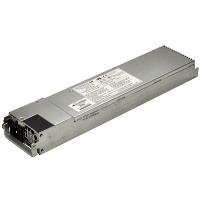
Figure 1: Supermicro PWS-501P-1R 500 Watt 1U Power Supply. The unit is a rectangular, metallic grey component with various connectors and a fan grille visible, designed for server rack integration.
5. عملیاتي لارښوونې
After successful installation, follow these steps to operate your system with the new power supply.
- ابتدايي بریښنا فعاله: With the AC power cord connected, press the system's power button. The system should initiate its boot sequence.
- د سیسټم څارنه: Monitor your system's stability and performance. Ensure all components are receiving power correctly. Modern operating systems and BIOS/UEFI often provide basic power monitoring information.
- بندول: To power off the system, use the operating system's shutdown procedure. For a hard shutdown, press and hold the power button until the system turns off.
6. ساتنه
منظم ساتنه ستاسو د بریښنا رسولو اوږد عمر او غوره فعالیت ډاډمن کولو کې مرسته کوي.
- د دوړو لرې کول: Periodically (e.g., every 6-12 months), power down and disconnect the system. Use compressed air to gently clear dust from the power supply's fan and ventilation grilles. د برېښنا رسونه مه خلاصوئ casing.
- د کیبل معاینه: Occasionally inspect all power cables for signs of wear, fraying, or damage. Replace any damaged cables immediately.
- د چاپیریال کنټرول: Ensure the operating environment remains clean, cool, and dry to prevent dust buildup and overheating.
7. ستونزه حل کول
If you encounter issues with your power supply, refer to the following basic troubleshooting steps:
7.1 No Power / System Not Turning On
- Check AC Connection: Ensure the AC power cord is securely plugged into both the power supply and a working electrical outlet.
- د ازموینې ځای: هڅه وکړئ چې بل وسیله په ورته ساکټ کې ولګوئ ترڅو تایید کړئ چې بریښنا لري.
- داخلي اړیکې: Verify that all power cables from the PSU are correctly and firmly connected to the motherboard and other components.
- د بریښنا تڼۍ: Ensure the system's power button is functioning correctly.
7.2 System Instability / Random Shutdowns
- ډیر ګرمول: Check for proper ventilation and dust buildup. Ensure the power supply fan is spinning.
- اوورلوډ: Ensure the total power draw of your components does not exceed the 500 Watt capacity of the power supply.
- تړلې اړیکې: Re-check all power cable connections.
If these steps do not resolve the issue, consult Supermicro's technical support or a qualified technician.
8. مشخصات
Key technical specifications for the Supermicro PWS-501P-1R power supply:
| فیچر | مشخصات |
|---|---|
| برانډ | سوپر مایکرو |
| د ماډل شمیره | د PWS-501P-1R لپاره تفتیش وسپارئ، موږ به په XNUMX ساعتونو کې له تاسو سره اړیکه ونیسو. |
| د واټ محصولtage | 500 واټ |
| 80 PLUS تصدیق | 80 پلس پلاتین |
| د ریک اندازه | 1U |
| د محصول Voltage | +5V، +12V |
| د فارم فکتور | ملکیت |
| د یخولو طریقه | هوا |
| د توکي وزن | ۰.۴۵ پونډه (تقریبا ۰.۴ کیلوګرامه) |
| د محصول ابعاد (LxWxH) | ۲.۶۴ x ۲.۳۲ x ۲.۷۶ انچه (تقریبا ۶.۷ x ۵.۹ x ۷ سانتي متره) |
| UPC | 672042094608 |
9. تضمین او ملاتړ
For detailed warranty information regarding your Supermicro PWS-501P-1R power supply, please refer to the official Supermicro webسایټ یا د تضمین کارت چې ستاسو محصول سره شامل دی. د تضمین شرایط او شرایط ممکن د سیمې او پیرود نیټې سره توپیر ولري.
For technical assistance, troubleshooting beyond this manual, or to inquire about replacement parts, please visit the official Supermicro support portal:
Supermicro Official Webسایټ: www.supermicro.com
Supermicro Support: په رسمي پاڼه کې د ملاتړ برخې ته مراجعه وکړئ webد اړیکو معلوماتو، FAQs، او د موټر چلوونکي ډاونلوډونو لپاره سایټ.