پیژندنه
This manual provides comprehensive instructions for the MYBAT Symbiosis Rugged Hybrid Case, model APNP9090HPCSYMS017NP, designed specifically for the Pantech Discover P909 smartphone. This case offers enhanced protection and includes an integrated kickstand for convenient media viewing. Please read these instructions carefully to ensure proper installation and use of your product.
د محصول ځانګړتیاوې
The MYBAT Symbiosis Rugged Hybrid Case is engineered with the following key features:
- Dual-Layer Construction: Composed of a soft silicone outer layer and a rigid hard plastic inner layer for comprehensive protection.
- Reinforced Edges: The silicone outer layer features reinforced edges, providing improved grip and additional impact absorption.
- مدغم شوی کیک سټینډ: A built-in kickstand allows for hands-free horizontal viewing of your device.
- دقیق فټ: Designed to precisely fit the Pantech Discover P909, ensuring access to all ports, buttons, and camera functions.

Image: The MYBAT Symbiosis Rugged Hybrid Case, showcasing its dual-layer design and how it encases the Pantech Discover P909, with both the front screen and the back of the case visible.
تنظیم او نصب کول
The MYBAT Symbiosis case is designed for straightforward installation without the need for any tools.
- Separate Layers: Gently peel the soft silicone outer layer away from the hard plastic inner layer.
- Insert Device: Carefully place your Pantech Discover P909 smartphone into the hard plastic inner layer. Ensure that the phone is seated correctly and all cutouts align with the device's ports and buttons.
- Apply Outer Layer: Once the phone is securely in the hard plastic layer, fit the silicone outer layer over the hard plastic layer. Ensure all edges are properly seated and that the silicone covers the hard plastic completely, providing a snug fit. Verify that all ports, buttons, and the camera remain accessible and unobstructed.
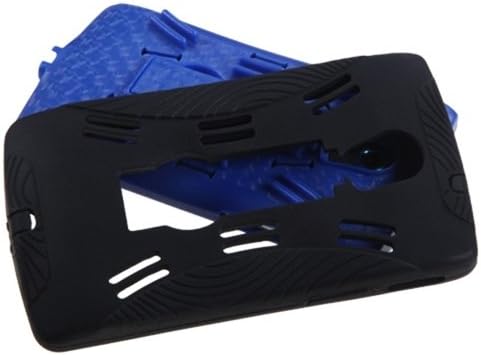
Image: The two distinct components of the MYBAT Symbiosis case, the flexible black silicone outer shell and the rigid blue plastic inner frame, laid out to illustrate the dual-layer design.
Operating Instructions (Kickstand)
The integrated kickstand provides a convenient way to prop your device for hands-free viewing.
- Locate Kickstand: Identify the recessed kickstand on the back of the case.
- Extend Kickstand: Using your fingertip, gently pull the kickstand outwards from its recess until it locks into an open, extended position.
- د وسیلې موقعیت: Place your Pantech Discover P909, with the case installed, on a flat surface in a horizontal orientation. The extended kickstand will support the device at an optimal viewزاویه.
- Retract Kickstand: To close, push the kickstand back into its recessed position until it clicks securely into place, flush with the back of the case.
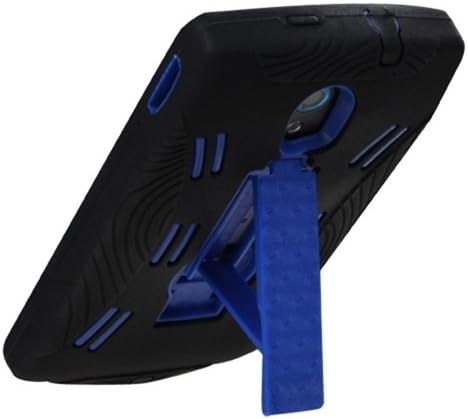
Image: The MYBAT Symbiosis case with its integrated blue kickstand fully extended, demonstrating how it props up the Pantech Discover P909 for hands-free viewing.
ساتنه
To ensure the longevity and appearance of your MYBAT Symbiosis case, follow these maintenance guidelines:
- پاکول: Clean the case regularly with a soft, slightly damp cloth. Avoid using harsh chemicals, abrasive cleaners, or solvents, as these can damage the material.
- معاینه: Periodically inspect the case for any signs of wear or damage, especially around the edges and the kickstand mechanism.
- د کیکسټنډ پاملرنه: Ensure the kickstand mechanism remains free of dirt and debris to allow for smooth operation.
د ستونزو حل کول
If you encounter any issues with your MYBAT Symbiosis case, refer to the following common solutions:
Issue: Charging or audio cables do not fit properly with the case installed.
حل لاره:
- Ensure the phone is correctly and fully seated within both layers of the case. Improper seating can misalign port cutouts.
- Verify that the case cutouts align precisely with the phone's charging and audio ports.
- If an aftermarket cable is being used, its connector size may vary from the original equipment manufacturer (OEM) cable, potentially causing fitment issues. Try using an OEM cable to confirm if the issue persists.
- If the issue persists with an OEM cable, carefully inspect the case for any manufacturing imperfections around the port cutouts that might obstruct the cable.
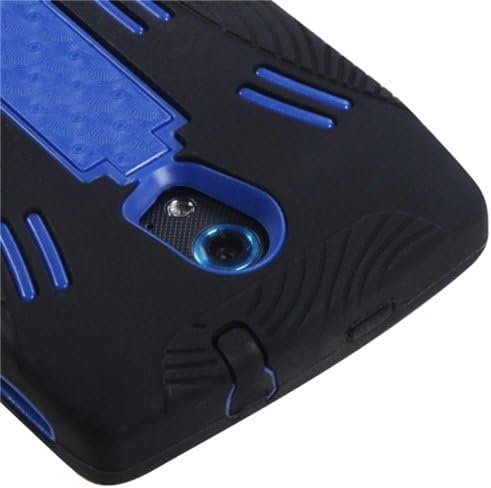
انځور: یو مفصل view of the back of the MYBAT Symbiosis case, focusing on the camera opening and the kickstand area, illustrating the precise design around the phone's features.
مشخصات
| صفت | تفصیل |
|---|---|
| د محصول ابعاد | 4.5 x 0.5 x 2.5 انچه |
| د توکي وزن | 2.08 اونس |
| مواد | Silicone (Outer Layer), Hard Plastic (Inner Layer) |
| رنګ | Dark Blue/Black |
| د ماډل شمیره | APNP9090HPCSYMS017NP |
تضمین او ملاتړ
For specific warranty information regarding your MYBAT Symbiosis Rugged Hybrid Case, please refer to the official MYBAT website or contact their customer service directly. It is recommended to retain your purchase receipt for any potential warranty claims or support inquiries.


