1. پیژندنه
This manual provides detailed instructions for the safe and efficient operation of your Vivitek Qumi Q5 Pocket DLP Projector. Please read this manual thoroughly before using the projector and retain it for future reference. The Vivitek Qumi Q5 is a compact, high-definition LED projector designed for portability and versatility, featuring 500 lumens brightness, WXGA resolution, and various connectivity options.
۱.۱. د خوندیتوب مهم معلومات
د پروجیکټر د زیان مخنیوي او د کارونکي خوندیتوب ډاډمن کولو لپاره لاندې خوندیتوب احتیاطي تدابیر په پام کې ونیسئ:
- د هوا د بهېدو لارې مه بندوئ. د پروجیکټر شاوخوا د هوا مناسب جریان ډاډمن کړئ.
- کله چې l وي، مستقیم د پروجیکټر لینز ته مه ګورئamp فعال دی. روښانه رڼا کولی شي سترګو ته زیان ورسوي.
- یوازې هغه بریښنا اډاپټر وکاروئ چې د پروجیکټر سره چمتو شوی وي.
- Do not expose the projector to rain or moisture to reduce the risk of fire or electric shock.
- پروجیکټر په یو ثابت، سطحه سطحه کې ځای پرځای کړئ.
- پروجیکټر د پاکولو دمخه یا کله چې د اوږدې مودې لپاره نه کارول کیږي د بریښنا له ساکټ څخه خلاص کړئ.
- ټول خدمتونه وړ خدمت پرسونل ته راجع کړئ.
3. د بسته محتويات
ډاډ ترلاسه کړئ چې لاندې ټول توکي ستاسو په بسته کې شامل دي:
- Vivitek Qumi Q5 Projector
- د بریښنا اډاپټر
- Universal I/O to VGA Cable
- HDMI کیبل
- 3.5mm AV-in Cable
- د بار وړلو کڅوړه
- ریموټ کنټرول
- د چټک پیل لارښود
- د تضمین کارت
4. محصول ختم شوview
Familiarize yourself with the various components and features of your Vivitek Qumi Q5 projector.
4.1 مخ View

انځور 4.1: مخکی view of the Vivitek Qumi Q5 projector, showing the lens and ventilation grilles.
The front of the projector features the projection lens and air vents for cooling. Ensure these vents are not obstructed during operation.
4.2 پورته View

انځور 4.2: پورته view of the Vivitek Qumi Q5 projector, highlighting the touch-sensitive control panel.
The top panel includes touch-sensitive controls for navigation and menu selection. The "Qumi" logo is also visible.
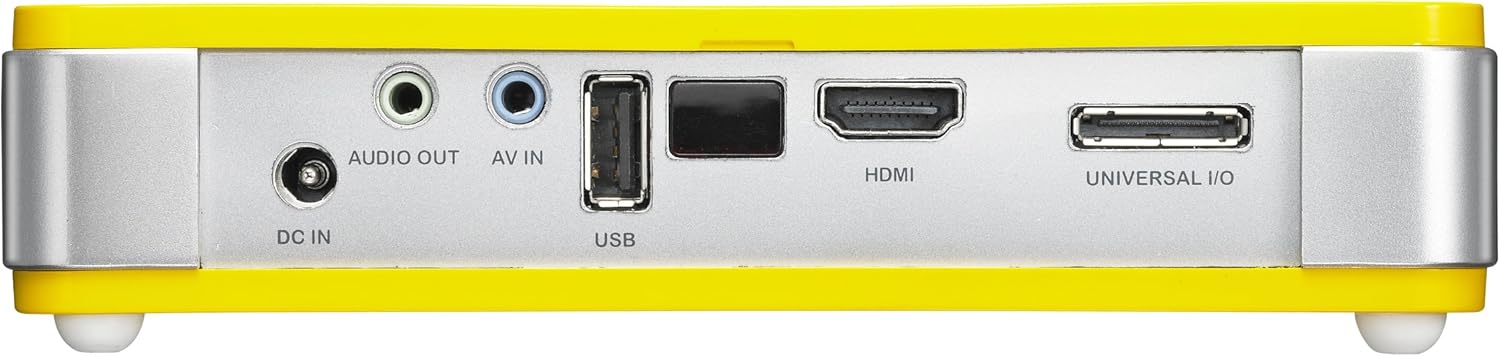
4.3 شاته View (د نښلولو بندرونه)

انځور 4.3: شاته view of the Vivitek Qumi Q5 projector, displaying all input and output ports.
The rear panel houses all essential connectivity ports:
- په DC کې: د بریښنا اډاپټر د نښلولو لپاره.
- د اوریدو غږ: 3.5mm jack for external speakers or headphones.
- AV IN: 3.5mm jack for composite video and stereo audio input.
- USB: د USB ذخیره کولو وسیلو سره د نښلولو لپاره.
- HDMI: High-Definition Multimedia Interface for digital video and audio input.
- UNIVERSAL I/O: Multi-purpose port for VGA and other analog inputs via adapter.
5. ترتیب کول
Follow these steps to set up your Vivitek Qumi Q5 projector.
5.1 Powering On the Projector
- د بریښنا اډیپټر ته DC IN په پروجکټور بندر.
- د بریښنا اډاپټر په دیوال کې ولګوئ.
- Press the power button on the projector or remote control to turn on the device. The power indicator light will illuminate.
۱.۳ د ننوتلو سرچینو نښلول
The Qumi Q5 supports various input sources:
- HDMI: Connect an HDMI cable from your source device (e.g., laptop, Blu-ray player) to the HDMI په پروجکټور بندر.
- VGA: Use the supplied Universal I/O to VGA cable to connect your computer's VGA output to the UNIVERSAL I/O بندر
- AV (مرکب): Use the supplied 3.5mm AV-in cable to connect composite video and stereo audio devices to the په IN کې بندر
- USB: یو USB فلش ډرایو دننه کړئ USB port to play media fileپه مستقیم ډول.
- بې سیم (اختیاري): If using an optional WiFi USB dongle, insert it into the USB port for wireless connectivity. Refer to the dongle's instructions for setup.
۳.۲.۲.۲ د تمرکز تنظیمول
Locate the focus wheel on the side of the projector. Rotate the wheel until the projected image appears sharp and clear on your screen or wall.
انځور 5.3: اړخ view of the Vivitek Qumi Q5, indicating the location of the focus adjustment wheel.
۴. د پروجیکټر چلول
۵.۱ په مینو کې نیویګیټ کول
Use the touch-sensitive buttons on the top panel or the remote control to navigate the projector's on-screen display (OSD) menu. The menu allows you to adjust image settings, input sources, and other system configurations.
۵.۲ د ننوتلو سرچینې غوره کول
Press the "Source" button on the remote control or navigate through the OSD menu to select the desired input source (HDMI, VGA, AV, USB, or Wireless).
۵.۴ د انځور سمونونه
Within the OSD menu, you can adjust various image parameters:
- روښانتیا/ تضاد: Adjust for optimal image visibility.
- رنګ/رنګ: د رنګونو بیا تولید ښه تنظیم کړئ.
- د اړخ نسبت: Select between 4:3, 16:9, or other available ratios to match your content.
- د کیسټون سمون: که چیرې پروجیکټر په بشپړ ډول د سکرین سره عمودي نه وي، د ټراپیزایډل تحریف سم کړئ.
6.4 Playing Media from USB
When a USB drive is inserted, the projector's media player interface will typically launch automatically. You can browse and play supported video, audio, and image fileپه مستقیم ډول د USB ډرایو څخه.
۴.۶ درې بعدي فعالیت
The Qumi Q5 is 3D-ready via DLP Link technology. To view 3D content, you will need compatible 3D source material, a 3D-capable player, and active DLP Link 3D glasses (sold separately).
7. ساتنه
مناسب ساتنه ستاسو د پروجیکټر اوږد عمر او غوره فعالیت تضمینوي.
۴.۱ د پروجیکټر پاکول
- بهر: د نرم، لینټ پاک ټوکر څخه لږ څه کار واخلئampد اوبو یا نرم پاکولو محلول سره پای ته رسیدلی. د کثافاتو پاکوونکي یا محلول مه کاروئ.
- لینز: Gently wipe the lens with a lens cleaning cloth or lens paper. Avoid touching the lens surface with your fingers.
- پلورونکي: Use a soft brush or compressed air to clear dust from the ventilation openings.
7.2 د LED رڼا سرچینه
The Qumi Q5 utilizes an LED light source with an estimated operational life of up to 30,000 hours, significantly reducing the need for lamp د دودیزو پروجیکټرونو په پرتله بدیل.
7.3 ذخیره کول
When not in use for extended periods, store the projector in its carrying pouch in a cool, dry place, away from direct sunlight and extreme temperatures.
8. ستونزه حل کول
د هغو عامو ستونزو د حل لپاره چې تاسو ورسره مخ کیږئ دې برخې ته مراجعه وکړئ.
| ستونزه | احتمالي لامل | د حل لاره |
|---|---|---|
| هیڅ عکس ندی ښودل شوی. |
|
|
| انځور تیاره دی. |
|
|
| هیڅ آډیو نشته. |
|
|
| Projector overheats or shuts down. |
|
|
9. مشخصات
Key technical specifications for the Vivitek Qumi Q5 projector:
- ماډل: Qumi Q5
- د ښودلو ټیکنالوژي: DLP Pico chipset
- اصلي پریکړه: WXGA (1280 x 720)
- روښانتیا: د 500 Lumens پورې
- د رڼا سرچینه: LED (Estimated 30,000 hours operation)
- ارتباط: HDMI, Universal I/O (VGA), AV mini-jack, USB, Audio-out mini-jack, Wireless (via optional USB dongle)
- داخلي حافظه: 4GB
- 3D چمتو: Yes, via DLP Link
- ابعاد: 4 x 6.3 x 1.3 انچه (10.16 x 16.00 x 3.30 سانتي متره)
- وزن: ۶ پونډه (۳ کیلو ګرامه)
- د بریښنا رسول: خارجي ځواک اډیپټر
10. تضمین او ملاتړ
Your Vivitek Qumi Q5 projector is covered by a limited warranty. Please refer to the included Warranty Card for specific terms and conditions, including warranty period and coverage details. For technical support, service, or further inquiries, please visit the official Vivitek webسایټ ته مراجعه وکړئ یا د دوی د پیرودونکو خدماتو څانګې سره اړیکه ونیسئ. د تضمین ادعاوو لپاره د پیرود ثبوت په توګه د پیرود رسید وساتئ.


