پیژندنه
This user manual provides comprehensive instructions for the installation, operation, and maintenance of your RCA RTS736W 30-Inch Streaming Soundbar. Please read this manual thoroughly before using the product to ensure proper functionality and to prevent damage.
The RCA RTS736W is designed to enhance your home audio experience with its 3.0 channel sound and integrated Wi-Fi for streaming online content.
کلیدي ځانګړتیاوې
- Wi-Fi Built-In for streaming video content to a TV.
- 3.0 Channel Left/Center/Right audio configuration.
- HDMI 1080p Output for high-definition connectivity.
- Includes 1 Rear Analog Audio-in Jack and 1 Side Line-in Jack for various audio sources.
- Flexible placement options: includes table or wall mounting brackets.
د بسته محتويات
ډاډ ترلاسه کړئ چې ټول توکي په کڅوړه کې شتون لري:
- RCA RTS736W 30-Inch Streaming Soundbar
- ریموټ کنټرول
- د بریښنا اډاپټر
- Table or Wall Mounting Brackets
- د کارونکي لارښود (دا لاسوند)
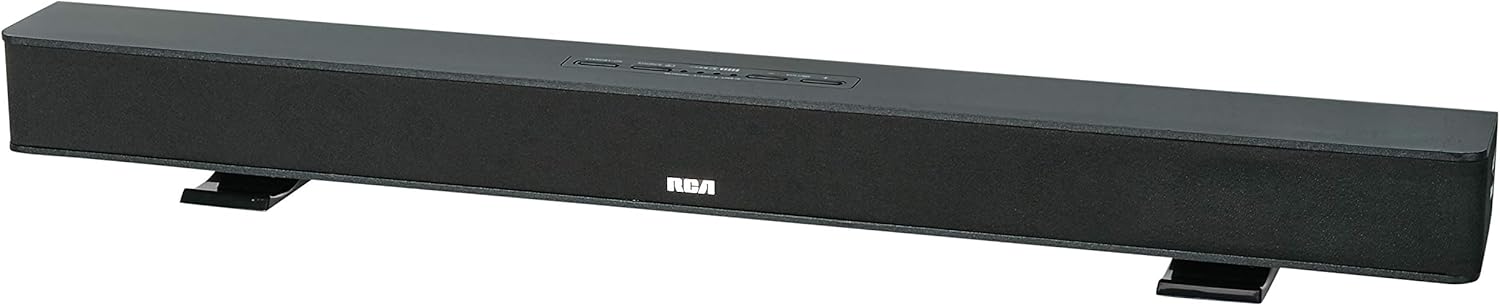
Image: The RCA RTS736W 30-Inch Streaming Soundbar, shown with its sleek black design and integrated controls.
چمتو کول
۶. د ځای پر ځای کولو اختیارونه
The soundbar offers flexible placement:
- د ټابلیټ ځای پرځای کول: Place the soundbar on a flat, stable surface in front of your television. Ensure there is adequate ventilation around the unit.
- دیوال نصبول: Use the included wall mounting brackets to secure the soundbar to a wall. Refer to the separate wall mounting template (if provided) for detailed instructions. Ensure the wall can support the weight of the soundbar.

Image: The RCA RTS736W soundbar positioned on a TV stand, demonstrating a typical home theater setup with various streaming service icons displayed on the television screen.
2. د بریښنا سره نښلول
- Connect the power adapter to the DC IN 13.5V port on the back of the soundbar.
- د بریښنا اډاپټر بله پای په دیوال کې ولګوئ.
3. آډیو اړیکې
Choose one of the following methods to connect the soundbar to your audio source:
- د HDMI محصول: Connect an HDMI cable from the HDMI OUT port on the soundbar to an HDMI input on your television. This connection supports 1080p video output from the soundbar's streaming functions.
- Analog Audio-in (AUX 1 / AUX 2): Use RCA audio cables to connect your TV or other audio devices to the AUX 1 or AUX 2 input jacks on the back of the soundbar. Match the red and white connectors.
- Side Line-in Jack: For portable devices like smartphones or tablets, connect a 3.5mm audio cable from your device's headphone jack to the Line-in jack located on the side of the soundbar.

انځور: نږدې انځور view of the rear panel of the RCA RTS736W soundbar, highlighting the AUX 1, AUX 2, DC IN 13.5V, HDMI OUT, and VIDEO OUT ports for various connections.
۲. د شبکې اتصال (وای فای)
To utilize the streaming features, connect the soundbar to your home Wi-Fi network. This process is typically guided by on-screen prompts when the soundbar is first powered on and connected to a TV via HDMI.
- Ensure your TV is connected to the soundbar via HDMI and powered on.
- د خپل وای فای شبکې غوره کولو لپاره په سکرین کې لارښوونې تعقیب کړئ او پټنوم دننه کړئ.
عملیاتي لارښوونې
1. بریښنا فعال/بند
فشار ورکړئ ځواک د غږ بار یا ریموټ کنټرول تڼۍ د واحد د فعالولو یا بندولو لپاره.
د ننوت ټاکنه
فشار ورکړئ داخلول button on the remote control or the soundbar to cycle through available audio sources: HDMI, AUX 1, AUX 2, Line-in, and Wi-Fi streaming.
3. د حجم کنټرول
د کارولو حجم + او حجم - buttons on the remote control or the soundbar to adjust the audio level.
فشار ورکړئ خاموش د آډیو د لنډمهاله خاموشولو لپاره تڼۍ.
4. محتويات خپرول
Once connected to Wi-Fi and your TV via HDMI, you can access various streaming applications. Navigate using the directional buttons and OK د ریموټ کنټرول تڼۍ.
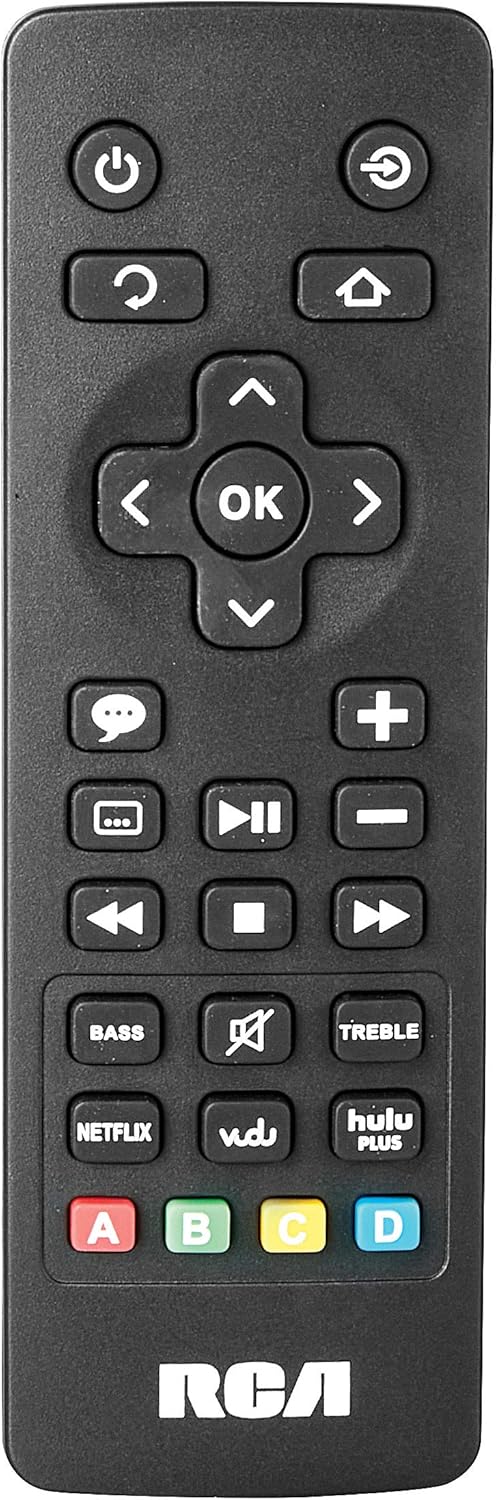
Image: The remote control for the RCA RTS736W soundbar, featuring dedicated buttons for power, volume, input selection, navigation, and direct access to streaming services like Netflix, Vudu, and Hulu Plus.
Dedicated buttons for services like Netflix, Vudu, and Hulu Plus may be available on the remote for direct access.
5. د آډیو سمون
د کارولو باس او سخت buttons on the remote control to fine-tune the audio output to your preference.
ساتنه
- پاکول: Disconnect the soundbar from the power outlet before cleaning. Use a soft, dry cloth to wipe the exterior surfaces. Do not use liquid cleaners or abrasive materials.
- وینټیلیشن: ډاډ ترلاسه کړئ چې د غږ بار کې د هوا د جریان دروازې بندې نه وي. مناسبه هوا جریان د ډیر تودوخې مخه نیسي.
- ذخیره کول: که چیرې د غږ بار د اوږدې مودې لپاره ذخیره کوئ، نو دا له بریښنا څخه جلا کړئ او په یخ او وچ ځای کې یې د مستقیم لمر وړانګو او سخت تودوخې څخه لرې وساتئ.
د ستونزو حل کول
هیڅ ځواک نشته
- Check if the power adapter is securely connected to the soundbar and a working wall outlet.
- ډاډ ترلاسه کړئ چې د بریښنا آوټ لیټ فعال دی د بل وسیلې سره یې ازموینه کولو سره.
نه غږ
- تایید کړئ چې په ساؤنډ بار کې د ننوتلو سمه سرچینه غوره شوې ده.
- Check all audio cable connections between the soundbar and your audio source (TV, etc.).
- Ensure the volume on both the soundbar and the connected audio source is turned up and not muted.
- If using HDMI, confirm that your TV's audio output settings are configured to send audio to the soundbar.
Streaming Issues (Buffering, Freezing)
- Check your Wi-Fi network connection. Ensure the signal strength is adequate.
- خپل کور روټر او موډیم بیا پیل کړئ.
- Restart the soundbar by unplugging it from the power outlet for a few minutes, then plugging it back in.
- Ensure your internet service is active and performing correctly.
ریموټ کنټرول کار نه کوي
- بیټرۍ په ریموټ کنټرول کې ځای په ځای کړئ.
- ډاډ ترلاسه کړئ چې د ریموټ کنټرول او د غږ بار سینسر ترمنځ هیڅ خنډ شتون نلري.
- ریموټ مستقیم د غږ بار ته په نښه کړئ.
مشخصات
| د ماډل شمیره | RTS736W |
| د سپیکر ډول | ساؤنډ بار |
| چینلونه | 3.0 (Left/Center/Right) |
| ارتباط | HDMI, RCA, Wi-Fi |
| بې سیم ټیکنالوژي | وای فای |
| د HDMI محصول | 1080p |
| د آډیو معلومات | 2x Analog Audio-in (RCA), 1x Side Line-in (3.5mm) |
| د سپیکر اندازه | ۷۸۷ انچه |
| د اعظمي تولید بریښنا | 150 واټ |
| خنډ | 8 اوهم |
| د بریښنا سرچینه | د بریښنا تار شوی |
| د محصول ابعاد (L x W x H) | 33.5 x 6.5 x 5.5 انچه |
| د توکي وزن | ۲.۴۵ پونډه |
| جوړونکی | Alco Electronics Ltd. |
د تضمین معلومات
Specific warranty details for the RCA RTS736W Soundbar are typically provided with the product packaging or can be found on the official RCA webسایټ. مهرباني وکړئ د تضمین ادعاوو لپاره د پیرود ثبوت وساتئ.
For warranty service, contact RCA customer support with your model number and purchase date.
د پیرودونکي ملاتړ
For further assistance, technical support, or service inquiries, please refer to the contact information provided in your product's original documentation or visit the official RCA support webسایټ
آنلاین سرچینې: Visit the RCA Store on Amazon
اړوند اسناد - RTS736W
 |
د RCA الټرا ایچ ډي سمارټ تلویزیون خوندیتوب احتیاطي تدابیر او د پیل کولو لارښود د RCA الټرا ایچ ډي سمارټ تلویزیونونو لپاره جامع خوندیتوب احتیاطي تدابیر، مهمې لارښوونې، د لوازمو لیست، او د پیل کولو لارښود، په شمول د ریموټ کنټرول او بیټرۍ معلومات. |
 |
د RCA RNSMU5836 58 انچه 4K UHD سمارټ تلویزیون لارښوونې لارښود د RCA RNSMU5836 58 انچه 4K UHD سمارټ تلویزیون لپاره جامع لارښود لارښود. د غوره کاروونکي تجربې لپاره تنظیم، اړیکې، سمارټ ځانګړتیاوې، د مینو اختیارونه، او د ستونزو حل کول پوښي. |
 |
د RCA SBT17015B ساؤنډ بار کارونکي لارښود او تنظیم کولو لارښود د RCA SBT17015B ساؤنډ بار لپاره جامع کارونکي لارښود، د تنظیم کولو، اتصالاتو، بلوتوټ جوړه کولو، آډیو تنظیماتو، خوندیتوب احتیاطاتو، او تضمین معلوماتو توضیحات. |
 |
د RCA RPJ135 معیاري HD پروجیکٹر د روکو سټریمینګ سټیک سره - د کارونکي لارښود د RCA RPJ135 معیاري HD پروجیکټر لپاره لارښود لارښود، په شمول د پروجیکټر او مدغم شوي روکو سټریمینګ سټیک لپاره تنظیم، عملیات، ستونزې حل کول، او تضمین معلومات. |
 |
د RCA RS32H2-EU 32 انچه LED HD LCD تلویزیون کارونکي لارښود د RCA RS32H2-EU 32 انچه LED HD LCD تلویزیون لپاره جامع کارونکي لارښود، چې د خوندیتوب لارښوونې، تنظیم، عملیات، مشخصات، او د ستونزو حل کول پوښي. |
 |
د RCA RENO کارن لارښود د RCA RENO سمارټ فون لپاره جامع کارونکي لارښود، د Android 10 (Go ایډیشن) لپاره د تنظیم، ځانګړتیاو، اړیکو، وسایلو، خوندیتوب او ساتنې توضیحات. |