Wstęp
Welcome to the user manual for your TCL FLIP 4 5G (T440W) flip phone. This guide provides essential information to help you get started, understand your device's features, and troubleshoot common issues. Please read this manual thoroughly to ensure proper use and optimal performance of your phone.
Co jest w pudełku
Your TCL FLIP 4 5G package includes the following items:
- Telefon
- Bateria
- Rumak
Produkt ponadview
The TCL FLIP 4 5G is designed for straightforward communication with modern conveniences. It features a classic flip design with dual displays and large, tactile buttons for ease of use.
Główne cechy:
- Dwa wyświetlacze: A 1.77-inch external display for notifications and a 3.2-inch internal display with adjustable text size, colors, and brightness.
- Easy Navigation Keyboard: Large tactile keypad with intuitive shortcut keys for quick access to contacts and messages.
- Łączność 5G: Reliable 5G network support for fast communication.
- Aparat 5MP: Capture photos and videos of important moments.
- Głos HD: Ensures clear call quality.
- Długotrwała bateria: Designed to keep you connected for extended periods.
- System operacyjny: Powered by KaiOS.
Układ urządzenia:
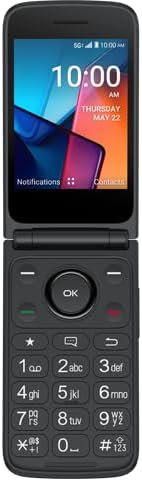
Rysunek 1: Przód view of the TCL FLIP 4 5G phone when open, displaying the internal screen and the physical keypad.
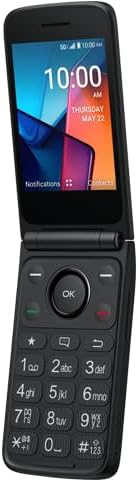
Rysunek 2: Kątowy view of the TCL FLIP 4 5G phone in its open position, highlighting the screen and keypad layout.
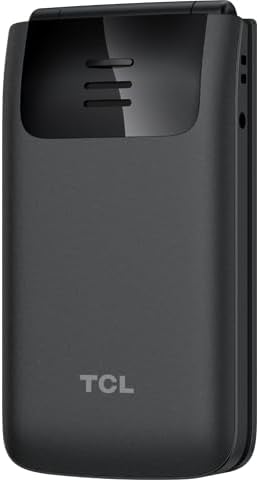
Rysunek 3: Tył view of the TCL FLIP 4 5G phone when closed, showing the external display, camera, and TCL branding.
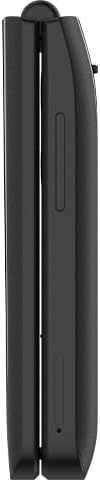
Rysunek 4: Strona view of the closed TCL FLIP 4 5G phone, illustrating the device's slim profile i przyciski boczne.
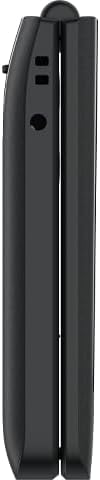
Rysunek 5: Strona przeciwna view of the closed TCL FLIP 4 5G phone, showing additional ports or buttons.
Organizować coś
1. Installing the Battery and SIM Card:
- Delikatnie zdejmij tylną obudowę telefonu.
- Insert your SIM card(s) into the designated slot(s). Ensure the gold contacts face downwards and the notched corner is correctly aligned.
- Włóż baterię do jej komory, dopasowując złote styki baterii do styków w telefonie.
- Załóż tylną pokrywę, dociskając ją mocno, aż zatrzaśnie się na swoim miejscu.
2. Ładowanie telefonu:
- Connect the charger to your phone's charging port.
- Podłącz ładowarkę do gniazdka elektrycznego.
- Przed pierwszym użyciem należy całkowicie naładować telefon. Wskaźnik baterii na ekranie pokaże stan ładowania.
Obsługa telefonu
1. Włączanie/wyłączanie zasilania:
- Aby włączyć urządzenie, naciśnij i przytrzymaj przycisk zasilania/zakończenia połączenia, aż ekran się zaświeci.
- Aby wyłączyć zasilanie, naciśnij i przytrzymaj przycisk zasilania/zakończenia połączenia, a następnie wybierz z opcji opcję „Wyłącz”.
2. Wykonywanie połączeń:
- Open the phone to access the keypad.
- Wybierz żądany numer telefonu za pomocą klawiatury numerycznej.
- Naciśnij zielony przycisk połączenia, aby rozpocząć połączenie.
- To end a call, press the Red End Call button or close the phone.
3. Wysyłanie wiadomości:
- Z menu głównego przejdź do „Wiadomości”.
- Wybierz „Nowa wiadomość” lub „Utwórz wiadomość”.
- Wprowadź numer telefonu odbiorcy lub wybierz go z kontaktów.
- Wpisz wiadomość za pomocą klawiatury.
- Press the "Send" option to transmit the message.
4. Korzystanie z aparatu:
- Dostęp do aplikacji aparatu można uzyskać z menu głównego.
- Skadruj ujęcie korzystając z wyświetlacza wewnętrznego.
- Press the "OK" button or a designated camera button to capture a photo or start/stop video recording.
- Photos and videos are saved to the phone's gallery.
5. Internet and Applications (KaiOS):
- Your phone runs on KaiOS, providing access to essential applications.
- Navigate through the menu to find apps like Web Browser, Weather, News, and more.
- Use the directional keys and "OK" button to interact with applications.
Konserwacja
- Keep your phone dry. Liquids can damage the device.
- Używaj wyłącznie zatwierdzonych ładowarek i akcesoriów.
- Unikaj ekstremalnych temperatur.
- Clean the screen and keypad with a soft, dry cloth.
- Do not attempt to disassemble or repair the phone yourself. Refer to authorized service centers.
Rozwiązywanie problemów
| Problem | Rozwiązanie |
|---|---|
| Telefon się nie włącza. | Upewnij się, że akumulator jest prawidłowo zainstalowany i naładowany. Podłącz ładowarkę i spróbuj ponownie. |
| Nie można wykonywać ani odbierać połączeń. | Check if the SIM card is properly inserted and activated. Verify network signal strength. Contact your service provider if issues persist. |
| Słaba jakość połączeń. | Move to an area with better network coverage. Ensure the earpiece/microphone is not obstructed. |
| Bateria szybko się rozładowuje. | Reduce screen brightness, close unused applications, and limit background data usage. |
Specyfikacje
| Nazwa modelu | TCL Flip 4 5G |
| Numer modelu przedmiotu | T440W |
| Marka | TCL |
| System operacyjny | KaiOS |
| Rozmiar ekranu (wewnętrzny) | 3.2 cali |
| External Display Size | 1.77 cali |
| Rezolucja | 480x320 |
| Pojemność pamięci masowej | 32 GB |
| Technologia komórkowa | 5G |
| Operator sieci bezprzewodowej | T-Mobile |
| Pojemność baterii | 3000 mlnamp Godziny |
| Waga przedmiotu | 6.4 uncji |
| Kolor | Szary |
| Producent | TCL |
Gwarancja i wsparcie
For warranty information and customer support, please refer to the documentation provided with your purchase or visit the official TCL support webZachowaj dowód zakupu na wypadek roszczeń gwarancyjnych.


