Wstęp
The Avantree Aura Loop is a next-generation wireless TV listening system designed to provide clear audio for television viewing. Powered by Auracast technology, it allows for shared listening with compatible earbuds and Auracast-enabled hearing aids. This system is specifically designed for Auracast devices and is not compatible with regular Bluetooth headphones or speakers. The included charging dock also functions as a transmitter, offering versatile connectivity options for your TV.
Produkt ponadview
The Avantree Aura Loop system includes the wireless earbuds and a transmitter that doubles as a charging dock. The earbuds and transmitter come pre-paired from the factory for immediate use.
Zawarte komponenty
- Bluetooth Headphones & Transmitter / Charging Dock
- Kabel światłowodowy
- Kabel ładujący typu C.
- Kabel audio AUX 3.5 mm
- Kabel AUX do RCA
Transmitter / Charging Dock Features
The transmitter unit serves multiple functions, including charging the earbuds and connecting to your TV.
- Przycisk zasilania: Located on the front for turning the unit on/off.
- Funkcja ładowania: The dock charges the earbuds when placed correctly. A red light indicates charging.
- Codec Indicator: Displays the audio codec in use.
- Audio Signal Indicators: Lights for AUX and OPT (Optical) indicate a valid audio signal.
- Porty wyjściowe audio: OPT OUT, AUX OUT for connecting to external speakers.
- Audio Input Ports: OPT IN, AUX IN, Mic IN for connecting to your TV.
- Port zasilania: DC IN (USB-C) for power supply.
- Przełącznik trybu wprowadzania: Allows selection between OPT, AUX, and Mic input modes.
- Przycisk blokady: Used only if headphones become unpaired (refer to troubleshooting).
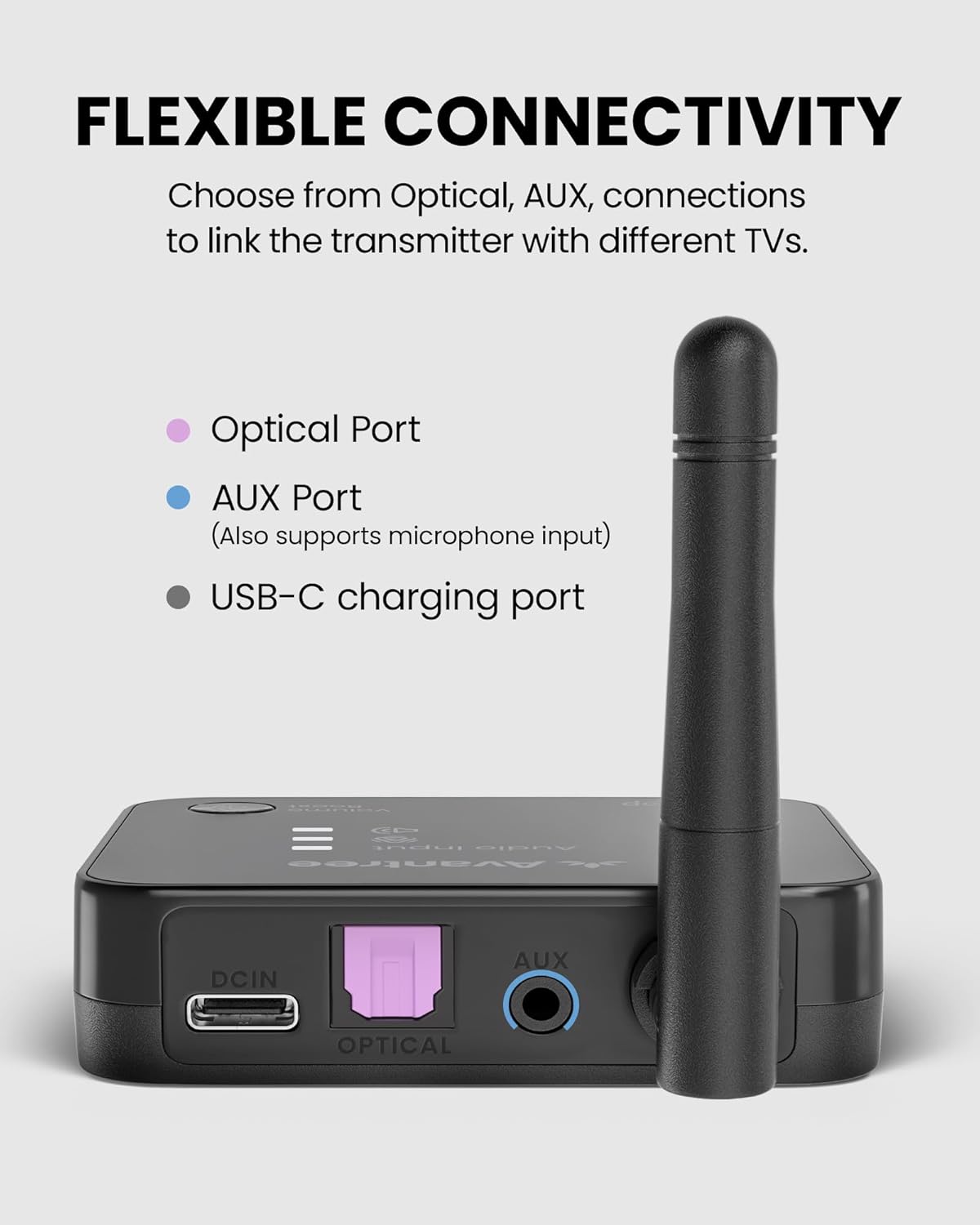
Obraz: Tył view of the Avantree Aura Loop transmitter showing various input and output ports.
Earbuds Features
- Power Off/On/Pairing Switch: Controls earbud power and pairing mode.
- Power/Charging/Connection Indicator: Zapewnia aktualizacje statusu.
- Equalizer Mode Select: Choose from three EQ modes, including Voice Clear.
- Port ładowania: Port USB-C do bezpośredniego ładowania.
- Charging Contacting Points: For charging via the dock.
- Volume/Track Skip Control: Dostosuj głośność i pomijaj utwory.
- Przycisk Odtwórz/Pauza/Połącz: Controls media playback and calls.

Image: Close-up of the Avantree Aura Loop earbuds showing inline controls and charging port.
Video: An unboxing video of the Avantree Aura Loop Auracast Wireless TV Earbuds, demonstrating the contents and initial appearance of the product.
Organizować coś
1. Włączanie
- Power on the earbuds using the Power Off/On/Pairing switch.
- Connect the transmitter to a power source using the provided Type-C cable and a 5V/1A wall plug (adapter not included).
- Flip the power switch on the transmitter to 'ON'.
- Once connected, the indicators on both the earbuds and transmitter will turn solid blue.
2. Podłączanie do telewizora
The Avantree Aura Loop offers three primary ways to connect to your TV: Optical, AUX (3.5mm), and RCA. Choose the option that matches your TV's available audio output ports.
Połączenie optyczne
- Connect one end of the Optical Fiber Cable to the OPT IN port on the transmitter (Input From TV section).
- Connect the other end of the Optical Fiber Cable to your TV's OPTICAL DIGITAL AUDIO OUT port.
- Set the Input Mode Switch on the transmitter to 'OPT'.
- On your TV's sound settings, ensure the audio output is set to 'Optical' and the sound format is 'PCM' (or Stereo). Avoid 'Auto' or 'Dolby' formats.
AUX (3.5mm) Connection
- Connect one end of the 3.5mm AUX Audio Cable to the AUX IN port on the transmitter (Input From TV section).
- Connect the other end of the 3.5mm AUX Audio Cable to your TV's HEADPHONE OUT or AUX OUT port.
- Set the Input Mode Switch on the transmitter to 'AUX'.
- On your TV's sound settings, ensure the audio output is set to 'Headset' or 'External Speaker'.
Połączenie RCA
- Attach the AUX to RCA Cable to the 3.5mm AUX Audio Cable.
- Connect the 3.5mm end to the AUX IN port on the transmitter (Input From TV section).
- Connect the red and white RCA plugs to your TV's AUDIO OUT (red and white) ports.
- Set the Input Mode Switch on the transmitter to 'AUX'.
- On your TV's sound settings, ensure the audio output is set to 'External Speaker'.
Video: A detailed guide on how to set up and connect Avantree wireless headphones to a TV using various audio connections like Optical, AUX, and RCA.
Instrukcja obsługi
Using with External TV Speaker (Soundbar / AV Receiver)
The Avantree Aura Loop transmitter can pass through audio to an external soundbar or AV receiver, allowing simultaneous listening through both the headphones and your external speakers. Ensure you use the same connection type (Optical or AUX) for both the TV input to the transmitter and the output from the transmitter to your external speaker.
- If your TV is connected to the transmitter via Optical, connect the OPT OUT port on the transmitter to your soundbar/AV receiver's Optical input.
- If your TV is connected to the transmitter via AUX, connect the AUX OUT port on the transmitter to your soundbar/AV receiver's AUX input.
Dodawanie drugiej pary słuchawek
The Auracast technology allows for one-to-many connections, meaning you can add a second pair of compatible Auracast headphones to the same transmitter for shared listening.
- Ensure the first pair of headphones is already connected and working.
- Put the second pair of compatible Auracast headphones into pairing mode (refer to the second headphone's user manual for specific instructions).
- On the Avantree Aura Loop transmitter, press and hold the pairing button (usually indicated by a '2' or a headphone icon) until its indicator light starts flashing red and blue.
- The second pair of headphones should connect automatically within a few seconds. Once connected, their indicator lights will turn solid blue.
Using Headphones with a Cellphone
The earbuds can also be used independently with a cellphone via Bluetooth. Note that the earbuds prioritize connection to the transmitter.
- Turn off the Avantree Aura Loop transmitter.
- Włącz słuchawki douszne.
- Press and hold the Power Off/On/Pairing switch on the earbuds until the indicator light flashes red and blue (pairing mode).
- On your cellphone, go to Bluetooth settings.
- Szukaj and select 'Avantree Aura Loop' (or similar model name) to connect.
- Once connected, you can listen to music and take calls.
Ładowanie
The Avantree Aura Loop earbuds can be charged using the charging dock or directly via a USB-C cable.
Charging with the Dock
- Sprawdź, czy stacja ładująca jest podłączona do źródła zasilania.
- Place the earbuds onto the charging dock, ensuring the metal pins align correctly.
- The indicator light on the dock will turn red while charging and blue when fully charged.
- Pełne naładowanie trwa około 2.5 godziny i zapewnia do 24 godzin pracy baterii.
Direct Charging with USB-C Cable
- Connect the provided Type-C charging cable to the charging port on the earbuds.
- Podłącz drugi koniec kabla do źródła zasilania USB.
- The indicator light on the earbuds will turn red while charging and turn off when fully charged.
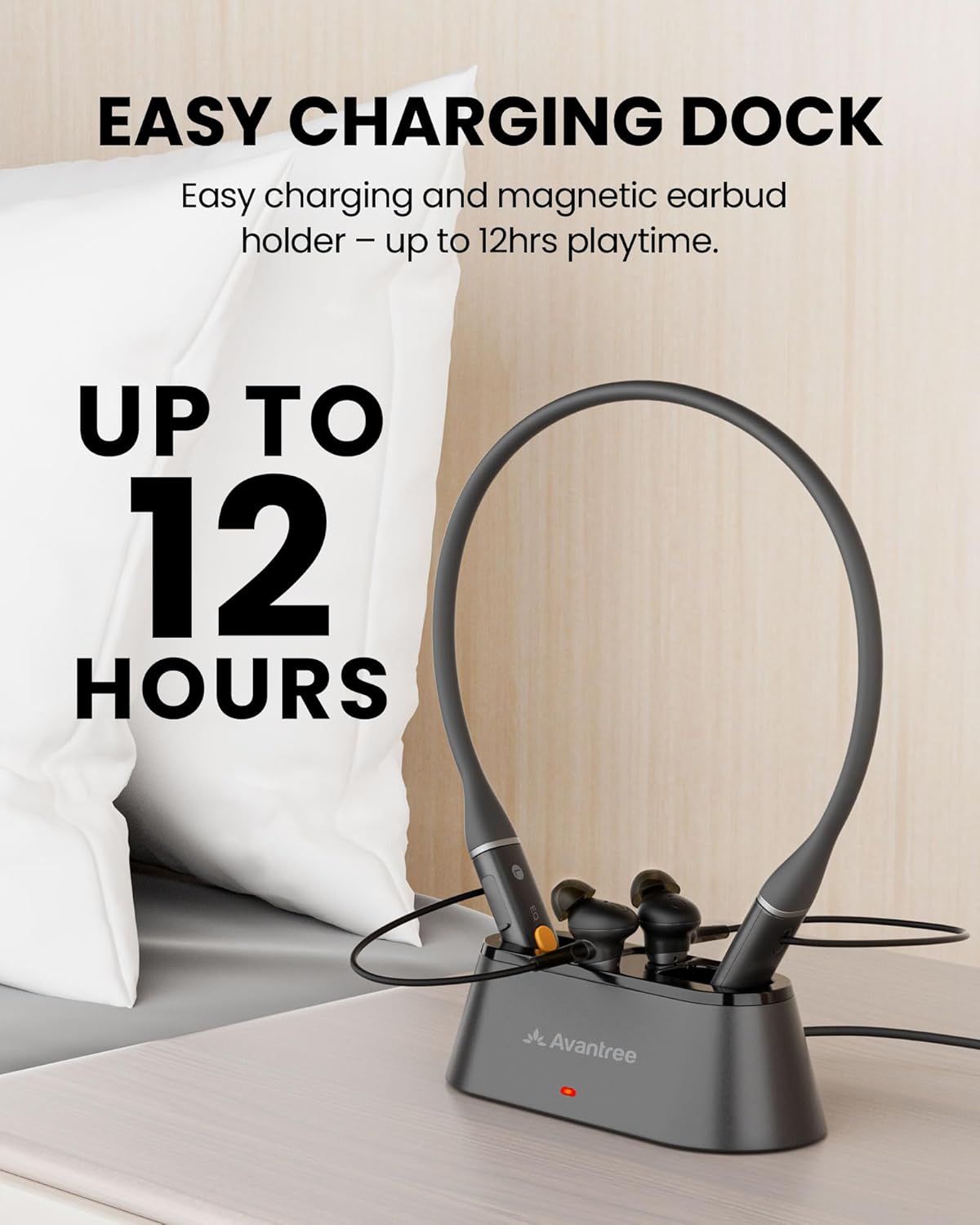
Image: The Avantree Aura Loop earbuds resting in their charging dock, indicating the ease of charging.
Rozwiązywanie problemów
- Brak dźwięku: Double-check all cable connections between the TV and transmitter. Verify TV audio output settings (PCM for Optical, Headset/External Speaker for AUX/RCA). Ensure the correct input mode (OPT/AUX) is selected on the transmitter.
- Headphones Unpaired: If the earbuds do not automatically connect to the transmitter, press the 'LOCK' button on the back of the transmitter to re-initiate pairing.
- Problemy z jakością dźwięku: Experiment with the three EQ modes (Balanced, Voice Clear 1, Voice Clear 2) on the earbuds to find the best clarity for your hearing. Ensure earbuds fit snugly in your ears.
- Krótki czas pracy baterii: Ensure earbuds are properly seated in the charging dock or connected directly via USB-C. Check that the charging indicator lights up.
Specyfikacje
- Nazwa modelu: Aura Loop
- Numer modelu przedmiotu: BTHT-4817
- Technologia łączności: Auracast, Bluetooth
- Technologia komunikacji bezprzewodowej: Bluetooth, Auracast
- Wersja Bluetooth: 5.4
- Kontrola hałasu: Izolacja akustyczna
- Czas pracy baterii: Do 24 godzin
- Cechy szczególne: 3 EQ Modes, Auracast Sharing, Easy Dock Charging
- Zgodne urządzenia: Cellphones, Desktops, Television
- Metoda sterowania: Dotykać
- Umieszczenie ucha: W uchu
- Waga przedmiotu: 15.2 uncji
Gwarancja i wsparcie
For warranty information, technical support, or further assistance, please visit the official Avantree weblub skontaktuj się z działem obsługi klienta. Zachowaj paragon zakupu na potrzeby roszczeń gwarancyjnych.
Wsparcie online: www.avantree.com/support


