1. Wprowadzenie
The GMKtec EVO-X1 AI Mini PC is a high-performance computing device designed for gaming, content creation, and demanding professional tasks. Featuring the AMD Ryzen AI 9 HX-370 Series processor with Zen 5 microarchitecture and XDNA 2 AI NPU, it delivers exceptional speed and efficiency in a compact form factor. This manual provides essential information for setting up, operating, maintaining, and troubleshooting your EVO-X1 Mini PC.
2. Co znajduje się w pudełku
Upon unboxing your GMKtec EVO-X1, please ensure all the following items are present:
- GMKtec Nucbox EVO AMD Ryzen AI 9 HX 370 Mini komputer PC
- Zasilacz i kabel
- Kabel HDMI
- Mocowanie VESA i śruby
- Instrukcja obsługi

Image: Retail boxed packaging showing the EVO-X1 Mini PC, power supply, HDMI cable, VESA mount, and user manual.
3. Funkcje produktu
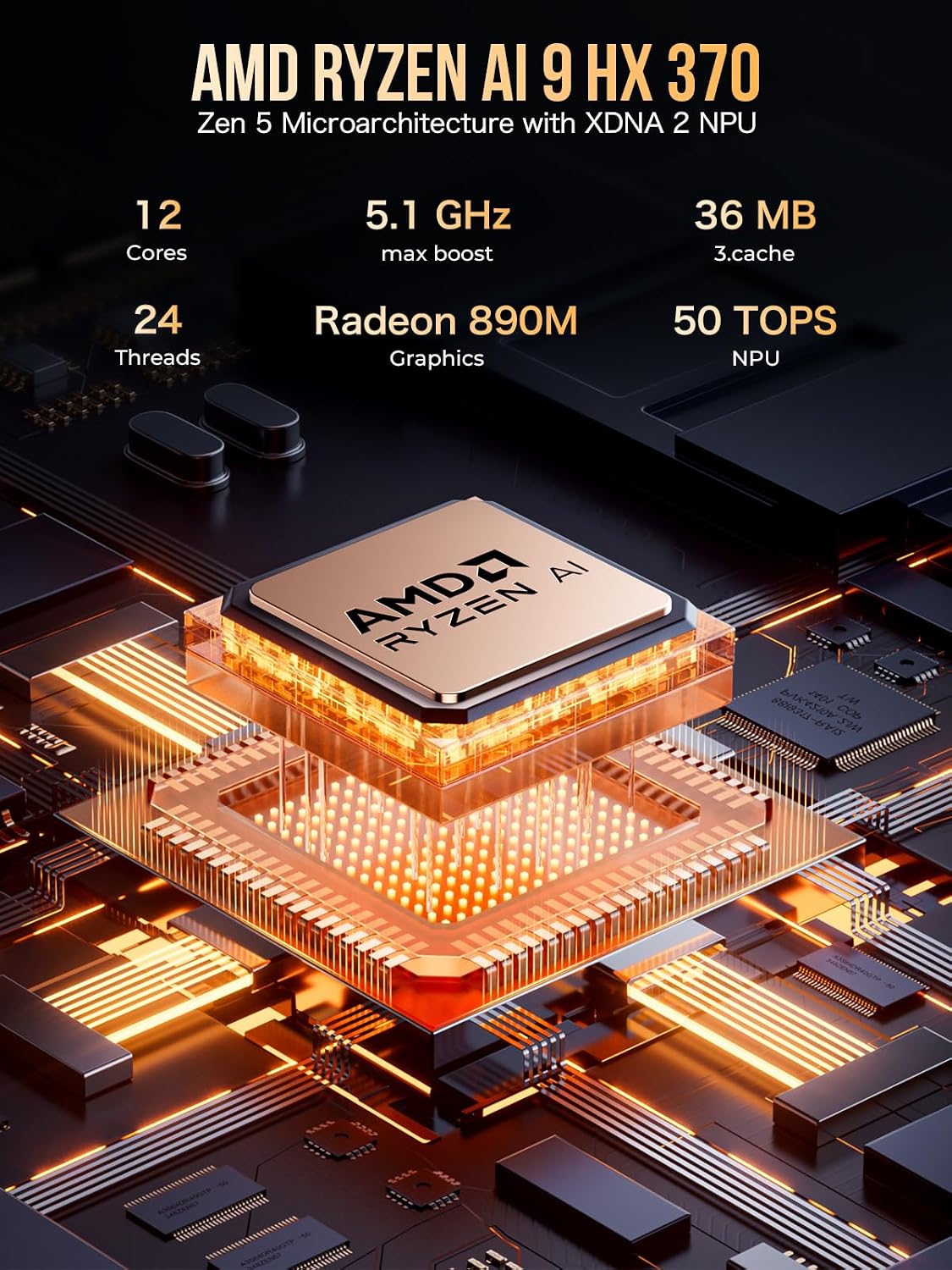
- Edytor: AMD Ryzen AI 9 HX-370 Series (Up to 5.1GHz) with Zen 5 Microarchitecture.
- AI NPU: XDNA 2 Architecture delivering up to 50 TOPS of AI processing power.
- Grafika: Integrated AMD Radeon 890M iGPU (RDNA 3.5).
- Pamięć: Quad Channel LPDDR5X RAM, up to 8000MT/s.
- Składowanie: 1TB PCIe 4.0 M.2 2280 SSD (Dual Slots, Max. 8TB).
- Obsługa wyświetlania: Triple 8K simultaneous output via HDMI 2.1 (8K@60Hz), DisplayPort 2.1 (8K@60Hz), and USB4 (40Gbps, supporting PD3.0/DP1.4/DATA).
- Sieć: Dual Intel NIC i226V 2.5Gbps LAN ports, WiFi 6, and Bluetooth 5.2.
- Ekspansja: Oculink port for external GPU setups (PCIe x4 speeds).
- Chłodzenie: Upgraded Dual Cooling Fans with Hyper Ice Chamber 2.0 design (360-degree airflow, 35dB in Quiet mode).
- Tryby wydajności: Three selectable modes (Quiet 35W, Balance 54W, Performance 65W) via UEFI (BIOS).

Obraz: Ponadview of GMKtec EVO-X1 highlighting key features like AMD Ryzen AI 9 HX 370, 4nm FinFET Tech, PCIe 4.0 SSD, LPDDR5X, Triple Screens, Windows 11 Pro, Dual Cooling Fans, and WiFi 6.

Obraz: Szczegółowy view of the AMD Ryzen AI 9 HX 370 processor, emphasizing its Zen 5 Microarchitecture with XDNA 2 NPU, 12 Cores, 24 Threads, 5.1 GHz max boost, Radeon 890M Graphics, and 50 TOPS NPU.

Image: Illustration of LPDDR5X 7500MHz Quad Channel memory, highlighting its speed of up to 7,500MT/s and performance improvements over older DDR generations.
4. Instrukcje konfiguracji
4.1 Podłączanie urządzeń peryferyjnych
Before powering on your EVO-X1, connect your essential peripherals:
- Monitor(s): Connect your display(s) using the HDMI 2.1, DisplayPort 2.1, or USB4 ports. The device supports up to three 8K displays simultaneously.
- Myszka klawiaturowa: Podłącz klawiaturę i mysz USB do dostępnych portów USB-A.
- Sieć: For wired internet, connect an Ethernet cable to one of the dual 2.5Gbps LAN ports. For wireless, ensure your Wi-Fi network is available.
- Audio: Connect headphones or speakers to the 3.5mm CTIA audio jack if needed.
4.2 Włączanie
- Connect the power supply cable to the DC IN port on the rear of the Mini PC.
- Podłącz zasilacz do gniazdka ściennego.
- Press the power button located on the front panel of the Mini PC. The power indicator will illuminate.
4.3 Początkowa konfiguracja systemu Windows 11 Pro
Upon first boot, the system will guide you through the Windows 11 Pro setup process. Follow the on-screen prompts to configure your language, region, network, user account, and other settings.
Obraz: przód i tył views of the GMKtec EVO-X1, showing various ports including USB, HDMI, DisplayPort, Ethernet, Oculink, and power button.
5. Instrukcja obsługi
5.1 Tryby wydajności
The EVO-X1 AI Mini PC features three performance modes, configurable via the UEFI (BIOS) settings, to optimize power consumption and performance:
- Tryb cichy (35 W): Ideal for light tasks and silent operation, with fan noise reduced to 35dB.
- Tryb zrównoważony (54 W): A balanced setting for everyday use, offering a good mix of performance and efficiency.
- Tryb wydajności (65 W): Maximizes CPU and GPU performance for demanding applications, gaming, and heavy workloads.
5.2 UEFI (BIOS) Settings
Access the UEFI (BIOS) settings during startup to configure advanced options such as VRAM Allocation, Auto Power On, and Wake-on-LAN. Consult the on-screen instructions within the BIOS for navigation and setting adjustments.
6. Łączność
The EVO-X1 offers a comprehensive array of ports and wireless options:
- Porty USB: Multiple USB 3.0 and USB 2.0 ports for connecting various peripherals.
- Porty USB4: Two 40Gbps USB4 ports (Type-C) supporting Power Delivery (PD3.0), DisplayPort (DP1.4), and high-speed data transfer.
- Port Oculink: A dedicated Oculink port (PCIe x4) for connecting external GPUs, offering higher bandwidth and lower latency compared to Thunderbolt.
- Wyjścia wideo: HDMI 2.1 (8K@60Hz) and DisplayPort 2.1 (8K@60Hz) for high-resolution displays.
- Ethernet: Dual Intel NIC i226V 2.5Gbps LAN ports for robust wired network connections.
- Bezprzewodowy: Integrated WiFi 6 for fast wireless internet and Bluetooth 5.2 for connecting wireless accessories.

Obraz: Szczegółowy view of the EVO-X1's rich interface, including USB4, HDMI 2.1, DisplayPort 2.1, USB 3.2, 2.5G LAN, CTIA audio, and Oculink ports.

Image: Depiction of the Oculink port supporting external graphics cards with data transfer speeds up to 64 Gbps for high-end gaming and professional graphics work.
7. Możliwość rozbudowy
The EVO-X1 is designed with expandability in mind:
- BARAN: The LPDDR5X memory is onboard, but the system supports high-speed performance.
- Składowanie: Features dual M.2 2280 PCIe 4.0 SSD slots, allowing for up to 8TB of total storage. This provides ample space for applications, games, and large files.
- External GPU: The Oculink port offers a direct PCIe x4 connection for external graphics cards, significantly boosting graphical performance for gaming or professional applications.

Obraz: Wybuchowy view of the EVO-X1's internal structure, showing the metallic detachable cover lid, top cooling fan cover, mini fan cooling boost for DDR/SSD, dual M.2 2280 PCIe 4.0 slots (8TB total), VC copper premium cooling base, and air cooling vents.
8. Konserwacja
8.1 Układ chłodzenia
The EVO-X1 features an upgraded Hyper Ice Chamber 2.0 cooling system with larger top and bottom cooling fans, providing 360-degree in and out airflow. The copper base helps maintain optimal temperatures.
- Ensure the side and bottom vents are clear of obstructions to allow for proper airflow.
- Regularly clean dust from the vents using compressed air to prevent overheating and maintain performance.
9. Rozwiązywanie Problemów
If you encounter issues with your GMKtec EVO-X1, consider the following general troubleshooting steps:
- Brak zasilania: Verify that the power cable is securely connected to both the Mini PC and the power outlet. Ensure the power adapter is functioning correctly.
- Brak wyświetlacza: Check all video cable connections (HDMI, DisplayPort, USB4) to your monitor(s). Try connecting to a different port or monitor if available.
- Problemy z urządzeniami peryferyjnymi: Ensure USB devices are properly connected. Try different USB ports. Update drivers if necessary.
- Łączność sieciowa: For wired connections, check the Ethernet cable and router status. For Wi-Fi, ensure the network is selected and the password is correct.
- System nie odpowiada: Perform a hard reboot by holding down the power button until the device shuts off, then power it back on.
- Przegrzanie: Ensure cooling vents are unobstructed. Consider switching to Quiet Mode for less demanding tasks.
For persistent issues, refer to the official GMKtec support resources or contact customer service.
10. Specyfikacje
| Funkcja | Szczegół |
|---|---|
| Edytor | AMD Ryzen AI 9 HX-370 Series (Up to 5.1 GHz) |
| AI NPU | XDNA 2 Architecture, 50 TOPS |
| Koprocesor graficzny | AMD Radeon 890M 2900MHz (zintegrowana) |
| BARAN | 32 GB LPDDR5X, 8000 MHz |
| Dysk twardy | 1 TB PCIe 4.0 M.2 2280 SSD (Dual Slots, Max. 8TB) |
| System operacyjny | Windows 11 Pro |
| Maksymalna rozdzielczość ekranu | 7680x4320 pikseli (8K) |
| Porty USB 3.0 | 4 |
| Porty USB4 | 2 (40Gbps, PD3.0/DP1.4/DATA compatible) |
| Port Oculink | 1 (PCI x4) |
| Sieć Ethernetowa | Dual 2.5 Gbps LAN (Intel i226V) |
| Typ bezprzewodowy | WiFi 6 (2.4 GHz, 5 GHz, 5.8 GHz), Bluetooth 5.2 |
| Waga przedmiotu | 2.2 funta |
| Wymiary opakowania | 5.19 x 4.9 x 2.28 cala |
11. Gwarancja i wsparcie
GMKtec offers a 1-year limited warranty for each Mini PC, starting from the date of purchase. This warranty covers all defects due to design and workmanship. For support, please contact the professional after-sales team. You can find contact information on the official GMKtec webstronie lub poprzez platformę zakupową.


