1. Wprowadzenie
The Fender Mustang LTX100 is a 100-watt modeling combo amplifier designed for guitarists seeking versatile tone and performance. This ampfunkcje lifier 25 amp models, 25 studio-quality effects, and 100 preset slots for extensive sound customization. It is equipped with a 12-inch Celestion G12FSD-100 speaker, an integrated color display with a chromatic tuner, Bluetooth audio streaming, and USB-C connectivity for recording and app control. This manual provides essential information for the proper setup, operation, and maintenance of your Mustang LTX100 ampliyfikator.

Figure 1.1: Fender Mustang LTX100 Amplifier z dołączonymi akcesoriami.
2. Informacje dotyczące bezpieczeństwa
Please read and understand all safety instructions before operating your Fender Mustang LTX100 amplifier. Zachowaj tę instrukcję do wykorzystania w przyszłości.
- OSTRZEŻENIE: To reduce the risk of fire or electric shock, do not expose this appliance to rain or moisture. Do not remove the cover. Refer servicing to qualified personnel only.
- OSTROŻNOŚĆ: Aby zapobiec porażeniu prądem, nie używaj tej (spolaryzowanej) wtyczki z przedłużaczem, gniazdkiem lub innym gniazdkiem, chyba że ostrza można całkowicie włożyć, aby zapobiec odsłonięciu ostrzy.
- OSTRZEŻENIE: Produkt ten zawiera substancje chemiczne, o których władze stanu Kalifornia wiedzą, że mogą powodować raka, wady wrodzone lub inne szkody reprodukcyjne.
- Zapewnij amplifier is connected to a grounded power outlet.
- Do not block ventilation openings. Maintain adequate space around the ampfiltr zapewniający prawidłowy przepływ powietrza.
- Unikaj umieszczania amplifier near heat sources such as radiators, heat registers, stoves, or other apparatus (including amp(lifiers) wytwarzające ciepło.
- Chroń przewód zasilający przed deptaniem i przytrzaśnięciem, zwłaszcza przy wtyczkach, gniazdkach i miejscach, w których wychodzi z urządzenia.
- Odłączaj urządzenie od zasilania podczas burzy z piorunami lub jeśli nie używasz go przez dłuższy czas.
3. Konfiguracja
3.1 Rozpakowywanie i umieszczanie
Ostrożnie usuń amplifier and all accessories from the packaging. Inspect the unit for any signs of damage. Place the amplifier on a stable, level surface, ensuring adequate space for ventilation.
3.2 Połączenie zasilania
- Zapewnij ampWyłącznik zasilania urządzenia jest ustawiony w pozycji WYŁĄCZONY.
- Connect the provided power cord to the INPUT POWER receptacle on the rear panel of the ampliyfikator.
- Podłącz drugi koniec przewodu zasilającego do odpowiedniego, uziemionego gniazdka sieciowego.
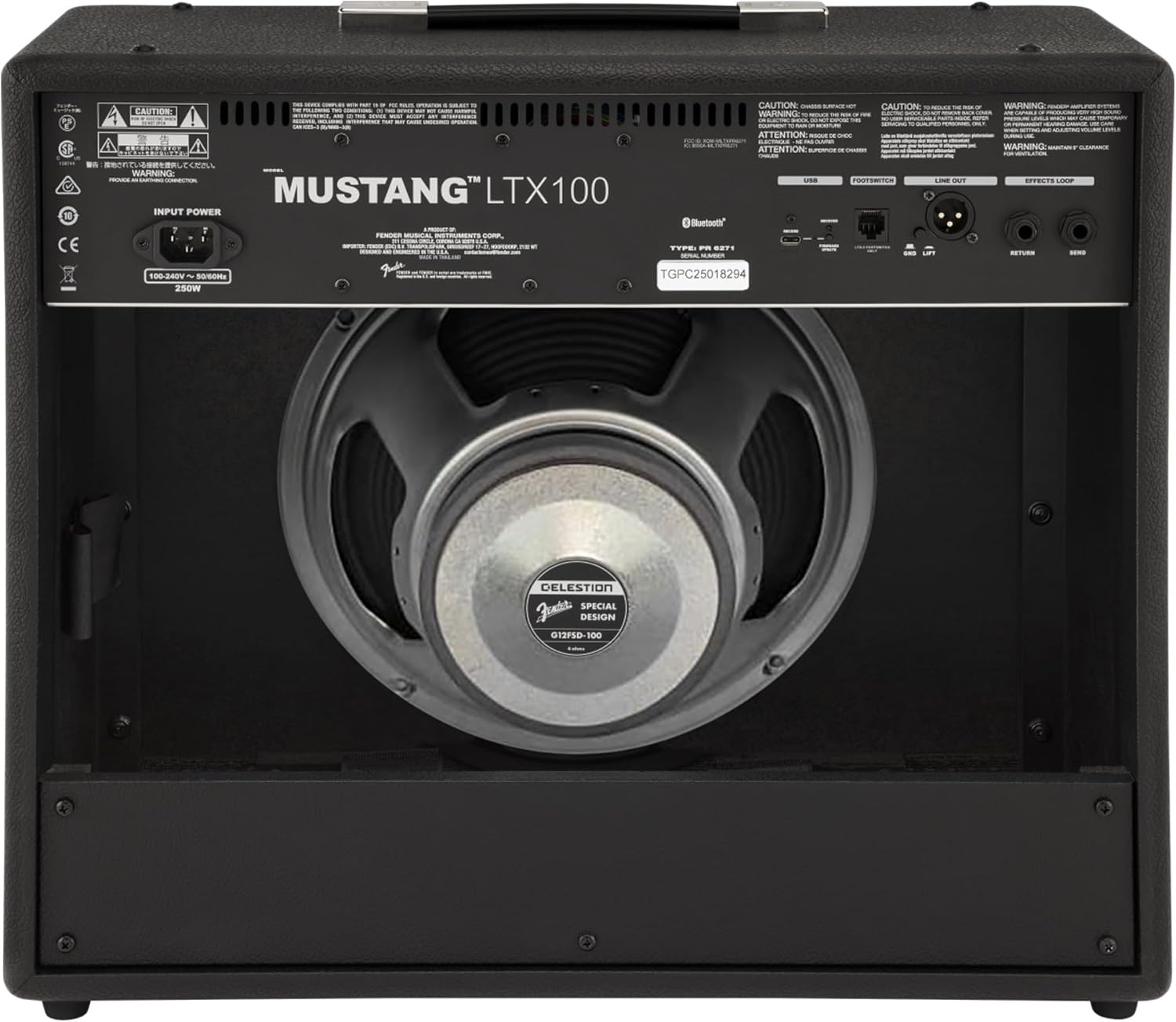
Rysunek 3.1: Połączenia na panelu tylnym
3.3 Instrument and Accessory Connections
- Wejście instrumentu: Connect your guitar using a standard 1/4-inch instrument cable to the INPUT jack on the front panel.
- Wejście pomocnicze: For connecting external audio devices (e.g., MP3 player, phone), use a 3.5mm stereo cable to the AUX input on the front panel.
- Wyjście słuchawkowe: For silent practice, connect headphones to the HEADPHONE OUT jack on the rear panel.
- Wyjście liniowe XLR: For connecting to a PA system or recording interface, use XLR cables to the LINE OUT jacks on the rear panel. A ground lift switch is provided to eliminate hum.
- Pętla efektów: External effects pedals can be connected via the SEND and RETURN jacks on the rear panel.
- USB typu C: Connect to a computer for recording, firmware updates, and Fender Tone 3.0 app control.
4. Instrukcja obsługi
4.1 Elementy sterujące na panelu przednimview

Rysunek 4.1: Elementy sterujące na panelu przednim
- WEJŚCIE: Gniazdo 1/4 cala do podłączenia gitary.
- AUX: Wejście stereo 3.5 mm dla zewnętrznych urządzeń audio.
- ZDOBYĆ: Controls the input level and amount of overdrive/distortion for the selected amp model.
- TOM: Adjusts the output level of the selected amp model.
- POTROIĆ: Dostosowuje odpowiedź wysokich częstotliwości.
- ŚRODEK: Dostosowuje odpowiedź częstotliwości średnich.
- GITARA BASOWA: Dostosowuje odpowiedź niskiej częstotliwości.
- MISTRZ: Kontroluje ogólną głośność wyjściową ampliyfikator.
- POKAZ: Color LCD screen for navigating menus, selecting amp models, effects, and viewing tuner.
- ENCODER KNOB: Used to scroll through menus and adjust parameters on the display. Press to select.
- Z POWROTEM: Powrót do poprzedniego menu lub ekranu.
- RATOWAĆ: Stores current settings as a preset.
- MENU: Accesses the main menu for system settings, global parameters, and more.
- UZYSKIWAĆ: Used for setting delay and modulation effect tempos. Hold to activate the chromatic tuner.
- WŁ./WYŁ.: Wyłącznik zasilania dla ampliyfikator.
4.2 Włączanie i podstawowa obsługa
- Ensure all connections are secure and the MASTER volume is set to a low level.
- Press the ON/OFF switch to power on the amplifier. The display will illuminate.
- Wybierz amp model and effect using the encoder knob and display.
- Adjust the GAIN, VOLUME, TREBLE, MIDDLE, and BASS knobs to shape your desired tone.
- Gradually increase the MASTER volume to achieve the desired listening level.
4.3 Używanie Amp Modele i efekty
The Mustang LTX100 offers 25 distinct amp models and 25 studio-quality effects. Use the encoder knob to browse through the available options on the display. Once an amp model or effect is selected, its parameters can be adjusted using the encoder knob or the dedicated tone knobs (Treble, Middle, Bass) if applicable.
4.4 Ustawienia wstępne
Ten amplifier comes with 70 factory presets and allows for 100 user-defined presets. To save your custom settings:
- Dial in your desired amp model, effects, and tone settings.
- Naciśnij przycisk ZAPISZ.
- Use the encoder knob to select a user preset slot.
- Press the encoder knob to confirm and save your preset.
4.5 Przesyłanie strumieniowe dźwięku przez Bluetooth
To stream audio from a mobile device:
- Aktywuj Bluetooth na swoim urządzeniu mobilnym.
- Na amplifier, navigate to the Bluetooth menu via the display.
- Select "Pair New Device" and choose "Mustang LTX100" from your device's Bluetooth list.
- Po sparowaniu możesz odtwarzać dźwięk przez ampliyfikator.
4.6 Fender Tone 3.0 App
The Fender Tone 3.0 app (available for iOS and Android) provides wireless control over your amplifier. It allows you to edit, save, and share presets, as well as access additional features. Connect your amplifier to your mobile device via Bluetooth to use the app.
5. Konserwacja
5.1 Czyszczenie
- Zawsze odłączaj ampPrzed czyszczeniem odłącz urządzenie od gniazdka elektrycznego.
- Do czyszczenia powierzchni zewnętrznych należy używać miękkiej, suchej ściereczki.
- Nie należy używać środków czyszczących o właściwościach ściernych, rozpuszczalników ani wosków, gdyż mogą one uszkodzić wykończenie.
- Avoid spraying liquids directly onto the ampliyfikator.
5.2 Przechowywanie
- Przechowuj ampPrzechowywać w suchym i chłodnym miejscu, z dala od bezpośredniego światła słonecznego i ekstremalnych temperatur.
- If storing for an extended period, cover the amplifier, aby chronić go przed kurzem.
6. Rozwiązywanie Problemów
| Problem | Możliwa przyczyna | Rozwiązanie |
|---|---|---|
| Brak zasilania | Power cord not connected; Power outlet not active; Ampwyłącznik zasilania lifier | Sprawdź połączenie przewodu zasilającego; Przetestuj gniazdko za pomocą innego urządzenia; Upewnij się, że wyłącznik zasilania jest w pozycji WŁ. |
| Brak dźwięku | Instrument cable faulty/disconnected; Guitar volume off; Amplifier volume/master low; Headphones connected | Check/replace instrument cable; Turn up guitar volume; Increase amplifier volume/master; Disconnect headphones |
| Zniekształcony dźwięk | Gain too high; Master volume too high; Faulty cable/instrument | Reduce GAIN; Reduce MASTER volume; Test with different cable/instrument |
| Problemy z połączeniem Bluetooth | Urządzenie nie jest w trybie parowania; Amplifier not discoverable; Interference | Ensure device is in pairing mode; Re-initiate pairing on amplifier; Move closer to amplifier; Restart both devices |
7. Specyfikacje
| Funkcja | Szczegół |
|---|---|
| Nazwa modelu | Mustang LTX100 |
| Numer modelu | 2311800000 |
| Moc wyjściowa | 100 watów |
| Głośnik | 1 x 12″ Celestion G12FSD-100 |
| Amp Modele | 25 |
| Ruchomości | 25 (distortion, overdrive, compression, modulation, delay, reverb, octave, etc.) |
| Ustawienia wstępne | 70 factory presets + 100 user slots |
| Wyświetlacz | Color LCD with onboard chromatic tuner |
| Łączność | Bluetooth audio, USB-C bidirectional audio |
| Wyjścia | XLR line out (with ground lift), headphone out |
| Wejścia | 1/4″ instrument input, 3.5 mm aux input |
| Wsparcie aplikacji | Fender Tone 3.0 app (iOS/Android) |
| Budowa | Kombinacja amplifier, rugged build |
| Waga przedmiotu | 26.4 funta |
| Wymiary produktu | 22.3 x 19.9 x 12.3 cala |
| Tworzywo | Metal |
| Źródło zasilania | Elektryczny przewodowy |
8. Gwarancja i wsparcie
For detailed warranty information, product registration, and technical support, please visit the official Fender website. You can also find FAQs, software updates, and additional resources there.
Official Fender Store: Fender Store on Amazon