1. Wprowadzenie
The Trevi RDA 70 BR is a compact and versatile portable radio designed to provide a comprehensive listening experience. It combines traditional radio functionality with modern digital features, making it suitable for listening to music or news anywhere. This manual provides instructions for the proper setup, operation, and maintenance of your device.
2. Informacje dotyczące bezpieczeństwa
- Przeczytaj uważnie wszystkie instrukcje przed użyciem urządzenia.
- Nie wystawiaj radia na działanie deszczu, wilgoci ani ekstremalnych temperatur.
- Unikaj umieszczania urządzenia w pobliżu źródeł ciepła lub w miejscu bezpośrednio nasłonecznionym.
- Nie rozmontowuj ani nie próbuj samodzielnie naprawiać urządzenia. Wszelkie prace serwisowe powierzaj wykwalifikowanemu personelowi.
- Trzymaj urządzenie z dala od silnych pól magnetycznych.
- Use only the specified charging cable (USB Type-C) for recharging the battery.
3. Zawartość opakowania
Sprawdź, czy w przesyłce znajdują się wszystkie elementy:
- Trevi RDA 70 BR Portable Radio
- Kabel do ładowania USB typu C.
- Instrukcja obsługi (ten dokument)
4. Koniec produktuview
Familiarize yourself with the various parts and controls of your Trevi RDA 70 BR radio.

Rysunek 1: Przód kątowy view of the Trevi RDA 70 BR Portable Radio, showing the speaker grille, display, and main controls.
Elementy sterujące na panelu przednim
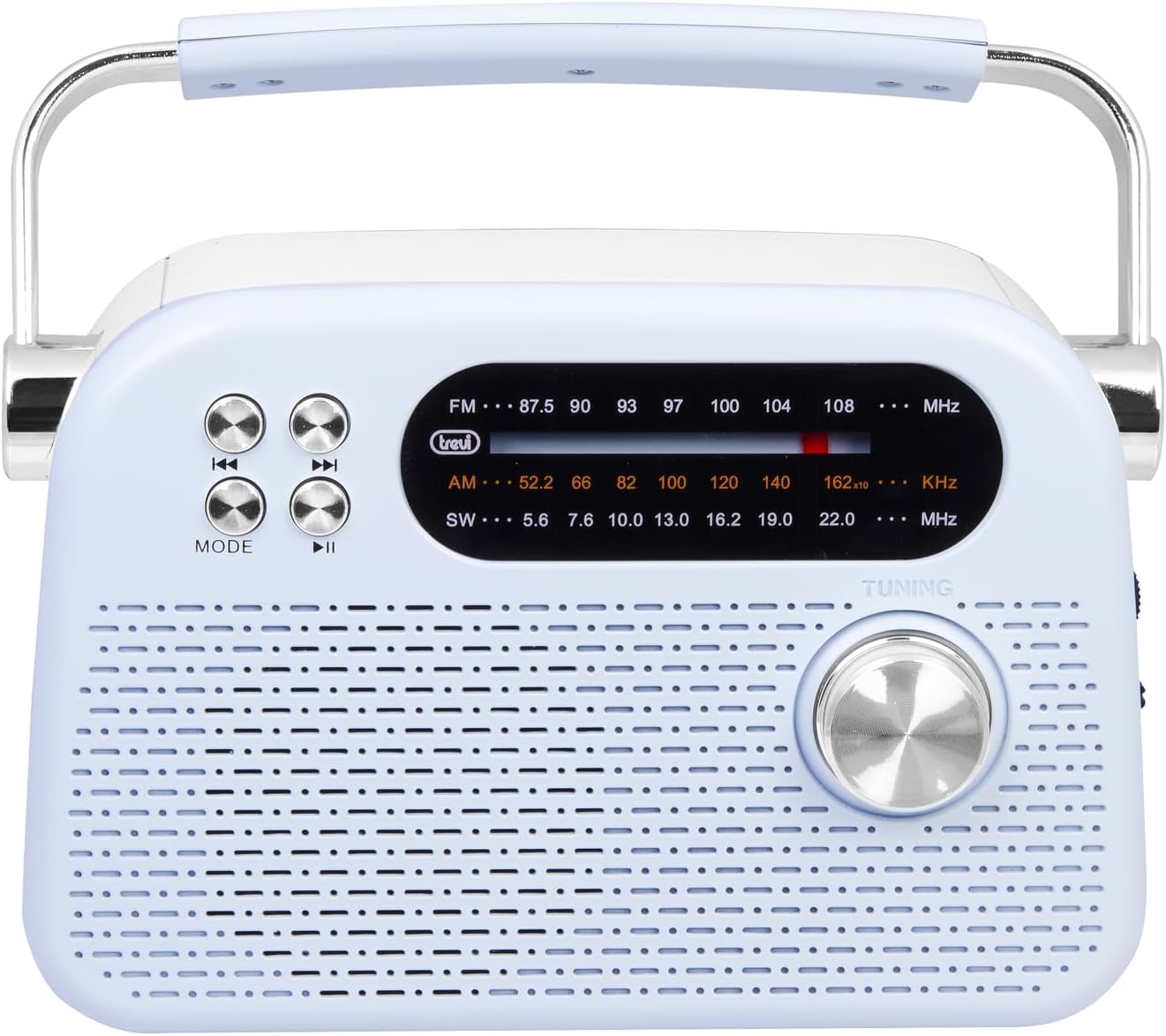
Rysunek 2: Szczegółowy widok z przodu view highlighting the display, mode button, playback controls, and tuning knob.
- Wyświetlacz: Pokazuje częstotliwość, tryb i inne informacje.
- Przycisk TRYB: Switches between radio bands (FM/AM/SW) and media playback modes (USB/Micro SD/Wireless).
- Playback Controls (◀◀ / ▶▶ / ▶▶): Used for skipping tracks in media mode or fine-tuning in radio mode.
- Gałka strojeniowa: For manual station tuning.
Side Panel Controls and Ports

Rysunek 3: Strona view showing the power switch, volume control, USB port, Micro SD slot, and USB Type-C charging port.
- OFF/ON/Volume Knob: Włącza/wyłącza radio i reguluje poziom głośności.
- DC 5V IN (USB Type-C): Charging port for the internal battery.
- Port USB: Do podłączania pamięci flash USB w celu odtwarzania plików MP3.
- Gniazdo Micro SD (TF): Do wkładania kart Micro SD w celu odtwarzania plików MP3.
- Przełącznik wyboru pasma: Selects between FM, AM, and SW radio bands, and MEDIA mode for USB/Micro SD/Wireless.
Panel tylny

Rysunek 4: Tył view showing the telescopic antenna and battery compartment.
- Antena teleskopowa: Extend for improved radio reception, especially for FM and SW bands.
- Komora baterii: Mieści akumulator litowo-jonowy.
5. Konfiguracja
5.1 Ładowanie akumulatora
- Locate the USB Type-C charging port on the side of the radio.
- Connect the provided USB Type-C cable to the radio's charging port.
- Podłącz drugi koniec kabla USB do standardowego zasilacza USB (nie ma go w zestawie) lub do portu USB komputera.
- The charging indicator light will illuminate (if present) to show charging status.
- Once fully charged, disconnect the cable. A full charge ensures maximum portability and uninterrupted use.
5.2 Regulacja anteny
For optimal radio reception, extend the telescopic antenna fully. Adjust its direction and angle to achieve the clearest signal, especially for FM and Shortwave (SW) broadcasts.
6. Instrukcja obsługi
6.1 Włączanie/wyłączanie i regulacja głośności
- Aby włączyć radio ON, rotate the OFF/ON/Volume knob clockwise.
- Continue rotating the knob clockwise to zwiększyć głośność.
- Rotate the knob counter-clockwise to zmniejsz głośność.
- Aby włączyć radio WYŁĄCZONY, rotate the knob counter-clockwise until it clicks into the OFF position.
6.2 Wybór trybu
Użyj Przełącznik wyboru pasma on the side panel to choose your desired mode:
- FM: For Frequency Modulation radio stations.
- RANO: Dla Amplitude Modulation radio stations.
- Płd.-zach.: For Shortwave radio stations.
- GŁOSKA BEZDŹWIĘCZNA: For playing audio from USB, Micro SD, or Wireless (Bluetooth) sources.
6.3 Strojenie radia
- Select the desired radio band (FM, AM, or SW) using the Band Selector Switch.
- Aby uzyskać lepszy odbiór, wysuń antenę teleskopową.
- Powoli obracaj Gałka strojenia on the front panel to scan for stations.
- The frequency will be displayed on the screen. Stop tuning when you find a clear station.
6.4 USB/Micro SD Playback (MP3)
- Insert a USB flash drive or a Micro SD card (with MP3 files) into the corresponding port/slot on the side panel.
- Switch the Band Selector Switch to GŁOSKA BEZDŹWIĘCZNA mode. The radio should automatically detect and begin playing MP3 files.
- Użyj Sterowanie odtwarzaniem (◀◀ / ▶▶) to skip to the previous or next track.
- Użyj Odtwórz/Pauza (▶▶) przycisk, aby wstrzymać lub wznowić odtwarzanie.
Połączenie bezprzewodowe (Bluetooth) 6.5
The radio supports wireless audio streaming from compatible devices.
- Switch the Band Selector Switch to GŁOSKA BEZDŹWIĘCZNA mode. The radio will enter Bluetooth pairing mode (indicated by an audible prompt or flashing indicator).
- Na smartfonie, tablecie lub innym urządzeniu z obsługą technologii Bluetooth włącz funkcję Bluetooth i wyszukaj dostępne urządzenia.
- Wybierać "Trevi RDA 70 BR" (or similar name) from the list of devices to pair.
- Po sparowaniu możesz przesyłać strumieniowo dźwięk ze swojego urządzenia do radia.
- Use the playback controls on your connected device or the radio's playback controls to manage audio.
7. Konserwacja
- Czyszczenie: Do czyszczenia zewnętrznej części radia należy używać miękkiej, suchej ściereczki. Nie należy używać środków czyszczących ani rozpuszczalników o działaniu ściernym.
- Składowanie: Jeśli radio nie będzie używane przez dłuższy czas, należy je przechowywać w chłodnym i suchym miejscu, z dala od bezpośredniego światła słonecznego i ekstremalnych temperatur.
- Pielęgnacja baterii: Aby przedłużyć żywotność baterii, unikaj częstego całkowitego rozładowywania. Ładuj ją regularnie, nawet jeśli nie jest używana regularnie.
8. Rozwiązywanie Problemów
| Problem | Możliwa przyczyna | Rozwiązanie |
|---|---|---|
| Brak zasilania | Battery is discharged; Power knob is OFF. | Charge the battery; Rotate the power knob to ON. |
| Słaby odbiór radia | Antena nie jest wysunięta; Słaby sygnał; Zakłócenia. | Extend and adjust the telescopic antenna; Move the radio to a different location; Tune carefully. |
| USB/Micro SD nie odtwarza się | Incorrect mode; Unsupported file format; uszkodzony files. | Ensure Band Selector Switch is on MEDIA; Check if files are MP3 format; Try a different USB/Micro SD card. |
| Cannot connect via Wireless (Bluetooth) | Radio not in pairing mode; Bluetooth off on device; Device already connected to another unit. | Ensure radio is in MEDIA mode; Enable Bluetooth on your device; Disconnect from other devices and try again. |
9. Specyfikacje
| Funkcja | Szczegół |
|---|---|
| Marka | Trevi |
| Model | RDA 70 BR |
| Wymiary (dł. x szer. x wys.) | Wymiary 18.5 x 7 x 12.5 cm |
| Waga | 600 gramów |
| Źródło zasilania | Akumulator litowy do ponownego ładowania |
| Port ładowania | USB typu C (prąd stały 5 V) |
| Obsługiwane pasma radiowe | FM, AM, SW |
| Odtwarzanie multimediów | USB, Micro SD (MP3 format) |
| Łączność bezprzewodowa | Tak (kompatybilny z Bluetooth) |
| Cechy specjalne | Przenośny, ładowalny |
10. Gwarancja i wsparcie
For warranty information and customer support, please refer to the documentation provided at the time of purchase or visit the official Trevi website. Standard return policies apply for products purchased through retailers. For specific details regarding returns or defective products, consult your purchase platform's help pages.


