1. Wprowadzenie
This manual provides comprehensive instructions for the safe and efficient operation, setup, and maintenance of the AIFEN A9 Plus Soldering Station. Please read this manual thoroughly before using the device to ensure proper functionality and to prevent damage or injury.
1.1. Koniec produktuview
The AIFEN A9 Plus is a high-performance soldering and rework station designed for precision temperature control. It features a 120W power output, a wide temperature range of 100℃ to 450℃, and compatibility with 115, 210, and 245 series soldering iron tips. Key features include four temperature presets, an automatic sleep function, and a user-friendly interface with comfortable silicone buttons.

Figure 1.1: The AIFEN A9 Plus Soldering Station, showcasing the main unit, soldering iron, and integrated stand with cleaning accessories.
1.2. Informacje dotyczące bezpieczeństwa
WARNING: Always observe the following safety precautions to prevent electric shock, fire, or personal injury.
- Ensure the soldering station is connected to a grounded power outlet with the correct voltage (prąd przemienny 110-240 V, 50/60 Hz).
- Do not operate the soldering station in wet or damp warunki.
- Soldering irons reach high temperatures. Avoid direct contact with the soldering tip and allow it to cool before handling.
- Use appropriate ventilation to avoid inhaling solder fumes.
- Gdy nie używasz lutownicy, zawsze odkładaj ją na stojak.
- Przechowywać w miejscu niedostępnym dla dzieci.
- Przed przystąpieniem do prac konserwacyjnych lub wymianą podzespołów należy odłączyć zasilanie.
2. Zawartość opakowania
Verify that all items listed below are present in your package. If any items are missing or damaged, contact your supplier.
- AIFEN A9 Plus Soldering Station Main Unit
- Soldering Iron Handle (compatible with 115/210/245 series tips)
- Soldering Tips (e.g., 3 tips for 115 series, specifically C115-I, C115-IS, C115-K)
- Kabel zasilający
- Cleaning Copper Wire Balls (integrated into stand)
- Cleaning Copper Brush (integrated into stand)
- Handle Sponge Cover (replacement assistant)
- Heater Puller Tool

Figure 2.1: The T115 soldering iron handle shown with three compatible C115 series soldering tips (C115-I, C115-IS, C115-K).
3. Konfiguracja
3.1. Identyfikacja komponentów
Familiarize yourself with the various parts of your AIFEN A9 Plus Soldering Station using the diagram below:

Figure 3.1: Detailed component identification of the AIFEN A9 Plus Soldering Station. Key components include the Heater Silicone Organizer, Heater Puller, Temperature Display, Screen Display (four-segment storage), Memory Function Key (CH1-CH4), Temperature Control Keys (up/down arrows), Set Button, Wire Control Handle, Handle Control Key, Cleaning Copper Wire Balls, Anti-splash Cleaner, Cleaning Copper Brush, Wire Storage Rack, and Adjustable Sleeping Bracket.
- Heater Silicone Organizer (210/245/115): Storage for soldering iron tips.
- Heater Puller: Tool for safely removing hot soldering tips.
- Wyświetlacz temperatury: Pokazuje aktualną i ustawioną temperaturę.
- Screen Display (four-segment storage): Provides visual feedback and allows for temperature preset storage.
- Memory Function Keys (CH1, CH2, CH3, CH4): Buttons for recalling saved temperature presets.
- Temperature Control Keys (Up/Down Arrows): Adjusts the temperature manually.
- Przycisk Ustaw: Confirms settings and enters menu options.
- Wire Control Handle: Uchwyt lutownicy.
- Handle Control Key: Button on the soldering iron handle for quick adjustments.
- Cleaning Copper Wire Balls: Used for dry cleaning of soldering tips.
- Anti-splash Cleaner: Designed to prevent solder splash during cleaning.
- Cleaning Copper Brush: For more thorough cleaning of soldering tips.
- Wire Storage Rack: Keeps the soldering iron cable organized.
- Adjustable Sleeping Bracket: Holds the soldering iron and can be adjusted for angle.
3.2. Wstępny montaż
- Rozpakuj wszystkie elementy z opakowania.
- Connect the soldering iron handle cable to the designated port on the main unit. Ensure a secure connection.
- Insert a desired soldering tip into the soldering iron handle. Ensure it is fully seated.
- Place the soldering iron handle into the adjustable sleeping bracket on the main unit.
3.3. Adjustable Sleeping Bracket
The sleeping bracket can be adjusted to your preferred angle for convenience and safety. Gently rotate the knob on the side of the bracket to loosen, adjust the angle, and then tighten the knob to secure it in place.
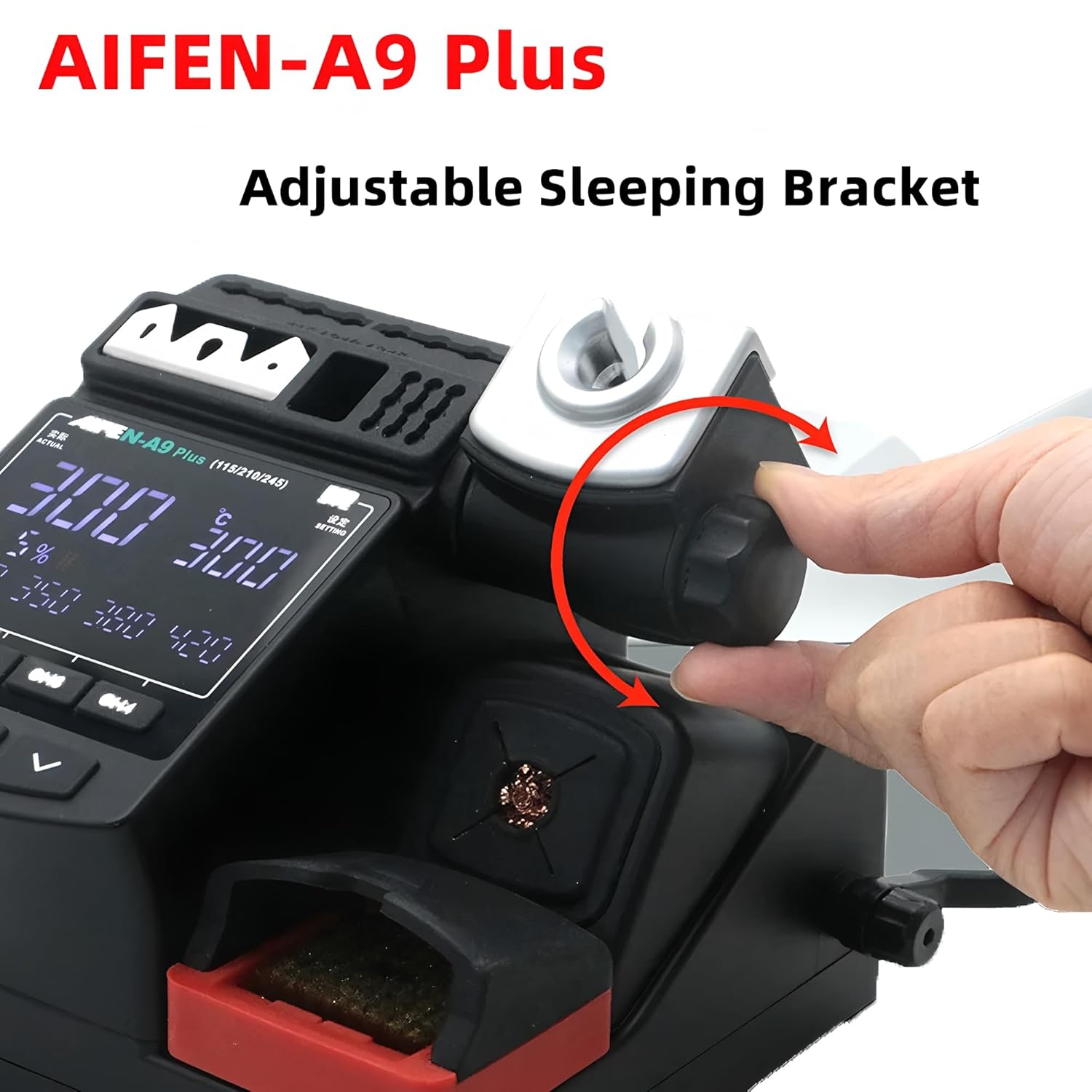
Figure 3.2: A hand demonstrating the adjustment of the sleeping bracket on the AIFEN A9 Plus Soldering Station.
3.4. Podłączenie zasilania
Connect the power cable to the power input on the rear of the soldering station, then plug the other end into a suitable grounded electrical outlet.
4. Instrukcja obsługi
4.1. Włączanie/wyłączanie zasilania
To power on the station, press the power switch located on the unit. The display will illuminate, showing the current temperature and settings. To power off, press the power switch again.
4.2. Regulacja temperatury
The A9 Plus offers both preset and manual temperature control.
- Ustawione temperatury: The station has four groups of temperature presets (CH1, CH2, CH3, CH4). Press the corresponding channel button to quickly select a preset temperature. These presets can be customized.
- Regulacja ręczna: Use the Up and Down arrow keys on the main unit to adjust the temperature incrementally. The temperature can also be adjusted directly from the soldering iron handle using its control key.
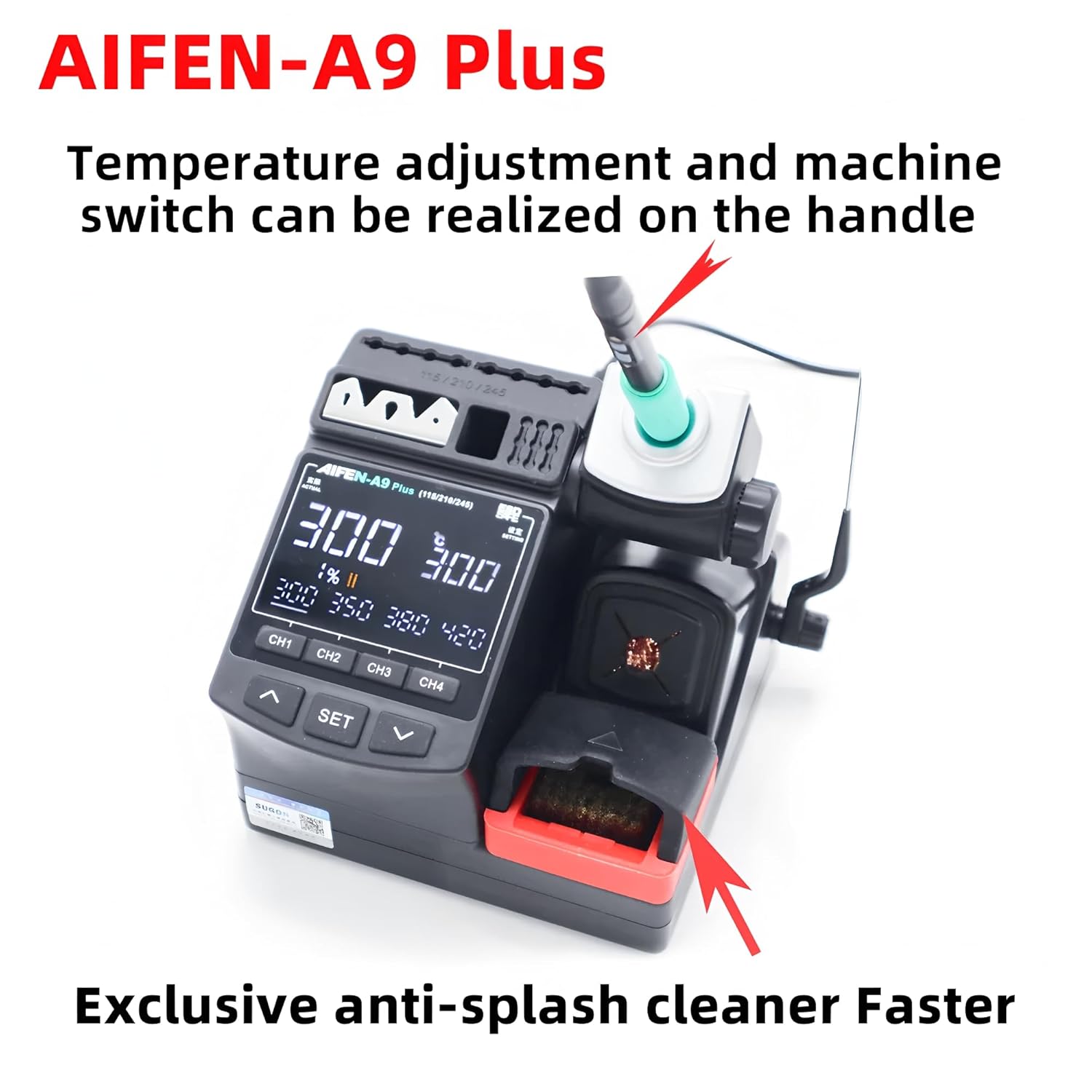
Figure 4.1: The AIFEN A9 Plus Soldering Station highlighting the capability to adjust temperature and switch the machine directly from the soldering iron handle.

Rysunek 4.2: Zbliżenie view of the AIFEN A9 Plus screen display, showing the four-segment storage for temperature presets and the comfortable silicone buttons for control.
4.3. Soldering Tip Changing
To change a soldering tip:
- Ensure the soldering iron is in its stand or powered off and cooled down.
- Use the provided heater puller tool to safely remove the hot tip. The station features a heating core unplugged sleep function, which prevents heat generation when the heating core is removed, enhancing safety during tip replacement.
- Insert the new tip firmly into the soldering iron handle.
The A9 Plus is compatible with 115, 210, and 245 series control handles and their respective tips, offering a broader range of applications.

Figure 4.3: The AIFEN A9 Plus Soldering Station illustrating compatibility with different heating cores and tips, including curved, cutter, and enlarged cutter heads, and highlighting its broader application range.
4.4. Funkcja automatycznego uśpienia
The soldering station is equipped with an automatic sleep function. When the soldering iron is placed in its stand for a set period, the station will automatically reduce the tip temperature to a lower, safe level to conserve energy and prolong tip life. It will quickly return to the set operating temperature once the iron is picked up.
4.5. Unit Conversion (℃/℉)
The station supports temperature display in both Celsius (℃) and Fahrenheit (℉). Refer to the manual's display settings section or the device interface for instructions on how to switch between these units.
4.6. Funkcja blokady klawiszy
The key lock function prevents accidental changes to settings during operation. Consult the on-screen menu or specific button combinations to activate or deactivate the key lock.
5. Konserwacja
5.1. Czyszczenie
Regular cleaning ensures optimal performance and extends the lifespan of your soldering station and tips.
- Wskazówki dotyczące lutowania: Use the integrated cleaning copper wire balls or the cleaning copper brush to remove excess solder and oxidation from the tip. The anti-splash cleaner design helps keep your workspace tidy.
- Station Unit: Przetrzyj jednostkę główną miękką, suchą ściereczką. Nie używaj środków czyszczących o właściwościach ściernych ani rozpuszczalników.
- Handle Sponge Cover: The station includes a replacement assistant for the handle sponge cover, indicating this part may require periodic replacement for hygiene and comfort.
5.2. Tip Care
To prolong the life of your soldering tips:
- Always tin the tip with a small amount of solder before and after use.
- Avoid excessive pressure when soldering.
- Do not clean the tip with abrasive materials.
- Utilize the automatic sleep function to reduce tip oxidation when idle.
6. Rozwiązywanie Problemów
If you encounter issues with your AIFEN A9 Plus Soldering Station, refer to the following common scenarios:
- Stacja nie włącza się: Ensure the power cable is securely connected to both the station and a working electrical outlet. Check the power switch.
- Soldering iron not heating: Verify that the soldering iron handle is properly connected to the main unit. Ensure the soldering tip is correctly inserted. The heating core unplugged sleep function prevents heating if the core is not detected, which is normal behavior during tip changes.
- Temperatura niestabilna: Ensure the soldering tip is clean and properly tinned. Check for any loose connections.
- Problemy z wyświetlaniem: If the display is not functioning correctly, try restarting the unit. If the problem persists, contact support.
W przypadku problemów nieujętych w tym dokumencie zapoznaj się z sekcją Gwarancja i wsparcie.
7. Specyfikacje
| Funkcja | Specyfikacja |
|---|---|
| Numer modelu | YQ-AIFEN A9+ 115+3tips |
| Producent | AIFEN/SUGON |
| Moc | 120 W |
| Wejście Voltage | Prąd zmienny 110-240 V, 50/60 Hz |
| Zakres temperatur | 100℃ - 450℃ (212℉ - 842℉) |
| Ustawienia temperatury | 4 groups (CH1, CH2, CH3, CH4) |
| Zgodne wskazówki | Seria 115, 210, 245 |
| Cechy specjalne | Heating core unplugged sleep function, ℃/℉ conversion, buzzer switch, keylock, automatic sleep function, anti-corrosion device housing |
8. Gwarancja i wsparcie
This product is manufactured by AIFEN/SUGON. For warranty information, technical support, or service inquiries, please contact your original point of purchase or the manufacturer directly. Keep your purchase receipt as proof of purchase for warranty claims.


