1. Wprowadzenie
Thank you for choosing the TCL 32V4C 32-inch HD Smart QLED Android TV. This manual provides essential information for setting up, operating, and maintaining your new television. Please read it thoroughly before use and keep it for future reference.
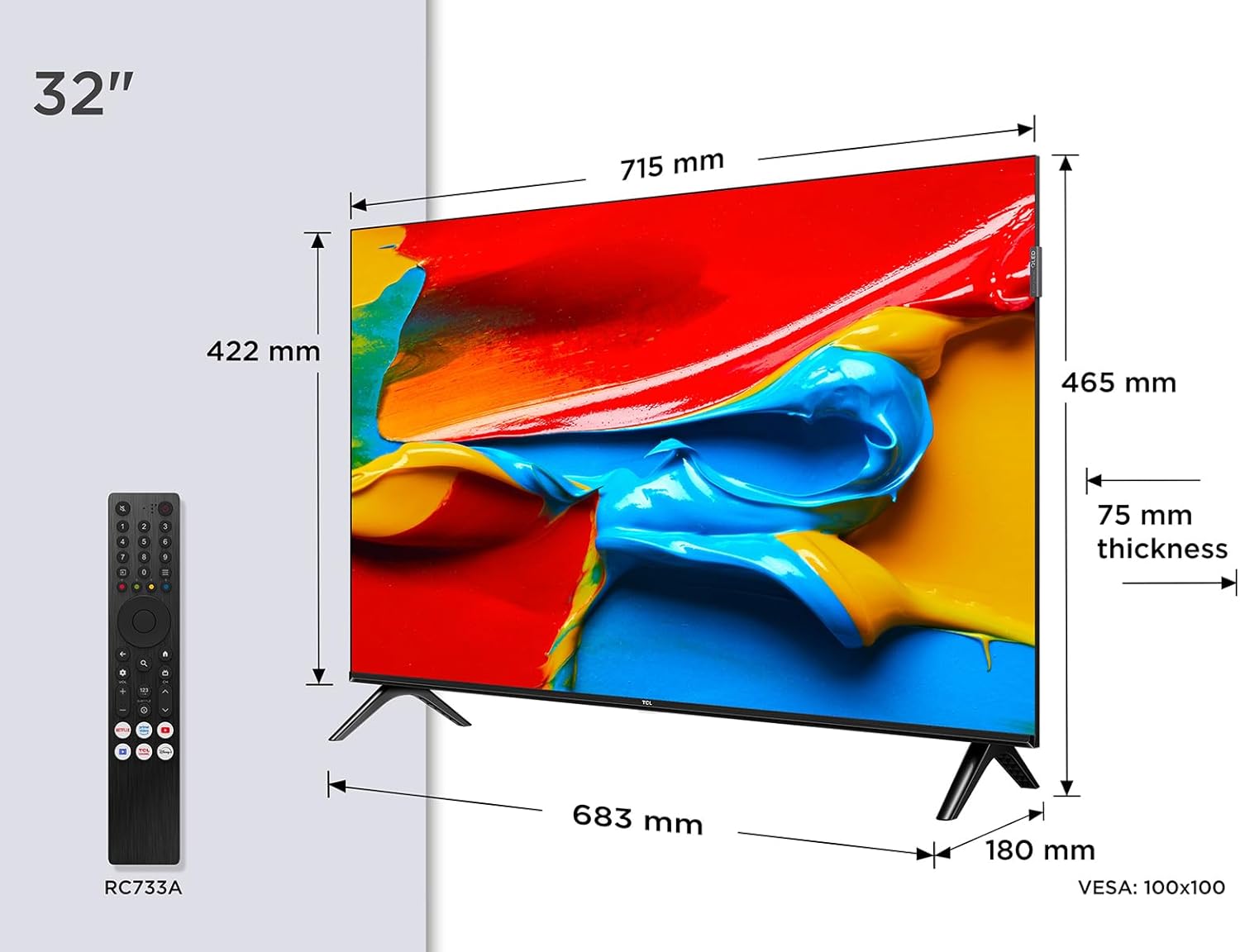
Obraz: Przód view of the TCL 32V4C 32-inch HD Smart QLED Android TV.
2. Informacje dotyczące bezpieczeństwa
Aby zmniejszyć ryzyko pożaru, porażenia prądem elektrycznym i obrażeń, należy zawsze przestrzegać podstawowych zasad bezpieczeństwa podczas korzystania z tego produktu.
- Nie wystawiaj telewizora na działanie deszczu ani wilgoci.
- Nie blokuj otworów wentylacyjnych.
- Upewnij się, że przewód zasilający jest prawidłowo uziemiony.
- Trzymaj telewizor z dala od bezpośredniego światła słonecznego, źródeł ciepła i otwartego ognia.
- Używaj wyłącznie dodatków/akcesoriów wskazanych przez producenta.
- Odłączaj telewizor od zasilania podczas burzy z piorunami lub jeśli nie używasz go przez dłuższy czas.
3. Co znajduje się w pudełku
Po rozpakowaniu należy sprawdzić, czy znajdują się w nim wszystkie poniższe elementy:
- TCL 32V4C 32-inch HD Smart QLED Android TV
- Zdalne sterowanie
- Kabel zasilający
- Stand (with screws)
- Instrukcja obsługi (ten dokument)
4. Konfiguracja
4.1. Instalacja stojaka
Place the TV screen-down on a soft, flat surface. Attach the stand bases to the bottom of the TV using the provided screws. Ensure the stand is securely fastened.
4.2. Montaż na ścianie (opcjonalnie)
If you choose to wall-mount your TV, please refer to the instructions provided with your wall-mount bracket. The TV supports VESA 100x100mm mounting. Ensure the wall mount is installed by qualified personnel.

Image: TCL 32V4C TV placed on its stand.
4.3. Podłączanie urządzeń
Connect your external devices (e.g., cable box, Blu-ray player, gaming console) to the TV's ports. The TCL 32V4C features multiple connectivity options including HDMI, USB, Ethernet, and Wi-Fi.

Image: Close-up of the TCL 32V4C TV's connectivity ports, including HDMI, USB, Optical, Cable, Satellite, AV Input, Headphone, and CI Slot.
- HDMI: Podłącz urządzenia wysokiej rozdzielczości.
- USB: Do odtwarzania multimediów z dysków USB.
- Ethernet/Wi-Fi: For internet connection and Smart TV features.
- Antena/Satelita: Podłącz antenę lub talerz satelitarny do odbioru telewizji naziemnej.
4.4. Pierwsze włączenie i konfiguracja
Plug the power cable into the TV and a power outlet. Press the power button on the remote control. Follow the on-screen instructions to select your language, connect to a network, and complete the initial setup of Android TV.
5. Instrukcja obsługi
5.1. Funkcje Android TV
Your TCL 32V4C TV comes with Android TV, providing access to a vast library of content. You can stream from popular services, use Google Cast to mirror content from your smart devices, and utilize Google Home compatibility for voice control.

Image: Screenshot of the Android TV interface displaying various streaming applications and content.
5.2. Picture Quality (QLED & HDR)
The QLED technology uses quantum dots to deliver intense, vibrant colors and exceptional visual perception. Combined with Direct LED backlighting, this ensures improved image quality and brightness. HDR (High Dynamic Range) further enhances contrast and detail, especially in bright and dark scenes.

Image: Visual explanation of TCL QLED technology, highlighting vibrant colors compared to traditional displays.

Image: Demonstrates the enhanced detail and contrast provided by HDR 10 technology.
5.3. Audio Quality (Dolby Audio)
Experience high-quality, immersive sound thanks to the integrated Dolby Audio processing. This technology ensures clear and detailed audio for all your entertainment, from movies to sports.

Image: Visual representation of immersive Dolby Audio technology.
5.4. Multiple ViewTryby pracy
The TV offers personalized viewing modes to optimize your experience for different content types:
- Tryb gry: Zmniejsza opóźnienie sygnału wejściowego, zapewniając szybszą reakcję podczas gry.
- Tryb sportowy: Enhances motion clarity and color for live sports.
- Tryb filmu: Optimizes picture settings for cinematic viewing.

Image: Depiction of various viewing modes (Game, Sports, Movie) available on the TV.
5.5. Oficjalny film o produkcie
Video: An official TCL video showcasing features like QLED, HDR, Android TV, and Slim Design. This video provides a visual overview of the TV's capabilities and user experience.
6. Konserwacja
6.1. Czyszczenie ekranu
Delikatnie przetrzyj ekran miękką, niepozostawiającą włókien ściereczką. W przypadku uporczywych zabrudzeń delikatnie przetrzyj.ampPrzetrzyj ściereczkę wodą lub specjalnym środkiem do czyszczenia ekranów. Nigdy nie spryskuj ekranu bezpośrednio płynem.
6.2. Czyszczenie szafki
Przetrzyj obudowę telewizora miękką, suchą ściereczką. Unikaj stosowania środków czyszczących o działaniu ściernym lub rozpuszczalników, które mogą uszkodzić wykończenie.
6.3. Zarządzanie kablami
Ensure all cables are neatly organized and not tangled to prevent damage or accidental disconnections.
7. Rozwiązywanie Problemów
Jeśli masz problemy z telewizorem, zapoznaj się z poniższymi typowymi problemami i ich rozwiązaniami:
| Problem | Możliwe rozwiązanie |
|---|---|
| Brak zasilania | Sprawdź, czy kabel zasilający jest prawidłowo podłączony i czy gniazdko elektryczne działa. |
| Brak obrazu/dźwięku | Verify input source, check cable connections, and ensure volume is not muted. |
| Pilot nie działa | Replace batteries, ensure no obstructions between remote and TV, and check remote sensor. |
| Niska jakość obrazu | Adjust picture settings (brightness, contrast, sharpness), check antenna/cable signal. |
| Nie można połączyć się z siecią Wi-Fi | Restart your router, check Wi-Fi password, or try a wired Ethernet connection. |
8. Specyfikacje
Szczegółowe dane techniczne telewizora TCL 32V4C:
| Funkcja | Opis |
|---|---|
| Marka | TCL |
| Numer modelu | 5901292526764 |
| Rozmiar ekranu | 32 cali |
| Technologia ekranowa | QLED |
| Rezolucja | 2K (HD) |
| Częstotliwość odświeżania | 60 Hz |
| Cechy specjalne | QLED, Android TV, HDR |
| Technologia łączności | Bluetooth, Ethernet, HDMI, USB, Wi-Fi |
| Proporcje obrazu | 16:9 |
| Wymiary produktu | Wymiary 18 x 71.5 x 46.5 cm |
| Waga | 5 kilogramów |
| Ocena efektywności energetycznej | F |
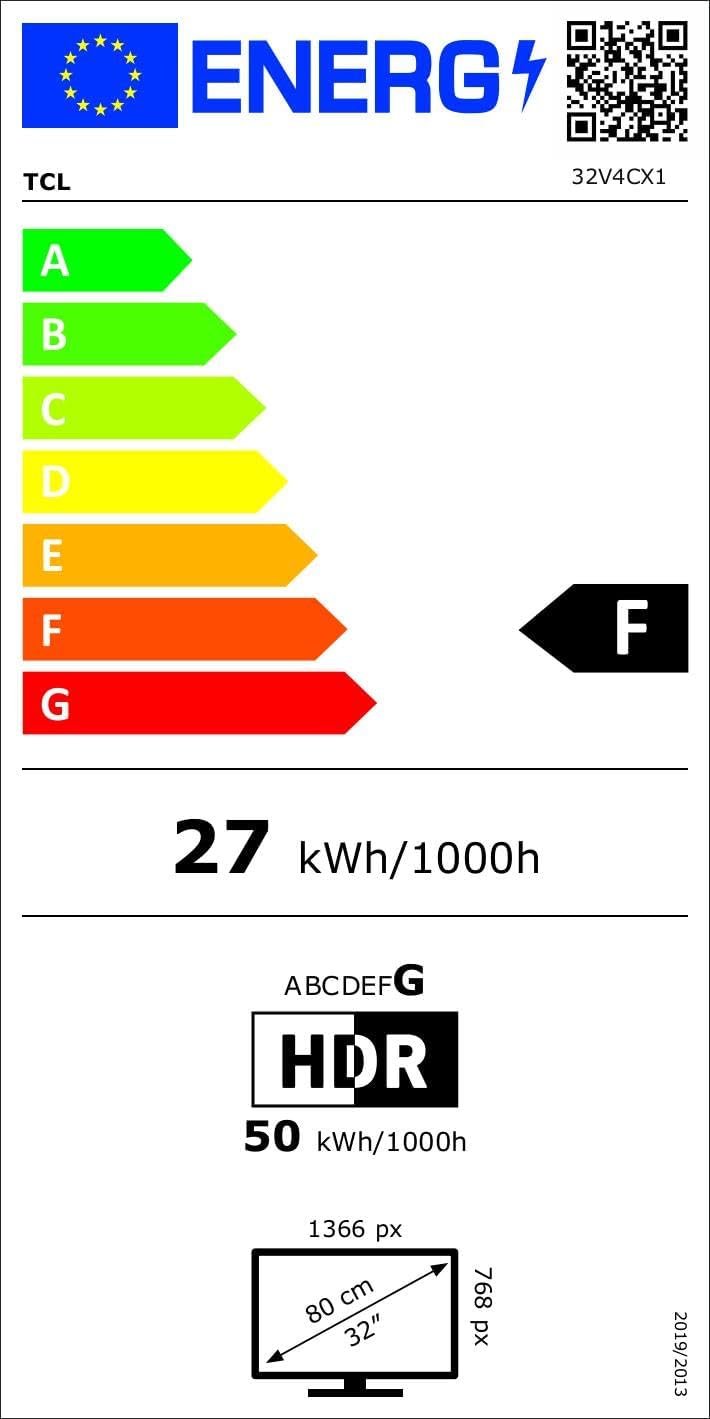
Image: Energy efficiency label for the TCL 32V4C TV, showing a rating of F and energy consumption details. For more details, visit the Baza danych EPREL.
9. Gwarancja i pomoc techniczna
Your TCL 32V4C TV comes with a 2-year general warranty from the manufacturer. For specific warranty terms, service, or technical support, please refer to the warranty card included with your product or visit the official TCL support webstrona.
For spare parts and software/firmware updates, availability is guaranteed for 8 years from the date of market introduction.


