1. Wprowadzenie
The KAT Walk C2 CORE VR Treadmill is an advanced omnidirectional walking platform designed to provide an immersive and natural locomotion experience in virtual reality. This device allows users to walk, run, and move freely in 360 degrees within VR environments, enhancing gameplay and offering a unique home fitness solution. It is engineered to reduce motion sickness often associated with VR and is compatible with a wide range of VR headsets.
2. Co znajduje się w pudełku
Your KAT Walk C2 CORE package includes the following components:
- KAT Walk C2 CORE Omnidirectional Treadmill
- KAT VR Shoes (specific size based on order)
- KAT Nexus Adapter
- Kabel
- Kontroler

Figure 2.1: Main components of the KAT Walk C2 CORE package.
3. Przewodnik konfiguracji
Follow these steps to set up your KAT Walk C2 CORE VR Treadmill:
3.1. Montaż
Refer to the detailed assembly instructions provided in the separate assembly manual for your KAT Walk C2 CORE. Ensure all parts are securely fastened before proceeding.
3.2. Wearing the Equipment
- Wear KAT VR Shoes: Put on the specialized KAT VR shoes. These shoes are designed to work with the treadmill's low-friction surface.
- Zabezpiecz uprząż: Step onto the treadmill platform. Carefully put on the safety harness and adjust it to fit snugly around your waist. Ensure it is securely buckled. This harness provides stability and prevents accidental falls.
- Connect VR Headset: Connect your VR headset to your PC or standalone device. The KAT Nexus adapter facilitates wireless gameplay for standalone devices like Meta Quest 2, 3, and Pro. For SteamVR headsets, direct connection to a PC is typically used.

Figure 3.1: Shoe size chart for selecting the correct KAT VR shoes.
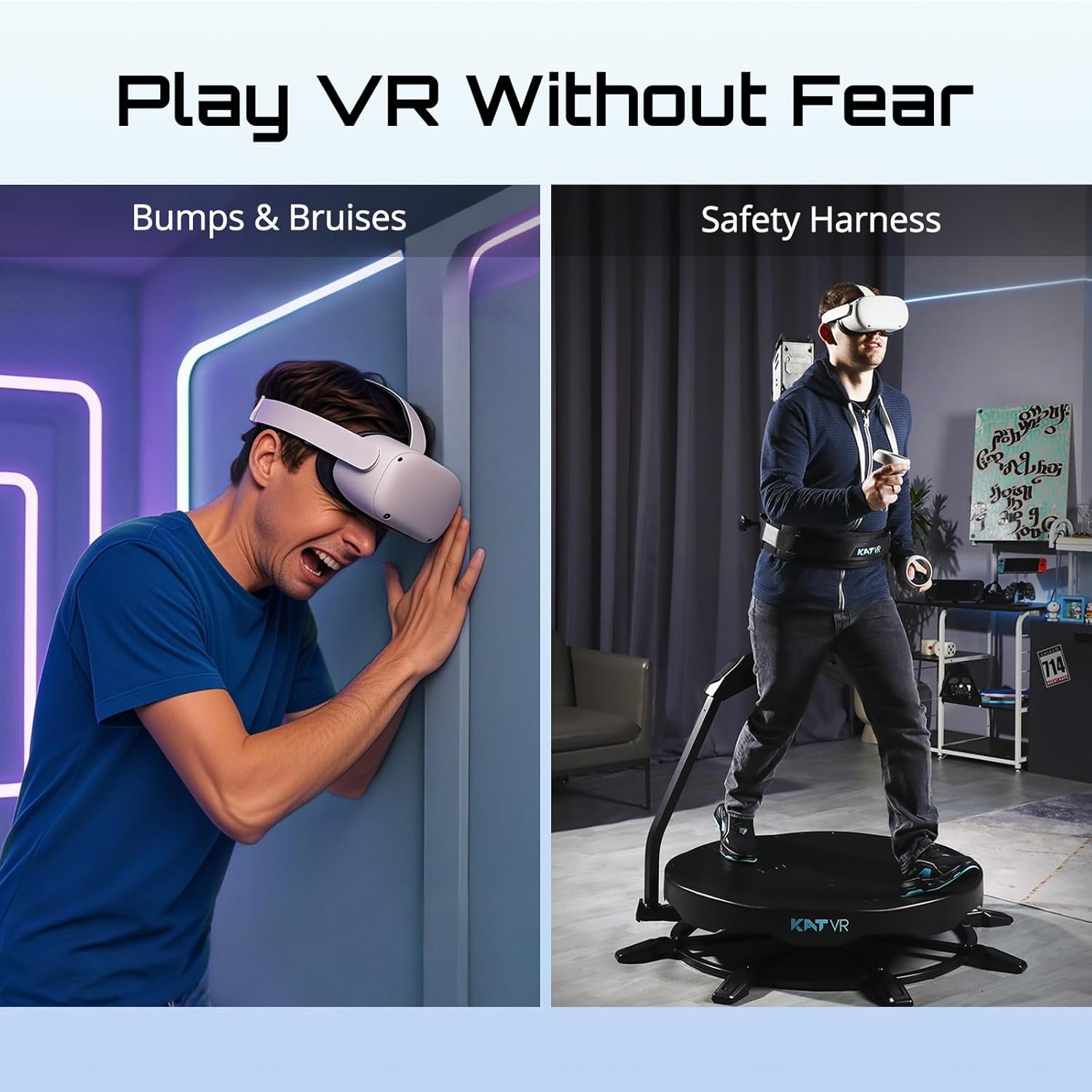
Figure 3.2: User wearing the safety harness on the KAT Walk C2 CORE.
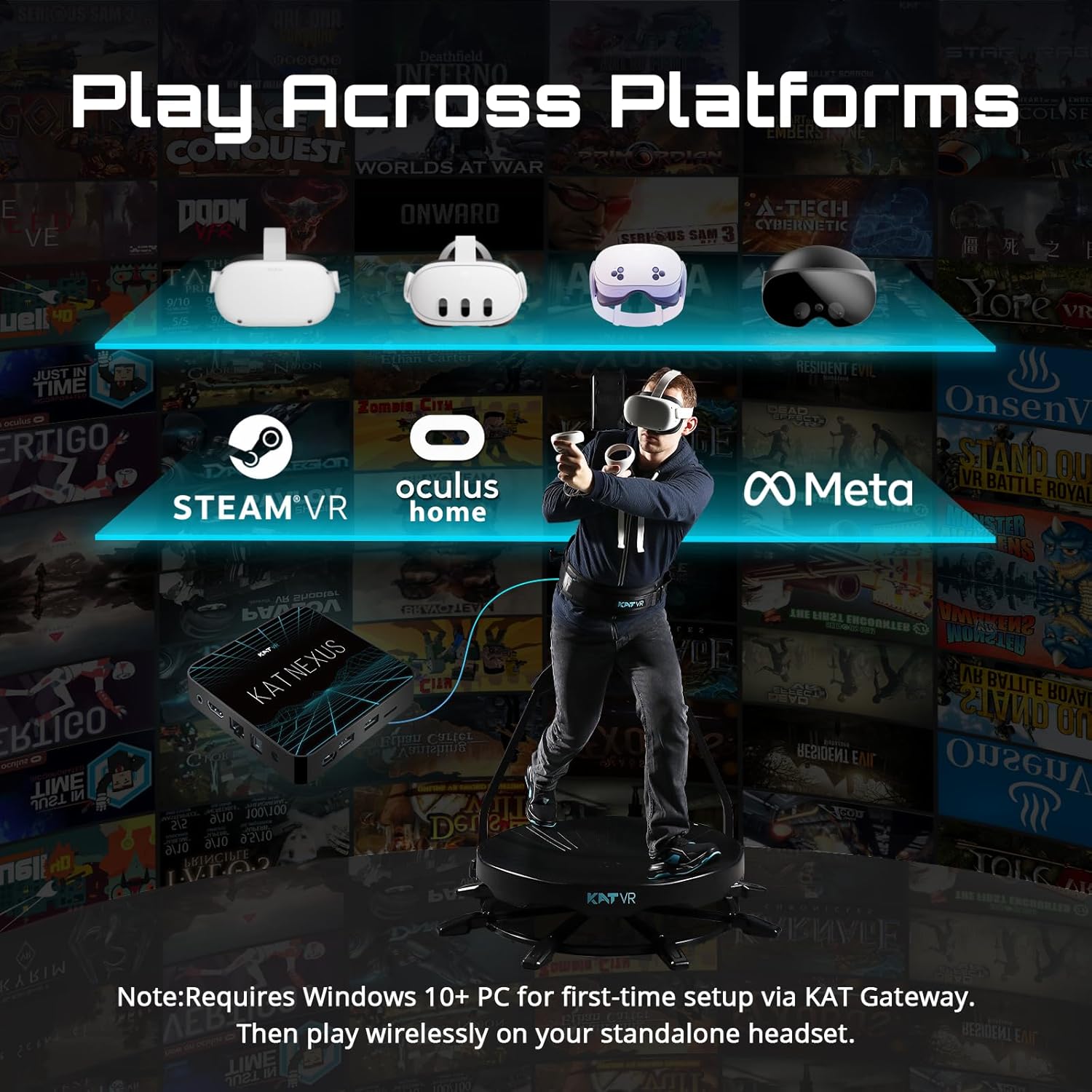
Figure 3.3: Connectivity options for the KAT Walk C2 CORE with various VR platforms.
3.3. Initial Calibration and Software
For first-time setup, a Windows 10+ PC is required for initial configuration via the KAT Gateway software. Follow the on-screen instructions within the software for calibration and pairing your devices. Ensure your VR headset and the KAT Walk C2 CORE are properly recognized.
Video 3.1: Walk C2 Core Product Overview. Ten film przedstawia ogólny przeglądview of the product and its initial setup.
Video 3.2: Safe, secure and flexible immersion in VR experiences. This short video demonstrates the safety and flexibility provided by the harness system.
4. Instrukcja obsługi
Once set up, operating the KAT Walk C2 CORE is intuitive, mimicking natural movement.
4.1. Starting a VR Experience
- Ensure your VR headset is active and connected to the KAT Walk C2 CORE system.
- Launch your desired VR game or application that supports free locomotion.
- Begin walking naturally on the treadmill platform. Your movements will be translated into the virtual environment.
4.2. Movement and Immersion
The omnidirectional design allows for 360-degree movement. You can walk, run, and turn in any direction, providing a highly immersive experience. The system is designed to reduce motion sickness by synchronizing your physical movement with your virtual movement.

Figure 4.1: The KAT Walk C2 CORE helps alleviate VR motion sickness by enabling natural locomotion.
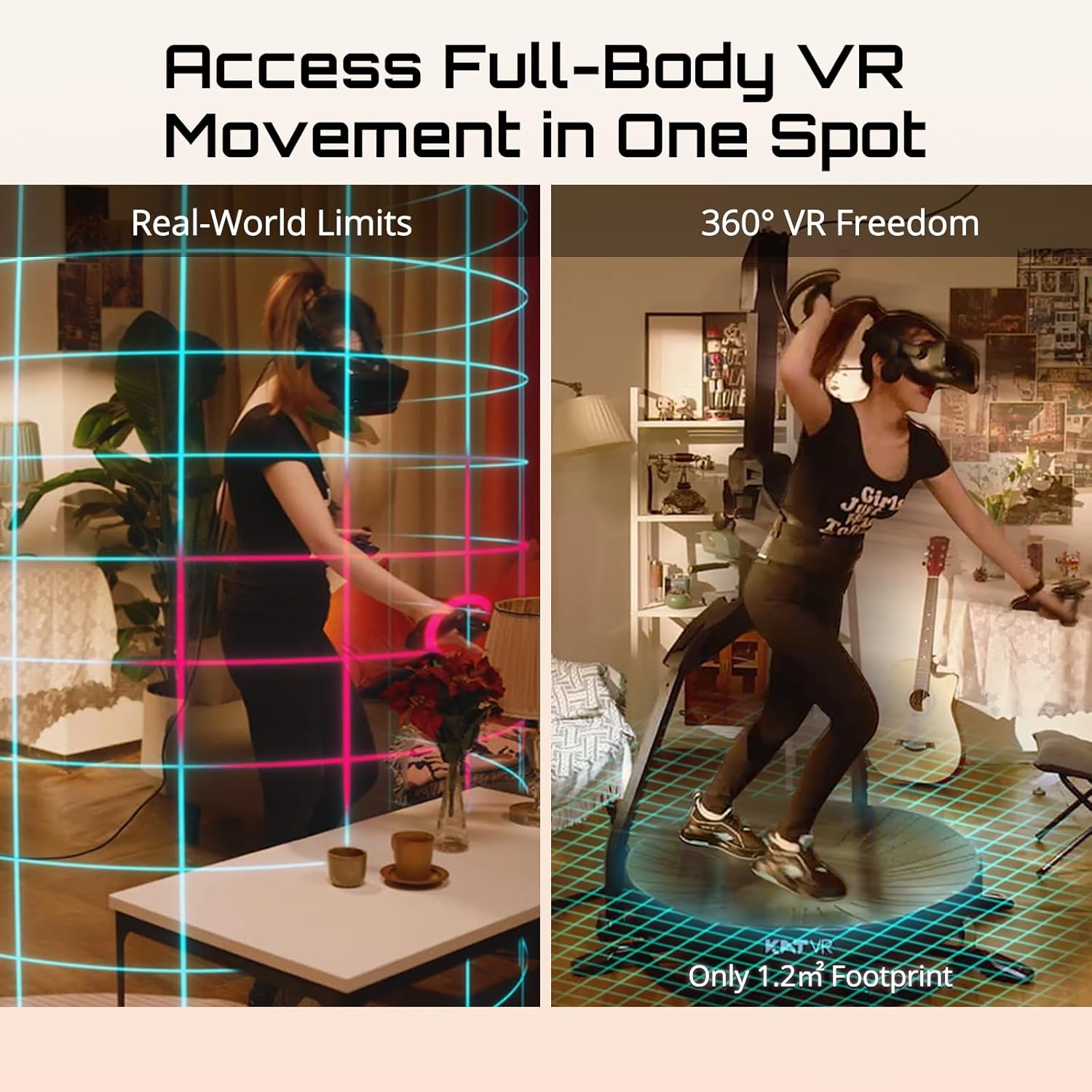
Figure 4.2: Experience full-body VR movement within a minimal physical footprint.

Figure 4.3: Seamlessly move inside your VR games with the KAT Walk C2 CORE.
4.3. Fitness Integration
The KAT Walk C2 CORE allows you to incorporate physical activity into your gaming sessions. Walking and running in VR can contribute to your daily fitness goals.

Figure 4.4: Engage in physical activity and burn calories while playing VR games.
Video 4.1: Lose weight without realizing it with KATVR Treadmill. This video demonstrates the fitness benefits of using the VR treadmill.
5. Konserwacja
Regular maintenance ensures the longevity and optimal performance of your KAT Walk C2 CORE.
5.1. Czyszczenie
- Wipe down the treadmill platform and harness with a soft, damp ściereczkę po każdym użyciu.
- Unikaj stosowania środków czyszczących o właściwościach ściernych i rozpuszczalników, które mogą uszkodzić powierzchnie.
- Keep the optical sensors on the platform clean and free from dust or debris to ensure accurate tracking.
5.2. Przechowywanie
Store the KAT Walk C2 CORE in a dry, cool place away from direct sunlight and extreme temperatures. Ensure cables are neatly coiled to prevent damage.
6. Rozwiązywanie Problemów
If you encounter issues with your KAT Walk C2 CORE, refer to the following common solutions:
6.1. No Movement in VR
- Sprawdź połączenia: Ensure all cables (power, USB, Nexus) are securely connected.
- Status oprogramowania: Verify that the KAT Gateway software is running and recognizes the treadmill and your VR headset.
- Umiejscowienie butów: Confirm that your KAT VR shoes are properly positioned on the treadmill platform and that the anti-slip locks are disengaged for movement.
- Kompatybilność gry: Ensure the VR game or application you are using supports free locomotion and is compatible with the KAT Walk C2 CORE.
6.2. Motion Sickness
- While the KAT Walk C2 CORE is designed to reduce motion sickness, some users may still experience it initially. Take breaks if you feel unwell.
- Ensure proper calibration of the system to match your physical movements accurately.
- Adjust in-game VR settings related to locomotion speed or comfort options if available.
6.3. Harness Discomfort
- Adjust the harness straps to ensure a snug but comfortable fit. It should support your weight without being overly restrictive.
- Ensure the harness is positioned correctly around your waist, as shown in the setup guide.
7. Specyfikacje
| Funkcja | Szczegół |
|---|---|
| Nazwa modelu | KAT Walk C 2 Core |
| Wymiary produktu | 49"D x 49"W x 79"H (assembled) / 37 x 37 x 73.2 inches (packaged) |
| Waga przedmiotu | 3.3 funta |
| Kolor | C 2 Core + Nexus |
| Funkcja specjalna | 360° Omnidirectional Action |
| Technologia łączności | Bluetooth, USB |
| Kompatybilne urządzenia | Standalone Virtual Reality Headsets |
| Konkretne zastosowania produktu | Hazard |
| Zakres wiekowy (opis) | 13 lata i więcej |
| Producent | KATVR |
| Kraj pochodzenia | Chiny |
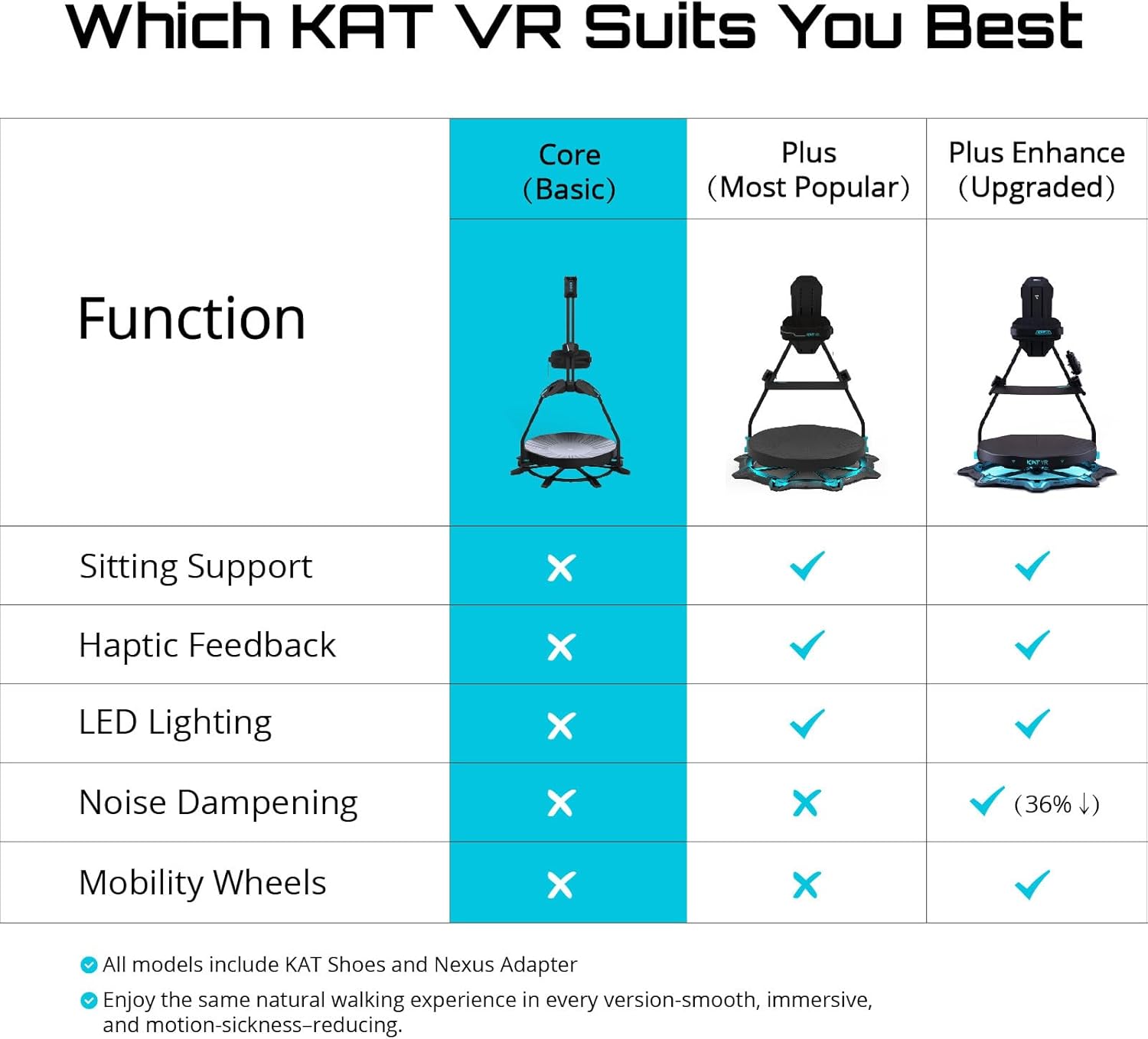
Figure 7.1: Feature comparison across KAT VR treadmill models.
8. Gwarancja i wsparcie
For warranty information, technical support, or service inquiries, please refer to the official KATVR webOdwiedź stronę internetową lub skontaktuj się bezpośrednio z działem obsługi klienta. Zachowaj paragon jako dowód zakupu na wypadek reklamacji.


