1. Wprowadzenie
The APC Smart-UPS SMT750C is an Uninterruptible Power Supply (UPS) designed to provide reliable power and surge protection for critical electronic equipment. This unit offers 750VA/500W of line-interactive pure sine wave power, making it suitable for servers, storage systems, network closets, business VoIP setups, desktop computers, and retail POS systems. It features Automatic VoltagRozporządzenie (AVR) w sprawie korekty objętościtage fluctuations and a SmartConnect Ethernet Port for cloud-based remote monitoring. This manual provides essential information for the safe and efficient installation, operation, and maintenance of your SMT750C UPS.
2. Informacje dotyczące bezpieczeństwa
WARNING: Risk of electric shock. Refer to bottom of unit for warnings.
- Przeczytaj uważnie wszystkie instrukcje przed instalacją i obsługą.
- Ten UPS zawiera wewnętrzne baterie i może stwarzać zagrożenie porażenia prądem nawet po odłączeniu od źródła zasilania prądem zmiennym.
- Do not open or disassemble the UPS. There are no user-serviceable parts inside except for the battery.
- Zasilacz UPS należy podłączać wyłącznie do uziemionego gniazdka.
- Do not use the UPS in direct sunlight, near heat sources, or in areas with excessive humidity.
- Ensure proper ventilation around the UPS. Do not block any ventilation openings.
3. Zawartość opakowania
Sprawdź, czy po rozpakowaniu znajdują się wszystkie elementy:
- Jednostka APC Smart-UPS SMT750C
- Dysk USB 3.0 o pojemności 16 GB
- Instrukcja obsługi (ten dokument)
- Kabel komunikacyjny USB
- Przewód zasilający

Image: Included 16GB USB 3.0 Drive. This USB drive provides additional storage or file możliwości transferu.
4. Koniec produktuview
Panel przedni
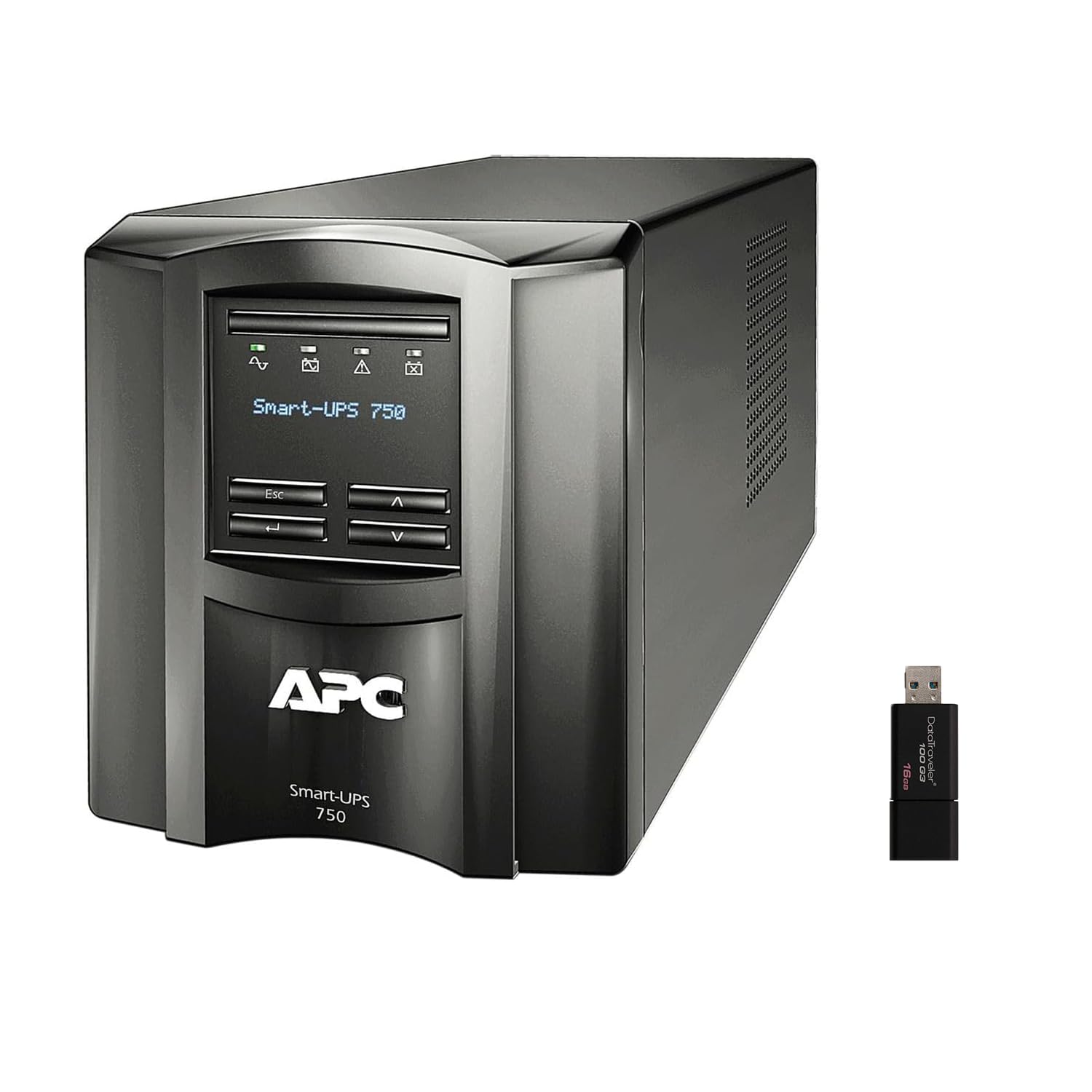
Obraz: przód i bok view of the APC Smart-UPS SMT750C. This image displays the compact tower design of the UPS unit.
- Przycisk zasilania: Controls the main power to the UPS.
- Wyświetlacz LCD: Provides real-time status information, load levels, battery charge, and estimated runtime.
- Przyciski nawigacyjne: Used to scroll through display menus and adjust settings.
Panel tylny
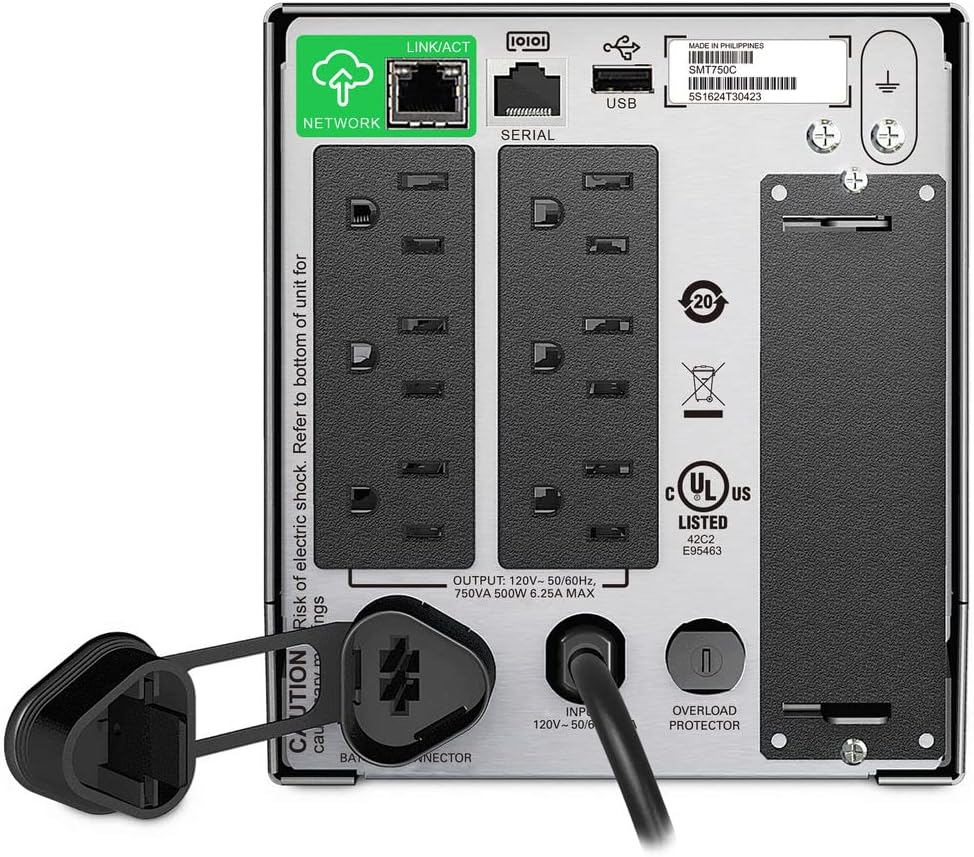
Image: Rear panel of the APC Smart-UPS SMT750C. This view highlights the various input/output ports, including NEMA 5-15R outlets, SmartConnect port, USB, and serial ports.
- NEMA 5-15R Outlets: Six outlets for connecting protected equipment.
- Port Ethernet SmartConnect: For cloud-based remote monitoring and management.
- Port USB: For communication with a computer for graceful shutdown via PowerChute Serial Shutdown software.
- Port szeregowy: Alternative communication port for graceful shutdown.
- SmartSlot: For optional Network Management Card (sold separately).
- Wejściowy przewód zasilający: Connects the UPS to the utility power.
- Zabezpieczenie przed przeciążeniem: Resettable circuit breaker.
5. Konfiguracja
5.1 Początkowe podłączenie akumulatora
Przed pierwszym użyciem należy podłączyć wewnętrzny akumulator. Ze względów bezpieczeństwa podczas transportu urządzenie jest wysyłane z odłączonym akumulatorem.
- UPS należy ustawić na stabilnej powierzchni.
- Znajdź pokrywę komory baterii, zazwyczaj na spodzie lub z tyłu urządzenia.
- Remove the cover to access the battery.
- Connect the red battery cable to the positive (+) terminal and the black battery cable to the negative (-) terminal. Ensure a secure connection.
- Załóż z powrotem pokrywę komory baterii.
5.2 Podłączanie do zasilania sieciowego
- Plug the UPS power cord into a grounded 3-prong AC outlet.
- Aby zapewnić pełną pojemność akumulatora, przed podłączeniem ważnego sprzętu należy ładować UPS przez co najmniej 24 godziny.
5.3 Podłączanie sprzętu
- Connect your critical equipment (e.g., computer, monitor, network devices) to the NEMA 5-15R outlets on the rear panel.
- For graceful shutdown capabilities, connect the provided USB cable from the UPS to your computer and install the PowerChute Serial Shutdown software (available for download from APC's webStrona).
- For remote monitoring, connect an Ethernet cable to the SmartConnect port and follow the instructions for cloud-based setup.
6. Działanie
6.1 Włączanie/wyłączanie
- To power on the UPS, press and hold the power button on the front panel until the unit beeps and the display illuminates.
- To power off the UPS, press and hold the power button until the unit beeps and the display turns off.
6.2 Automatyczna objętośćtage Rozporządzenie (AVR)
The SMT750C features AVR, which automatically corrects minor voltage fluctuations (sags and surges) without switching to battery power. This protects connected equipment from voltage irregularities and extends battery life.
6.3 Działanie podtrzymujące baterię
Podczas zasilaniatage, the UPS will automatically switch to battery power, providing continuous power to connected equipment. The LCD display will show the estimated remaining runtime. When utility power returns, the UPS will automatically switch back to utility power and recharge its battery.
6.4 Remote Monitoring (SmartConnect)
The SmartConnect port allows for cloud-based remote monitoring of your UPS. This feature enables IT professionals and network administrators to:
- Monitor UPS status and performance.
- Wykonaj aktualizację oprogramowania sprzętowego.
- Conduct remote diagnostics.
- Receive proactive email notifications with recommended actions.
7. Konserwacja
7.1 Wymiana baterii
The internal battery is a user-replaceable component. When the battery reaches the end of its service life, the UPS will indicate a battery fault. To replace the battery:
- Ensure the UPS is powered off and disconnected from utility power.
- Zdejmij pokrywę komory baterii.
- Disconnect the battery cables (red and black).
- Carefully slide out the old battery.
- Insert a genuine APC replacement battery (model RBC154, sold separately).
- Connect the battery cables, ensuring correct polarity (red to positive, black to negative).
- Załóż z powrotem pokrywę komory baterii.
- Recycle the old battery responsibly.
7.2 Czyszczenie
Okresowo czyść zewnętrzną część UPS-a miękką, suchą ściereczką. Nie używaj płynów ani środków czyszczących w aerozolu. Upewnij się, że otwory wentylacyjne są wolne od kurzu i zanieczyszczeń.
8. Rozwiązywanie Problemów
| Problem | Możliwa przyczyna | Rozwiązanie |
|---|---|---|
| UPS się nie włącza | Akumulator nie jest podłączony lub jego poziom naładowania jest niski | Ensure battery cables are connected. Plug UPS into AC outlet and allow to charge. |
| UPS wydaje ciągły sygnał dźwiękowy | Overload or on battery power | Reduce connected load. Check utility power. |
| Battery symbol blinking | Battery needs to be flipped (initial setup) or is failing | For new units, ensure battery is correctly oriented and connected. For older units, consider battery replacement. |
| Brak zasilania w gniazdkach | UPS is off, circuit breaker tripped, or utility power lost | Turn on UPS. Reset circuit breaker. Check utility power. |
9. Specyfikacje
- Model: SMT750C
- Moc wyjściowa: 500 W / 750 VA
- Połączenia wyjściowe: 6xNEMA 5-15R
- Połączenia wejściowe: NEMA 5-15P
- Nominalna Objętość Wejściowatage: 120 V
- Moc nominalna Objętośćtage: 120 V
- Typ baterii: Kwas ołowiowy
- Współczynnik kształtu: Wieża
- Wymiary (wys. x szer. x gł.): 6.34 cala (16.1 cm) x 5.43 cala (13.8 cm) x 14.53 cali (36.9 cm)
- Masa netto: 27.56 funty (12.5 kg)
- Kolor: Czarny
- Tworzywo: Metal
- Dołączone akcesoria: Dysk USB 3.0 o pojemności 16 GB
10. Gwarancja i wsparcie
APC udziela standardowej gwarancji na ten produkt. Szczegółowe warunki gwarancji można znaleźć w karcie gwarancyjnej dołączonej do produktu lub na oficjalnej stronie APC. website. For technical support, product registration, or to purchase replacement parts, please visit www.apc.com or contact APC customer service.
Protection plans are available for extended coverage. For example, a 3-Year Protection Plan is available.


