1. Wprowadzenie
Dziękujemy za zakupasing the MUSE M-15 Alarm Clock Radio. This manual provides essential information for the safe and efficient operation of your device. Please read it thoroughly before use and retain it for future reference.
2. Informacje dotyczące bezpieczeństwa
- Źródło zasilania: Use only the specified battery type (1 AA battery). Ensure correct polarity when inserting batteries.
- Woda i wilgoć: Do not expose the device to water, rain, or excessive moisture. Avoid placing it near liquids.
- Ciepło: Trzymaj urządzenie z dala od źródeł ciepła, takich jak grzejniki, kratki wentylacyjne, piece lub inne urządzenia (w tym amp(lifiers) wytwarzające ciepło.
- Czyszczenie: Czyścić wyłącznie suchą szmatką. Nie używaj środków czyszczących w płynie ani w aerozolu.
- Serwisowanie: Nie próbuj samodzielnie naprawiać tego produktu. Wszelkie czynności serwisowe należy powierzyć wykwalifikowanemu personelowi serwisowemu.
- Sprzedaż: Baterie i urządzenie należy utylizować zgodnie z lokalnymi przepisami. Nie wrzucać baterii do ognia.
3. Koniec produktuview
Familiarize yourself with the components of your MUSE M-15 Alarm Clock Radio.
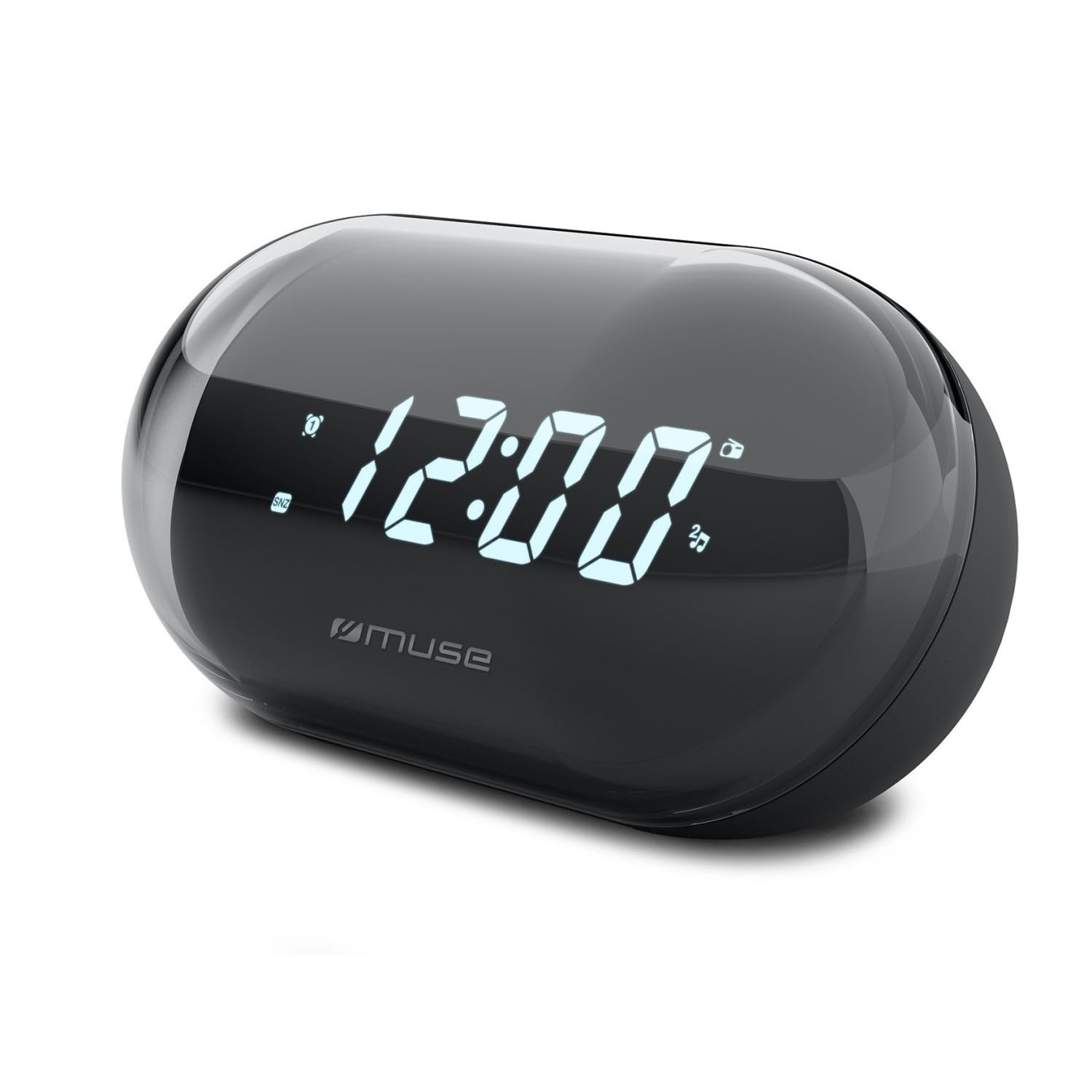
Obraz: Przód view of the MUSE M-15 Alarm Clock Radio, showing the digital display and control buttons.
Sterowanie i funkcje:
- Wyświetlacz cyfrowy: Pokazuje godzinę, status alarmu i częstotliwość radiową.
- Przycisk ustawiania czasu: Służy do zmiany aktualnego czasu.
- Przycisk ustawiania alarmu: Used to set and activate/deactivate the alarm.
- Tuning Buttons (+/-): Used to adjust radio frequency.
- Regulacja głośności: Reguluje poziom wyjściowy audio.
- Przycisk zasilania / trybu: Turns the device on/off and switches between radio and clock modes.
- Przycisk drzemki: Tymczasowo wycisza alarm.
- Komora baterii: Located on the back, for 1 AA battery.
4. Konfiguracja
4.1 Instalacja baterii
- Znajdź pokrywę komory baterii z tyłu urządzenia.
- Aby otworzyć komorę, przesuń lub podnieś pokrywę.
- Insert one (1) AA battery, ensuring the correct polarity (+ and -) matches the diagram inside the compartment.
- Dokładnie załóż pokrywę komory baterii.
Note: The MUSE M-15 is battery-powered and does not require an external power adapter.
5. Instrukcja obsługi
5.1 Ustawianie czasu
- W trybie zegara naciśnij i przytrzymaj Przycisk ustawiania czasu until the hour digits begin to flash.
- Użyj Tuning Buttons (+/-) aby ustawić godzinę. Naciśnij Przycisk ustawiania czasu jeszcze raz, aby potwierdzić godzinę i przejść do minut.
- Użyj Tuning Buttons (+/-) Aby ustawić minuty, naciśnij Przycisk ustawiania czasu jeszcze raz, aby zapisać czas i wyjść z trybu ustawiania czasu.
5.2 Ustawianie alarmu
- Naciśnij i przytrzymaj Przycisk ustawiania alarmu until the alarm hour digits begin to flash.
- Użyj Tuning Buttons (+/-) to adjust the alarm hour. Press the Przycisk ustawiania alarmu jeszcze raz, aby potwierdzić i przejść do protokołu.
- Użyj Tuning Buttons (+/-) to adjust the alarm minutes. Press the Przycisk ustawiania alarmu jeszcze raz, aby zapisać czas alarmu.
- Aby włączyć lub wyłączyć alarm, naciśnij krótko przycisk Przycisk ustawiania alarmuPo aktywacji na wyświetlaczu pojawi się ikona alarmu.
5.3 Using the Radio
- Naciśnij Przycisk zasilania/trybu to switch to radio mode. The display will show the radio frequency.
- Użyj Tuning Buttons (+/-) to manually tune to your desired radio station.
- Dostosuj głośność za pomocą Kontrola głośności.
- Aby wyłączyć radio, naciśnij Przycisk zasilania/trybu again to return to clock mode or turn off the device.
5.4 Funkcja drzemki
Gdy zabrzmi alarm, naciśnij Przycisk drzemki to temporarily silence the alarm for a few minutes. The alarm will sound again after the snooze period ends.
6. Konserwacja
6.1 Czyszczenie
Wipe the exterior of the device with a soft, dry cloth. Do not use abrasive cleaners, waxes, or solvents as they may damage the finish.
6.2 Wymiana baterii
When the display dims or the device functions become erratic, it is time to replace the battery. Follow the battery installation steps in Section 4.1.
7. Rozwiązywanie Problemów
| Problem | Możliwa przyczyna | Rozwiązanie |
|---|---|---|
| Urządzenie się nie włącza. | Bateria jest rozładowana lub nieprawidłowo włożona. | Replace the AA battery or check its polarity. |
| Alarm nie włącza się. | Alarm nie jest włączony lub głośność jest zbyt niska. | Upewnij się, że ikona alarmu jest widoczna na wyświetlaczu. Zwiększ głośność. |
| Słaby odbiór radia. | Słaby sygnał lub zakłócenia. | Reposition the device or extend the antenna (if applicable). Try tuning to a stronger station. |
| Time/Alarm settings reset. | Poziom naładowania baterii jest zbyt niski. | Wymień baterię AA. |
8. Specyfikacje
- Model: MUZA M-15
- Wymiary produktu (dł. x szer. x wys.): 15 x 3.81 x 10 cm (5.9 x 1.5 x 3.9 cala)
- Waga: 300 gramów (0.66 funta)
- Źródło zasilania: 1 baterie AA (brak w zestawie)
- Typ wyświetlacza: Cyfrowy
- Cechy: Alarm, Radio, Digital Time Display
- Typ montażu: Mocowanie na stole
9. Gwarancja i wsparcie
This product is covered by a standard manufacturer's warranty. For detailed warranty information, please refer to the warranty card included with your purchase or visit the official MUSE webstrona.
For technical support, troubleshooting assistance, or spare parts inquiries, please contact MUSE customer service through their official webstronę internetową lub dane kontaktowe znajdujące się na opakowaniu produktu.
Please have your model number (M-15) and purchase date available when contacting support.


