1. Wprowadzenie
This manual provides essential instructions for setting up, operating, and maintaining your ZOTAC ZBOX-CI343-BE Intel N100 Mini PC. Please read this manual thoroughly before using the device to ensure proper functionality and longevity.
2. Zawartość opakowania
Sprawdź, czy wszystkie wymienione poniżej elementy znajdują się w Twojej paczce. Jeśli brakuje któregokolwiek z nich lub jest on uszkodzony, skontaktuj się ze sprzedawcą.

Obraz 2.1: Contents of the ZOTAC ZBOX-CI343-BE package, including the mini PC unit, power adapter, power cable, WiFi antenna, VESA mounting kit, and a quick start guide.
- ZOTAC ZBOX-CI343-BE Mini PC Unit
- Zasilacz
- Power Cable (type may vary by region)
- Antena WiFi
- Zestaw montażowy VESA
- Szybki przewodnik
3. Koniec produktuview
Familiarize yourself with the various components and ports of your ZOTAC ZBOX-CI343-BE Mini PC.
3.1 Panel przedni

Obraz 3.1: Przód view of the ZOTAC ZBOX-CI343-BE, showing the power button, USB 3.1 ports, USB-C port, SD card slot, and audio jack.
- Przycisk zasilania: Naciśnij, aby włączyć lub wyłączyć urządzenie.
- Gniazdo karty SD: Do wkładania kart pamięci SD.
- Port USB 3.1 typu C: Do podłączania urządzeń zgodnych ze standardem USB-C.
- Port USB 3.1 typu A: Do podłączania urządzeń USB.
- Gniazdo słuchawkowe/mikrofonowe: Do wyjścia i wejścia audio.
3.2 Panel tylny

Obraz 3.2: Tył view of the ZOTAC ZBOX-CI343-BE, displaying the WiFi antenna connector, dual LAN ports, USB 3.1 port, DisplayPort, HDMI port, and DC power input.
- Złącze anteny WiFi: For attaching the included WiFi antenna.
- Dwa porty LAN: Do przewodowych połączeń sieciowych.
- Port USB 3.1 typu A: Do podłączania urządzeń USB.
- DisplayPort (DP): Do podłączenia do wyświetlacza.
- Port HDMI: Do podłączenia do wyświetlacza.
- DC IN: Do podłączenia zasilacza.
3.3 Góra i bok Views

Obraz 3.3: Szczyt view of the ZOTAC ZBOX-CI343-BE, showing the ZOTAC logo and ribbed passive cooling design.
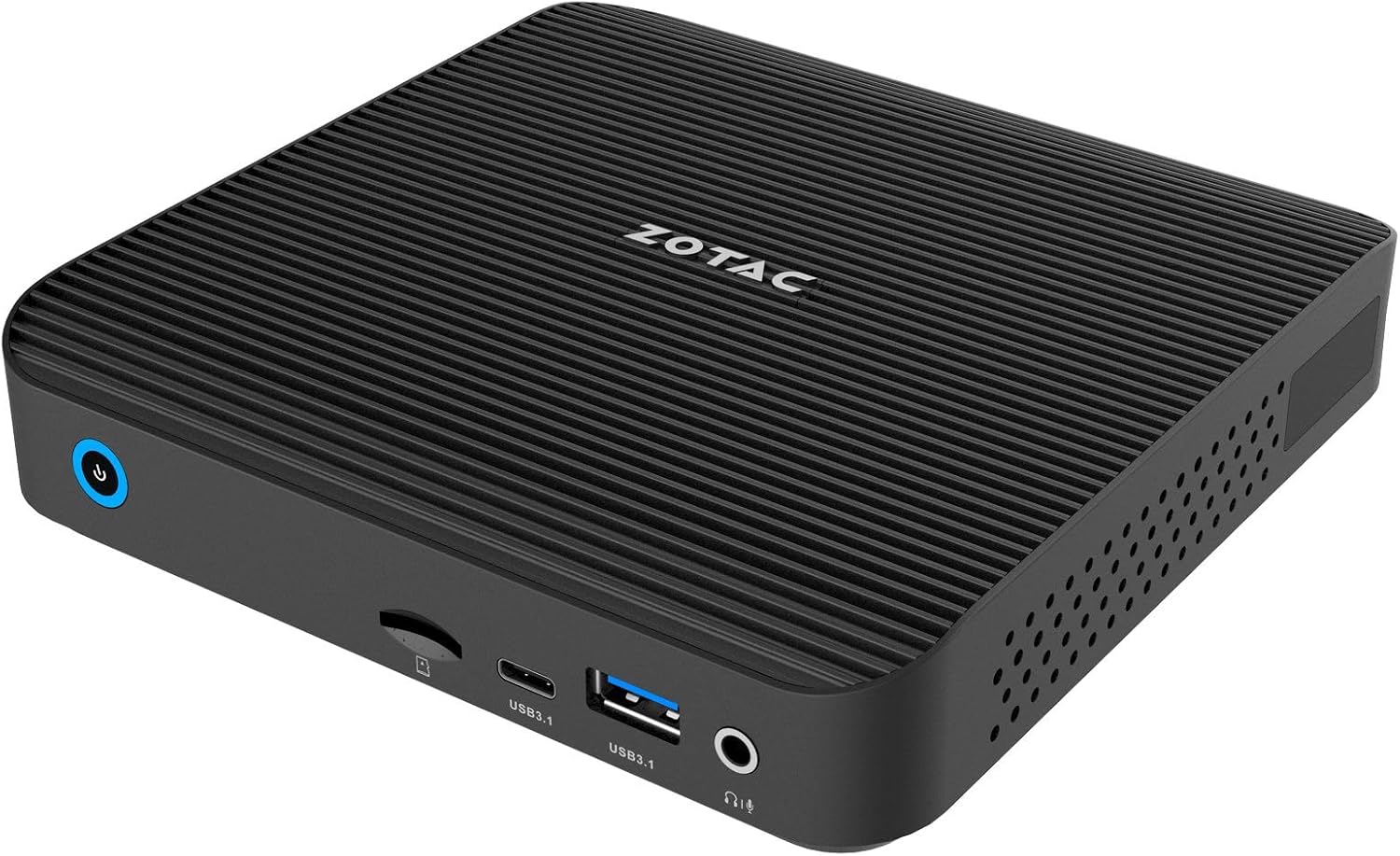
Obraz 3.4: Kątowy przód view of the ZOTAC ZBOX-CI343-BE, highlighting the compact form factor and front panel ports.

Obraz 3.5: Kątowy tył view of the ZOTAC ZBOX-CI343-BE, showing the rear panel ports and side ventilation.
4. Instrukcje konfiguracji
Follow these steps to set up your ZOTAC ZBOX-CI343-BE Mini PC.
- Install Memory and Storage (if not pre-installed): As a barebone system, you will need to install compatible DDR5 RAM and an SSD. Refer to the Quick Start Guide for detailed instructions on opening the chassis and installing components.
- Podłącz urządzenia peryferyjne:
- Podłącz monitor(y) do portu HDMI lub DisplayPort na tylnym panelu.
- Connect your keyboard and mouse to the available USB ports (front or rear).
- Jeśli używasz sieci przewodowej, podłącz kabel Ethernet do jednego z portów LAN.
- Attach the included WiFi antenna to the connector on the rear panel for wireless connectivity.
- Podłącz zasilanie: Podłącz zasilacz do portu DC IN na tylnym panelu, a następnie podłącz kabel zasilający do gniazdka elektrycznego.
- Pierwsze uruchomienie i instalacja systemu operacyjnego:
- Aby włączyć Mini PC, naciśnij przycisk zasilania na panelu przednim.
- Since this is a barebone system, you will need to install an operating system (e.g., Windows 10/11, Linux). Prepare a bootable USB drive with your preferred OS installer.
- Follow the on-screen prompts to install the operating system. You may need to enter the BIOS/UEFI settings (typically by pressing DEL or F2 during boot) to configure boot order.
- After OS installation, install necessary drivers, which can usually be found on the ZOTAC support webstrona.
5. Instrukcja obsługi
Once the operating system is installed and configured, your ZBOX-CI343-BE is ready for use.
- Włączanie/wyłączanie: Press the power button once to turn on. To turn off, use the operating system's shutdown function. A short press of the power button can also put the system to sleep. A long press (approx. 5 seconds) will force a shutdown.
- Łączność: Utilize the various USB ports for external devices, HDMI/DisplayPort for displays, and LAN/WiFi for network access.
- Montaż VESA: The included VESA mounting kit allows you to attach the Mini PC to the back of a compatible monitor or to a wall mount, saving desk space.
6. Konserwacja
Regular maintenance helps ensure optimal performance and extends the lifespan of your Mini PC.
- Czyszczenie:
- Delikatnie przetrzyj zewnętrzną część miękką, suchą ściereczką.
- Use compressed air to clear dust from ventilation openings periodically. Ensure the device is powered off before cleaning.
- Avoid using liquid cleaners or solvents directly on the device.
- Aktualizacje oprogramowania:
- Aby zwiększyć bezpieczeństwo i wydajność, aktualizuj system operacyjny i sterowniki do najnowszych wersji.
- Check the ZOTAC website for updated drivers specific to the ZBOX-CI343-BE model.
- Warunki środowiskowe: Operate the device in a well-ventilated area, away from direct sunlight, heat sources, and excessive moisture.
7. Rozwiązywanie Problemów
W tej sekcji omówiono typowe problemy, na które możesz natrafić.
- Brak zasilania:
- Upewnij się, że zasilacz jest solidnie podłączony zarówno do komputera Mini PC, jak i do sprawnego gniazdka elektrycznego.
- Sprawdź, czy kabel zasilający nie jest uszkodzony.
- Brak wyjścia wyświetlacza:
- Check that the monitor is powered on and correctly connected to the HDMI or DisplayPort.
- Jeśli to możliwe, wypróbuj inny kabel wyświetlacza lub monitor.
- Sprawdź, czy na monitorze wybrano właściwe źródło sygnału wejściowego.
- System operacyjny nie uruchamia się:
- Verify that an operating system has been successfully installed.
- Check BIOS/UEFI settings to ensure the correct boot device is selected.
- If recently installed, ensure all necessary drivers are present.
- Brak połączenia z internetem:
- For wired connections, ensure the Ethernet cable is properly connected and router/modem is working.
- For wireless connections, ensure the WiFi antenna is attached, WiFi is enabled in the OS, and you are connected to the correct network with the correct password.
- W razie konieczności zaktualizuj sterowniki sieciowe.
For further assistance, refer to the ZOTAC support webodwiedź witrynę lub skontaktuj się z obsługą klienta.
8. Specyfikacje
Detailed technical specifications for the ZOTAC ZBOX-CI343-BE Mini PC.
| Funkcja | Specyfikacja |
|---|---|
| Marka | ZOTAC |
| Nazwa modelu | ZBOX-CI343-BE |
| Edytor | Intel N100 (1.1 GHz) |
| Koprocesor graficzny | Grafika Intel UHD |
| Typ pamięci | DDR5 RAM (Barebone - user installable) |
| Typ pamięci masowej | SSD (Barebone - user installable) |
| Maksymalna rozdzielczość ekranu | 3840x2160 |
| Wyjście wideo | HDMI, DisplayPort |
| Łączność bezprzewodowa | 802.11ax, Bluetooth |
| Sieć lokalna | Podwójny Gigabitowy Ethernet |
| Porty USB | USB 3.1 typu A, USB 3.1 typu C |
| Czytnik kart | Gniazdo karty SD |
| Audio | Gniazdo słuchawkowe/mikrofonowe |
| System operacyjny | Barebone (Compatible with Windows 10/11, Linux) |
| Waga przedmiotu | 2.2 funta |
| Wymiary produktu | 3.94 x 1.97 x 0.5 cala |
9. Gwarancja i wsparcie
ZOTAC products are covered by a limited warranty. Please refer to the official ZOTAC webAby zapoznać się ze szczegółowymi warunkami gwarancji obowiązującymi w Twoim regionie, odwiedź naszą witrynę.
For technical support, driver downloads, and frequently asked questions, visit the ZOTAC support portal:
When contacting support, please have your product model (ZBOX-CI343-BE) and serial number ready.


