1. Wprowadzenie
Thank you for choosing the De'Longhi Rivelia EXAM440.35.BG Automatic Coffee Machine. This appliance is designed to provide a premium coffee experience with ease of use and customizable options. Please read this manual carefully before using the appliance to ensure proper operation, maintenance, and safety.
2. Ważne instrukcje bezpieczeństwa
Aby zminimalizować ryzyko pożaru, porażenia prądem i obrażeń ciała, należy zawsze przestrzegać podstawowych zasad bezpieczeństwa podczas korzystania z urządzeń elektrycznych.
- Przed użyciem należy przeczytać wszystkie instrukcje.
- Nie dotykaj gorących powierzchni. Używaj uchwytów lub gałek.
- Aby uniknąć pożaru, porażenia prądem elektrycznym i obrażeń ciała, nie zanurzaj przewodu, wtyczek ani urządzenia w wodzie lub innym płynie.
- Należy zachować ścisły nadzór, jeżeli z urządzenia korzystają dzieci lub w ich pobliżu.
- Odłącz od gniazdka, gdy nie jest używane i przed czyszczeniem. Pozostaw do ostygnięcia przed założeniem lub zdjęciem części oraz przed czyszczeniem urządzenia.
- Nie używaj żadnego urządzenia z uszkodzonym przewodem lub wtyczką lub po awarii urządzenia lub po jego uszkodzeniu w jakikolwiek sposób. Zwróć urządzenie do najbliższego autoryzowanego serwisu w celu sprawdzenia, naprawy lub regulacji.
- Użycie akcesoriów niezalecanych przez producenta urządzenia może spowodować pożar, porażenie prądem lub obrażenia ciała.
- Nie stosować na zewnątrz.
- Nie pozwól, aby przewód zwisał z krawędzi stołu lub blatu i dotykał gorących powierzchni.
- Nie umieszczać na gorącym palniku gazowym lub elektrycznym ani w jego pobliżu, a także w nagrzanym piekarniku.
- Zawsze najpierw podłącz wtyczkę do urządzenia, a następnie podłącz przewód do gniazdka ściennego. Aby odłączyć, ustaw dowolny element sterujący w pozycji „wyłączone”, a następnie wyjmij wtyczkę z gniazdka ściennego.
- Nie używaj urządzenia niezgodnie z jego przeznaczeniem.
- Zachowaj szczególną ostrożność podczas usuwania gorącej pary.
3. Koniec produktuview
The De'Longhi Rivelia EXAM440.35.BG is a compact automatic coffee machine featuring a 3.5-inch color touchscreen, a manual milk frother, and the innovative Bean Switch System for easily changing coffee bean varieties.

Rysunek 3.1: Przód view of the De'Longhi Rivelia EXAM440.35.BG coffee machine in Sand Beige.
Kluczowe komponenty:
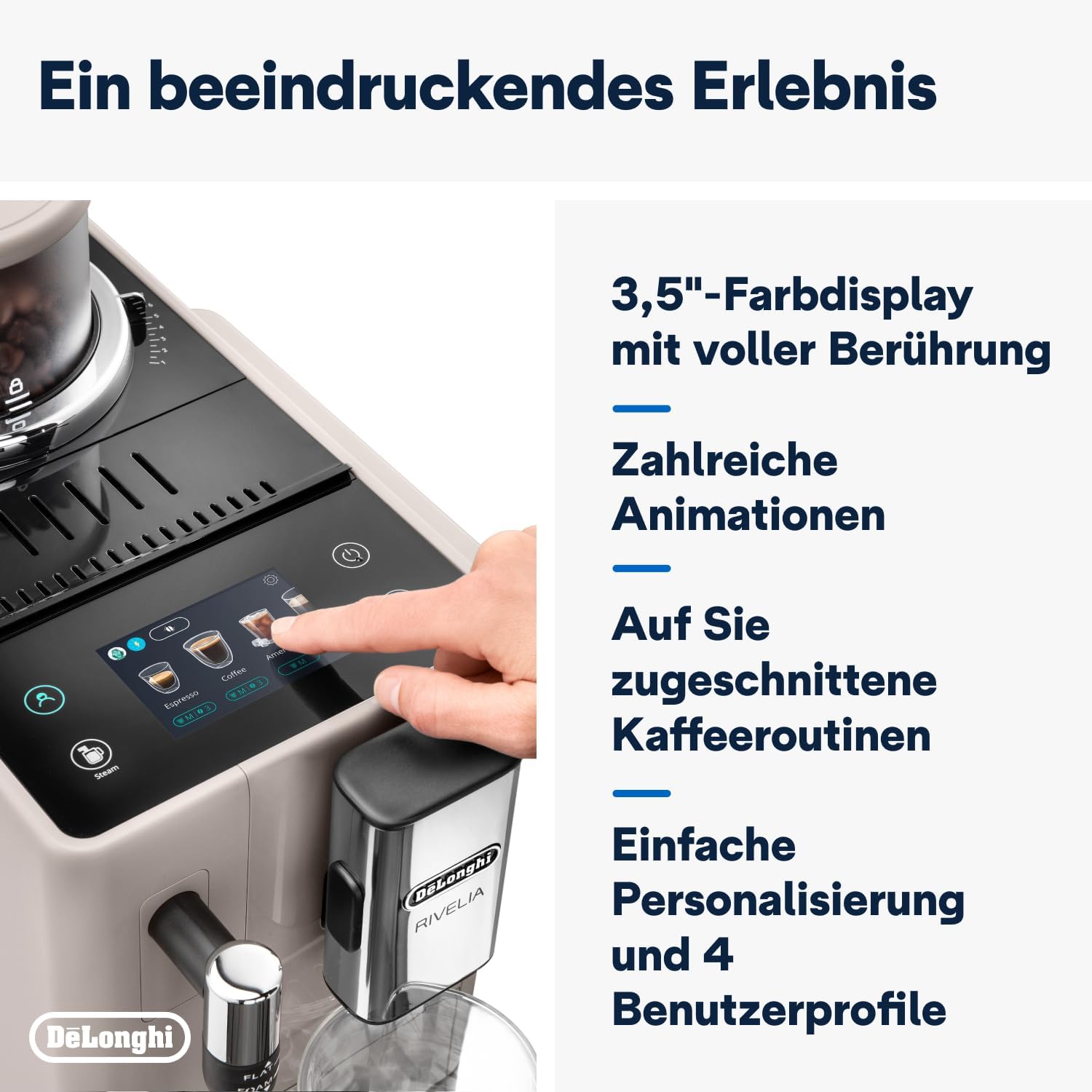
- 3.5" Full-Touch Color Display: For intuitive control and personalized coffee routines.
- Bean Switch System: Two interchangeable 250g bean containers for different coffee varieties.
- Ręczny spieniacz mleka: For preparing creamy milk foam for lattes and cappuccinos.
- Zbiornik na wodę: Wyjmowany, pojemność 1.4 litra.
- Tacka ociekowa i pojemnik na fusy: For collecting excess water and used coffee grounds.
- Wylewka do kawy: Regulowana wysokość dla różnych rozmiarów miseczek.

Rysunek 3.2: The De'Longhi Rivelia series, showcasing various color options including Sand Beige.
4. Konfiguracja początkowa
4.1 Rozpakowywanie i umieszczanie
- Ostrożnie wyjmij maszynę z opakowania.
- Urządzenie należy ustawić na stabilnej, równej powierzchni, z dala od rozprysków wody i źródeł ciepła.
- Należy zapewnić odpowiednią ilość miejsca wokół maszyny, aby umożliwić wentylację i dostęp do podzespołów.
4.2 Napełnianie zbiornika na wodę
- Wyjmij zbiornik na wodę z boku urządzenia.
- Napełnij zbiornik świeżą, zimną wodą z kranu do poziomu oznaczonego MAX.
- Replace the water tank securely into the machine.
4.3 Filling the Bean Container (Bean Switch System)
The Rivelia features two interchangeable bean containers. You can switch between them to enjoy different coffee varieties.
- Lift the lid of a bean container.
- Wsyp świeże ziarna kawy do pojemnika. Nie przepełniaj go.
- Place the filled bean container onto the machine's bean hopper. Ensure it is seated correctly.
- To switch beans, simply lift the current container, replace it with another filled container, and the machine will detect the change.

Rysunek 4.1: The Bean Switch System with two interchangeable bean containers.

Rysunek 4.2: Illustration of filling the bean container with fresh coffee beans.
4.4 First Use and Rinsing Cycle
Before making your first coffee, perform a rinsing cycle to clean the internal circuits.
- Podłącz maszynę do gniazdka elektrycznego.
- Włącz maszynę za pomocą przycisku zasilania.
- Follow the on-screen instructions for the initial setup, including language selection and water hardness.
- The machine will automatically perform a rinsing cycle. Place a container under the coffee spouts and hot water spout to collect the water.
- Po zakończeniu cyklu płukania urządzenie jest gotowe do użycia.
5. Działanie
5.1 Using the 3.5" Full-Touch Color Display
The intuitive touchscreen allows you to select beverages, customize settings, and manage user profiles.

Rysunek 5.1: The 3.5-inch full-touch color display in use, showing beverage selection.
- Wybór napojów: Swipe through the menu to choose from 8 pre-programmed coffee recipes.
- Personalizacja: Adjust coffee strength, temperature, and volume for each drink.
- Użytkownik Profiles: Create up to 4 personalized user profiles to save your favorite settings. The machine adapts its menu based on your routine.
- Bean Adapt Technology: This technology automatically adjusts grinding parameters, dosage, and brewing temperature to optimize extraction for the selected coffee bean variety.
5.2 Przygotowywanie napojów kawowych
- Ensure the water tank is filled and a bean container is in place.
- Umieścić filiżankę pod dyszami kawy.
- Select your desired beverage from the touchscreen menu.
- Adjust settings (strength, volume) if desired.
- Press the "Start" icon to begin brewing.

Rysunek 5.2: A selection of coffee drinks, including espresso, americano, and milk-based beverages.
5.3 Using the Manual Milk Frother
The integrated steam wand allows you to manually froth milk for creamy cappuccinos and lattes.
- Napełnij dzbanek na mleko zimnym mlekiem (mlecznym lub roślinnym).
- Umieść dyszę pary w mleku, tuż pod jego powierzchnią.
- Activate the steam function via the touchscreen.
- Move the jug up and down to create desired foam texture.
- Po spienieniu wyłącz funkcję pary i natychmiast wyczyść dyszę.

Rysunek 5.3: Demonstrating the manual milk frother for creating creamy milk foam.
5.4 Dozowanie gorącej wody
The machine can also dispense hot water for teas or other hot beverages.
- Place a cup under the hot water spout (usually the steam wand).
- Select the hot water function from the touchscreen.
- Press "Start" to dispense hot water.
6. Czyszczenie i konserwacja
Regularne czyszczenie zapewnia optymalną wydajność i wydłuża żywotność ekspresu do kawy.
6.1 Codzienne czyszczenie
- Tacka ociekowa i pojemnik na fusy: Opróżniaj i płucz codziennie. Urządzenie poinformuje Cię, gdy pojemnik na fusy będzie wymagał opróżnienia.
- Zbiornik na wodę: Płucz codziennie i napełniaj świeżą wodą.
- Wylewki do kawy: Wyczyść z reklamąamp płótno.
- Spieniacz do mleka: Po każdym użyciu należy przetrzeć dyszę parowąamp ściereczką i krótko przedmuchaj parą, aby usunąć wszelkie pozostałości mleka.
6.2 Cotygodniowe czyszczenie
- Jednostka zaparzająca: Remove the brew unit (refer to the machine's internal instructions for removal) and rinse it thoroughly under running water. Allow it to air dry before reinserting.
- Bean Containers: Empty and clean the bean containers, especially when switching bean types, to prevent oil buildup.
6.3 Odkamienianie
The machine will indicate when descaling is required. Use only De'Longhi descaling solution and follow the on-screen instructions precisely. Descaling regularly prevents limescale buildup and maintains coffee quality.
7. Rozwiązywanie Problemów
This section addresses common issues you might encounter with your De'Longhi Rivelia EXAM440.35.BG.
| Problem | Możliwa przyczyna | Rozwiązanie |
|---|---|---|
| Maszyna się nie włącza. | Niepodłączony; gniazdko elektryczne uszkodzone. | Sprawdź podłączenie przewodu zasilającego; spróbuj użyć innego gniazdka. |
| "Fill Water Tank" message appears, but tank is full. | Water tank not inserted correctly; sensor issue. | Remove and reinsert the water tank firmly. Ensure the float in the tank moves freely. |
| Kawa jest zbyt słaba lub wodnista. | Zbyt grube ustawienie stopnia zmielenia; za mała dawka kawy; stare ziarna. | Adjust grind setting finer; increase coffee strength via menu; use fresh beans. |
| Spieniacz do mleka nie wytwarza piany. | Zablokowana dysza pary; mleko nie jest wystarczająco zimne; niewłaściwy rodzaj mleka. | Clean steam wand thoroughly; use cold milk; ensure milk is suitable for frothing. |
| Touchscreen unresponsive or scratched. | Tymczasowa usterka oprogramowania, uszkodzenie fizyczne. | Restart the machine. If scratched, contact customer support for service options. Avoid abrasive cleaners. |
8. Specyfikacje techniczne
| Funkcja | Szczegół |
|---|---|
| Marka | De Longhi |
| Numer modelu | EXAM440.35.BG |
| Kolor | Piaskowy beż |
| Wymiary (dł. x szer. x wys.) | Wymiary 43 x 24.5 x 38.5 cm |
| Waga | 9.8 kilograma |
| Pojemność zbiornika na wodę | 1.4 litrów |
| Moc | 1450 watów |
| Tomtage | 240 wolty |
| Tworzywo | Metal |
| Cechy specjalne | 4 użytkowników profiles, 8 coffee beverages, Bean Switch System, Integrated steam wand, Coffee routines, Bean Adapt Technology |
| Automatyczne wyłączanie | Tak |
Rysunek 8.1: Product dimensions: 245mm (width) x 430mm (depth) x 385mm (height).
9. Gwarancja i wsparcie
9.1 Informacje o gwarancji
Your De'Longhi Rivelia EXAM440.35.BG coffee machine comes with a standard manufacturer's warranty. Please refer to the warranty card included in your product packaging for specific terms and conditions, including the warranty period and coverage details. Keep your proof of purchase for warranty claims.
9.2 Obsługa klienta
For technical assistance, spare parts, or service, please contact De'Longhi customer support. You can find contact information on the official De'Longhi webstronie internetowej lub w dokumentacji dołączonej do urządzenia.
- Wsparcie online: Visit the official De'Longhi webwitryna z odpowiedziami na często zadawane pytania, poradnikami rozwiązywania problemów i możliwością rejestracji produktu.
- Wsparcie telefoniczne: Contact numbers are typically listed in your warranty booklet or on the brand's webstrona.


