Wstęp
Thank you for choosing the Fossil BQ2799 Men's Watch. This manual provides detailed instructions for setting up, operating, and maintaining your new timepiece. Please read this manual carefully to ensure proper use and to enjoy the full functionality of your watch.
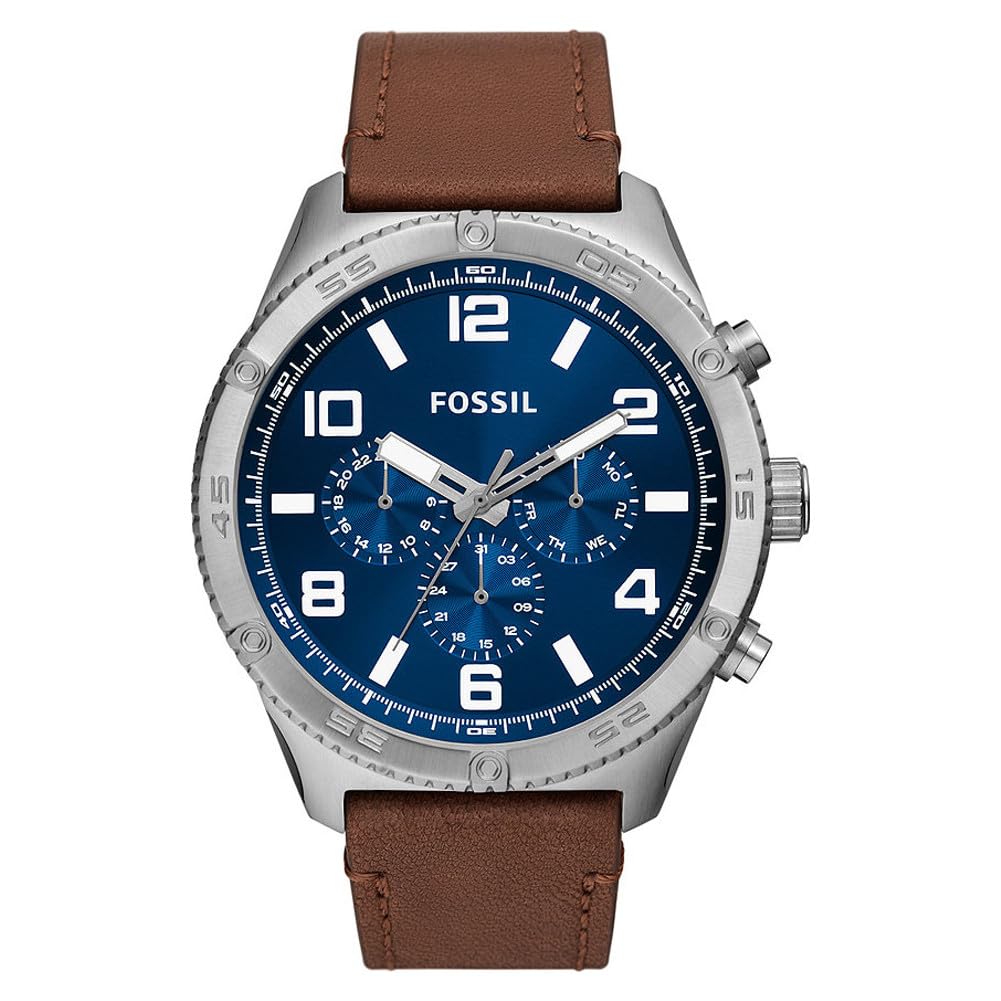
Obraz: Przód view of the Fossil BQ2799 Men's Watch, showcasing the blue dial, silver-tone case, and brown leather strap.
Konfiguracja i początkowe użycie
Ustawianie czasu
- Wyciągnij koronę: Gently pull the crown (the knob on the side of the watch) out to position 2.
- Dostosuj czas: Obróć koronkę zgodnie z ruchem wskazówek zegara lub przeciwnie do ruchu wskazówek zegara, aby ustawić wskazówkę godzinową i minutową na właściwym czasie.
- Wciśnij koronę: Po ustawieniu godziny należy docisnąć koronkę do pozycji 1, aby uruchomić zegarek.
Ustawianie daty
Your Fossil BQ2799 watch features a date display. To set the date:
- Wyciągnij koronę: Gently pull the crown out to position 1 (first click).
- Dostosuj datę: Turn the crown clockwise or counter-clockwise to set the date. Avoid setting the date between 9 PM and 3 AM, as this can damage the movement.
- Wciśnij koronę: Wciśnij koronkę z powrotem do pierwotnej pozycji.

Obraz: Bok view of the Fossil BQ2799 watch, showing the crown and chronograph pushers on the right side of the case.
Obsługa funkcji chronografu
The Fossil BQ2799 is equipped with a chronograph, allowing you to measure elapsed time. The chronograph features three sub-dials and two pushers.

Image: Close-up of the Fossil BQ2799 watch dial, highlighting the chronograph sub-dials and main hands.
- Start: Naciśnij górny przycisk (A), aby uruchomić chronograf. Wskazówka sekundowa chronografu zacznie się poruszać.
- Zatrzymać: Naciśnij ponownie górny przycisk (A), aby zatrzymać chronograf. Upływający czas będzie wskazywany przez wskazówki chronografu.
- Reset: Press the bottom pusher (B) to reset the chronograph hands to their zero positions.
Understanding the Sub-dials
- Wskaźnik 24-godzinny: Displays the time in a 24-hour format, useful for distinguishing AM/PM.
- Chronograph Minutes: Measures elapsed minutes when the chronograph is active.
- Chronograph Seconds: Measures elapsed seconds when the chronograph is active.
Pielęgnacja i konserwacja
Czyszczenie zegarka
- Wytrzyj kopertę i szkiełko zegarka miękką, suchą ściereczką.
- Aby zapobiec uszkodzeniom i odbarwieniu paska skórzanego, należy unikać długotrwałego wystawiania go na działanie wody, bezpośredniego światła słonecznego i silnych środków chemicznych.
- Do not use chemical cleaners, as they may damage the watch's finish.
Odporność na wodę
Your Fossil BQ2799 watch has a water resistance rating of 50 meters (5 ATM). This means it is suitable for short periods of recreational swimming, but not for diving or snorkeling. Avoid operating the crown or pushers when the watch is wet to prevent water ingress.
Wymiana baterii
The watch is powered by a quartz movement and requires a battery. When the battery runs low, the watch may stop or the second hand may skip. Battery replacement should be performed by a qualified watch technician to ensure the watch's water resistance is maintained.

Obraz: View of the Fossil BQ2799 watch, focusing on the brown leather strap and the buckle closure.
Rozwiązywanie problemów
- Zegarek nie działa: Sprawdź, czy koronka jest całkowicie dociśnięta. Jeśli tak, bateria może wymagać wymiany.
- Nieprawidłowa godzina/data: Refer to the "Setting the Time" and "Setting the Date" sections to re-adjust.
- Wskazówki chronografu nie resetują się do zera: This may require a chronograph reset procedure. Consult a professional watch repair service if the issue persists after attempting to reset.
Specyfikacje
| Funkcja | Szczegół |
|---|---|
| Numer modelu | BQ2799-AMZUK |
| Typ ruchu | Kwarc |
| Typ wyświetlacza | Analog |
| Materiał obudowy | Stal nierdzewna |
| Średnica koperty | 50 milimetrów |
| Grubość obudowy | 13 milimetrów |
| Materiał paska | Skóra |
| Przepustowość łącza | 24 milimetrów |
| Kolor paska | Brązowy |
| Kolor tarczy | Niebieski |
| Materiał kryształu | Szkło mineralne |
| Odporność na wodę | 50 metrów (5 ATM) |
| Cechy specjalne | Chronograf |
| Waga przedmiotu | 250 gram |
Informacje o gwarancji
Fossil watches typically come with a limited warranty covering manufacturing defects. Please refer to the official documentation included with your watch for specific warranty terms and conditions. For warranty claims or service, retain your proof of purchase.
Note: Independent of your legal right of withdrawal, you have a 30-day return right for many products. For exceptions and conditions, please consult the relevant policies.
Obsługa klienta
For further assistance, technical support, or service inquiries regarding your Fossil BQ2799 watch, please visit the official Fossil website or contact their customer service department. Contact information can typically be found in the documentation provided with your watch or on the Fossil brand webstrona.
Możesz również odwiedzić Sklep Fossil na Amazonie aby uzyskać więcej informacji o produkcie.


