
Introduction
The SoundMAGIC E80C earbuds are designed for audiophiles, offering refined sound and detailed audio. They feature a robust aluminum construction and a high-quality twisted core cable for durability and reduced interference. The in-line microphone and volume controls provide convenient communication and music management.
What's in the Box

Image: SoundMAGIC E80C accessories including earbuds, carrying case, various eartips, and adapters.
Your SoundMAGIC E80C package includes:
- SoundMAGIC E80C Wired Earbuds with Microphone
- Carrying Hard Case
- Silicone Eartips (various sizes: S/M/L, double flange)
- Comply Premium Earphone Tips (Isolation)
- Cellphone Adapter
- Computer Adapter (splitter for separate mic/audio jacks)
- Cable Clip
Product Overview
High Fidelity Sound
The E80C features powerful custom 10mm dynamic drivers, delivering accurate and well-balanced sound. Expect a wide sound stage, authentic bass, and clear highs across the full audio spectrum. Music is reproduced with outstanding detail.

Image: Diagram illustrating the internal components of the 10mm dynamic driver for high fidelity sound, including the N48 NdFeB magnet and 6um vibrating diaphragm.
Robust Metal Construction
The full metal earphone housing is constructed from aluminum, ensuring extreme stability and durability for daily use. Precision manufacturing and rigorous assembly contribute to stable product quality.

Image: Exploded view diagram of the SoundMAGIC E80C earbud showing its aluminum construction and internal components, highlighting CNC turning for precision.
High Quality Twisted Cable
The twisted core HiFi cable is designed for enhanced durability against bending and to prevent tangling. This construction also helps to reduce radio interference, ensuring a cleaner audio signal.

Image: Close-up image of the SoundMAGIC E80C's twisted cable and 60-degree angled gold-plated jack, with an inset showing the cable's internal structure including enameled copper wire, TPE skin, and 400D Kevlar fiber.
Convenient Mic & Volume Controls
An integrated microphone allows for clear conversations. The in-line controller buttons provide easy access to functions such as answering/ending calls, skipping tracks (next/previous), pausing/playing music, and activating voice assistants like Siri.
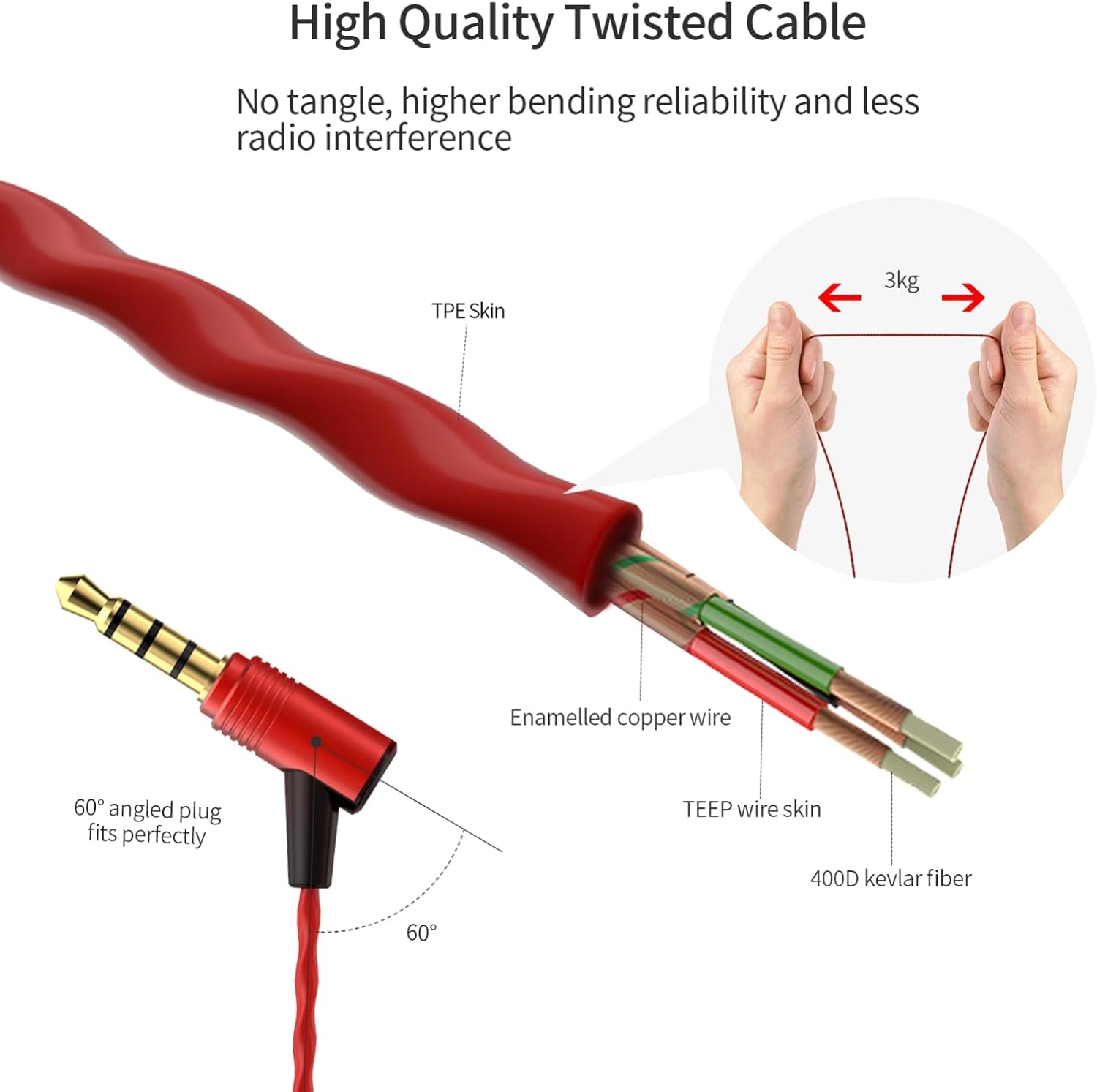
Image: A person wearing SoundMAGIC E80C earbuds, with a close-up of the in-line remote showing volume up/down and play/pause buttons.
Comfortable In-Ear Fit
The earbuds are ergonomically designed to be flexible and lightweight, ensuring a comfortable fit for extended periods. Multiple sizes of eartips (S/M/L) are included to help achieve optimal fit and excellent noise isolation.

Image: A person wearing SoundMAGIC E80C earbuds, with icons indicating light and small design, good noise isolation, and ergonomic fit. Dimensions of the earbud are also shown.
Setup
1. Choosing the Right Eartips
Selecting the correct eartip size is crucial for both comfort and sound quality. Experiment with the included silicone and Comply foam eartips to find the best seal for your ears. A good seal enhances bass response and noise isolation.
- Gently remove the pre-installed eartips from the earbuds.
- Select a pair of eartips (silicone or foam) that you believe will fit best.
- For silicone tips: Stretch the eartip over the nozzle of the earbud until it is securely attached.
- For Comply foam tips: Compress the foam tip by rolling it between your fingers. Insert the compressed tip into your ear canal and hold it in place for a few seconds while the foam expands to create a seal.
- Test the fit and sound. If the bass is weak or external noise is not sufficiently blocked, try a different size or type of eartip.
2. Connecting to Your Device
The SoundMAGIC E80C earbuds connect via a standard 3.5mm audio jack.
- For smartphones, tablets, and other devices with a single 3.5mm jack: Plug the earbud's 3.5mm jack directly into your device's headphone port.
- For computers with separate audio and microphone jacks: Use the included computer adapter. Plug the earbud's 3.5mm jack into the adapter's female port, then plug the two male plugs of the adapter into the corresponding headphone (green) and microphone (pink) ports on your computer.
- For devices requiring a different connector (e.g., USB-C or Lightning): You will need a separate adapter (not included) compatible with your device's port and a 3.5mm jack.
Operating Instructions
In-line Remote Control
| Button/Action | Function (Music Playback) | Function (Phone Calls) |
|---|---|---|
| Volume Up (+) | Increase volume | N/A |
| Volume Down (-) | Decrease volume | N/A |
| Center Button (Single Press) | Play/Pause music | Answer/End call |
| Center Button (Double Press) | Next track | N/A |
| Center Button (Triple Press) | Previous track | N/A |
| Center Button (Long Press) | Activate voice assistant (e.g., Siri) | Reject incoming call |
Using the Microphone
The integrated microphone is located on the in-line remote. For optimal voice clarity during calls or voice commands, ensure the microphone is positioned close to your mouth and not obstructed by clothing.
Maintenance
- Cleaning Eartips: Regularly remove eartips and clean them with a soft, damp cloth. For silicone tips, you can wash them with mild soap and water, then rinse thoroughly and allow to air dry completely before reattaching.
- Cleaning Earbuds: Use a dry, soft cloth to wipe the earbud housing. Avoid using harsh chemicals or abrasive materials.
- Cable Care: The twisted cable is designed to be tangle-resistant. To prolong its life, avoid sharp bends or excessive pulling. When storing, coil the cable loosely.
- Storage: Use the provided carrying hard case to protect your earbuds from dust, dirt, and physical damage when not in use.
- Avoid Moisture: The earbuds are not water-resistant. Avoid exposure to water, sweat, or high humidity.
Troubleshooting
| Problem | Possible Solution |
|---|---|
| No sound or low volume |
|
| Sound only from one earbud |
|
| Microphone not working |
|
| Poor sound quality (e.g., weak bass, tinny sound) |
|
Specifications
- Model Name: E80C
- Connectivity Technology: Wired
- Headphones Jack: 3.5 mm Jack
- Noise Control: Sound Isolation (Passive Noise Isolation)
- Audio Driver Type: Dynamic Driver (10mm custom dynamic drivers)
- Impedance: 64 Ohms
- Material: Aluminum (earbud housing)
- Cable Feature: Twisted Core, Tangle Free Cord
- Control Type: Volume Control, Remote (in-line)
- Special Features: Microphone Included, Noise Isolation, Tangle Free Cord, Universal Phone Control, Volume Control
- Item Weight: 16 Grams (0.564 ounces)
- Water Resistance Level: Not Water Resistant
- Compatible Devices: Devices with 3.5mm headphone jack
Official Product Videos
SoundMAGIC Wired Earphones Overview
Video: An unboxing and overview of the SoundMAGIC wired earphones, showcasing the included accessories and discussing their features and benefits. This video is provided by the seller.
SoundMAGIC HiFi Stereo Wired Earphones Review
Video: A detailed review of the SoundMAGIC HiFi Stereo Wired Earphones, focusing on sound quality, comfort, and the functionality of the in-line microphone. This video is provided by the seller.
SoundMAGIC Earbuds Headphones Features
Video: A review highlighting the features of the SoundMAGIC Earbuds Headphones, including their build quality, accessories, and sound performance for various uses like podcasts. This video is provided by the seller.
Warranty & Support
For warranty information and customer support, please refer to the official SoundMAGIC website or contact their customer service directly. Details are typically provided in the product packaging or on the manufacturer's website.
