1. Wprowadzenie
Thank you for choosing the Rockstar PAD20 PRO ADVANCED Electronic Drum Pad. This manual provides essential information for the safe and effective use of your new instrument. Please read it thoroughly before operation and retain it for future reference. The PAD20 PRO ADVANCED is designed to offer advanced percussion performance with versatile drum kits, enhanced connectivity, and durable construction.
2. Informacje dotyczące bezpieczeństwa
- Zasilanie: Używaj wyłącznie określonego zasilacza. Upewnij się, że napięcietage odpowiada wymaganiom urządzenia.
- Woda i wilgoć: Do not expose the unit to rain, moisture, or excessive humidity. Avoid placing liquid containers near the device.
- Wentylacja: Zapewnij odpowiednią wentylację wokół urządzenia. Nie blokuj otworów wentylacyjnych.
- Źródła ciepła: Trzymaj urządzenie z dala od źródeł ciepła, takich jak grzejniki, kratki wentylacyjne, piece i inne urządzenia wytwarzające ciepło.
- Czyszczenie: Przed czyszczeniem odłącz zasilanie. Użyj miękkiej, suchej ściereczki. Nie używaj środków czyszczących w płynie ani w aerozolu.
- Serwisowanie: Nie próbuj samodzielnie naprawiać tego produktu. Wszelkie czynności serwisowe należy powierzyć wykwalifikowanemu personelowi serwisowemu.
3. Zawartość opakowania
Sprawdź, czy w opakowaniu znajdują się wszystkie elementy:
- Rockstar PAD20 PRO ADVANCED Electronic Drum Pad
- Zasilacz
- Instrukcja obsługi (ten dokument)
4. Koniec produktuview
4.1 Panel przedni i elementy sterujące
The front panel features eight velocity-sensitive pads, a large LCD screen, and various control buttons and knobs for navigation and sound manipulation.
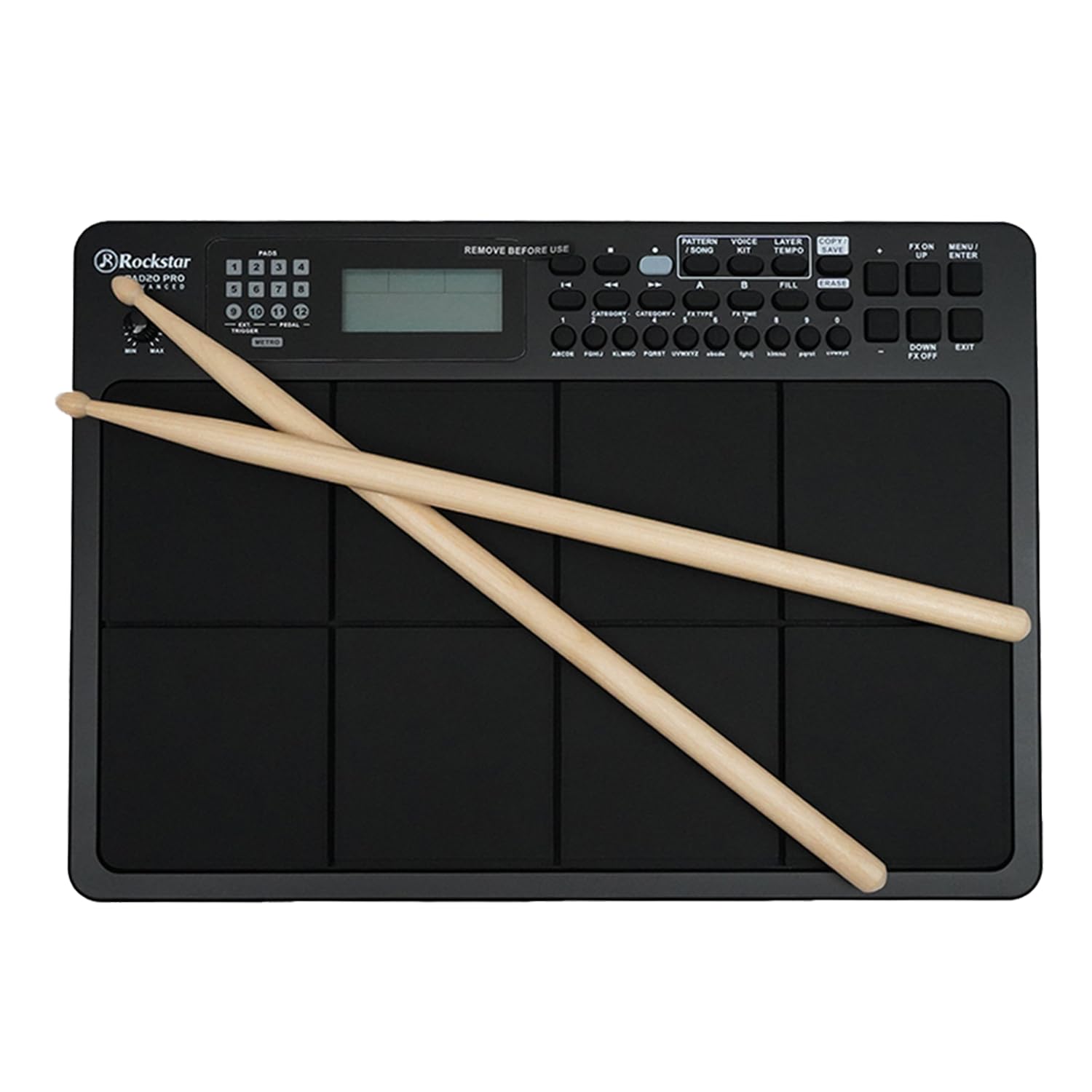
Rysunek 1: Przód view of the Rockstar PAD20 PRO ADVANCED with drumsticks, showing the pads, display, and control buttons.
- Pads (1-8): Velocity-sensitive pads for triggering sounds.
- Wyświetlacz LCD: Large backlight display for navigating menus, selecting kits, and viewparametrów.
- Przyciski nawigacyjne: Buttons for moving through menus and adjusting settings.
- Pokrętło głośności: Reguluje ogólną głośność wyjściową.
- Przyciski funkcyjne: Dedicated buttons for Pattern, Voice, Layer, Kit, Song, Tempo, Copy, Save, FX On/Off, Menu, Up/Down, Enter, Exit.
4.2 Połączenia panelu tylnego
The rear panel provides various input and output ports for connecting to external devices.

Rysunek 2: Rear panel connections diagram, illustrating ports for USB, MIDI In/Out, audio outputs, and power input.
- USB 2.0 MIDI Port: Do podłączenia do komputera w celu przesyłania danych MIDI.
- MIDI IN/OUT Ports: For connecting to other MIDI devices.
- Audio Outputs (L/MONO, R): Do podłączenia do amplifier, mikser lub interfejs audio.
- Wyjście słuchawkowe: Do prywatnego monitoringu.
- Wejście pomocnicze: For connecting external audio players.
- External Trigger/Pedal Inputs: For connecting additional pads or footswitches.
- Pobór mocy: Do podłączenia zasilacza prądu stałego.
5. Konfiguracja
- Umieszczenie: Place the PAD20 PRO ADVANCED on a stable, flat surface.
- Podłączenie zasilania: Connect the provided power adapter to the DC IN port on the rear panel, then plug the adapter into a power outlet.
- Połączenie audio:
- Dla zewnętrznego amplification, connect the L/MONO and R audio outputs to your amplifier or mixer using appropriate cables.
- For private practice, connect headphones to the Headphone Output.
- Połączenie MIDI/USB (opcjonalnie): To use the PAD20 PRO ADVANCED as a MIDI controller or to connect to a computer, use a USB cable to connect the USB 2.0 MIDI port to your computer.
- Włączanie: Naciśnij przycisk zasilania, aby włączyć urządzenie. Wyświetlacz LCD się podświetli.
6. Instrukcja obsługi
6.1 Podstawowa obsługa
Upon powering on, the unit will typically load the last used drum kit. Strike the pads with drumsticks or your hands to produce sounds.
6.2 Nawigacja po wyświetlaczu

Rysunek 3: Close-up of the LCD screen, showing kit selection and voice information. The display is bright and clear.
Use the navigation buttons (Up/Down, Left/Right, Enter, Exit) to move through menus and adjust parameters shown on the large backlight LCD display.
6.3 Drum Kit Selection
The PAD20 PRO ADVANCED features 100 professionally curated drum kits. To select a kit:
- Naciśnij ZESTAW przycisk.
- Use the navigation buttons to scroll through the available kits.
- Naciskać WCHODZIĆ aby potwierdzić swój wybór.
6.4 Funkcje nagrywania
The unit supports real-time record and step record edit functions. Refer to the on-screen menu for detailed instructions on how to initiate, stop, and edit recordings.
6.5 Connectivity and MIDI
The USB 2.0 MIDI port allows seamless integration with your computer. You can use the PAD20 PRO ADVANCED as a MIDI controller for software instruments or to send MIDI data to a Digital Audio Workstation (DAW).
7. Konserwacja
- Czyszczenie: Wipe the unit with a soft, dry cloth. For stubborn dirt, a slightly damp cloth can be used, followed by a dry cloth. Avoid abrasive cleaners.
- Składowanie: Jeśli urządzenie nie będzie używane przez dłuższy czas, należy je przechowywać w chłodnym i suchym miejscu, z dala od bezpośredniego światła słonecznego i ekstremalnych temperatur.
- Pielęgnacja podpasek: Avoid striking the pads with excessive force or sharp objects, as this can damage the sensors.
8. Rozwiązywanie Problemów
| Problem | Możliwa przyczyna | Rozwiązanie |
|---|---|---|
| Brak dźwięku z padów | Volume too low; incorrect audio connection; headphones not connected properly. | Increase master volume. Check audio cables and connections. Ensure headphones are fully inserted. |
| Urządzenie nie włącza się | Zasilacz nie jest podłączony; gniazdko elektryczne jest uszkodzone. | Ensure power adapter is securely connected to the unit and a working power outlet. Try a different outlet. |
| Pads are unresponsive or trigger inconsistently | Sensitivity settings; physical damage to pads. | Check pad sensitivity settings in the menu. If problem persists, contact support. |
| Problemy z połączeniem MIDI | Incorrect USB cable; driver issues; software settings. | Ensure a proper USB 2.0 cable is used. Check computer's device manager for driver status. Verify MIDI input settings in your software. |
9. Specyfikacje
| Funkcja | Opis |
|---|---|
| Model | PAD20 PRO |
| Naramienniki | 8 Velocity-sensitive pads |
| Zestawy perkusyjne | 100 (Pre-programmed) |
| Wyświetlacz | Large Backlight LCD |
| Łączność | USB 2.0 MIDI, MIDI IN/OUT, Audio Outputs (L/MONO, R), Headphone Output, Aux Input, External Trigger/Pedal Inputs |
| Funkcje nagrywania | Real-time Record, Step Record Edit |
| Materiał korpusu | Plastikowy |
| Rodzaj wykończenia | Wykończenie w kolorze czarnym |
| Wymiary produktu | 30.5 x 30.5 x 50.8 cm (dł. x szer. x wys.) |
| Waga przedmiotu | 2 kilogramów |
| Kraj pochodzenia | Chiny |
10. Gwarancja i wsparcie
The Rockstar PAD20 PRO ADVANCED comes with a 2 Years Hassle Free Warranty from the date of purchase. This warranty covers manufacturing defects under normal use. For warranty claims or technical support, please contact Rockstar customer service.
Dane kontaktowe producenta:
Numer telefonu: +91 8885241706
Email: care@justshop24x7.com


