1. Wprowadzenie
The Zelotes F17 Vertical Wireless Mouse is designed for enhanced comfort and productivity, featuring an ergonomic vertical design that promotes a natural hand posture. This manual provides comprehensive instructions for setting up, operating, maintaining, and troubleshooting your new mouse.

Image: The Zelotes F17 Vertical Wireless Mouse, showcasindzięki ergonomicznej konstrukcji i dołączonemu odbiornikowi USB.
2. Zawartość opakowania
Sprawdź, czy w przesyłce znajdują się wszystkie elementy:
- 1 x Zelotes Wireless Vertical Mouse
- 1 x odbiornik USB
- 1 x Instrukcja obsługi
3. Przewodnik konfiguracji
Follow these steps to set up your Zelotes F17 Vertical Wireless Mouse:
- Zainstaluj baterie: The mouse requires two AA batteries (not included). Locate the battery compartment on the underside of the mouse. Open the cover, insert the batteries according to the polarity indicators, and close the cover.
- Pobierz odbiornik USB: The USB receiver is conveniently stored next to the battery compartment. Gently pull it out.
- Podłącz odbiornik USB: Plug the USB receiver into an available USB port on your computer (Laptop, PC, Mac).
- Włączanie: Locate the On/Off switch on the underside of the mouse and slide it to the 'On' position. The mouse is plug-and-play, requiring no driver installation.

Image: The underside of the Zelotes F17 mouse, illustrating the battery compartment and the integrated storage slot for the USB receiver.
Video: A demonstration of the Zelotes F17 Vertical Wireless Mouse in use, highlighting its ergonomic grip and functionality.
4. Instrukcja obsługi
The Zelotes F17 mouse features 6 buttons and adjustable DPI settings for optimal control.
4.1 Ergonomiczny uchwyt
The vertical design allows your hand to rest in a natural handshake position, reducing wrist and forearm strain during prolonged use.
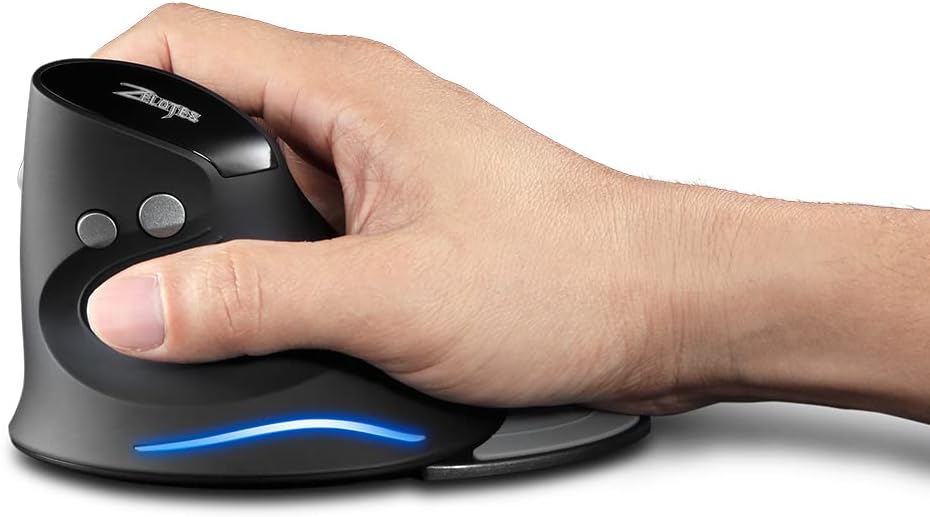
Image: A hand demonstrating the natural, ergonomic grip on the Zelotes F17 vertical mouse.
4.2 Funkcje przycisków
- Lewy przycisk myszy: Standardowa funkcja kliknięcia podstawowego.
- Kliknij prawym przyciskiem myszy: Standardowa funkcja dodatkowego kliknięcia.
- Kółko przewijania: Scroll up or down, and click for middle-button functionality.
- Przycisk DPI: Przełącza między ustawieniami DPI (1200/1600/2400 DPI).
- Przyciski do przodu/do tyłu: Located on the thumb side, these buttons allow for quick navigation in web przeglądarki lub file odkrywcy.
4.3 regulowane DPI
Press the DPI button (located near the scroll wheel) to switch between 1200, 1600, and 2400 DPI settings. This allows you to adjust the mouse sensitivity to suit your task, whether it's precise graphic design or fast-paced gaming.
4.4 Detachable Palm Rest
The Zelotes F17 includes a detachable palm rest for additional wrist support. You can easily attach or remove it based on your preference and comfort needs.

Image: The Zelotes F17 mouse with its detachable palm rest separated, illustrating the modular design.
5. Konserwacja
To ensure the longevity and optimal performance of your Zelotes F17 mouse, follow these maintenance guidelines:
- Czyszczenie: Do przecierania powierzchni myszy użyj miękkiej, suchej ściereczki. W przypadku uporczywych zabrudzeń delikatnie przetrzyjampPrzetrzyj ściereczkę wodą lub delikatnym środkiem czyszczącym. Unikaj stosowania silnych środków chemicznych i materiałów ściernych.
- Wymiana baterii: When the mouse's performance degrades or the LED illumination dims, it's time to replace the AA batteries. Refer to Section 3.1 for battery installation instructions.
- Składowanie: When not in use for extended periods, turn off the mouse to conserve battery life. Store the USB receiver in its dedicated slot on the underside of the mouse to prevent loss.
6. Rozwiązywanie Problemów
If you encounter issues with your Zelotes F17 mouse, try the following solutions:
| Problem | Możliwa przyczyna | Rozwiązanie |
|---|---|---|
| Mysz nie reaguje | Low battery; USB receiver disconnected; Mouse is off. | Replace batteries; Re-insert USB receiver; Turn mouse On. |
| Nieregularny ruch kursora | Zabrudzony czujnik optyczny; Nieodpowiednia powierzchnia; Niski poziom naładowania baterii. | Clean optical sensor; Use on a smooth, non-reflective surface; Replace batteries. |
| LED illumination not working | Low battery; Mouse is off. | Replace batteries; Turn mouse On. |
| Ustawienie DPI nie ulega zmianie | DPI button malfunction. | Ensure the mouse is powered on and connected. If the issue persists, contact customer support. |
7. Specyfikacje
Key technical specifications for the Zelotes F17 Vertical Wireless Mouse:
| Funkcja | Szczegół |
|---|---|
| Wymiary produktu | 4.33 x 3.39 x 3.15 cala |
| Waga przedmiotu | 3.53 uncji |
| Numer modelu przedmiotu | F17 |
| Marka | zelotes |
| Kolor | Czarny |
| Technologia łączności | USB (2.4 GHz Wireless) |
| Funkcja specjalna | Ergonomic Design, Removable Wrist Rest, LED Illumination |
| Technologia wykrywania ruchu | Optyczny |
| Ustawienia DPI | 1200/1600/2400 DPI |
| Liczba przycisków | 6 |
| Źródło zasilania | 2 baterie AA (brak w zestawie) |
| Zgodność | Win11, Win10, Win8, Win7, Mac OS |

Image: A diagram illustrating the dimensions of the Zelotes F17 Vertical Wireless Mouse.
8. Gwarancja i wsparcie
For warranty information or technical support, please refer to the contact details provided on the product packaging or the official Zelotes webZachowaj paragon jako dowód zakupu.


