Wstęp
This manual provides comprehensive instructions for the setup, operation, and maintenance of your Zoook Rocker Thunder 2 Karaoke Bluetooth Party Speaker. Please read this manual thoroughly before using the product to ensure proper function and to maximize your enjoyment.

Image: The Zoook Rocker Thunder 2 speaker, a black portable unit with colorful LED lights on the front grille, a control panel on top, and a wired microphone and remote control beside it.
Co jest w pudełku
Po otwarciu przesyłki prosimy upewnić się, że znajdują się w niej wszystkie poniższe elementy:
- Zoook Rocker Thunder 2 Bluetooth Speaker
- Kabel ładujący Micro USB
- Mikrofon przewodowy
- Instrukcja obsługi (ten dokument)
- Zdalne sterowanie

Image: A visual representation of the package contents, including the speaker, wired microphone, and remote control.
Główne cechy
- 30W Powerful Audio Output: Delivers clear and robust sound for various environments.
- Flashing DJ Lights: Integrated multi-color LED lights enhance the party atmosphere.
- Funkcjonalność karaoke: Includes a wired microphone for singing along to your favorite tracks.
- Wbudowany akumulator: Features a 4000mAh Lithium-Ion battery for portable use.
- Wiele opcji łączności: Supports Bluetooth streaming, USB disk, TF card, AUX input, and FM radio.
- Nagrywanie jednym kliknięciem: Allows recording of microphone input directly to a connected USB or TF card.
- Zdalne sterowanie: Provides convenient control over speaker functions from a distance.

Image: The Zoook Rocker Thunder 2 speaker with icons highlighting its features: One Click Recording, Karaoke Ready, Bluetooth Streaming, TF Card Support, USB Disk, Lithium-Ion Battery, FM Radio, and Flashing DJ Lights.
Przewodnik po konfiguracji
1. Ładowanie głośnika
- Podłącz kabel ładujący Micro USB do portu ładowania głośnika.
- Podłącz drugi koniec kabla do kompatybilnego zasilacza USB (nie ma go w zestawie) lub do portu USB komputera.
- Zaświeci się kontrolka ładowania. Po pełnym naładowaniu kontrolka może zmienić kolor lub zgasnąć, w zależności od modelu.
2. Włączanie/wyłączanie zasilania
- To power on, press and hold the Power button on the control panel.
- Aby wyłączyć urządzenie, naciśnij i przytrzymaj przycisk zasilania ponownie.
3. Connecting the Wired Microphone
- Insert the microphone cable into the MIC input jack on the speaker's control panel.
- Ensure the ON/OFF switch on the microphone is set to 'ON' for operation.
4. Parowanie Bluetooth
- Power on the speaker. It will automatically enter Bluetooth pairing mode, indicated by a flashing Bluetooth light or an audible prompt.
- Włącz Bluetooth w swoim urządzeniu mobilnym (smartfonie, tablecie itp.).
- Szukaj available Bluetooth devices and select "ZOOOK THUNDER 2" from the list.
- Po sparowaniu głośnik wyemituje dźwięk potwierdzający, a kontrolka Bluetooth zaświeci się światłem ciągłym.
Instrukcja obsługi
1. Wybór trybu
- Press the 'MODE' button on the control panel or remote to switch between Bluetooth, FM Radio, AUX, USB, and TF card modes.
2. Tryb Bluetooth
- Po pomyślnym sparowaniu możesz rozpocząć odtwarzanie dźwięku z podłączonego urządzenia.
- Use the speaker's volume knob or your device's volume controls to adjust the sound level.
- Use the 'Previous/Next Track' buttons on the speaker or remote to navigate songs.
3. Funkcja karaoke
- Ensure the wired microphone is connected and powered on.
- Adjust the microphone volume using the dedicated 'MIC VOL' knob (if available) or the main volume control.
- To add an echo effect, use the 'ECHO' knob to control the intensity.

Image: The Zoook Rocker Thunder 2 speaker with a vintage-style microphone, emphasizing its karaoke feature and 30-watt power.
4. Tryb radia FM
- Switch to FM mode using the 'MODE' button.
- Press and hold the 'Play/Pause' button to initiate an automatic station scan. The speaker will save available stations.
- Use the 'Previous/Next Track' buttons to switch between saved FM stations.
5. Odtwarzanie z USB/karty TF
- Insert a USB flash drive or TF (MicroSD) card into the respective port.
- Głośnik automatycznie przełączy się w tryb USB/TF i rozpocznie odtwarzanie dźwięku files.
- Use the 'Previous/Next Track' and 'Play/Pause' buttons to control playback.
6. Funkcja nagrywania
- Ensure a USB drive or TF card is inserted.
- Press the 'REC' button to start recording microphone input.
- Press 'REC' again to stop recording. The recording will be saved to the inserted storage device.
7. DJ Lights Control
- Press the 'ON/OFF LED' button on the control panel to toggle the flashing DJ lights on or off.
Wideo: Film promocyjny pokazującyasing the Zoook Rocker Thunder 2 speaker in a party setting, demonstrating its sound and flashing lights, and highlighting its portability and karaoke features.
Video: An Amazon.in product video highlighting the key features of the Zoook Rocker Thunder 2 speaker, including its 30W power, DJ lights, karaoke function, and built-in battery.
Konserwacja
- Czyszczenie: Use a soft, dry cloth to clean the speaker's exterior. Avoid using harsh chemicals or abrasive cleaners.
- Pielęgnacja baterii: To prolong battery life, fully charge the speaker before first use and recharge it regularly, even if not in frequent use. Avoid completely draining the battery.
- Składowanie: Przechowuj głośnik w chłodnym, suchym miejscu, z dala od bezpośredniego światła słonecznego i ekstremalnych temperatur.
- Narażenie na działanie wody: Ten głośnik nie jest wodoodporny. Unikaj narażenia na działanie wody i wysokiej wilgotności.
Rozwiązywanie problemów
- Brak zasilania: Ensure the speaker is charged. Connect the charging cable and allow it to charge for a period before attempting to power on.
- Brak dźwięku: Sprawdź poziom głośności zarówno głośnika, jak i podłączonego urządzenia. Upewnij się, że wybrano prawidłowy tryb wejściowy.
- Mikrofon nie działa: Verify the microphone is securely plugged into the MIC input and its ON/OFF switch is in the 'ON' position. Adjust the microphone volume knob.
- Problemy z połączeniem Bluetooth: Ensure the speaker is in Bluetooth pairing mode. Turn off and on Bluetooth on your device, then try re-pairing. Keep devices within the effective Bluetooth range.
- Słaby odbiór FM: Extend the antenna fully. Try repositioning the speaker to improve signal reception.
Specyfikacje
| Funkcja | Szczegół |
|---|---|
| Model | Grzmot 2 |
| Marka | Zoook |
| Maksymalna moc wyjściowa głośników | 30 watów |
| Źródło zasilania | Zasilany bateryjnie |
| Typ baterii | Litowo-jonowy (4000mAh) |
| Średnia żywotność baterii | 6 godzin |
| Technologia łączności | AUX, Bluetooth, USB, Wireless |
| Tryb wyjścia audio | Stereofoniczny |
| Cechy specjalne | Bluetooth, Portable, Wireless, Flashing DJ Lights, Karaoke |
| Wymiary produktu (dł. x szer. x wys.) | Wymiary 30 x 17 x 38 cm |
| Waga przedmiotu | 3.2 kilogramów |
| Kolor | Czarny |
| Kraj pochodzenia | Chiny |

Image: The Zoook Rocker Thunder 2 speaker with its dimensions labeled: 11 inches wide, 5.5 inches deep, and 13.4 inches high.
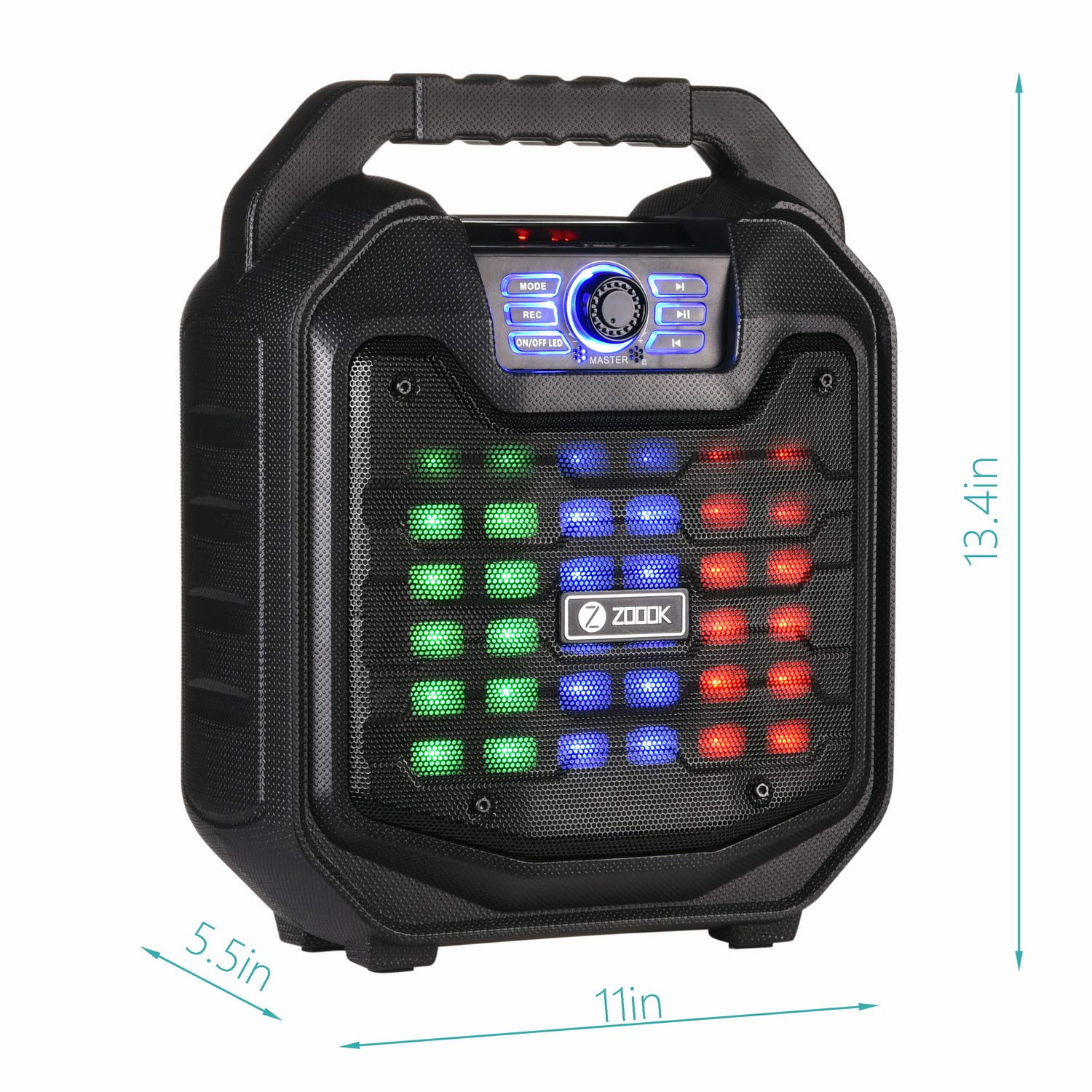
Image: A comparison table showing different models in the Zoook Thunder Series, including the Thunder 2, with specifications like microphone type, wattage, recording, and party lights.
Gwarancja i wsparcie
Your Zoook Rocker Thunder 2 speaker comes with a 1-letnia gwarancja. For any queries, assistance, or support, please use the following contact methods:
- Numer bezpłatny: 1800-103-3544
- Wsparcie e-mailowe: support@zoook.co.in
- Pomoc przez czat: Via Facebook at www.facebook.com/GoZoook
- Service Centre List: Find your nearest service center at https://goo.gl/eezwYW
Please provide us an opportunity to assist you and make your experience delightful!

Image: A graphic displaying Zoook's customer support options, including a toll-free number, email address, and Facebook chat link.


