1. Wprowadzenie
The Marantz SR5013 is a 7.2 channel AV Receiver designed to deliver high-quality audio and video performance for home entertainment systems. It supports advanced audio formats and video technologies, providing a comprehensive solution for your home theater needs.
Główne cechy obejmują:
- 7.2 Channel Surround Sound with 100W per channel output.
- Support for object-based audio formats: Dolby Atmos, DTS:X, and DTS Virtual:X.
- Advanced video processing: Full-rate pass-through, SD/HD video upscaling to Ultra HD, 4:4:4 Pure Color sub-sampmolwa.
- HDR compatibility: HDR10, BT.2020, 3D, 21:9 video, Dolby Vision, and HLG (Hybrid Log-Gamma).
- Multiple HDMI inputs and outputs: 8 HDMI inputs and 2 HDMI outputs with full HDCP 2.2 support.
2. Informacje dotyczące bezpieczeństwa
Przed użyciem urządzenia prosimy o dokładne zapoznanie się z niniejszą instrukcją bezpieczeństwa. Zachowaj instrukcję do wykorzystania w przyszłości.
- Wentylacja: Zapewnij odpowiednią przestrzeń wokół urządzenia, aby zapewnić odpowiednią wentylację. Nie blokuj otworów wentylacyjnych.
- Źródło zasilania: Podłącz urządzenie wyłącznie do gniazdka sieciowego prądu przemiennego.tage określone na tylnym panelu.
- Woda i wilgoć: Nie wystawiaj urządzenia na działanie deszczu ani wilgoci. Nie stawiaj na urządzeniu przedmiotów wypełnionych płynami, takich jak wazony.
- Czyszczenie: Przed czyszczeniem odłącz urządzenie od gniazdka ściennego. Używaj wyłącznie suchej ściereczki.
- Serwisowanie: Nie próbuj samodzielnie naprawiać urządzenia. Wszelkie prace serwisowe zlecaj wykwalifikowanemu personelowi.
3. Konfiguracja
3.1. Rozpakowanie i ustawienie
Carefully remove the receiver and all accessories from the packaging. Ensure all components are present, including the receiver unit, remote control, batteries, and setup microphone.

The Marantz SR5013 AV Receiver positioned within a home entertainment environment, illustrating typical placement for optimal performance and ventilation.
Place the receiver on a stable, level surface with sufficient space around it for proper ventilation. Avoid placing it in direct sunlight or near heat sources.
3.2. Połączenia
Przed dokonaniem jakichkolwiek podłączeń należy upewnić się, że odbiornik i wszystkie podłączone urządzenia są wyłączone i odłączone od gniazdek ściennych.
3.2.1. Połączenia HDMI
Connect your video sources (e.g., Blu-ray player, game console, streaming device) to the HDMI input ports on the rear of the receiver. Connect your TV or projector to one of the HDMI output ports.
- The SR5013 features 8 HDMI inputs and 2 HDMI outputs.
- All HDMI ports support HDCP 2.2 for protected content.
- The receiver supports 4K Ultra HD pass-through and upscaling.
3.2.2. Połączenia audio
Podłącz głośniki do odpowiednich zacisków głośnikowych na tylnym panelu. Upewnij się, że biegunowość każdego głośnika jest prawidłowa (+ do + i - do -).
- Supports 7.2 channel speaker configurations.
- Dedicated terminals for front, center, surround, and surround back/height speakers.
3.2.3. Połączenia na panelu przednim

Close-up of the front panel connections on the Marantz SR5013, including AUX1 HDMI input, USB port, and setup microphone input.
The front panel provides convenient access to additional inputs:
- AUX1 HDMI: For temporary connection of HDMI devices.
- Port USB: Do podłączania urządzeń pamięci masowej USB w celu odtwarzania dźwięku files.
- SETUP MIC: For connecting the supplied setup microphone for room calibration.
3.3. Wstępna konfiguracja
After making all physical connections, power on the receiver and your display device. The receiver will guide you through the initial setup process using an on-screen display.
3.3.1. On-Screen Smart Menu

An on-screen display of the Marantz SR5013's Smart Menu, showing options for "Now Playing," "Source," "Sound Mode," and "Setup Menu."
Follow the on-screen instructions to configure basic settings such as language, network connection, and speaker setup.
3.3.2. Kalibracja pomieszczenia Audyssey
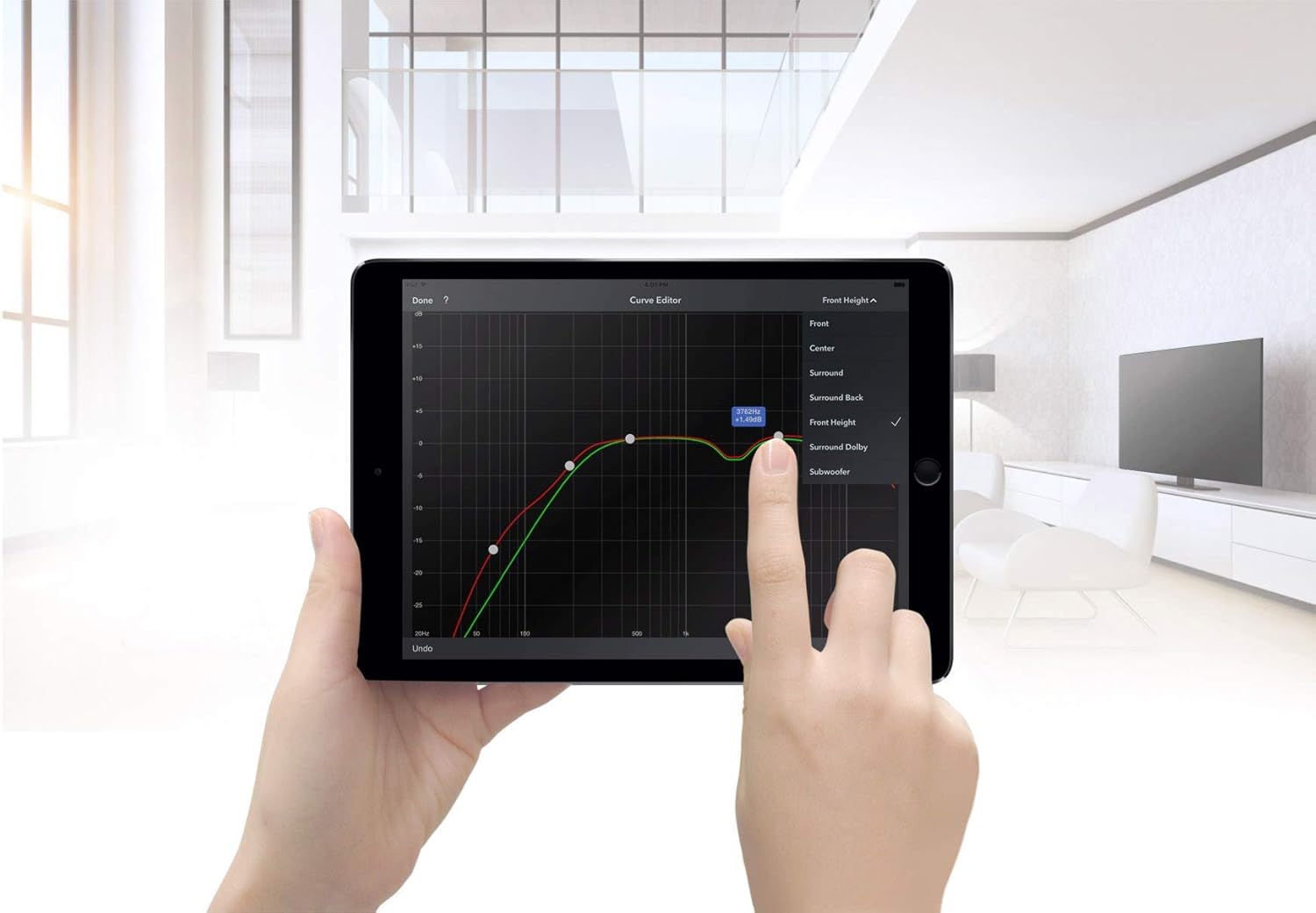
A tablet displaying the Audyssey MultEQ XT32 curve editor, used for precise room acoustic calibration of the Marantz SR5013.
Use the supplied setup microphone and the Audyssey MultEQ XT32 calibration system to automatically measure and optimize your speaker settings for your listening environment. This process ensures the best possible sound quality.
4. Instrukcja obsługi
4.1. Pilot zdalnego sterowania

The RC036SR remote control for the Marantz SR5013 AV Receiver, displaying various buttons for device control, input selection, and sound modes.
The included remote control (RC036SR) provides full control over the receiver's functions. Insert the two AA batteries (not included) into the remote control, observing correct polarity.
4.2. Podstawowa obsługa
- Włączanie/wyłączanie: Press the POWER button on the remote or the front panel.
- Wybór wejścia: Use the INPUT SELECTOR knob on the front panel or the dedicated input buttons on the remote (e.g., Blu-ray, TV Audio, Game) to switch between connected sources.
- Regulacja głośności: Use the VOLUME knob on the front panel or the VOLUME +/- buttons on the remote to adjust the sound level.
4.3. Tryby audio
The SR5013 supports various audio modes to enhance your listening experience:
- Dolby Atmos: Provides immersive, multi-dimensional sound by adding overhead audio effects.
- DTS:X: Object-based audio technology that delivers flexible and immersive soundscapes.
- Wirtualny DTS:X: Creates a virtual height and surround effect without the need for dedicated height or surround speakers.
- Stereo: For traditional two-channel audio playback.
Use the 'SOUND MODE' button on the remote control to cycle through available audio modes.
4.4. Funkcje wideo
The receiver processes and passes through various video signals:
- HDR10, Dolby Vision, HLG: Support for High Dynamic Range video formats for enhanced contrast and color.
- BT.2020: Wide color gamut support for more vibrant and realistic colors.
- 3D and 21:9 Video: Compatibility with 3D content and ultra-wide aspect ratio displays.
5. Konserwacja
- Czyszczenie: Przetrzyj urządzenie miękką, suchą ściereczką. Nie używaj środków czyszczących o właściwościach ściernych ani rozpuszczalników.
- Wentylacja: Regularnie sprawdzaj, czy otwory wentylacyjne nie są zablokowane kurzem lub zanieczyszczeniami.
- Przewód zasilający: Okresowo sprawdzaj przewód zasilający pod kątem uszkodzeń.
6. Rozwiązywanie Problemów
If you encounter issues with your Marantz SR5013, refer to the following common troubleshooting steps:
- Brak zasilania: Ensure the power cord is securely connected and the wall outlet is functioning. Check the power switch on the unit.
- Brak dźwięku: Verify speaker connections, input selection, and volume level. Check if the MUTE function is active. Ensure the correct audio output mode is selected.
- Brak wideo: Confirm HDMI cable connections between the source, receiver, and TV. Ensure the correct HDMI input is selected on both the receiver and the TV. Check video output settings on the source device.
- Pilot nie działa: Check the batteries and ensure they are inserted correctly. Point the remote directly at the receiver's remote sensor.
- Problemy z łącznością Bluetooth: Ensure the receiver's Bluetooth function is enabled and the device you are trying to connect is in pairing mode. Move the devices closer to each other.
For persistent issues, consult the full troubleshooting guide in the comprehensive user manual (if available) or contact customer support.
7. Specyfikacje
| Funkcja | Specyfikacja |
|---|---|
| Nazwa marki | Marantz |
| Numer modelu | SR5013 |
| Moc wyjściowatage | 100 W na kanał |
| Kolor | Czarny |
| Cechy specjalne | Support 3D Audio |
| Wymiary produktu (dł. x szer. x wys.) | Wymiary 33.81 x 43.99 x 16.1 cm |
| Waga przedmiotu | 12.38 kilogramów |
| Wymagane baterie | 2 baterie AA (do pilota) |
| Technologia łączności | Bezprzewodowy (Bluetooth, Wi-Fi) |
| Typ kontrolera | Asystent Google (sterowanie głosowe) |
| Kompatybilne urządzenia | Telewizja |
| Wszystkie porty HDMI | 10 (8 wejść, 2 wyjścia) |
| Typ złącza | HDMI |
| Tryb wyjścia audio | Stereo, Surround, Dolby Atmos, DTS:X, DTS Virtual:X |
| Konfiguracja kanału dźwięku przestrzennego | 7.2 kanały |
| Obsługa kodowania wideo | HDR10, BT.2020, 3D, 21:9, Dolby Vision, HLG |
8. Gwarancja i wsparcie
This Marantz SR5013 AV Receiver is offered as a refurbished product. Refurbished products are typically inspected and tested to function like new.
Odnowiona gwarancja Amazon: If purchased through Amazon Renewed, this product is eligible for replacement or refund under the Amazon Renewed Guarantee if you are not satisfied with your purchase.
Gwarancja producenta: Please be aware that manufacturer warranties for new products may not apply to refurbished units. Some users have reported that Marantz may not honor warranty claims for products purchased as renewed. It is advisable to verify warranty coverage directly with the seller or Marantz if this is a concern.
For further assistance, please refer to the seller's support channels or the official Marantz website for product documentation and service information.


