Wstęp
The Insignia NS-SPBTWAVE2-BK Wave 2 Portable Bluetooth Speaker provides high-quality wireless audio streaming from your compatible devices. Designed for versatility, its robust construction and rubberized feet allow for stable placement in both horizontal and vertical orientations. Enjoy hands-free communication with the built-in speakerphone and extended listening sessions thanks to its 12-hour battery life.
This manual provides essential information for setting up, operating, maintaining, and troubleshooting your speaker. Please read it thoroughly before use and retain it for future reference.
Zawartość opakowania
Sprawdź, czy w przesyłce znajdują się wszystkie elementy:
- Insignia NS-SPBTWAVE2-BK Wave 2 Portable Bluetooth Speaker
- Kabel ładujący USB
- 3.5mm Audio Cable (Auxiliary)
- Szybki przewodnik konfiguracji (lub podobna dokumentacja)
Cechy produktu
- Połączenie bezprzewodowe: Connects wirelessly to smartphones, tablets, and other Bluetooth-enabled devices.
- Długa żywotność baterii: Features a rechargeable 2,000 mAh battery, providing up to 12 hours of playback on a full charge.
- Wbudowany mikrofon: Enables hands-free calling directly through the speaker.
- Dodatkowe wejście audio: Allows for wired connection to audio devices via a 3.5mm audio cable.
- Wszechstronne rozmieszczenie: Designed to stand securely in both horizontal and vertical positions.
Części głośnika
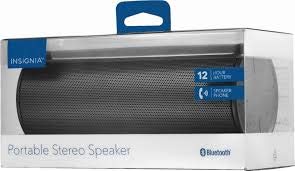
Rycina 1: Przód view of the Insignia Wave 2 Speaker in horizontal orientation.

Rysunek 2: Pionowy view of the speaker, illustrating the power button, charging port, and auxiliary input port at the bottom.
Refer to the images above for the location of key components such as the power button, volume controls, Bluetooth indicator, charging port, and auxiliary input.
Organizować coś
1. Ładowanie głośnika
- Connect the small end of the USB charging cable to the charging port on the speaker (refer to Figure 2).
- Connect the large end of the USB charging cable to a USB power adapter (not included) or a powered USB port on a computer.
- The charging indicator light will illuminate. Allow approximately 12 hours for a full charge before first use. The indicator light will change or turn off once charging is complete.
2. Parowanie Bluetooth
- Ensure the speaker is fully charged. Press and hold the Power button to turn on the speaker. The Bluetooth indicator light will begin to flash, indicating it is in pairing mode.
- On your Bluetooth-enabled device (smartphone, tablet, etc.), navigate to the Bluetooth settings and ensure Bluetooth is enabled.
- Szukaj available devices. Select "Insignia Wave 2" from the list.
- Once paired, the Bluetooth indicator light on the speaker will become solid, and you may hear an audible confirmation.
- Jeśli zostaniesz poproszony o podanie hasła, wpisz „0000”.
3. Auxiliary (Wired) Connection
- Connect one end of the 3.5mm audio cable to the AUX input port on the speaker (refer to Figure 2).
- Connect the other end of the 3.5mm audio cable to the headphone jack or audio output port of your audio device.
- The speaker will automatically switch to auxiliary mode when a cable is detected.
Obsługa głośnika
Włączanie/wyłączanie zasilania
- To turn on: Press and hold the Power button until the indicator lights illuminate.
- To turn off: Press and hold the Power button until the indicator lights turn off.
Kontrola głośności
- Dostosuj głośność za pomocą przycisków głośności znajdujących się na głośniku.
- You can also control the volume from your connected Bluetooth device or auxiliary audio source.
Rozmowy bez użycia rąk
Po podłączeniu za pomocą Bluetooth głośnik można wykorzystać do prowadzenia rozmów w trybie głośnomówiącym:
- Odbierz połączenie: Naciśnij przycisk Odtwórz/Pauza/Połącz jeden raz.
- Zakończ połączenie: Press the Play/Pause/Call button once during a call.
- Odrzuć połączenie: Naciśnij i przytrzymaj przycisk Odtwórz/Pauza/Połącz.
- Speak clearly towards the speaker's built-in microphone for optimal voice pickup.
Konserwacja
- Czyszczenie: Do czyszczenia obudowy głośnika należy używać miękkiej, suchej i niepozostawiającej włókien ściereczki. Nie należy używać płynów czyszczących, aerozoli ani rozpuszczalników.
- Pielęgnacja baterii: To prolong battery life, avoid fully discharging the battery frequently. Recharge the speaker regularly, even if not in use. Avoid exposing the speaker to extreme temperatures (hot or cold).
- Składowanie: When not in use for extended periods, store the speaker in a cool, dry place away from direct sunlight and moisture.
- Wodoodporność: Ten głośnik jest NIE Wodoodporny. Unikać narażenia na działanie wody i nadmiernej wilgoci.
Rozwiązywanie problemów
| Problem | Możliwe rozwiązanie |
|---|---|
| Głośnik nie włącza się. | Upewnij się, że bateria jest naładowana. Podłącz głośnik do źródła zasilania za pomocą kabla ładującego USB. |
| Brak dźwięku z głośnika. | Check the volume level on both the speaker and the connected device. Ensure the correct input source (Bluetooth or AUX) is selected. Verify the Bluetooth connection or auxiliary cable. |
| Nie można sparować przez Bluetooth. | Ensure the speaker is in pairing mode (flashing Bluetooth indicator). Turn off and on Bluetooth on your device. Move the speaker closer to your device. Forget the speaker from your device's Bluetooth list and try pairing again. |
| Niska jakość dźwięku lub zniekształcenia. | Ensure the speaker is within Bluetooth range (approx. 33 ft / 10 m). Reduce the volume on the source device or speaker. Check for interference from other wireless devices. Try a different audio source or file. |
| Mikrofon nie działa podczas rozmów. | Ensure the speaker is properly connected via Bluetooth. Speak directly towards the speaker. Check your phone's call settings to ensure audio is routed to the Bluetooth speaker. |
Specyfikacje
- Nazwa modelu: Fala 2
- Numer modelu: NS-SPBTWAVE2-BK
- Technologia łączności: Bluetooth
- Czas pracy baterii: Do 12 godzin
- Typ baterii: 1 litowo-jonowy (w zestawie)
- Czas ładowania: Około 12 godzin
- Wymiary produktu: 6.8 x 2.8 x 2.8 cala (17.3 x 7.1 x 7.1 cm)
- Waga przedmiotu: 1 funta (0.45 kg)
- Tryb wyjścia audio: Stereofoniczny
- Stosunek sygnału do szumu: 80dB
- Wbudowany mikrofon: Tak
- Wejście pomocnicze: Tak (3.5 mm)
- Wodoodporny: NIE
- Tworzywo: Plastikowy
- Kod UPC: 600603230455
Gwarancja i wsparcie
This Insignia NS-SPBTWAVE2-BK Wave 2 Portable Bluetooth Speaker comes with a Ograniczona gwarancja. For specific terms and conditions of your warranty, please refer to the warranty card included with your purchase or visit the official Insignia webstrona.
W celu uzyskania wsparcia technicznego, pomocy w rozwiązywaniu problemów lub zgłoszenia reklamacji prosimy o kontakt z Działem Obsługi Klienta Insignia. Dane kontaktowe zazwyczaj znajdują się na stronie internetowej Insignia. webstronie lub w dokumentacji produktu.


