
Victron Energy SCC115045210
Victron Energy SmartSolar MPPT Solar Charge Controller User Manual
Model: SCC115045210
1. Introduction
This manual provides essential information for the installation, operation, and maintenance of your Victron Energy SmartSolar MPPT Solar Charge Controller. Designed to optimize solar energy harvesting and battery longevity, this controller is a reliable component for various solar power systems.
The SmartSolar MPPT charge controller ensures that every ray of available sunlight is converted into usable energy, while optimizing battery longevity. With lightning-fast optimum power point tracking and intelligent charge algorithms, it guarantees maximum possible power output, even when solar panels are partially shaded.
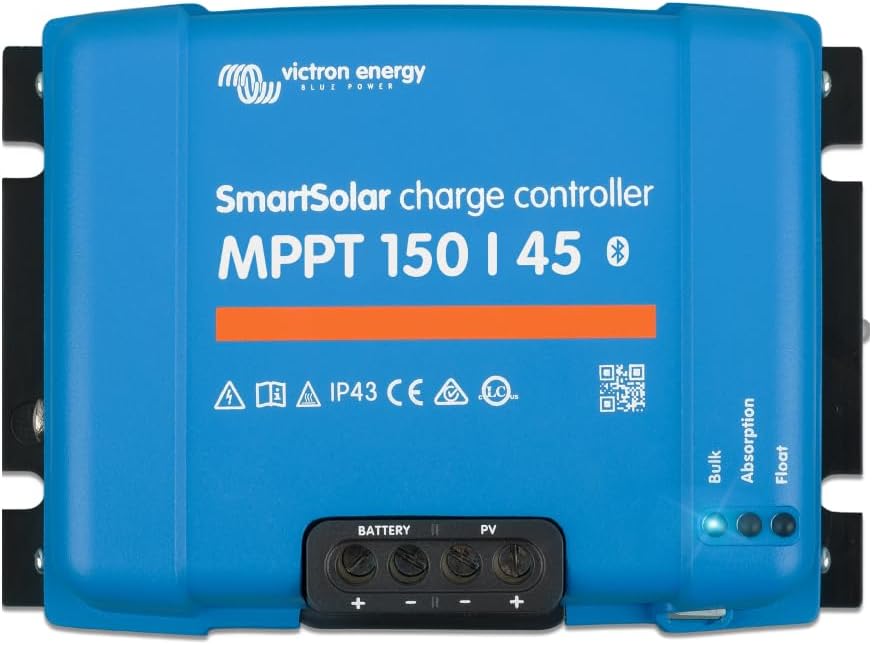
Image 1: Front view of the Victron Energy SmartSolar MPPT Solar Charge Controller.
2. Key Features
- Maximize Power Output: Features lightning-fast optimum power point tracking and intelligent charge algorithms for maximum power output, even in partial shade.
- Synchronized Charging: Multiple SmartSolar MPPT charge controllers can synchronize to behave as one, ensuring battery longevity and system-wide energy optimization.
- Connectivity: The VictronConnect app allows real-time data monitoring, 30-day performance history, device configuration, firmware updates, and alarm settings via Bluetooth.
- Intelligent Load Output: Power devices directly and securely from the solar charger. Configure voltage thresholds for automatic load disconnection to protect batteries.
- Built to Last: Designed for durability in tough conditions.

Image 2: Overview of key features including fast efficiency, professional build quality, industry-leading monitoring, improved battery longevity, and charging synchronization.
3. Specifications
| Attribute | Value |
|---|---|
| Model Number | SCC115045210 |
| Brand | Victron Energy |
| Display Type | LED |
| Operating Temperature | 20 Degrees Celsius |
| Charging Port Type | Solar Panel Input, Battery Output |
| Product Dimensions | 10.63 x 9.84 x 5.91 inches |
| Item Weight | 3.04 ounces (0.19 Pounds) |
| Voltage | 12 Volts (compatible with various system voltages) |
| Material | Plastic |
| Color | Blue |

Image 3: Product dimensions and weight for installation planning.
4. Setup and Installation
The Victron Energy SmartSolar MPPT Charge Controller is designed for straightforward integration into new or existing solar panel setups. Ensure all connections are secure and follow local electrical codes.
4.1. Pre-installation Checklist
- Verify compatibility with your solar panel array and battery bank (voltage and current ratings).
- Ensure adequate ventilation around the controller.
- Have appropriate wiring, fuses, and circuit breakers ready.
- Confirm battery type for correct charging profile selection.
4.2. Connection Steps
- Connect the battery to the controller's battery terminals first.
- Connect the solar panels to the controller's PV terminals.
- (Optional) Connect loads to the controller's load output terminals, if applicable.
- Ensure all connections are tight and polarity is correct.
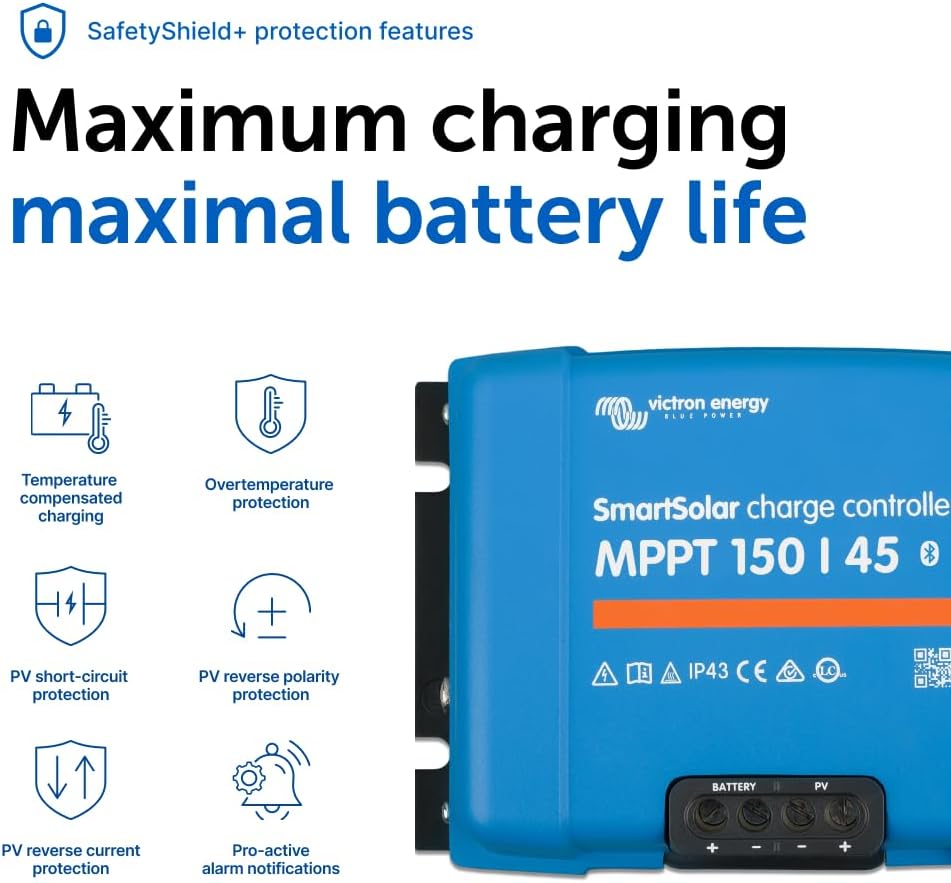
Image 4: Close-up view of the battery and PV input terminals on the SmartSolar MPPT Charge Controller.
5. Operating Instructions
The SmartSolar MPPT controller operates automatically once correctly installed. For advanced monitoring and configuration, use the VictronConnect app.
5.1. VictronConnect App
The VictronConnect app provides comprehensive control and monitoring capabilities. It connects to your controller via Bluetooth.
- Real-time Data: View current solar power production, battery voltage, current, and charge state.
- Performance History: Access 30-day performance logs to track energy harvest over time.
- Configuration: Easily set battery presets, adjust charging parameters, and update firmware.
- Alarms: Set custom alarms for various system parameters.

Image 5: Screenshot of the VictronConnect app displaying real-time solar system data.
5.2. Synchronized Charging
For larger systems, multiple SmartSolar MPPT controllers can be synchronized to work together, ensuring optimal charging across all connected batteries and maximizing their lifespan.

Image 6: Diagram illustrating how multiple SmartSolar controllers can synchronize for enhanced charging efficiency.
5.3. Intelligent Load Output
The intelligent load output feature allows direct powering of DC loads from the controller. This output can be configured to automatically disconnect loads if the battery voltage drops below a user-defined threshold, protecting the battery from deep discharge.
6. Maintenance
Regular maintenance ensures the longevity and optimal performance of your SmartSolar MPPT Charge Controller.
- Visual Inspection: Periodically check for loose connections, damaged wiring, or signs of overheating.
- Cleanliness: Keep the controller clean and free from dust and debris. Ensure cooling fins are not obstructed.
- Firmware Updates: Regularly check for and install firmware updates via the VictronConnect app to ensure the controller has the latest features and bug fixes.
- Battery Health: Monitor battery voltage and state of charge through the app to ensure proper battery health and prevent over-discharge or over-charge.

Image 7: The SmartSolar MPPT Charge Controller is designed with SafetyShield+ protection features for maximum charging and maximal battery life.
7. Troubleshooting
This section provides guidance on common issues you might encounter. For more detailed troubleshooting, refer to the VictronConnect app's diagnostic features or contact support.
| Problem | Possible Cause | Solution |
|---|---|---|
| No power output from PV | Insufficient sunlight; disconnected PV array; blown fuse. | Check sunlight conditions; verify PV connections; inspect and replace fuses if necessary. |
| Battery not charging | Incorrect battery settings; faulty battery; loose battery connections. | Verify battery type and settings in VictronConnect; test battery health; tighten battery connections. |
| Bluetooth connectivity issues | Out of range; interference; app not updated. | Move closer to the device; reduce interference; update VictronConnect app. |
| Overheating | Poor ventilation; excessive load. | Ensure adequate airflow around the unit; reduce load if consistently overheating. |
The VictronConnect app also provides pro-active alarm notifications to help identify and address issues promptly.
8. Warranty and Support
Victron Energy stands by the quality of its products. For specific warranty details, please refer to the documentation included with your product or visit the official Victron Energy website.
For technical support, troubleshooting assistance, or service, please contact your local Victron Energy dealer or refer to the global dealer support network. With 45 years of expertise, Victron Energy provides reliable solutions and professional assistance.
Visit the Victron Energy Store for more products and information.
Related Documents - SCC115045210
 |
Manuel du chargeur solaire Victron Energy SmartSolar MPPT 100/30 & 100/50 Manuel d'utilisation détaillé pour les chargeurs solaires Victron Energy SmartSolar MPPT 100/30 et 100/50. Couvre l'installation, la configuration, le fonctionnement, le dépannage et les spécifications techniques pour une gestion optimale de l'énergie solaire. |
 |
Over-Paneling an MPPT Solar Charge Controller Guide A comprehensive guide explaining the concept and practice of over-paneling MPPT solar charge controllers, including benefits, limitations, and specific controller compatibility. |
 |
Victron Energy MPPT Control Display Manual: Installation, Operation & Specifications Comprehensive user manual for the Victron Energy MPPT Control display. Learn about installation, operation, status and history menus, settings, troubleshooting, warranty, and technical specifications for SmartSolar and BlueSolar MPPT solar chargers. |
 |
MPPT Control Display Manual | Victron Energy Official user manual for the Victron Energy MPPT Control display. Includes installation, mounting, operation, troubleshooting, and technical specifications for the solar charger display. |
 |
Victron Energy SmartSolar MPPT Charge Controllers Manual User manual for Victron Energy SmartSolar MPPT charge controllers (models 75/10, 75/15, 100/15, 100/20, 100/20-48V). Covers features like Bluetooth Smart, VE.Direct, MPPT tracking, load output, battery management, installation, safety, and troubleshooting. |
 |
Victron Energy SmartSolar MPPT Solar Charger Manual Comprehensive manual for Victron Energy SmartSolar MPPT solar charge controllers (150/60, 150/70, 250/60, 250/70). Covers safety, installation, configuration, operation, monitoring, and troubleshooting for efficient solar energy management. |
Ask a question about this manual
Ask about setup, troubleshooting, compatibility, parts, safety, or missing instructions. Manuals+ will review the question and use this page’s manual context to help answer it.