1. Wprowadzenie
The Turtle Beach Stealth 700 is a premium wireless gaming headset designed for an immersive audio experience on PlayStation 5 and PlayStation 4 consoles. This manual provides essential information on setting up, operating, and maintaining your headset, ensuring optimal performance and longevity.

Figure 1: Turtle Beach Stealth 700 Wireless Gaming Headset
2. Co znajduje się w pudełku
Upon unboxing your Turtle Beach Stealth 700 headset, please ensure all the following components are present:
- Turtle Beach Stealth 700 Wireless Gaming Headset
- Bezprzewodowy nadajnik USB
- Kabel ładujący USB-C
- Szybki przewodnik / Dokumentacja
Film 1: Oficjalny produktview and unboxing of the Turtle Beach Stealth 700 headset.
3. Koniec produktuview
Familiarize yourself with the physical components and controls of your Stealth 700 headset.
3.1 Elementy zestawu słuchawkowego

Figure 2: User wearing the Stealth 700 headset, demonstrating its over-ear design.
- Regulowany pałąk: Features a synthetic leather-wrapped headband for comfort.
- Poduszki nauszne: Premium synthetic leather-wrapped ear cushions with ProSpecs glasses-friendly design to relieve pressure.
- 50mm Over-Ear Speakers: Deliver immersive surround sound and chat audio.
- High-Sensitivity Flip-Up Mic: Integrated microphone that mutes when flipped up.
3.2 Sterowanie
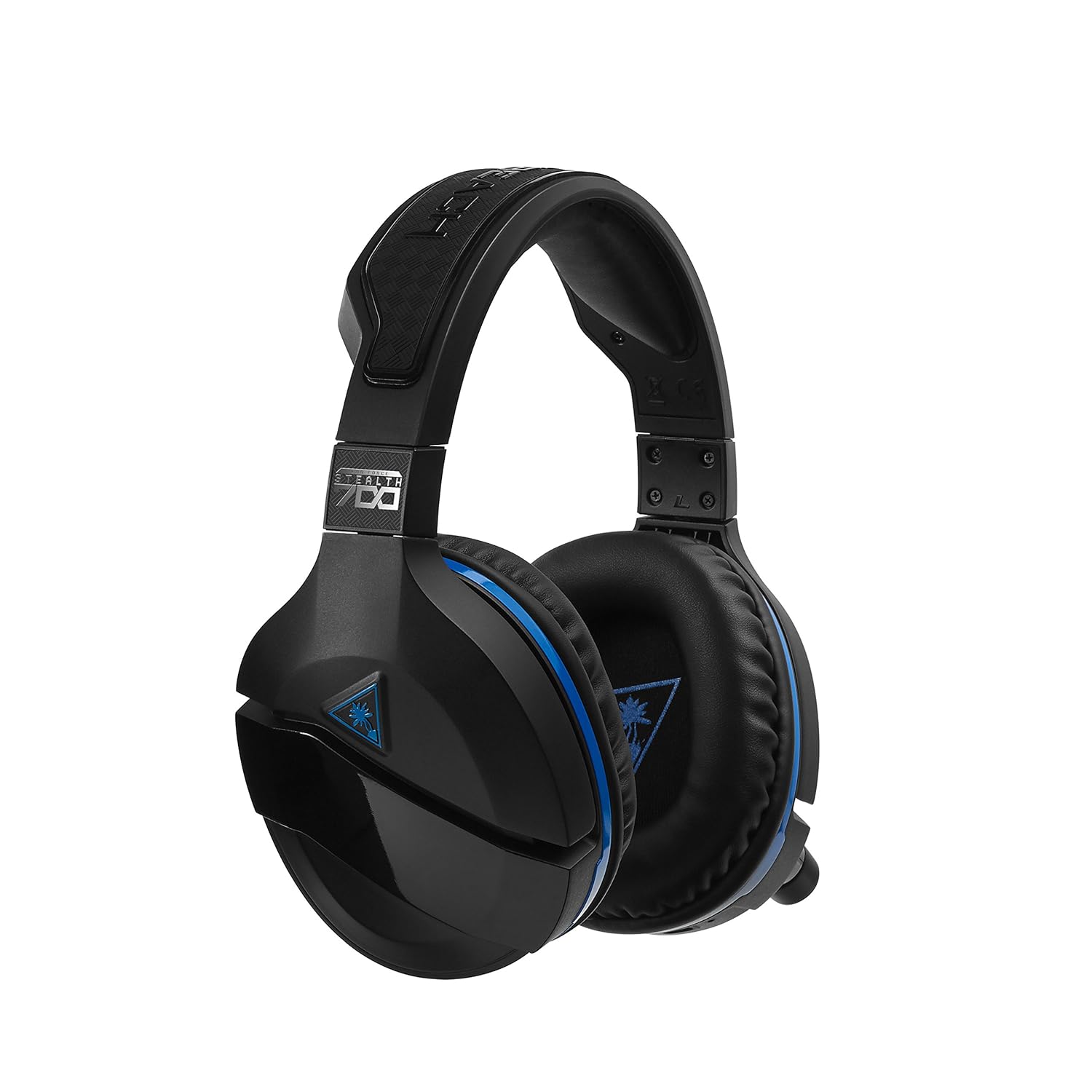
Figure 3: Right earcup controls and microphone in the down position.
- Przycisk zasilania: Włącza/wyłącza zestaw słuchawkowy.
- Przycisk Bluetooth: Inicjuje parowanie Bluetooth.
- Game Volume Dial: Adjusts the overall game audio volume.
- Chat Volume Dial: Adjusts the chat audio volume independently.
- Mic Monitoring Dial: Adjusts the level of your own voice heard in the headset.
- Superhuman Hearing Button: Activates/deactivates the Superhuman Hearing sound setting.
- Przycisk trybu: Cycles through DTS surround sound modes and audio presets.

Figure 4: Microphone in the flipped-up (muted) position.
4. Instrukcje konfiguracji
Follow these steps to set up your Turtle Beach Stealth 700 headset with your PlayStation console.
4.1 Pierwsze ładowanie
- Connect the USB-C Charging Cable to the headset and a USB power source.
- Charge the headset fully before first use (approximately 5 hours). The LED indicator will change when fully charged.
4.2 Connecting to PlayStation (Wireless)
- Plug the Wireless USB Transmitter into an available USB port on your PlayStation console.
- Power on your Stealth 700 headset by pressing and holding the Power Button until the LED illuminates.
- The headset and transmitter should automatically pair. A solid LED on both indicates a successful connection.
- Na PlayStation przejdź do Ustawienia > Urządzenia > Urządzenia audio.
- Ustawić Urządzenie wejściowe Do Zestaw słuchawkowy USB (Turtle Beach Stealth 700).
- Ustawić Urządzenie wyjściowe Do Zestaw słuchawkowy USB (Turtle Beach Stealth 700).
- Ustawić Wyjście na słuchawki Do Wszystkie audio.
- Adjust your volume levels as desired.
4.3 Bluetooth Pairing (for Mobile Devices)
The Stealth 700 supports Bluetooth connectivity for calls, music, and the Turtle Beach Audio Hub app while gaming.
- With the headset powered on, press and hold the Przycisk Bluetooth until the headset announces "Bluetooth Pairing" and the LED flashes blue.
- On your mobile device, go to Bluetooth settings and select "Stealth 700" from the list of available devices.
- The headset will announce "Bluetooth Paired" when the connection is successful.
5. Instrukcja obsługi
5.1 Basic Audio Control
- Głośność gry: Use the upper dial on the left earcup to adjust game audio.
- Chat Volume: Use the lower dial on the left earcup to adjust chat audio.
5.2 Korzystanie z mikrofonu
- Aby wyłączyć wyciszenie: Flip the microphone down.
- Aby wyciszyć: Flip the microphone up. The headset will provide an audible cue.
- Variable Mic Monitoring: Adjust the lower dial to control how much of your own voice you hear in the headset.
5.3 Aktywna redukcja szumów (ANC)
The Stealth 700 features active noise-cancellation to minimize external distractions.
- Aby aktywować/dezaktywować: Press the Power Button briefly while the headset is on. The headset will announce the status.
5.4 Superhuman Hearing
This exclusive Turtle Beach sound setting enhances critical in-game sounds like footsteps and weapon reloads.
- Aby aktywować/dezaktywować: Press the dedicated Superhuman Hearing button on the left earcup.
5.5 Audio Presets and DTS Surround Sound
Cycle through different audio presets and DTS surround sound modes for an optimized listening experience.
- To Cycle: Naciśnij Przycisk trybu to switch between available presets (e.g., Bass Boost) and DTS Headphone:X 7.1 surround sound options.
6. Turtle Beach Audio Hub App
The Turtle Beach Audio Hub app (available for iOS and Android) allows you to customize various settings of your Stealth 700 headset via Bluetooth.
- Adjust mic monitoring levels.
- Select DTS surround sound modes.
- Choose from various audio presets, including Bass Boost.
- Enable/disable Dynamic Chat Boost.
- Zarządzaj połączeniami Bluetooth.
7. Konserwacja
Właściwa pielęgnacja zapewnia trwałość i wydajność zestawu słuchawkowego.
- Czyszczenie: Użyj miękkiego, damp cloth to clean the headset. Avoid harsh chemicals.
- Składowanie: Przechowuj zestaw słuchawkowy w chłodnym, suchym miejscu, z dala od bezpośredniego światła słonecznego i ekstremalnych temperatur.
- Pielęgnacja baterii: Aby zapewnić optymalną żywotność baterii, unikaj częstego całkowitego rozładowywania. Ładuj ją regularnie.
8. Rozwiązywanie Problemów
If you encounter issues with your Stealth 700 headset, try the following solutions:
8.1 No Audio / Disconnection
- Sprawdź, czy zestaw słuchawkowy jest całkowicie naładowany i włączony.
- Verify the Wireless USB Transmitter is securely plugged into the console.
- Check PlayStation audio settings (Settings > Devices > Audio Devices) to ensure the headset is selected as input/output.
- Try re-pairing the headset and transmitter by powering both off and on.
8.2 Mikrofon nie działa
- Ensure the microphone is flipped down to unmute.
- Check PlayStation audio settings to confirm the headset is selected as the input device.
- Adjust the Mic Monitoring dial to ensure it's not set to zero.
- Jeżeli to możliwe, przetestuj mikrofon za pomocą innej aplikacji lub urządzenia.
8.3 Problemy z parowaniem Bluetooth
- Ensure the headset is in Bluetooth pairing mode (LED flashing blue).
- Forget the "Stealth 700" device from your mobile device's Bluetooth settings and try pairing again.
- Upewnij się, że żadne inne urządzenie Bluetooth nie zakłóca połączenia.
9. Specyfikacje
| Funkcja | Szczegół |
|---|---|
| Numer modelu | TBS-3770-01 |
| Łączność | Wireless (USB Transmitter), Bluetooth |
| Kompatybilne urządzenia | PlayStation 5, PlayStation 4 |
| Typ sterownika audio | Dynamiczny sterownik |
| Rozmiar głośnika | 50mm |
| Żywotność baterii | Do 10 godzin |
| Czas ładowania | Około 5 godzin |
| Wersja Bluetooth | 5.0 |
| Zasięg Bluetooth | 10 metrów |
| Cechy specjalne | DTS Headphone:X 7.1 Surround Sound, Active Noise Cancellation, Superhuman Hearing, ProSpecs Glasses Friendly Design, Dynamic Chat Boost, Variable Mic Monitoring |
| Tworzywo | Faux Leather (ear cushions, headband) |
| Waga przedmiotu | 1.6 funtów |
10. Gwarancja i wsparcie
For detailed warranty information, product registration, and further technical support, please visit the official Turtle Beach webmiejsce na www.turtlebeach.com. You can also find FAQs and additional resources there.


