1. Wprowadzenie
Dziękujemy za zakupasing the ONKYO X-U6(W) CD Receiver System. This manual provides essential information for the safe and efficient operation of your new audio system. Please read it thoroughly before use and keep it for future reference.
The ONKYO X-U6(W) is a versatile CD receiver system featuring Bluetooth with NFC for easy wireless connection to smartphones and tablets, a USB terminal for high-quality digital playback from iPod/iPhone/iPad and MP3 files, a PC IN (USB Type B) terminal for high-quality audio from your computer, and an FM tuner with Wide FM support.
2. Informacje dotyczące bezpieczeństwa
Aby zapewnić bezpieczną obsługę i zapobiec uszkodzeniom, należy przestrzegać następujących środków ostrożności:
- Zasilanie: Podłącz urządzenie wyłącznie do określonego źródła zasilania.tage.
- Wentylacja: Zapewnij odpowiednią wentylację wokół urządzenia. Nie blokuj otworów wentylacyjnych.
- Wilgoć: Nie wystawiaj urządzenia na działanie deszczu ani wilgoci. Nie stawiaj na urządzeniu przedmiotów wypełnionych płynami, takich jak wazony.
- Obce przedmioty: Nie wkładaj żadnych obcych przedmiotów do otworów urządzenia.
- Serwisowanie: Nie próbuj samodzielnie naprawiać urządzenia. Wszelkie prace serwisowe zlecaj wykwalifikowanemu personelowi.
- Umieszczenie: Urządzenie należy ustawić na stabilnej, równej powierzchni, z dala od bezpośredniego światła słonecznego, źródeł ciepła i silnych pól magnetycznych.
3. Zawartość opakowania
Sprawdź, czy w przesyłce znajdują się wszystkie elementy:
- ONKYO X-U6(W) CD Receiver System (Main Unit)
- Pilot zdalnego sterowania (RC-893S)
- Kabel zasilający
- Speaker Cables (2 pairs)
- Antena FM

Rysunek 3.1: Included accessories for the ONKYO X-U6(W) CD Receiver System. This image displays the remote control, power cable, two sets of speaker wires, and an FM antenna, all essential components for setting up and operating the system.
4. Konfiguracja
4.1 Podłączanie głośników
- Podłącz kable głośnikowe do GŁOŚNICY terminals on the rear panel of the main unit. Ensure that the positive (+) and negative (-) terminals on the receiver match those on your speakers.
- Connect the other end of the speaker cables to your passive speakers.
4.2 Podłączanie zasilania
- Connect the supplied power cable to the AC IN terminal on the rear of the unit.
- Podłącz drugi koniec kabla zasilającego do gniazdka ściennego.
4.3 Podłączanie anteny FM
- Podłącz dostarczoną antenę FM do FM ANTENNA 75Ω terminal on the rear panel.
- Rozłóż antenę, aby uzyskać optymalny odbiór.
4.4 Podłączanie urządzeń zewnętrznych
The X-U6(W) offers several options for connecting external audio sources:
- WYRYSOWAĆ: Use RCA audio cables to connect analog audio devices (e.g., a turntable with a phono preamp, an older media player) to the LINE IN (R/L) terminale.
- PC IN (USB Type B): Connect your computer to this terminal using a USB cable for high-quality digital audio playback.
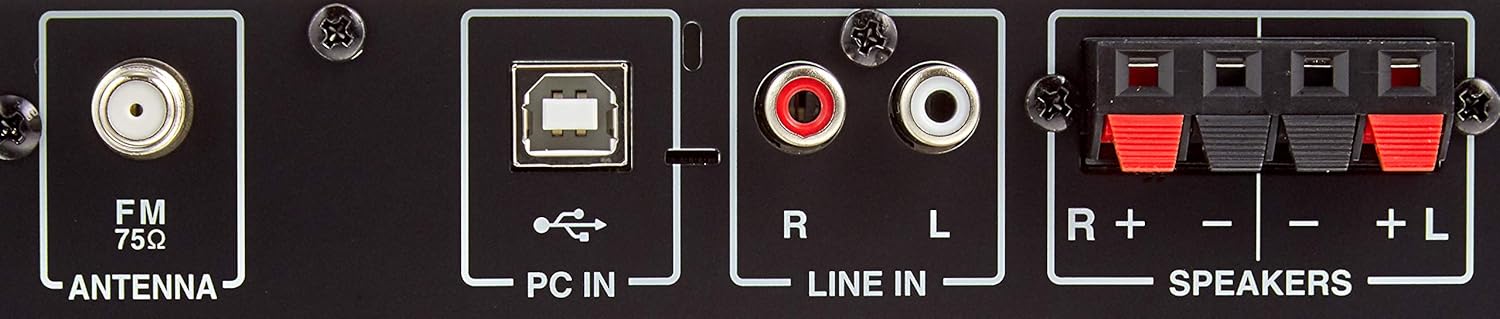
Rysunek 4.1: Rear panel connections. This image highlights the various input and output ports on the back of the receiver, including the FM antenna input, PC IN (USB Type B), LINE IN (RCA stereo), and speaker terminals (R+-, L+-).
5. Instrukcja obsługi
5.1 Włączanie/wyłączanie zasilania
Naciśnij MOC przycisk na panelu przednim lub pilocie, aby włączyć lub wyłączyć urządzenie.
5.2 Odtwarzanie płyt CD
- Naciśnij CD button on the remote control or front panel to select the CD source.
- Naciśnij OTWÓRZ/ZAMKNIJ przycisk otwierający szufladę na płytę CD.
- Umieść płytę CD etykietą do góry w podajniku i naciśnij OTWÓRZ/ZAMKNIJ ponownie, aby je zamknąć.
- Odtwarzanie rozpocznie się automatycznie. Użyj ODTWÓRZ/PAUZA, ZATRZYMYWAĆ SIĘ, I POMINĄĆ przyciski sterujące.
5.3 Odtwarzanie USB
The unit supports playback from iPod/iPhone/iPad and USB memory devices containing MP3 files.
- Connect your iPod/iPhone/iPad or USB memory device to the USB port na panelu przednim.
- Naciśnij USB button on the remote control or front panel to select the USB source.
- Use the navigation buttons (up/down/left/right) and WCHODZIĆ on the remote to browse and select files.
5.4 Bluetooth Connection (NFC)
The X-U6(W) features NFC for quick Bluetooth pairing.
- Naciśnij Bluetooth button on the remote control or front panel to select the Bluetooth source. The Bluetooth indicator will flash.
- For NFC-enabled devices: Touch your NFC-enabled smartphone or tablet to the N-Mark on the unit's front panel. Confirm the pairing on your device.
- W przypadku urządzeń bez funkcji NFC: Enable Bluetooth on your device and search for "ONKYO X-U6". Select it to pair.
- Once paired, the Bluetooth indicator will glow steadily, and you can play audio from your device.
5.5 Strojenie radia FM
- Naciśnij FM button on the remote control or front panel to select the FM tuner.
- Użyj Strojenie +/- przycisków na pilocie, aby ręcznie dostroić się do stacji.
- Aby automatycznie wyszukać stacje, naciśnij i przytrzymaj Strojenie +/- przycisk.
5.6 Using PC IN
- Podłącz komputer do PC IN (USB Type B) terminal on the rear panel using a USB cable.
- Naciśnij PC button on the remote control or front panel to select the PC IN source.
- On your computer, select the ONKYO X-U6 as the audio output device.
5.7 Funkcje zdalnego sterowania
The remote control provides full functionality for the X-U6(W) system.

Rysunek 5.1: Remote Control (RC-893S). This image shows the complete layout of the remote control, detailing buttons for power, source selection (CD, USB, Bluetooth, FM, LINE, PC), playback controls, volume adjustment, menu navigation, timer, mute, folder browsing, sound settings, repeat, and shuffle functions.
- Power (Orange button): Włącza/wyłącza urządzenie.
- CD/USB/Bluetooth/FM/LINE/PC: Wybiera źródło wejściowe.
- Głośność (+/-): Reguluje główną głośność.
- Play/Pause (►/∥): Rozpoczyna lub wstrzymuje odtwarzanie.
- Zatrzymaj (■): Zatrzymuje odtwarzanie.
- Skip (◀◀ / ►►): Skips tracks or files.
- Tuning (◀TUNING / TUNING►): Tunes FM radio frequencies.
- Menu/Enter/Navigation: Do poruszania się po menu i potwierdzania wyborów.
- Regulator czasowy: Sets the sleep timer or playback timer.
- Niemy: Wycisza wyjście audio.
- Wyświetlacz: Zmienia wyświetlane informacje.
- Dźwięk: Accesses sound settings (e.g., bass, treble).
- Powtarzaj/Losuj: Controls playback modes for CD/USB.
6. Konserwacja
To maintain the performance and appearance of your ONKYO X-U6(W) system, follow these guidelines:
- Czyszczenie: Przetrzyj urządzenie miękką, suchą ściereczką. W przypadku uporczywych zabrudzeń użyj ściereczki delikatnie zwilżonej wodą.ampened with water or a mild, non-abrasive cleaner. Do not use harsh chemicals or solvents.
- Wentylacja: Periodically check that the ventilation openings are not blocked by dust or debris.
- Tacka na płyty CD: Keep the CD tray clean and free of dust. Avoid touching the lens inside the CD player.
- Składowanie: Jeśli urządzenie będzie przechowywane przez dłuższy czas, należy odłączyć je od gniazdka elektrycznego i przykryć, aby chronić je przed kurzem.
7. Rozwiązywanie Problemów
If you encounter problems with your unit, refer to the following common issues and solutions:
| Problem | Możliwa przyczyna | Rozwiązanie |
|---|---|---|
| Brak zasilania | Kabel zasilający nie jest dobrze podłączony. | Sprawdź podłączenie kabla zasilającego do urządzenia i gniazdka ściennego. |
| Brak dźwięku | Volume is too low or muted. Incorrect input source selected. Speaker cables not connected properly. | Increase volume, check mute status. Select correct input source. Verify speaker cable connections. |
| Parowanie Bluetooth nie powiodło się | Bluetooth not enabled on device. Unit is too far from device. Interference. | Ensure Bluetooth is enabled on your device. Move device closer to the unit. Avoid sources of interference. |
| Płyta CD nie odtwarza się | Płyta CD jest brudna lub porysowana. Płyta CD została włożona nieprawidłowo. | Clean the CD. Insert CD with label side up. Try a different CD. |
If the problem persists after trying these solutions, please contact your ONKYO dealer or authorized service center.
8. Specyfikacje
| Funkcja | Specyfikacja |
|---|---|
| Marka | Onkyo |
| Numer modelu | X-U6(W) |
| Kolor | Biały |
| Wymiary produktu (dł. x szer. x wys.) | Wymiary 27.3 x 21.5 x 9.9 cm |
| Waga przedmiotu | 1.9 kilogramów |
| Wyjście audio | 15 watów |
| Number of Speakers (ch) | 2 |
| Kompatybilność bezprzewodowa | Bluetooth |
| Technologia łączności | Przewodowy |
| Łączna liczba portów USB | 2 |
| Typ tunera | Szerokie FM |
| Pobór mocy | 32 W |
| Akcesoria | Zdalne sterowanie |
| Baterie w zestawie | NIE |
| Rok wydania | 2016 |
| Cechy produktu | Prosty projekt |
| Styl | Nowoczesny |
9. Gwarancja i wsparcie
For warranty information, please refer to the warranty card or documentation included with your product. Keep your proof of purchase for warranty claims.
For technical support, product registration, or service inquiries, please visit the official Onkyo website or contact your local Onkyo dealer. Contact information can typically be found on the manufacturer's webmiejscu lub w opakowaniu produktu.
Wsparcie online: www.onkyo.pl


