1. Rozpoczęcie pracy
1.1 Zawartość opakowania
Verify that all items are present in your Ultimate Ears Boom 2 package:
- Ultimate Ears Boom 2 Bluetooth Speaker
- Kabel ładujący Micro-USB
- Zasilacz (może się różnić w zależności od regionu)
1.2 Ładowanie głośnika
Before initial use, fully charge your Ultimate Ears Boom 2 speaker. Connect the micro-USB cable to the charging port on the speaker and the other end to the power adapter, then plug into a wall outlet. The LED indicator will show charging status.

The Ultimate Ears Boom 2 speaker, ready for charging.
1.3 parowanie Bluetooth
Aby podłączyć głośnik do urządzenia obsługującego technologię Bluetooth:
- Press and hold the Power button on the top of the speaker until you hear a tone and the LED flashes white.
- Na urządzeniu mobilnym przejdź do ustawień Bluetooth.
- Select 'UE Boom 2' from the list of available devices.
- Once connected, you will hear a confirmation tone from the speaker.

Szczyt view of the speaker, highlighting the power and Bluetooth pairing buttons.
1.4 Ultimate Ears App
For enhanced control and additional features, download the Ultimate Ears app from your device's app store (iOS 9.0 or later required for Apple devices, Android compatible). The app allows for remote power control, equalizer adjustments, and PartyUp mode.
2. Speaker Operation
2.1 Włączanie/wyłączanie zasilania
Press the Power button located on the top of the speaker to turn it on or off. A distinct sound will indicate the power status.
2.2 Regulacja głośności
Adjust the volume using the large '+' and '-' buttons located on the side of the speaker. You can also control the volume from your connected Bluetooth device.
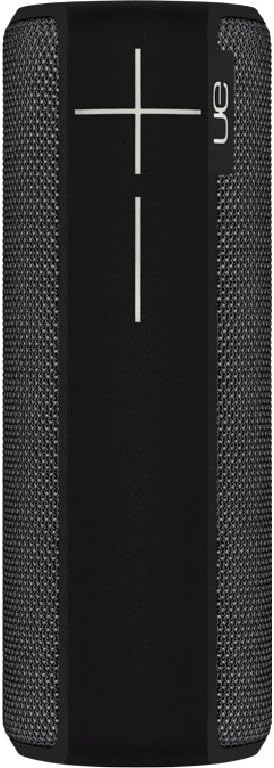
Strona view of the speaker, featuring the prominent volume control buttons.
2.3 Music Control (Tap Gestures)
The Boom 2 features tap controls for music playback:
- Pojedyncze dotknięcie: Tap the top of the speaker once to play or pause the current track.
- Podwójne wciśnięcie: Tap the top of the speaker twice to skip to the next track.
2.4 Stan baterii
To check the battery level, press both the '+' and '-' volume buttons simultaneously. The speaker will announce the remaining battery percentage.
2.5 Cechy wodoodporności i trwałości
The Ultimate Ears Boom 2 is designed to be waterproof (IPX7 rated) and shockproof. It can be immersed in water up to 1 meter for 30 minutes. Ensure the charging port cover is securely closed before exposing the speaker to water.

The speaker's waterproof design allows for use in various environments.

The Ultimate Ears Boom 2 demonstrating its water resistance.
2.6 PartyUp Mode (Connecting Multiple Speakers)
Use the Ultimate Ears app to connect multiple Boom speakers together for a more expansive sound experience. Follow the instructions within the app to activate PartyUp mode.
3. Pielęgnacja i konserwacja
3.1 Instrukcje dotyczące czyszczenia
Do czyszczenia głośnika należy używać miękkiej,amp cloth. Avoid using harsh chemicals or abrasive cleaners, as these can damage the speaker's finish or waterproof seals. Ensure the charging port is dry before charging.
3.2 Żywotność baterii
To maximize battery life, avoid fully discharging the speaker frequently. Charge the speaker regularly, and if storing for an extended period, ensure it has at least a 50% charge.
3.3 Przechowywanie
Store the speaker in a cool, dry place away from direct sunlight and extreme temperatures. Ensure the charging port cover is closed to prevent dust and debris from entering.
4. Przewodnik rozwiązywania problemów
4.1 Brak zasilania
- Ensure the speaker is charged. Connect it to the power adapter and allow it to charge for at least 15 minutes before attempting to power on.
- Naciśnij i przytrzymaj mocno przycisk zasilania przez kilka sekund.
4.2 Problemy z połączeniem Bluetooth
- Ensure the speaker is in pairing mode (flashing white LED).
- Turn off and on Bluetooth on your mobile device.
- Forget 'UE Boom 2' from your device's Bluetooth list and attempt to re-pair.
- Move the speaker closer to your device; the maximum range is approximately 33 meters (100 feet).
4.3 Brak dźwięku lub niski poziom głośności
- Zwiększ głośność głośnika i podłączonego urządzenia.
- Sprawdź, czy głośnik jest prawidłowo podłączony przez Bluetooth.
- Check if the audio source on your device is playing correctly.
4.4 Zniekształcenia dźwięku
- Zmniejsz głośność głośnika i podłączonego urządzenia.
- Zapewnij dźwięk file lub jakość streamingu nie jest niska.
- Odsuń się od potencjalnych źródeł zakłóceń (np. routerów Wi-Fi i innych urządzeń Bluetooth).
4.5 Problemy z łącznością aplikacji
- Ensure your mobile device's operating system meets the app's requirements (iOS 9.0+).
- Uruchom ponownie aplikację lub zainstaluj ją ponownie.
- Ensure the speaker's firmware is up to date via the app.
5. Specyfikacje techniczne
| Funkcja | Specyfikacja |
|---|---|
| Nazwa modelu | Wybuch 2 |
| Numer modelu | 984-000557 |
| ASIN | B0141208EA |
| Technologia łączności | Bluetooth, USB |
| Technologia komunikacji bezprzewodowej | Bluetooth |
| Kompatybilne urządzenia | Computers, Smartphones (Android, iOS) |
| Żywotność baterii | Do 15 godzin |
| Stopień wodoodporności | IPX7 (do 1 metra przez 30 minut) |
| Maksymalny zasięg | 33 metrów (100 stóp) |
| Moc wyjściowa głośnika | 25 watów |
| Wymiary produktu | 6.7D x 6.7W x 18H cm (approx. 15 x 5 x 5 cm; 0.54 grams) |
| Tryb wyjścia audio | Otaczać |
| Źródło zasilania | Zasilanie bateryjne (w zestawie 1 bateria litowo-polimerowa) |
6. Gwarancja i obsługa klienta
6.1 Ograniczona gwarancja
The Ultimate Ears Boom 2 comes with a Limited Warranty. For specific details regarding warranty coverage, terms, and conditions, please refer to the warranty documentation included with your product or visit the official Ultimate Ears webstrona.
6.2 Obsługa klienta
If you encounter any issues not covered in this manual or require further assistance, please contact Ultimate Ears customer support through their official website. For return policies or issues related to your purchase, consult the retailer's (e.g., Amazon.it) help pages.


