1. Wprowadzenie
The Edifier P180 is a stereo earbud headset designed for clear audio and convenient communication. Featuring an inline microphone and control, it offers a comfortable listening experience for various devices.

Figure 1: Edifier P180 Wired Earbud Headset
2. Co znajduje się w pudełku
- Edifier P180 Earbud Headset
- Kabel
3. Główne cechy
- Classic Comfort: Ergonomic design for comfortable wear without irritating the ear canal.
- Doskonała jakość dźwięku: Equipped with 16mm neodymium magnetic monomers for high-fidelity audio playback.
- Integrated Microphone and Control: 3.5mm stereo earphones with a built-in microphone and remote button for mobile phone communication.
- Funkcjonalność: Single button control for picking up/hanging up calls and skipping songs (device dependent for iOS/Android).
- Trwała konstrukcja: Constructed with quality materials for longevity.

Rysunek 2: Ergonomiczna konstrukcja zapewniająca wygodę.
4. Konfiguracja
- Rozpakować: Carefully remove the Edifier P180 headset from its packaging.
- Sprawdzać: Check the earbuds and cable for any visible damage.
- Łączyć: Insert the 3.5mm audio jack into the headphone port of your compatible device (smartphone, tablet, computer, etc.). Ensure the jack is fully inserted for proper audio and microphone function.
- Pozycja: Place the earbuds comfortably in your ears. The ergonomic design is intended to rest well without causing irritation.
5. Instrukcja obsługi
The Edifier P180 features an inline control button for easy management of calls and music playback.
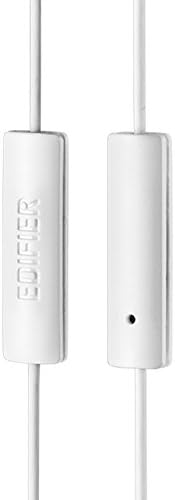
Figure 3: Inline microphone and control button.
- Odbieranie / kończenie połączeń: Press the control button once to answer an incoming call. Press it again to end an active call.
- Odtwarzanie/wstrzymywanie muzyki: Press the control button once to play or pause audio playback.
- Pomijanie utworów: Double-press the control button to skip to the next track. Triple-press to go to the previous track (functionality may vary by device and operating system).
- Asystent głosowy: Long-press the control button to activate your device's voice assistant (e.g., Siri, Google Assistant).
Film 1: Oficjalny produktview of the Edifier P180 Classic Earbud Headsets, demonstrating features and usage.
6. Konserwacja
- Czyszczenie: Delikatnie przetrzyj słuchawki i kabel miękką, suchą ściereczką. Unikaj stosowania silnych środków chemicznych i materiałów ściernych.
- Składowanie: When not in use, store the headset in a clean, dry place, away from extreme temperatures and direct sunlight. Avoid tangling the cable.
- Unikaj wilgoci: Do not expose the headset to water or excessive moisture, as this can damage the internal components.
7. Rozwiązywanie Problemów
- Brak dźwięku:
- Sprawdź, czy wtyczka 3.5 mm jest dokładnie włożona do portu audio urządzenia.
- Sprawdź ustawienia głośności swojego urządzenia.
- Przetestuj słuchawki douszne z innym urządzeniem, aby wykluczyć problem związany z konkretnym urządzeniem.
- Mikrofon nie działa:
- Sprawdź, czy gniazdo 3.5 mm jest całkowicie włożone.
- Sprawdź ustawienia wejścia mikrofonu w swoim urządzeniu.
- Przetestuj mikrofon za pomocą innego urządzenia lub aplikacji.
- Przerywany dźwięk:
- Check the cable for any kinks or damage.
- Upewnij się, że gniazdo audio jest czyste i wolne od zanieczyszczeń.
8. Specyfikacje
| Funkcja | Specyfikacja |
|---|---|
| Numer modelu | P180 |
| Odpowiedź częstotliwościowa | 20 Hz - 20 000 Hz |
| Gniazdo słuchawkowe | 3.5 mm Jack |
| Technologia łączności | Przewodowy |
| Waga przedmiotu | 1.76 uncji (50 grama) |
| Wymiary produktu | 2.01 x 5.59 x 0.91 cala |
| Tworzywo | Neodymowy |
| Typ sterowania | Inline Control Button |
| Impedancja | 32 omy |
| Kontrola hałasu | Izolacja akustyczna |
9. Gwarancja i pomoc techniczna
The Edifier P180 headset is backed by a 1-letnia gwarancja. For any support inquiries or warranty claims, please refer to the contact information provided with your purchase or visit the official Edifier webstrona.


