Wstęp
The Behringer NEKKST K8 is an ultra-linear 150-Watt reference-class studio monitor designed for accurate sound reproduction. It features an 8-inch woofer and a 1-inch silk dome tweeter, utilizing advanced waveguide technology for optimal acoustic dispersion and a wide 'sweet zone'. This monitor operates in a true bi-amping mode with two separate amplifiers for enhanced sound clarity.

Obraz: Przód view of the Behringer NEKKST K8 Studio Monitor, showcasing the 8-inch woofer and 1-inch tweeter.
Ważne instrukcje bezpieczeństwa
Please read and follow all safety instructions before operating the Behringer NEKKST K8 studio monitor. Retain these instructions for future reference.
- Ryzyko porażenia prądem: Do not open the device. Refer all servicing to qualified service personnel.
- Nie wystawiać urządzenia na działanie deszczu i wilgoci.
- Nie należy używać tego urządzenia w pobliżu wody.
- Czyścić wyłącznie suchą szmatką.
- Nie zasłaniaj żadnych otworów wentylacyjnych. Montaż należy wykonać zgodnie z instrukcją producenta.
- Nie należy instalować w pobliżu źródeł ciepła, takich jak grzejniki, kratki wentylacyjne, piece lub inne urządzenia (w tym amp(lifiers) wytwarzające ciepło.
- Chroń przewód zasilający przed deptaniem i przytrzaśnięciem, zwłaszcza przy wtyczkach, gniazdkach i miejscach, w których wychodzi z urządzenia.
- Stosować wyłącznie dodatki/akcesoria wskazane przez producenta.
- Odłączaj urządzenie od zasilania podczas burzy z piorunami lub jeśli nie używasz go przez dłuższy czas.

Image: Safety and regulatory labels found on the Behringer NEKKST K8, indicating electrical warnings and compliance information.
Organizować coś
Rozpakowywanie
Carefully unpack your NEKKST K8 monitor. Inspect the unit for any signs of damage that may have occurred during transit. Retain the original packaging for future transport or storage.
Znajomości
The NEKKST K8 offers both balanced XLR and unbalanced RCA input options. Connect your audio source (e.g., audio interface, mixer) to the appropriate input on the rear panel of the monitor.
- Wejście XLR: For balanced audio signals, providing optimal noise rejection.
- Wejście RCA: For unbalanced audio signals, commonly used with consumer audio equipment.
Ensure the monitor is powered off before making any connections.
Placement and Room Compensation
Proper placement of your studio monitors is crucial for accurate sound reproduction. The NEKKST K8 features 'ROOM COMPENSATION' switches on the rear panel to help optimize its performance for your specific acoustic environment.
- Free Field: Use this setting when the monitor is placed away from walls and corners.
- Ściana: Select this setting if the monitor is placed close to a wall.
- Narożnik: Choose this setting if the monitor is placed in a corner, which typically results in increased bass response.
Experiment with these settings to achieve the most balanced sound in your listening space.
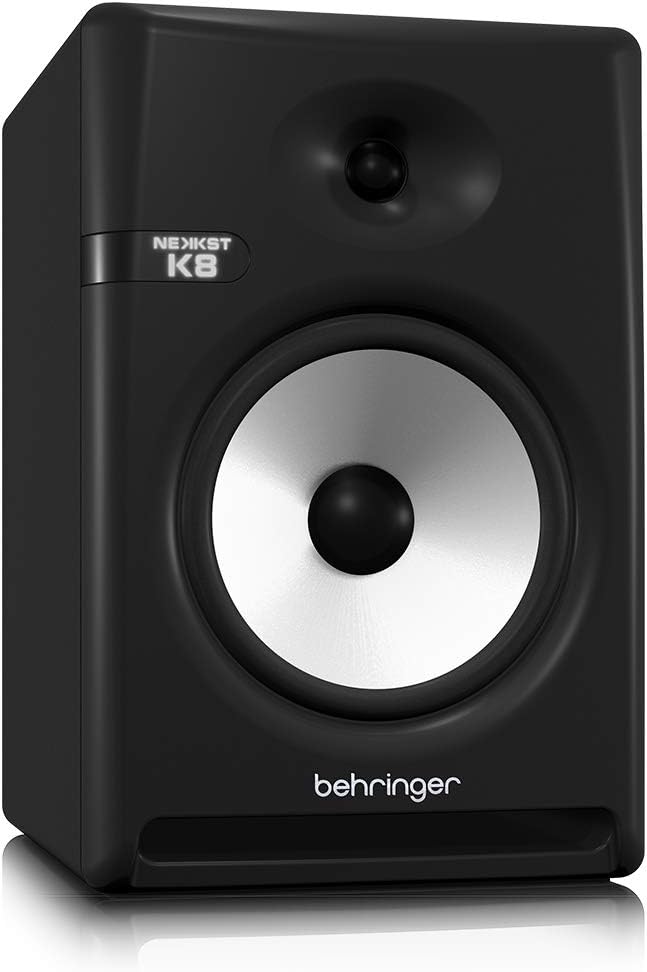
Image: Rear panel of the Behringer NEKKST K8, displaying XLR and RCA inputs, along with various control switches for room compensation and frequency adjustments.

Obraz: Szczegółowy view of the NEKKST K8's rear control panel, highlighting the input trim, frequency adjustments, and room compensation switches.
Podłączenie zasilania
Connect the provided power cord to the AC IN socket on the rear panel and then to a suitable power outlet. Ensure the power switch is in the OFF position before connecting to power.
Działanie
Włączanie/wyłączanie
After all connections are made, switch the power button on the rear panel to the ON position. It is recommended to power on your monitors last and power them off first to prevent any pops or clicks through your speakers.
Input Trim Adjustment
The 'INPUT TRIM' knob on the rear panel allows you to adjust the input sensitivity of the monitor. Start with the knob at a lower setting and gradually increase it to achieve a comfortable listening level without distortion. This control helps match the output level of your audio source to the monitor's input.
Frequency Adjustments
The NEKKST K8 provides 'HIGH FREQUENCY' and 'LOW FREQUENCY' switches for fine-tuning the monitor's response to your listening environment and personal preference. These switches allow you to cut or boost specific frequency ranges.
- WYSOKA CZĘSTOTLIWOŚĆ: Adjusts the treble response. Options typically include flat, -2 dB, +2 dB.
- LOW FREQUENCY: Adjusts the bass response. Options typically include flat, -2 dB, -4 dB, -6 dB. This can be useful for compensating for room acoustics or when using a subwoofer.
Refer to the markings on the rear panel for specific dB adjustments.
Konserwacja
Czyszczenie
To clean the exterior of your NEKKST K8 monitor, use a soft, dry cloth. Do not use liquid cleaners, abrasive cleaners, or solvents, as these can damage the finish or internal components. Ensure the monitor is unplugged before cleaning.
Składowanie
If storing the monitor for an extended period, it is recommended to use the original packaging to protect it from dust and physical damage. Store in a cool, dry place away from direct sunlight and extreme temperatures.
Rozwiązywanie problemów
| Problem | Możliwa przyczyna | Rozwiązanie |
|---|---|---|
| Brak dźwięku |
|
|
| Zniekształcony dźwięk |
|
|
| Buczenie lub hałas |
|
|
Jeśli po wypróbowaniu tych rozwiązań problem nadal występuje, skontaktuj się z obsługą klienta Behringer.
Specyfikacje
| Nazwa modelu | K8 |
| Typ głośnika | Monitor |
| Średnica głośnika niskotonowego | 8 cali |
| Średnica głośnika wysokotonowego | 1 cali |
| Maksymalna moc wyjściowa głośnika | 150 watów |
| Cotage | 150 watów |
| Odpowiedź częstotliwościowa | 20000 Hz (Upper limit; full range typically wider) |
| Technologia łączności | RCA, XLR |
| Tryb wyjścia audio | Stereofoniczny |
| Źródło zasilania | Elektryczny przewodowy |
| Wymiary produktu | 13.4" gł. x 13.4" szer. x 18.8" wys. |
| Waga przedmiotu | 19.18 funtów |
| Tworzywo | Plastic, Metal, Fabric |
| Producent | Music Tribe US |
| UPC | 748252139344 |
Informacje o gwarancji
The Behringer NEKKST K8 Studio Monitor comes with a Limited Warranty. For detailed information regarding warranty terms, conditions, and registration, please refer to the official Behringer webstronie internetowej lub karcie gwarancyjnej dołączonej do produktu.
Wsparcie
For further assistance, technical support, or to download the latest drivers and software, please visit the official Behringer webstronie lub skontaktuj się z działem obsługi klienta.
Możesz również odwiedzić Sklep Behringer na Amazon Aby uzyskać informacje o produkcie i akcesoriach.