1. Koniec produktuview
The Eaton TR7740W-K is a combination USB charger and tamper-resistant AC receptacle designed for convenient charging of electronic devices and safe power access. This device integrates two USB charging ports and a standard 125V AC outlet into a single unit, eliminating the need for bulky adapters.
Główne cechy obejmują:
- Dual USB ports for charging most electronic devices.
- Energy-efficient design compared to traditional plug-in adapters.
- LED indicator light to show charging status; turns off upon full charge.
- 15A 125V tamper-resistant AC receptacle, compliant with 2011 NEC Article 406.12 for child safety.
- UL approved tamper-resistant shutters prevent insertion of foreign objects.
- Backwire clamps on side terminals for easy installation with #12 and #14 AWG wire.
- Designed to replace existing standard duplex receptacles.
2. Informacje dotyczące bezpieczeństwa
OSTRZEŻENIE: To avoid fire, shock, or death, turn off power at the circuit breaker or fuse box and test that power is off before wiring. This device must be installed in accordance with national and local electrical codes.
- Przed instalacją lub serwisowaniem należy zawsze odłączyć zasilanie.
- Use only with copper wire. Do not use with aluminum wire.
- Sprawdź, czy wszystkie połączenia przewodów są solidne.
- Urządzenie jest przeznaczone wyłącznie do użytku wewnątrz pomieszczeń.
- Do not exceed the maximum electrical ratings of the device.
- Jeśli nie masz pewności co do którejkolwiek części niniejszej instrukcji, skonsultuj się z wykwalifikowanym elektrykiem.
Ostrzeżenie dotyczące Propozycji 65: Ten produkt może zawierać substancje chemiczne, o których władze stanu Kalifornia wiedzą, że mogą powodować raka, wady wrodzone lub inne uszkodzenia układu rozrodczego.
3. Zawartość opakowania
- Eaton TR7740W-K Combination USB Charger Receptacle (White)
- (3) Pre-stripped 6-inch wire leads
- Sprzęt montażowy (śruby)
4. Konfiguracja i instalacja
Installation should be performed by a qualified individual. Follow these steps carefully:
- Wyłącz zasilanie: Locate the circuit breaker or fuse box controlling the outlet where you intend to install the receptacle. Turn off the power to that circuit. Verify power is off using a voltagtester.
- Usuń stare gniazdo: Unscrew and carefully pull the existing receptacle from the wall box. Disconnect the wires from the old receptacle. Note the wire connections: typically, black (hot), white (neutral), and bare copper or green (ground).
- Przygotuj przewody: If necessary, strip approximately 1/2 inch (12.7 mm) of insulation from the ends of the circuit wires. The TR7740W-K includes pre-stripped wire leads for convenience.
- Połączenia przewodowe:
- Połącz zielony lub goły miedziany przewód uziemiający from the wall box to the green ground screw on the new receptacle.
- Połącz przewód biały (neutralny) from the wall box to the silver screw terminal or the white pre-stripped wire lead on the new receptacle.
- Połącz czarny (gorący) przewód from the wall box to the brass screw terminal or the black pre-stripped wire lead on the new receptacle.
- For backwire clamps, insert the stripped wire end fully into the clamp opening and tighten the screw firmly.
- Gniazdo montażowe: Carefully push the wired receptacle back into the wall box. Secure it with the mounting screws provided.
- Zainstaluj płytkę ścienną: Attach the decorative wallplate (not included) over the receptacle.
- Przywróć zasilanie: Włącz ponownie zasilanie za pomocą wyłącznika obwodu lub skrzynki bezpiecznikowej.

Obraz 1: Przód view of the Eaton TR7740W-K, highlighting the USB ports and AC outlet.
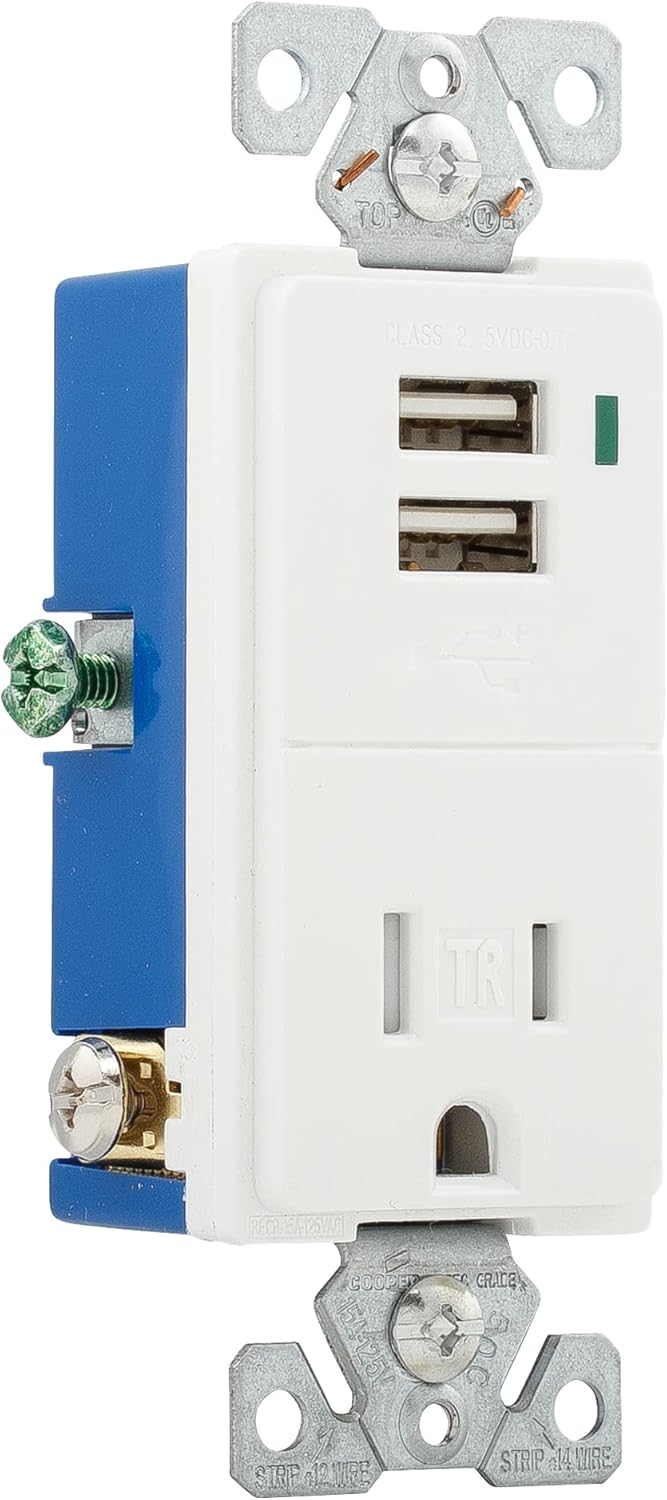
Obraz 2: Bok view of the Eaton TR7740W-K, illustrating the wiring terminals for installation.
5. Instrukcja obsługi
Using your Eaton TR7740W-K combination receptacle is straightforward:
- Ładowanie przez USB: Insert your device's USB charging cable into one of the two USB ports. The LED indicator light will glow to confirm that the device is charging. The light will turn off when the device reaches a full charge.
- Zasilanie prądem zmiennym: Plug any standard 125V AC appliance or charger into the tamper-resistant AC outlet. The tamper-resistant shutters require simultaneous pressure on both slots to open, preventing single-object insertion for enhanced safety.
The USB ports provide a total output of 0.7A (700mA) at 5V DC. While suitable for most smartphones and smaller electronic devices, some high-current devices like certain tablets (e.g., older iPads) may charge slower or not at full speed due to their higher power requirements.
6. Konserwacja
The Eaton TR7740W-K requires minimal maintenance:
- Czyszczenie: Disconnect power before cleaning. Wipe the surface with a soft, damp ściereczka. Nie należy używać środków czyszczących o właściwościach ściernych ani rozpuszczalników.
- Kontrola: Periodically inspect the receptacle for any signs of damage, loose connections, or discoloration. If any issues are found, turn off power and consult a qualified electrician for repair or replacement.
7. Rozwiązywanie Problemów
| Problem | Możliwa przyczyna | Rozwiązanie |
|---|---|---|
| No power to AC outlet or USB ports. | Circuit breaker tripped or fuse blown. Loose wiring connection. | Check and reset the circuit breaker or replace the fuse. Turn off power and check wire connections. |
| USB device not charging or charging slowly. | Device requires higher current than supplied (0.7A total). Faulty USB cable. Device not properly connected. | Verify device's charging requirements. Use a different USB cable. Ensure cable is fully inserted. Note that some high-power devices may charge slower. |
| LED indicator not glowing when charging. | Device is fully charged. Faulty LED. | Check if the device is already fully charged. If not, and the device is charging, the LED may be faulty (does not affect charging function). |
| Difficulty inserting plug into AC outlet. | Tamper-resistant shutters engaged. | Apply firm, even pressure to both prongs of the plug simultaneously to engage the shutters. Do not force. |
8. Specyfikacje
| Funkcja | Szczegół |
|---|---|
| Numer modelu | TR7740W-K |
| Marka | Jeść |
| AC Receptacle Rating | 15A, 125V AC |
| Wyjście USB | 5V DC, 0.7A (700mA) total |
| Okablowanie | Uziemienie 2-biegunowe, 3-żyłowe |
| Kolor | Biały |
| Tworzywo | Miedź |
| Certyfikaty | UL Listed, NEMA |
| Wymiary produktu | Approximately 9.01 x 4.4 x 6.61 inches (overall package) / 1.9 x 3.8 x 5.9 inches (device) |
| Waga przedmiotu | 4.2 uncji |
9. Gwarancja i wsparcie
For warranty information and technical support, please refer to the official Eaton website or contact Eaton customer service directly. Keep your purchase receipt as proof of purchase for any warranty claims.
Obsługa klienta Eaton: Proszę odwiedzić www.eaton.com for contact details and further product information.


