Wstęp
This manual provides comprehensive instructions for the installation, operation, and maintenance of your Aiphone 2-Call DA Series Door Station, model DA-2DS. Please read this manual thoroughly before attempting to install or operate the unit to ensure correct usage and to prevent damage.
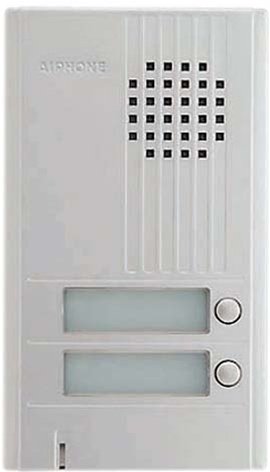
Obraz: Przód view of the Aiphone DA-2DS 2-Call Door Station. This silver unit features two call buttons for multi-tenant or multi-location communication.
Informacje dotyczące bezpieczeństwa
Aby zapobiec obrażeniom ciała i uszkodzeniom sprzętu, należy przestrzegać następujących środków ostrożności:
- Przed przystąpieniem do wykonywania jakichkolwiek czynności związanych z okablowaniem lub konserwacją należy zawsze odłączyć zasilanie.
- Ensure all wiring is compliant with local electrical codes and regulations.
- Nie wystawiaj urządzenia na działanie nadmiernej wilgoci lub ekstremalnych temperatur.
- Use only specified power supplies and accessories.
- Instalacja powinna być wykonana przez wykwalifikowany personel.
Zawartość opakowania
Sprawdź, czy w opakowaniu znajdują się wszystkie elementy:
- Aiphone DA-2DS Door Station Unit
- Śruby montażowe i kotwy
- Instrukcja obsługi (ten dokument)
Organizować coś
Montowanie
Select a suitable mounting location, typically near the entrance, at a height that allows easy access for all users. Ensure the surface is flat and secure. Use the provided mounting screws and anchors to firmly attach the door station to the wall.
Okablowanie
Connect the door station to the indoor master station using appropriate wiring. The DA-2DS requires a 2-wire connection for each call button to the corresponding indoor station. Refer to the wiring diagram provided with your indoor master station for specific connection points. Ensure all connections are secure and insulated.
Początkowe włączenie zasilania
After all wiring is complete and verified, apply power to the system. Test each call button to ensure proper communication with the indoor stations.
Instrukcja obsługi
Wykonywanie połączenia
To initiate a call from the door station, press the desired call button. This will activate the corresponding indoor master station, which will then ring to alert the occupant.
Odbieranie połączenia
When a call is initiated from the door station, the indoor master station will ring. The occupant can answer the call by pressing the talk button on the indoor station. Two-way communication will then be established.
Konserwacja
Czyszczenie
Clean the exterior of the door station periodically with a soft, damp ściereczką. Nie używaj środków czyszczących o działaniu ściernym, rozpuszczalników ani silnych środków chemicznych, ponieważ mogą one uszkodzić wykończenie i elementy wewnętrzne.
Regularne kontrole
Periodically check the mounting screws for tightness and ensure all wiring connections remain secure. Test the call buttons and communication functionality regularly to ensure proper operation.
Rozwiązywanie problemów
| Problem | Możliwa przyczyna | Rozwiązanie |
|---|---|---|
| No sound from door station | Loose wiring connection; faulty speaker/microphone | Check wiring connections at both door and master stations. If problem persists, contact support. |
| Call button does not activate indoor station | Incorrect wiring; faulty button | Verify wiring connections for the specific call button. Test button functionality. |
| Zakłócenia lub słaba jakość dźwięku | Improper wiring; electrical interference | Ensure wiring is correctly installed and shielded if necessary. Check for nearby sources of electrical interference. |
Specyfikacje
- Model: DA-2DS
- Producent: Aiphone
- Numer części: DA-2DS
- Waga przedmiotu: 3 funta
- Kolor: Srebrny
- Ilość sztuk w opakowaniu: 1
- Baterie w zestawie: NIE
- Data pierwszej dostępności: 8 maja 2008 r.
Informacje o gwarancji
Aiphone products are designed for reliability and performance. This product is covered by a limited warranty against defects in materials and workmanship. For specific warranty terms and conditions, please refer to the warranty card included with your purchase or visit the official Aiphone webZachowaj dowód zakupu na wypadek roszczeń gwarancyjnych.
Wsparcie
For technical assistance, troubleshooting, or service inquiries, please contact Aiphone customer support. You can find contact information, including phone numbers and online resources, on the official Aiphone website. When contacting support, please have your model number (DA-2DS) and a description of the issue ready.