1. Introduksjon
This manual provides detailed instructions for the installation, operation, and maintenance of the Aigo B760L D4 Motherboard. Please read this manual thoroughly before installing or using the product to ensure proper functionality and to prevent damage.
2. Sikkerhetsinformasjon
Følg alltid følgende sikkerhetsregler:
- Disconnect power before installing or removing any components.
- Hold hovedkortet i kantene for å unngå å berøre sensitive komponenter.
- Use an anti-static wrist strap to prevent electrostatic discharge (ESD) damage.
- Sørg for tilstrekkelig ventilasjon i datamaskinkabinettet for å forhindre overoppheting.
- Ikke utsett hovedkortet for fuktighet eller ekstreme temperaturer.
3. Pakkens innhold
Bekreft at alle varene er til stede i pakken:
- Aigo B760L D4 Motherboard
- Brukerhåndbok (dette dokumentet)
- SATA Cables (quantity may vary)
- I / O-skjold
- Driver-CD/USB (hvis inkludert)
4. Produktet er overview
The Aigo B760L D4 is an M-ATX motherboard designed for Intel LGA 1700 processors, featuring the Intel B760 chipset. It supports DDR4 memory and offers a range of connectivity options.
4.1 Hovedkortoppsett
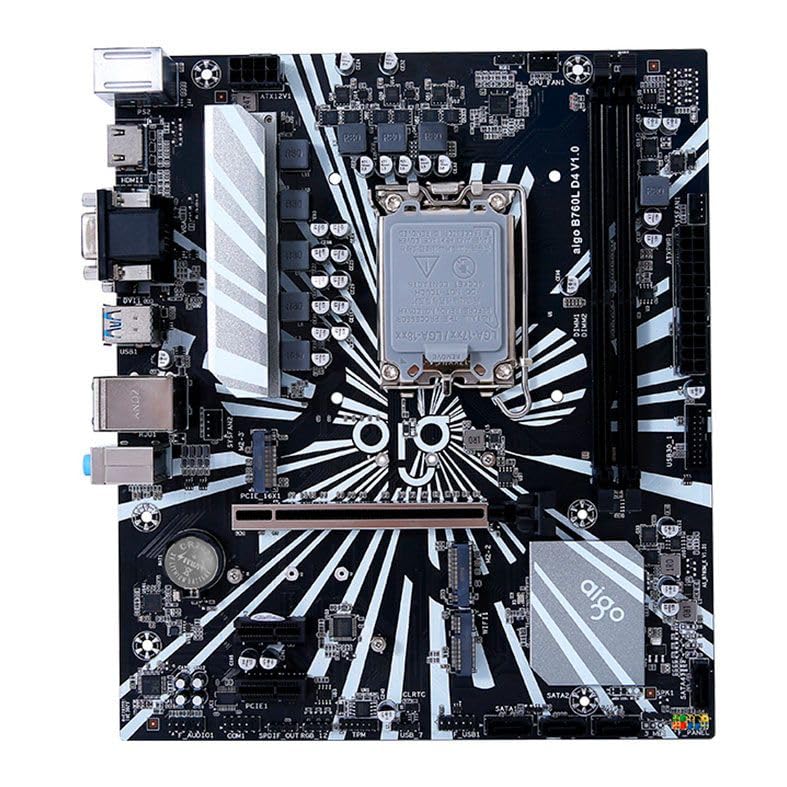
Figur 1: Overview of the Aigo B760L D4 Motherboard alongside its retail packaging.

Figur 2: Ovenfra og ned view of the Aigo B760L D4 Motherboard, highlighting component placement.

Figur 3: Vinklet view of the Aigo B760L D4 Motherboard, showing the CPU socket and memory slots.
4.2 Bakre I/O-panel

Figure 4: Rear I/O panel of the Aigo B760L D4 Motherboard, displaying various connectivity ports.
The rear I/O panel includes:
- 1 x PS/2 Keyboard and Mouse port
- 2 x USB 2.0-porter
- 4 x USB 3.0-porter
- 1 x HDMI-port
- 2 x DVI ports
- 1 x VGA-port
- 1 x RJ45 LAN port
- Audio jacks (Line In, Line Out, Mic In)
5. Oppsett
5.1 Installere CPU
- Finn LGA 1700 CPU-sokkelen på hovedkortet.
- Åpne spaken på CPU-sokkelen og løft lasteplaten.
- Juster CPU-en forsiktig med sokkelen, og sørg for at det trekantede merket på CPU-en samsvarer med merket på sokkelen.
- Plasser CPU-en forsiktig i sokkelen uten å tvinge den.
- Lukk lasteplaten og fest den med spaken.
5.2 Installing DDR4 Memory
The motherboard supports up to 64GB of DDR4 memory across two slots, with speeds from 2133 MHz to 3200 MHz in dual-channel configuration.
- Åpne klipsene i begge ender av DIMM-sporet.
- Juster minnemodulen med sporet, og sørg for at hakket på modulen samsvarer med nøkkelen i sporet.
- Trykk godt ned på begge ender av minnemodulen til klipsene klikker på plass.
5.3 Installere lagringsenheter
The motherboard features 4 x SATA 3.0 ports and 2 x M.2 NVME Dual-Protocol slots.
5.3.1 SATA-disker
- Koble den ene enden av en SATA-datakabel til en SATA-port på hovedkortet.
- Koble den andre enden av SATA-datakabelen til SATA-harddisken eller SSD-en.
- Connect a SATA power cable from your power supply to the drive.
5.3.2 M.2 NVME Drives
- Locate an M.2 slot on the motherboard.
- Fjern M.2-avstandsskruen.
- Insert the M.2 NVME drive into the slot at a 30-degree angle.
- Gently push the drive down and secure it with the standoff screw.
5.4 Koble til strøm
Connect the 24-pin ATX power connector and the 8-pin ATX 12V power connector from your power supply to the corresponding ports on the motherboard.
5.5 Installere utvidelseskort
The motherboard includes 1 x PCIe x16 slot and 1 x PCIe x1 slot.
- Align your expansion card (e.g., graphics card) with the appropriate PCIe slot.
- Press down firmly until the card is seated correctly in the slot.
- Secure the card with a screw to the computer case.
6. Drift
6.1 Første oppstart og BIOS-oppsett
After assembling your system, connect a monitor, keyboard, and mouse. Power on the system. During startup, press the designated key (usually DEL or F2) to enter the BIOS/UEFI setup utility. Here you can configure boot order, system time, and other advanced settings.
6.2 Installasjon av operativsystem
The Aigo B760L D4 Motherboard supports Windows 10 and Windows 11 operating systems. Insert your OS installation media (USB drive or DVD) and follow the on-screen instructions to install the operating system.
6.3 Driverinstallasjon
After OS installation, install the necessary drivers for the chipset, audio, LAN, and other integrated components. These drivers are typically provided on a CD/USB with the motherboard or can be downloaded from the manufacturer's webnettstedet.
7. Vedlikehold
- Hold det rent: Regularly clean dust from inside your computer case using compressed air. Dust accumulation can lead to overheating.
- BIOS-oppdateringer: Sjekk produsentens website for BIOS/UEFI updates. Updates can improve stability, compatibility, and performance. Follow update instructions carefully.
- Driveroppdateringer: Hold driverne oppdatert for å sikre optimal ytelse og kompatibilitet med ny programvare og maskinvare.
- Miljøkontroll: Operate the system in a cool, dry, and well-ventilated environment.
8. Feilsøking
8.1 Ingen strøm
- Ensure the power supply is connected correctly to the motherboard (24-pin and 8-pin ATX 12V).
- Check if the power supply switch is in the "ON" position.
- Verify that the power button on the case is correctly connected to the motherboard's front panel header.
8.2 Ingen visning
- Ensure the monitor is connected to the correct video output (either integrated graphics or a dedicated graphics card).
- Sett inn grafikkortet og minnemodulene på nytt.
- Try booting with only one memory module installed.
8.3 Systemustabilitet / Krasj
- Check CPU and GPU temperatures to ensure they are not overheating.
- Verify that all power connectors are securely attached.
- Kjør minnediagnostikkverktøy for å se etter defekt RAM.
- Ensure BIOS is updated to the latest stable version.
9. Spesifikasjoner
| Trekk | Spesifikasjon |
|---|---|
| Merke | Aigo |
| Modell | AIGO-B760L-D4 |
| Brikkesett | Intel B760 |
| CPU-sokkel | LGA 1700 |
| minne Slots | 2 x DDR4 DIMM-spor |
| Maksimal minnekapasitet | 64 GB |
| Støtte for minnehastighet | 2133 ~ 3200 MHz (Dual Channel) |
| Lydgrensesnitt | 1 x HDMI, 2 x DVI, 1 x VGA |
| SATA Slots | 4 x SATA 3.0 |
| M.2 spor | 2 x M.2 NVME Dual-Protocol |
| USB-porter (bak) | 2 x USB 2.0, 4 x USB 3.0 |
| Utvidelsesspor | 1 x PCIe x1, 1 x PCIe x16 |
| Operativsystemstøtte | Windows 10/11 |
| PS/2-port | 1 x PS/2 Keyboard and Mouse |
| Power Phase | 8-fase |
| Strømkontakter | 1 x 24-pin ATX, 1 x 8-pin ATX 12V |
| WiFi -grensesnitt | 1 x WiFi interface (PCIe compatible) |
| LAN-port | 1 x RJ45 |
| Dimensjoner | 24.4 x 21 cm (M-ATX) |
10. Garanti og støtte
For garantiinformasjon og teknisk støtte, se dokumentasjonen som fulgte med kjøpet eller besøk den offisielle Aigo-siden webnettstedet. Ta vare på kjøpsbeviset for garantikrav.


