1. Introduksjon
This manual provides detailed instructions for the installation, operation, and maintenance of the SINOTIMER TM919A-2 LCD Digital Programmable Timer Switch. This device is designed for automatic control of electrical appliances based on programmed time schedules, offering daily and weekly programming options.
2. Produktfunksjoner
- Weekly 7-day programmable digital time switch.
- Flere voltage options (5V, 12V, 24V, 110V, 220V, 85-265V). This specific model is 220V.
- Detachable battery design for backup power.
- 35mm DIN rail mounting for easy installation.
- LCD display for clear time and program viewing.
- 16 ON/OFF programs per day or week.
- Manuell overstyringsfunksjon.
- High capacity 16A switching contact.
3. Sikkerhetsinformasjon
WARNING: Risk of electric shock. Installation should only be performed by a qualified electrician or competent person.
- Sørg for at strømmen er koblet fra før installasjon eller vedlikehold.
- Do not exceed the maximum load capacity of 16A.
- Bekreft riktig voltage supply for the specific model (220V for TM919A-2).
- Hold enheten unna fuktighet og ekstreme temperaturer.
4. Produktet er overview og komponenter
The SINOTIMER TM919A-2 features an LCD display, control buttons, and wiring terminals for power input and load control.

Figur 4.1: Front view of the SINOTIMER TM919A-2 Digital Timer Switch, showing the LCD display, control buttons (P, D+, H+, M+, RESET, MANUAL), and wiring terminals.

Figur 4.2: The timer switch with its transparent protective cover opened, revealing the control buttons for programming and manual operation.
Kontrollknapper:
- P (Program): Enters program setting mode.
- D+ (Day): Adjusts day of the week or program day.
- H+ (Hour): Adjusts hour or program hour.
- M+ (Minute): Adjusts minute or program minute.
- NULLSTILLE: Tilbakestiller alle innstillinger til fabrikkinnstillinger.
- HÅNDBOK: Toggles output ON/AUTO/OFF.
5. Oppsett og installasjon
5.1 Koblingsskjema
Refer to the wiring diagram on the side of the device and the illustration below for correct connection. Ensure all connections are secure.

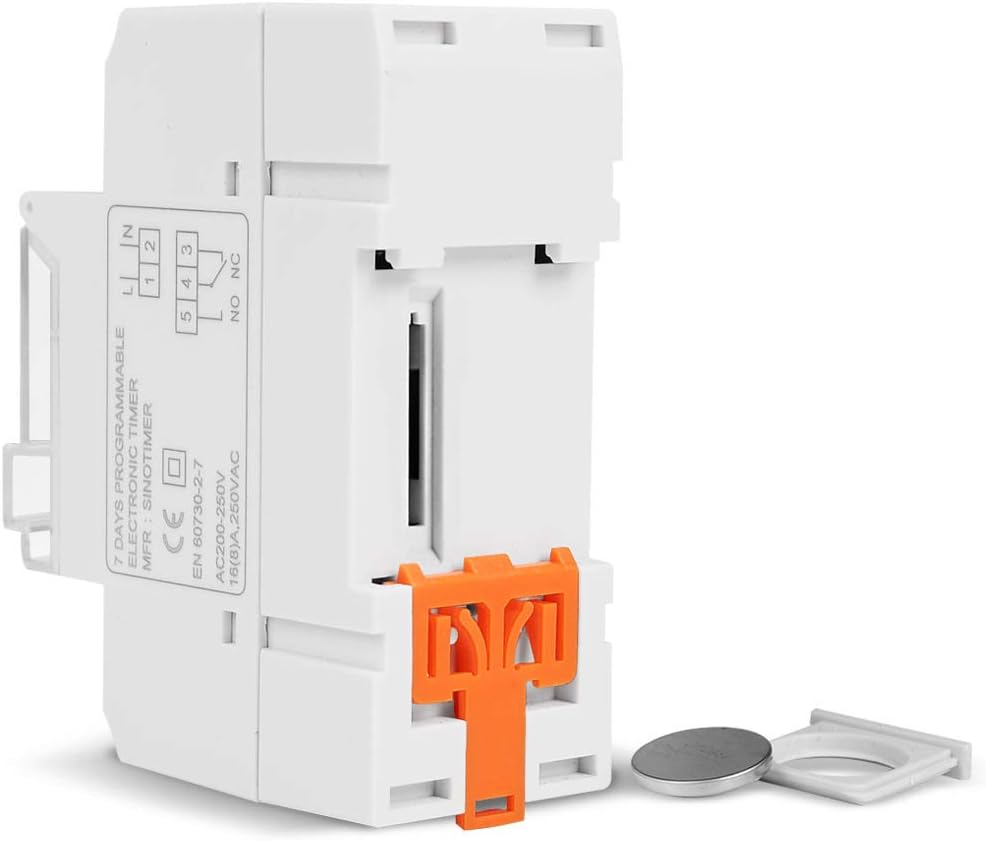
Figur 5.1: Side view of the timer switch displaying the wiring diagram. Terminals 1 and 2 are for power input (L and N). Terminals 3, 4, and 5 are for the relay output (Common, Normally Open, Normally Closed).
- Terminaler 1 og 2 (L, N): Connect to the main power supply (220V AC for this model).
- Terminal 3 (NO - Normally Open): Connects to the load when the timer is ON.
- Terminal 4 (COM - Common): Connects to one side of the load and the power supply.
- Terminal 5 (NC - Normally Closed): Connects to the load when the timer is OFF (less common for typical applications).
5.2 Initial Power-up and Reset
Upon first power-up or after a long period without power, the LCD display may be blank. The internal battery provides backup for settings. If the display is unresponsive or shows garbled characters, press the TILBAKESTILL button using a pointed object (e.g., a pen tip). This will clear all settings and restore the timer to its default state.
5.3 Stille inn gjeldende tid og dag
- Trykk på P button once. The display will show the current time setting.
- Pressen D+ for å angi gjeldende ukedag.
- Pressen H+ for å stille inn gjeldende time.
- Pressen M+ for å stille inn gjeldende minutt.
- Trykk på P button again to exit time setting mode and return to normal operation.
6. Bruksanvisning
6.1 Programmering av PÅ/AV-sykluser
Timeren støtter opptil 16 PÅ/AV-programmer. Hvert program består av en PÅ-tid og en AV-tid.
- Trykk på P button repeatedly until "1 ON" appears on the display. This is the first ON program.
- Pressen D+ for å velge dag(er) for dette programmet. Alternativene inkluderer individuelle dager, ukedager, helger eller alle 7 dager.
- Pressen H+ to set the desired hour for the "ON" event.
- Pressen M+ to set the desired minute for the "ON" event.
- Pressen P again. "1 OFF" will appear. This is the first OFF program.
- Repeat steps 2-4 to set the day(s), hour, and minute for the "OFF" event.
- Fortsett å trykke P to cycle through "2 ON", "2 OFF", up to "16 ON", "16 OFF". If you do not need all 16 programs, simply press P until the display returns to the current time.
- To save and exit programming mode, press the P button until the current time is displayed.
6.2 Manuell overstyring
De HÅNDBOK button allows you to override the programmed settings temporarily or permanently.
- Pressen HÅNDBOK once: Toggles between ON/AUTO/OFF modes.
- PÅ: The output is continuously ON, ignoring programs.
- AV: The output is continuously OFF, ignoring programs.
- BIL: The timer operates according to the programmed ON/OFF cycles. This is the standard operating mode.
7. Vedlikehold
7.1 Batteribytte
The timer includes a detachable CR2032 lithium battery to maintain time and program settings during power outages. If the display becomes dim or resets frequently, the battery may need replacement.

Figur 7.1: The timer switch shown with its battery compartment open and a CR2032 lithium battery, indicating the detachable battery design.
- Disconnect power to the timer before attempting battery replacement.
- Finn batterirommet, vanligvis på siden eller baksiden av enheten.
- Fjern forsiktig det gamle CR2032-batteriet.
- Insert a new CR2032 battery, ensuring correct polarity (+ side up).
- Lukk batterirommet.
- Reconnect power and reset the current time and day if necessary.
8. Feilsøking
- Displayet er tomt:
- Check power supply connections (Terminals 1 & 2).
- Ensure the internal battery is charged or replaced if old.
- Trykk på TILBAKESTILL knapp.
- Programmene kjører ikke:
- Sørg for at timeren er på AUTO mode (check the display for "AUTO"). Press HÅNDBOK å sykle moduser.
- Kontroller at gjeldende klokkeslett og dag er riktig angitt.
- Check that the ON/OFF programs are correctly entered and enabled for the desired days.
- Confirm wiring to the load (Terminals 3, 4, 5) is correct.
- Timer resets unexpectedly:
- The internal battery may be low or depleted. Replace the CR2032 battery.
- Ensure stable power supply to the unit.
9. Spesifikasjoner
| Trekk | Spesifikasjon |
|---|---|
| Modell | TM919A-2 |
| Strømforsyning | 220V AC (as per model) |
| Strømforbruk | 4.5 VA (MAX) |
| Temperaturområde | -20°C til +50°C |
| Utstilling | LCD |
| Switching Contact | 1 skiftebryter |
| Programmer | 16 ON/OFF per day or week |
| Hysterese | 2 sec/day (at 25°C) |
| Kapasitet | 16A |
| Tidsrekkevidde | 1 minutt til 168 timer |
| Minimumsintervall | 1 minutt |
| Black-out Memory | 60 days (with internal battery) |
| Varevekt | 0.15 kg (5.3 unser) |
| Montering | 35mm DIN-skinne |
| Skjermstørrelse | 1.2 tommer |
Figur 9.1: Dimensional drawing of the SINOTIMER TM919A-2, showing measurements in centimeters for height, width, and depth.
10. Garanti og støtte
Specific warranty information for the SINOTIMER TM919A-2 is not provided in the product details. For warranty claims or technical support, please contact your retailer or the manufacturer directly. Keep your purchase receipt as proof of purchase.


