1. Introduksjon
Takk for kjøpetasing the Lenco SPR-100BK Splash-Proof Bluetooth Speaker. This portable speaker delivers powerful sound with strong bass and features FM radio, USB, SD card playback, and integrated light effects. Designed for durability, it is splash-proof, making it suitable for various environments. This manual provides essential information for safe and optimal use of your device.
2. Viktige sikkerhetsinstruksjoner
- Ikke utsett enheten for ekstreme temperaturer, direkte sollys eller høy luftfuktighet.
- Ensure the charging port cover is securely closed when near water to maintain splash-proof integrity.
- Ikke demonter eller modifiser enheten. Overlat all service til kvalifisert personell.
- Bruk kun den spesifiserte ladekabelen.
- Hold enheten unna sterke magnetiske felt.
- Unngå å miste eller utsette enheten for sterke støt.
3. Produktet er overview
Familiarize yourself with the components of your Lenco SPR-100BK speaker.
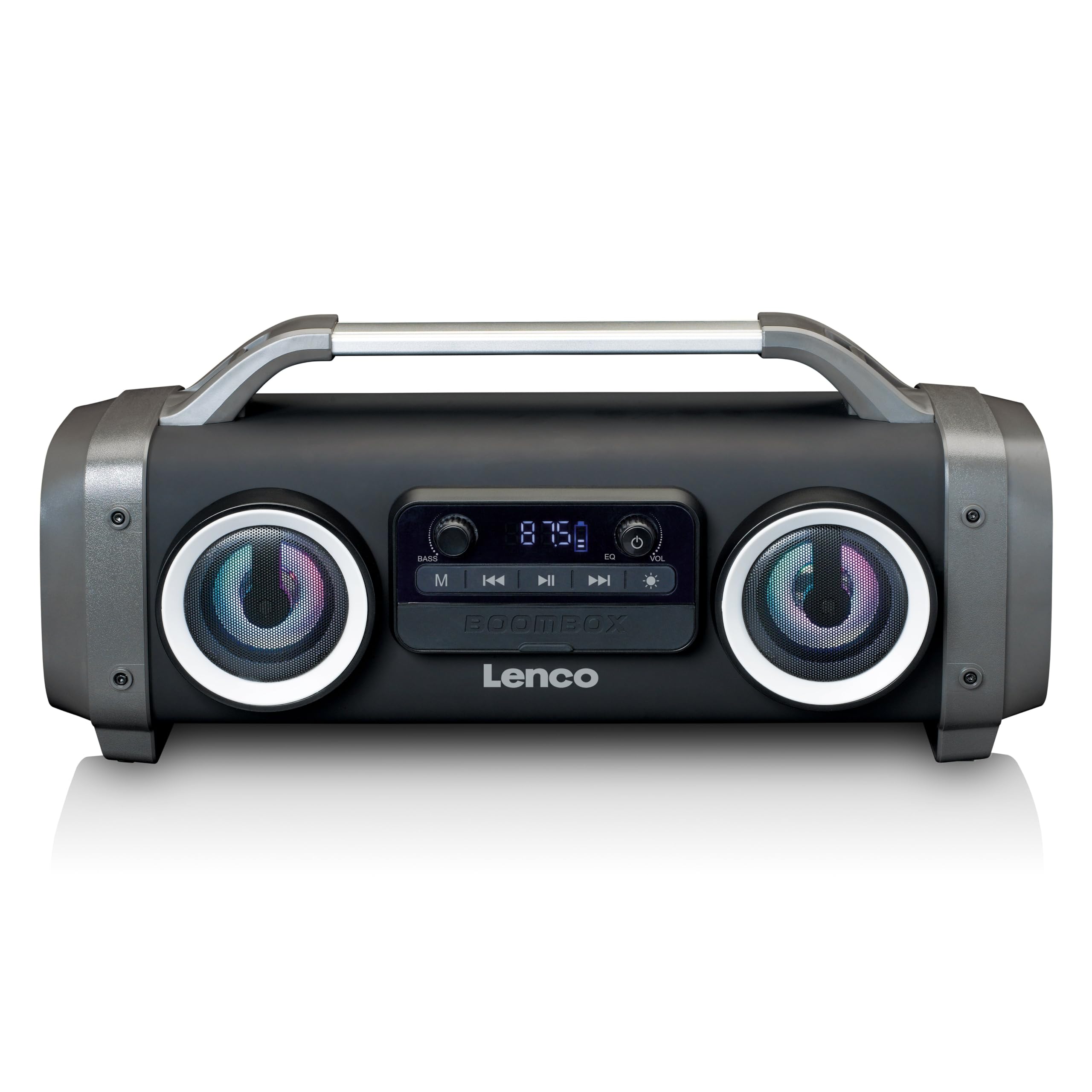
Figur 1: Foran view of the Lenco SPR-100BK speaker, showing the main speaker grille, control panel, and integrated light effects.
3.1 Kontroller og porter
- Strømknapp: Slår høyttaleren på eller av.
- Modusknapp: Switches between Bluetooth, FM Radio, USB, SD, and AUX modes.
- Spill av/pause-knapp: Spiller av eller setter lyd på pause.
- Volumkontrollknapp: Justerer hovedvolumet.
- Bass Boost Knob: Justerer bassnivået.
- Lyseffektknapp: Cycles through or turns off light effects.
- USB-port: For avspilling fra USB-minnepinne.
- SD-kortspor: For avspilling av SD-kort.
- AUX-inngang (3.5 mm): For tilkobling av eksterne lydenheter.
- Charging Port (Mini USB): For lading av det interne batteriet.
4. Oppsett
4.1 Utpakking
Carefully remove the speaker and all accessories from the packaging. Ensure the following items are present:
- Lenco SPR-100BK Bluetooth Speaker
- USB ladekabel
- 3.5mm Audio Cable (AUX cable)
- Brukerhåndbok
4.2 Lading av batteriet
- Locate the Mini USB charging port on the speaker.
- Connect the supplied USB charging cable to the speaker's charging port.
- Connect the other end of the USB cable to a compatible USB power adapter (5V/1A, not included) or a computer's USB port.
- Ladeindikatorlampen vil lyse, vanligvis rødt, under lading. Den vil slå seg av eller endre farge (f.eks. blå) når den er fulladet.
- A full charge takes approximately 4-5 hours and provides up to 15 hours of playback (without light effects).
4.3 Første gangs strøm på
Trykk og hold inne Strømknapp for a few seconds until the speaker powers on and you hear an audible prompt or see the display light up.
5. Drift
5.1 Strøm på/av
- For å slå på: Trykk og hold inne Strømknapp.
- For å slå av: Trykk og hold inne Strømknapp igjen.
5.2 Bluetooth-tilkobling
- Turn on the speaker. It will automatically enter Bluetooth pairing mode, indicated by a flashing LED.
- Aktiver Bluetooth på mobilenheten din (smarttelefon, nettbrett osv.).
- Søk etter tilgjengelige Bluetooth-enheter og velg "SPR-100BK" fra listen.
- Når den er paret, vil høyttaleren avgi en bekreftelseslyd, og LED-lampen vil slutte å blinke.
- True Wireless Stereo (TWS)-modus: If you have two SPR-100BK speakers, you can pair them for stereo sound.
- Sørg for at begge høyttalerne er slått på og i Bluetooth-modus.
- On one speaker (the master), press and hold the Modusknapp until you hear a TWS pairing prompt.
- The two speakers will automatically connect. Once connected, pair your device to the master speaker as described above.
5.3 FM-radio
- Trykk på Modusknapp repeatedly until you select FM Radio mode.
- For å automatisk skanne og lagre stasjoner: Trykk og hold inne Spill av/pause-knapp. The speaker will scan for available FM stations and save them automatically.
- To switch between saved stations: Use the Forrige/neste spor-knapper (if available, otherwise it will cycle through automatically).
- Note: For better FM reception, ensure the included 3.5mm audio cable is plugged into the AUX input, as it acts as an external antenna.
5.4 USB/SD-kortavspilling
- Insert a USB flash drive or an SD card (with supported audio files) inn i den respektive porten/sporet.
- The speaker will automatically switch to USB or SD mode and begin playback. If not, press the Modusknapp for å velge riktig kilde.
- Bruk Spill av/pause-knapp og Forrige/neste spor-knapper for å kontrollere avspillingen.
5.5 AUX-inngang
- Connect one end of the supplied 3.5mm audio cable to the AUX input on the speaker.
- Koble den andre enden til hodetelefonkontakten eller lydutgangen på den eksterne enheten.
- Trykk på Modusknapp for å velge AUX-modus.
- Kontroller avspilling og volum fra den eksterne enheten din.
5.6 Lyseffekter
Trykk på Lyseffektknapp to cycle through different light modes or to turn the lights off. The speaker features 12 color light effects.
5.7 Lydjustering
- Volum: Roter Volumkontrollknapp to increase or decrease the overall sound level.
- Bass: Roter Bass Boost Knob to adjust the intensity of the bass.
6. Vedlikehold
6.1 Rengjøring
Wipe the speaker with a soft, dry cloth. Do not use abrasive cleaners, waxes, or solvents. For stubborn dirt, a slightly damp cloth can be used, ensuring all port covers are sealed.
6.2 Batteristell
- For å forlenge batterilevetiden, lad høyttaleren helt opp før første gangs bruk.
- Unngå å tømme batteriet helt ofte.
- Hvis du oppbevarer høyttaleren over lengre tid, bør du lade den opp til omtrent 50 % annenhver måned.
6.3 Oppbevaring
Oppbevar høyttaleren på et kjølig og tørt sted, unna direkte sollys og ekstreme temperaturer.
7. Feilsøking
| Problem | Mulig årsak | Løsning |
|---|---|---|
| Høyttaleren slår seg ikke på. | Batteriet er utladet. | Lad høyttaleren med den medfølgende USB-kabelen. |
| Ingen lyd. | Volumet er for lavt; feil modus valgt; enheten er ikke tilkoblet. | Increase volume; press Mode button to select correct source; ensure Bluetooth device is paired or AUX cable is connected. |
| Bluetooth-paring mislykkes. | Høyttaleren er ikke i paringsmodus; enheten er for langt unna; forstyrrelser. | Ensure speaker is in Bluetooth pairing mode (flashing LED); move device closer; turn off other Bluetooth devices. |
| Dårlig FM-radiomottak. | No external antenna; weak signal. | Plug in the 3.5mm AUX cable to act as an antenna; try moving the speaker to a different location. |
| USB/SD-avspilling fungerer ikke. | Støttes ikke file formatering; kort/stasjon ikke satt inn riktig; ødelagt files. | Sikre files are in a supported format (e.g., MP3); reinsert the USB drive/SD card; try a different drive/card. |
8. Spesifikasjoner
| Modellnummer | SPR-100BK |
| Merke | Lenco |
| Strømutgang | 25 watt RMS |
| Tilkobling | Bluetooth, USB, SD Card, 3.5mm AUX Input |
| Batteritype | Litium-ion (4400 mAh) |
| Avspillingstid | Up to 15 hours (reduced with light effects) |
| Ladeinngang | 5V/1A (Mini USB) |
| Spesielle funksjoner | Splash-proof design, Integrated light effects, FM Radio, TWS function |
| Dimensjoner (L x B x H) | 60 x 60 x 85 cm |
| Vekt | 2 kilo |
Merk: Spesifikasjoner kan endres uten forvarsel.
9. Garanti og støtte
9.1 Garantiinformasjon
This Lenco product is covered by a warranty for a period of 2 år on parts from the date of purchase. This warranty covers manufacturing defects and workmanship under normal use. It does not cover damage caused by misuse, accidents, unauthorized modifications, or normal wear and tear.
9.2 Programvareoppdateringer
Software updates for this product are guaranteed until 13. april 2030.
9.3 Kundestøtte
For technical assistance, warranty claims, or product inquiries, please contact Lenco customer support through their official website or the retailer where the product was purchased. Please have your model number (SPR-100BK) and proof of purchase ready.
Offisiell Lenco Webnettsted: www.lenco.com