Introduksjon
Takk for kjøpetasing the SENTRY HPXBT150 Bluetooth Flat Cord Earbuds. This manual provides detailed instructions on how to set up, operate, and maintain your new wireless earbuds. Please read this manual thoroughly before use to ensure optimal performance and longevity of your device.
Pakkeinnhold
- SENTRY HPXBT150 Bluetooth Flat Cord Earbuds
- Beskyttende etui
- USB-ladekabel (mikro-USB)
- Removable Ear Hooks
- Brukerhåndbok
Produkt overview
The SENTRY HPXBT150 earbuds feature Bluetooth wireless technology, allowing for a cord-free listening experience. They include an in-line microphone for hands-free calls and media control buttons for easy operation. Removable ear hooks provide a secure fit, especially during physical activity.
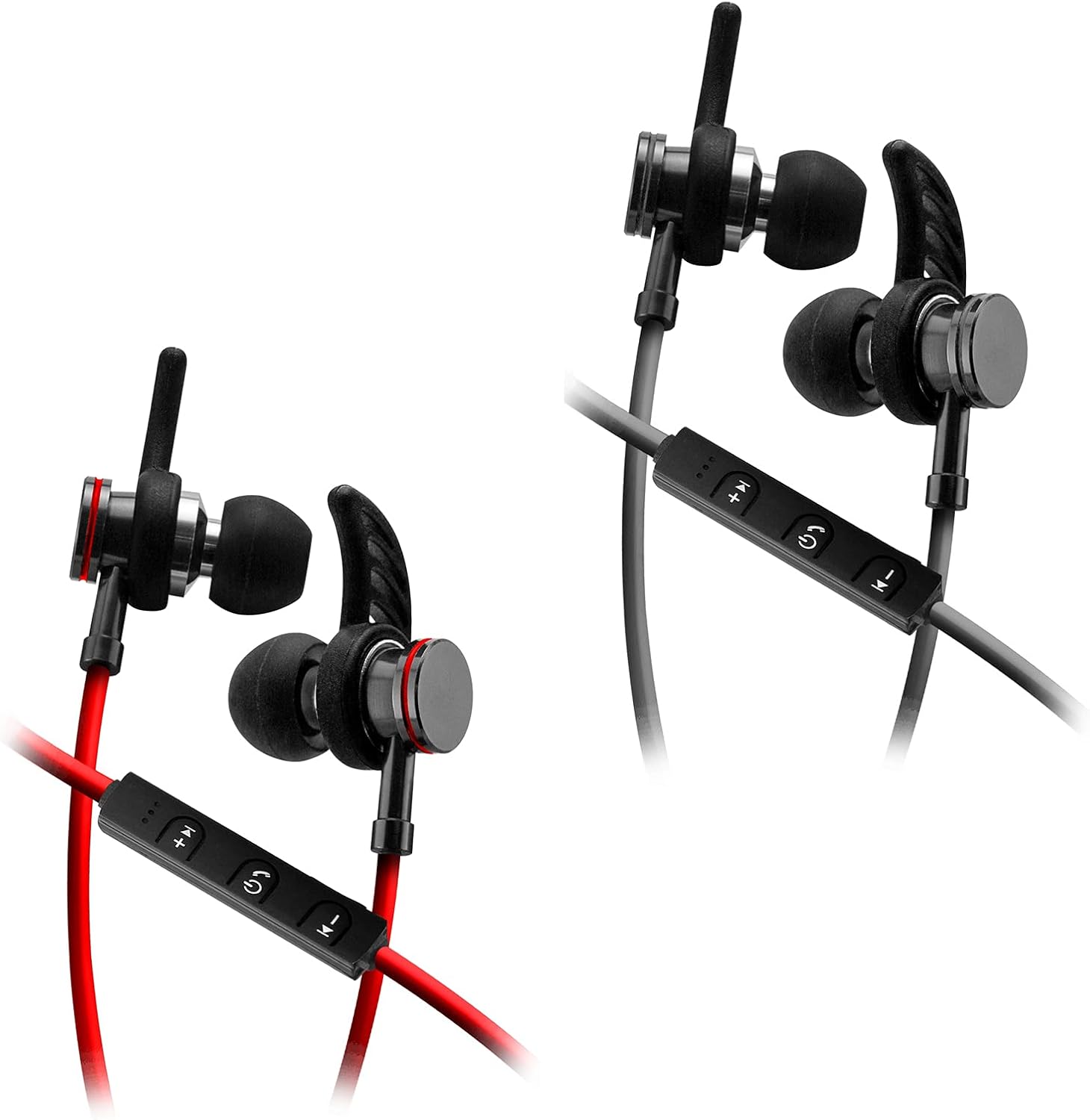
Image: SENTRY HPXBT150 Bluetooth Earbuds showing the in-line control panel and ear hooks. The control panel features volume up/next track, power/multifunction, and volume down/previous track buttons.
Oppsett
1. Lading av ørepluggene
- Locate the Micro-USB charging port on the in-line control unit.
- Connect the provided USB charging cable to the earbuds' charging port.
- Koble den andre enden av USB-kabelen til en kompatibel USB-strømkilde (f.eks. en datamaskins USB-port eller en USB-veggadapter).
- The LED indicator light will illuminate during charging. It will change color or turn off once charging is complete. A full charge typically takes approximately 1-2 hours.
2. Bluetooth-paring
- Ensure the earbuds are fully charged before initial pairing.
- Press and hold the multi-function button (usually the center button on the in-line control) for approximately 5-7 seconds until the LED indicator light flashes red and blue alternately. This indicates the earbuds are in pairing mode.
- On your Bluetooth-enabled device (smartphone, tablet, computer), go to the Bluetooth settings menu.
- Aktiver Bluetooth og søk etter tilgjengelige enheter.
- Select "HPXBT150" or a similar name from the list of found devices.
- Once successfully paired, the LED indicator on the earbuds will typically flash blue slowly or turn off, and you will hear an audible confirmation.
- Hvis du blir bedt om et passord, skriv inn «0000».
Bruksanvisning
Slå på/av
- Strøm på: Press and hold the multi-function button for approximately 3 seconds until the LED indicator flashes blue and you hear a power-on tone.
- Slå av: Press and hold the multi-function button for approximately 3-5 seconds until the LED indicator flashes red and you hear a power-off tone.
Musikkavspilling
- Spill av/pause: Trykk på multifunksjonsknappen én gang.
- Volum opp: Trykk på «+»-knappen.
- Volum ned: Trykk på '-'-knappen.
- Neste spor: Trykk og hold inne «+»-knappen.
- Forrige spor: Trykk og hold inne '-'-knappen.
Samtalehåndtering
- Svar/avslutt samtale: Trykk på multifunksjonsknappen én gang.
- Avvis anrop: Trykk og hold inne multifunksjonsknappen i omtrent 2 sekunder.
- Ring siste nummer på nytt: Dobbelttrykk på multifunksjonsknappen.
Vedlikehold
- Rengjøring: Use a soft, dry cloth to clean the earbuds. Do not use harsh chemicals or abrasive materials.
- Lagring: When not in use, store the earbuds in the provided protective case to prevent damage.
- Batteripleie: For å spare batterilevetid, unngå å lade ut øreproppene helt ofte. Lad dem regelmessig, selv om de ikke brukes over lengre tid.
- Unngå fuktighet: Keep the earbuds away from water and excessive moisture.
Feilsøking
| Problem | Mulig løsning |
|---|---|
| Øreproppene slår seg ikke på. | Ensure the earbuds are fully charged. Connect to a power source and allow time to charge. |
| Kan ikke kobles til enheten. | Ensure earbuds are in pairing mode (flashing red/blue). Turn off and on Bluetooth on your device. Move earbuds closer to your device. Forget previous pairings on your device and try again. |
| Ingen lyd eller lavt volum. | Check volume levels on both the earbuds and your connected device. Ensure earbuds are properly paired. Try re-pairing the earbuds. |
| Intermitterende forbindelse. | Ensure there are no obstructions between the earbuds and your device. Move closer to your device. Avoid environments with strong Wi-Fi or other wireless interference. |
Spesifikasjoner
- Modell: HPXBT150
- Tilkoblingsteknologi: Trådløs (Bluetooth)
- Driverenhet: 10 mm
- Impedans: 32+/-3 Ohms
- Følsomhet: 103dB +/- 3dB
- Frekvensrespons: 20Hz–20kHz
- Kompatible enheter: Phones, Tablets, MP3 Players, Computers, Gaming Consoles
- Kontrolltype: Mediekontroll
- Spesielle funksjoner: Microphone Included, USB Connectivity, Removable Ear Hooks
- Varevekt: 2.08 unser
Sikkerhetsinformasjon
- Do not expose the earbuds to extreme temperatures, direct sunlight, or fire.
- Do not disassemble or modify the earbuds. This may void the warranty and cause damage.
- Unngå å lytte med høyt volum i lengre perioder for å unngå hørselsskader.
- Oppbevares utilgjengelig for barn og kjæledyr.
- Kast produktet på en ansvarlig måte i henhold til lokale forskrifter.
Garanti og støtte
For warranty information and technical support, please refer to the documentation included with your purchase or contact SENTRY customer service directly. Keep your proof of purchase for warranty claims.


