1. Belangrijke veiligheidsinformatie
Please read all safety instructions before using the projector. Keep this manual for future reference.
- Blokkeer de ventilatieopeningen niet. Zorg voor voldoende ruimte rondom de projector voor een goede luchtcirculatie.
- Vermijd direct zonlicht dat door de projectorlens wordt verspreid.
- Plaats de projector niet in de buurt van warmtebronnen of in direct zonlicht.
- Gebruik alleen de stroomadapter die bij het apparaat is geleverd.
- Probeer de projector niet zelf te openen of te repareren. Laat alle onderhoudswerkzaamheden uitvoeren door gekwalificeerd personeel.
- Houd de projector uit de buurt van water en andere vloeistoffen.
2. Inhoud van het pakket
Controleer of alle artikelen in het pakket aanwezig zijn:
- Aurzen Roku TV Smart Projector (D1R Cube)
- Stroomkabel
- Remote Control (2 AAA Batteries Required, not included)
- Gebruikershandleiding (dit document)
3. Product voorbijview
The Aurzen D1R Cube is a compact smart projector featuring built-in Roku TV for integrated streaming. It offers 1080P Full HD resolution, Dolby Audio, and a sealed optical engine for enhanced durability and clarity.
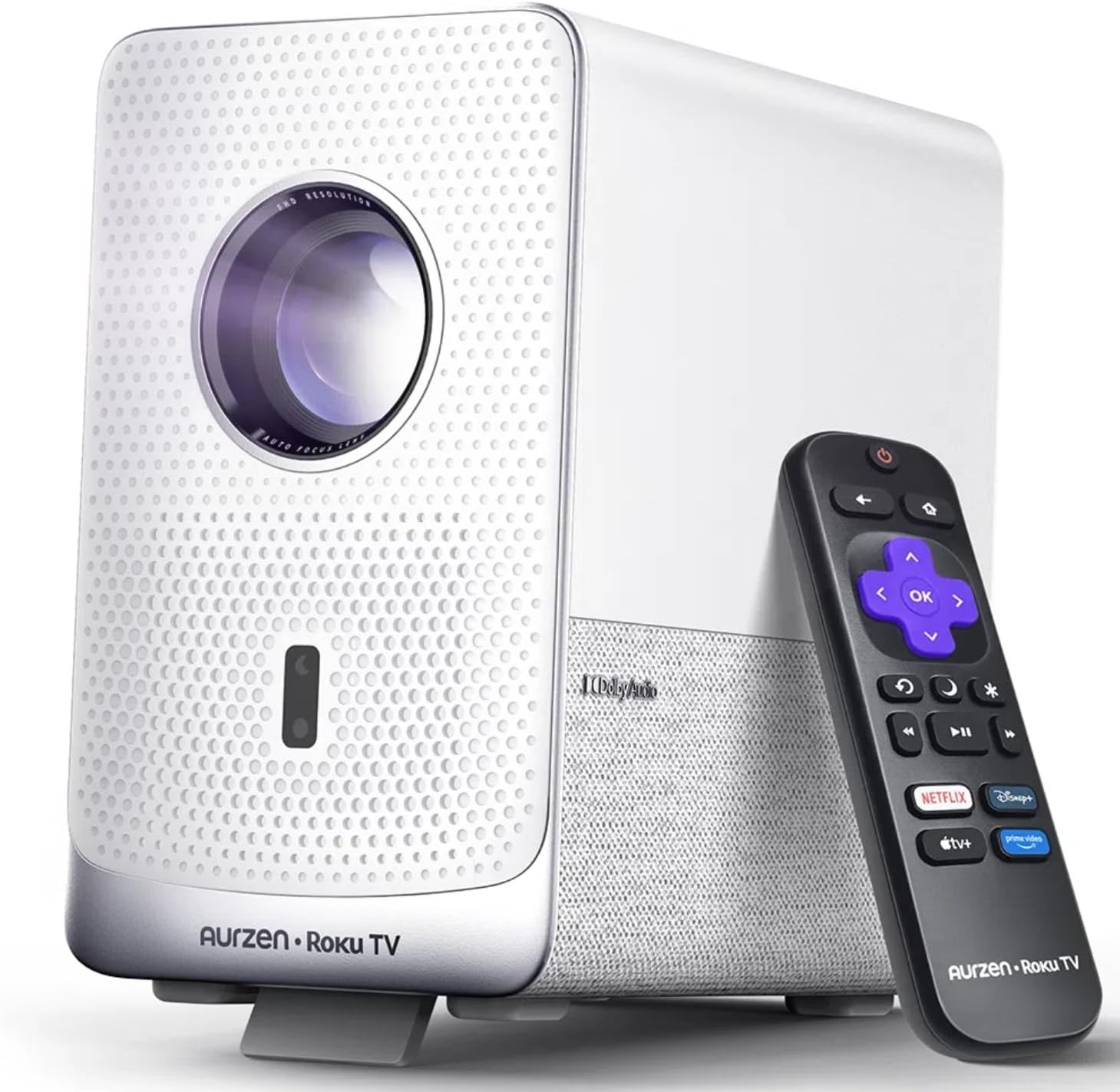
Image: The Aurzen D1R Cube Smart Projector shown with its remote control. The projector is white with a textured front panel and a visible lens.
Belangrijkste kenmerken:
- Roku TV Built-in: Krijg direct toegang tot populaire streamingdiensten.
- Sealed Optical Engine: Protects against dust, maintaining image quality and extending lifespan.
- 1080P FHD Resolution: Delivers crisp and clear visuals.
- Dolby-audio: Provides enhanced sound experience.
- Autofocus en trapeziumcorrectie: Automatic image adjustment for quick setup.
- Dual-band WiFi & Bluetooth 5.2: For seamless connectivity.
- Apple AirPlay: Effortless content sharing from Apple devices.
- Compatibiliteit met Smart Home: Works with Apple HomeKit, Siri, Alexa, and Google Assistant.

Image: An internal diagram illustrating the sealed optical engine of the Aurzen D1R Cube projector, highlighting its dust-proof design.
4. Instellen
4.1 Initiële plaatsing
Plaats de projector op een stabiele, vlakke ondergrond. Voor optimale viewing, position it directly in front of your projection surface (wall or screen). The projector features automatic focus and keystone correction to adjust the image, but a relatively straight angle is recommended.

Image: A visual representation of the projector's auto-focus and auto-keystone correction features, showing how the image automatically adjusts to create a perfect rectangular display.
4.2 Stroomaansluiting
- Sluit het netsnoer aan op de stroomingang van de projector.
- Sluit het andere uiteinde van het netsnoer aan op een geschikt stopcontact.
- The projector will power on automatically or can be turned on using the power button on the device or remote.
4.3 Afstandsbediening instellen
Insert two AAA batteries (not included) into the remote control. Ensure correct polarity. The remote is pre-paired with the projector.
4.4 Eerste installatie van de Roku TV
Upon first power-on, follow the on-screen instructions to set up your Roku TV. This includes:
- Selecteer uw taal.
- Connecting to a Wi-Fi network (a stable internet connection is required).
- Activating your Roku account. If you do not have one, you will be prompted to create a free account.
- Installing desired streaming channels.
5. Gebruiksaanwijzing
5.1 In-/uitschakelen
Druk op de aan/uit-knop op de projector of de afstandsbediening om het apparaat in of uit te schakelen.
5.2 Roku Home Screen Navigation
Use the directional pad and OK button on the remote to navigate the Roku home screen. Access streaming channels, search for content, and adjust settings.

Image: A screenshot of the Roku TV home screen, displaying various streaming app icons and navigation options.
5.3 Streamingtoepassingen
The Roku TV platform provides access to a wide range of streaming applications such as Netflix, Prime Video, Disney+, Hulu, YouTube, and more. Select an app from the home screen to begin streaming.

Afbeelding: Een grafische presentatieasing various popular streaming service logos available on the Roku TV platform, including Netflix, Disney+, and Hulu.
5.4 Externe apparaten aansluiten
The projector includes HDMI and USB ports for connecting external devices.
- HDMI: Connect gaming consoles, Blu-ray players, or other HDMI-enabled devices. Select the corresponding HDMI input from the Roku TV menu.
- USB-poort: Media afspelen files (foto's, video's, muziek) van een USB-opslagapparaat.
5.5 Bluetooth-connectiviteit
Connect Bluetooth headphones or speakers for an enhanced audio experience.
- Go to the Roku TV settings menu.
- Select 'Remotes & devices' then 'Bluetooth devices'.
- Zet uw Bluetooth-apparaat in de koppelingsmodus.
- Select your device from the list on the projector screen to pair.

Image: A diagram illustrating the Bluetooth connectivity of the Aurzen D1R Cube projector, showing it connecting to various external audio devices.
5.6 Apple AirPlay
Effortlessly share content from your Apple devices (iPhone, iPad, Mac) to the projector using Apple AirPlay.
- Ensure your Apple device and the projector are connected to the same Wi-Fi network.
- On your Apple device, open the content you wish to share (e.g., photos, videos).
- Tik op het AirPlay-pictogram (meestal een rechthoek met een pijl die naar boven wijst).
- Select your Aurzen D1R Cube projector from the list of available devices.

Image: A family watching content projected from an Apple device onto a large screen via Apple AirPlay using the Aurzen D1R Cube projector.
5.7 Spraakbesturing en integratie met slimme huizen
The projector supports voice control via the Roku mobile app and is compatible with Apple HomeKit, Siri, Alexa, and Google Assistant for broader smart home integration.
- Roku mobiele app: Download the Roku mobile app to use voice commands, type easily, and control your projector from your smartphone.
- Smart Home Assistants: Link your Roku account to your preferred smart home ecosystem (Apple Home, Amazon Alexa, Google Home) to control the projector with voice commands.
6. Onderhoud
6.1 Sealed Optical Engine
The Aurzen D1R Cube features a sealed optical engine designed to prevent dust accumulation on internal components. This reduces the need for routine internal cleaning and helps maintain consistent image quality over time.

Image: A side-by-side comparison showing the difference in dust accumulation between a sealed optical engine (left) and an open optical engine (right) after a period of use.
6.2 Algemene reiniging
- Buitenkant: Wipe the exterior of the projector with a soft, dry cloth. Do not use abrasive cleaners or solvents.
- Lens: Gently clean the projector lens with a lens cleaning cloth or specialized lens cleaning solution. Avoid touching the lens with your fingers.
- Ventilatie: Ensure ventilation openings are clear of dust and debris. Use a soft brush or compressed air to gently clean them if necessary.
6.3 Opslag
When not in use for extended periods, store the projector in a cool, dry place, away from direct sunlight and extreme temperatures. Consider using a protective cover or case to prevent dust accumulation.
7. Probleemoplossing
If you encounter issues with your Aurzen D1R Cube projector, refer to the following common solutions:
| Probleem | Mogelijke oplossing |
|---|---|
| Geen stroom | Zorg ervoor dat het netsnoer goed is aangesloten op zowel de projector als het stopcontact. Test het stopcontact met een ander apparaat. |
| Geen afbeelding | Check if the projector is powered on. Verify the input source (HDMI, USB) is correctly selected. Ensure the lens cap is removed. |
| Onscherpe afbeelding | The projector has auto-focus. If the image remains blurry, try repositioning the projector or restarting it to trigger auto-focus again. Ensure the lens is clean. |
| Geen geluid | Check the volume level on the projector and any connected external audio devices. Ensure Bluetooth audio is correctly paired or external speakers are properly connected. |
| Problemen met wifi-connectiviteit | Ensure your Wi-Fi router is working. Restart the projector and your router. Verify the Wi-Fi password is correct in the Roku TV settings. |
| Afstandsbediening reageert niet | Replace the AAA batteries in the remote control. Ensure there are no obstructions between the remote and the projector. |
For further assistance, please refer to the online support resources or contact Aurzen customer service.
8. Specificaties
Detailed technical specifications for the Aurzen D1R Cube Smart Projector:
| Functie | Specificatie |
|---|---|
| Merk | Aurzen |
| Model | D1R Cube |
| Weergaveresolutie Maximaal | 1920 x 1080 (1080P FHD) |
| Connectiviteitstechnologie | WiFi (Dual-band 2.4G/5G), Bluetooth 5.2, HDMI, USB, Audio |
| Speciale kenmerken | Roku TV Smart Projector, Sealed Optical Engine, Dolby Audio, Apple AirPlay, Smart Home Compatibility |
| Artikelgewicht | 5.68 pond |
| Productafmetingen | 7.42 x 7 x 7.83 inch |
| Kleur | Wit |
9. Garantie en ondersteuning
9.1 Productgarantie
Aurzen products are covered by a manufacturer's warranty. Please refer to the warranty card included with your product or visit the official Aurzen website voor specifieke garantievoorwaarden.
9.2 Klantenservice
For technical support, troubleshooting assistance, or warranty claims, please contact Aurzen customer service through their official channels. You can find more information and contact options on the Aurzen Brand Store on Amazon.


