
1. Inleiding
Thank you for choosing the TELESTAR TOP 250 DAB+/Internet Radio. This manual provides essential information for setting up, operating, and maintaining your device. Please read it thoroughly before use to ensure proper functionality and safety.
2. Veiligheidsinformatie
Volg altijd de basisveiligheidsmaatregelen wanneer u dit product gebruikt om het risico op brand, elektrische schokken en letsel te beperken.
- Stel het apparaat niet bloot aan regen of vocht.
- Open de c nietasing; laat alle onderhoudswerkzaamheden over aan gekwalificeerd personeel.
- Zorg voor voldoende ventilatie rond het apparaat.
- Gebruik uitsluitend de meegeleverde stroomadapter.
- Houd het apparaat uit de buurt van warmtebronnen en direct zonlicht.
3. Inhoud van het pakket
Pak de doos voorzichtig uit en controleer of alle items aanwezig zijn:
- TELESTAR TOP 250 Unit
- External Power Adapter DC 15 Volt / 1.5 A
- Schroefbare telescopische antenne
- Remote Control with Battery (CR2025)
- Gebruikershandleiding (dit document)

Image: Contents of the TELESTAR TOP 250 package, including the radio unit, remote control, power adapter, and antenna.
4. Product voorbijview
4.1 Voorpaneel
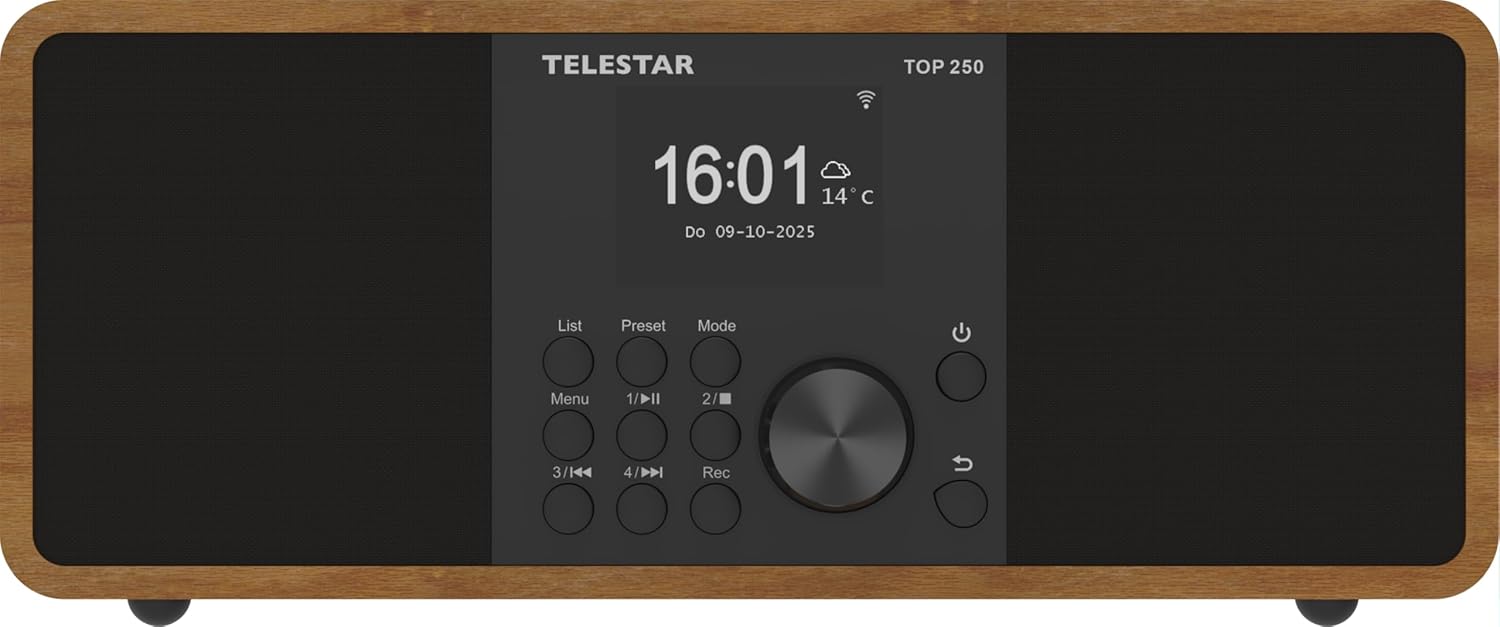
Afbeelding: Voorzijde view of the TELESTAR TOP 250, highlighting the central display, navigation knob, and various control buttons.
- Weergave: Large 6.1 cm illuminated color display for information and menu navigation.
- Bedieningsknop: Used for volume adjustment and menu navigation.
- Direct Selection Buttons (1-4): For quick access to favorite stations or functions.
- Menuknop: Geeft toegang tot het hoofdmenu.
- Modusknop: Switches between different operating modes (DAB+, FM, Internet Radio, Bluetooth, USB).
- Aan/uit-knop: Hiermee wordt het apparaat in- of uitgeschakeld of in de stand-bymodus gezet.
4.2 Achterpaneel
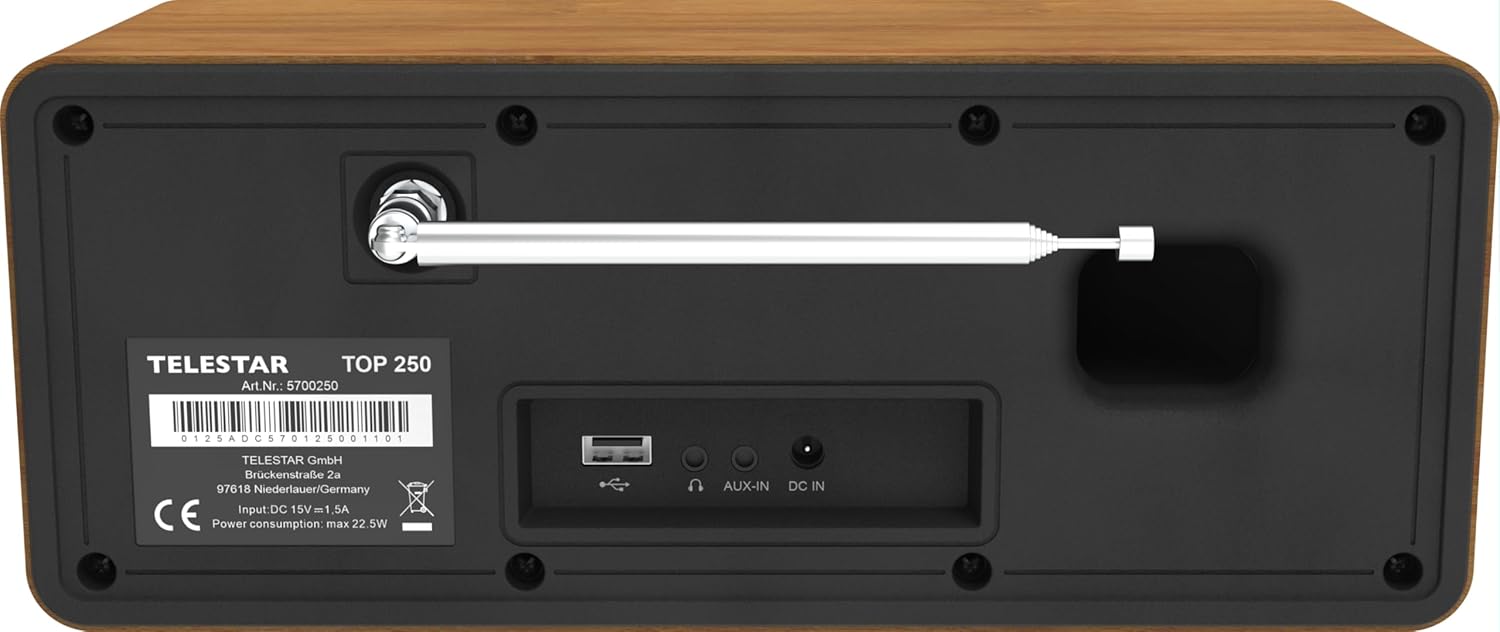
Image: Rear panel of the TELESTAR TOP 250, detailing the screw-on antenna connector, USB 2.0 port, 3.5mm AUX-in, headphone jack, and DC power input.
- Antenne-aansluiting: For the screw-on telescopic antenna.
- USB 2.0-poort: For USB media playback and recording.
- AUX-in (3.5 mm): Sluit externe audioapparaten aan.
- Koptelefoon aansluiting: Voor privéluisteren.
- DC IN: Stroomaansluiting voor de externe stroomadapter.
4.3 afstandsbediening

Image: The remote control for the TELESTAR TOP 250, showing buttons for power, mode selection, equalizer, volume control, navigation, direct presets, and recording.
The remote control allows convenient operation of all functions from a distance. Ensure the CR2025 battery is correctly inserted.
5. Instellen
5.1 Stroom aansluiten
- Connect the external power adapter to the DC IN port on the rear of the unit.
- Sluit de stroomadapter aan op een geschikt stopcontact.
5.2 De antenne aansluiten
Screw the telescopic antenna firmly into the antenna connector on the rear panel. Extend the antenna for optimal reception of DAB+ and FM signals.
5.3 Eerste installatie
- Druk op de aan / uit-knop om het apparaat in te schakelen.
- The display will guide you through the initial setup process, including language selection and network configuration.
- For Internet Radio, select your Wi-Fi network and enter the password.
- The radio will automatically scan for available DAB+ and FM stations.
6. Gebruiksaanwijzing
6.1 DAB+-radio
Select DAB+ mode using the Mode button. The radio will automatically scan for and list available DAB+ stations. Use the control knob or navigation buttons to browse and select stations.
6.2 FM-radio
Select FM mode using the Mode button. Use the control knob to tune to stations or perform an auto-scan for available FM frequencies.
6.3 Internetradio
Select Internet Radio mode. Ensure the device is connected to a Wi-Fi network. You can browse stations by genre, location, or search for specific stations. The device supports thousands of internet radio stations worldwide.
6.4 Bluetooth-audiostreaming
The TELESTAR TOP 250 supports both Bluetooth reception and transmission.
- Receive Function: Pair your smartphone or other Bluetooth device with the TOP 250 to stream audio wirelessly to the radio's speakers.
- Send Function: Transmit the currently playing radio station (DAB+, FM, Internet Radio) via Bluetooth to your wireless headphones or external Bluetooth speakers.
6.5 USB-weergave en -opname
Insert a USB memory stick into the USB 2.0 port on the rear panel.
- USB-weergave: De radio kan audio afspelen. files stored on the USB stick. Navigate through your files using the control knob and display.
- USB-opname: Record radio broadcasts directly to the USB stick. You can initiate direct recording or program recordings for specific times and durations.
6.6 Wekker en slaaptimer
- Wekker: Set up to 5 programmable alarms. Choose to wake up to various sounds, DAB+, FM, or Internet Radio. Alarms can be set for once, daily, weekdays, or weekends.
- Slaaptimer: Set a timer for the radio to automatically turn off after a specified period.
6.7 Nachtmodus
The night mode function allows you to dim or turn off the display illumination for a set period, preventing disturbance during sleep. This function can be individually adjusted for standby and operation modes.
6.8 App-besturing
Control your TELESTAR TOP 250 using the dedicated Soundmate app, available for iOS and Android devices. The app provides full control over the radio's functions without additional cost.
6.9 Emergency Alarm System (ASA)
The integrated ASA emergency alarm system allows the radio to automatically transmit official alert messages in case of catastrophes. The device will activate from standby mode, and alerts may also be sent via SMS (multilingual).
7. Onderhoud
- Schoonmaak: Gebruik een zachte, droge doek om het apparaat schoon te maken. Gebruik geen schuurmiddelen of oplosmiddelen.
- Antenne: Ga voorzichtig om met de telescopische antenne om beschadiging te voorkomen.
- Software-updates: Periodically check for software updates through the system settings to ensure optimal performance and new features.
8. Probleemoplossing
| Probleem | Mogelijke oorzaak | Oplossing |
|---|---|---|
| Geen stroom | De voedingsadapter is niet aangesloten; het stopcontact werkt niet. | Controleer de stroomaansluitingen. Probeer een ander stopcontact. |
| Slechte DAB+/FM-ontvangst | Antenne niet correct uitgeschoven of gepositioneerd; zwak signaal. | Extend and adjust the telescopic antenna; try repositioning the radio. |
| Internetradio maakt geen verbinding | Onjuist wifi-wachtwoord; zwak wifi-signaal; probleem met de router. | Verify Wi-Fi password; move radio closer to router; restart router. |
| Problemen met Bluetooth-koppeling | Device not in pairing mode; too far from radio. | Ensure both devices are in pairing mode; bring devices closer. |
| Geen geluid | Volume te laag; dempen ingeschakeld; verkeerde bron geselecteerd. | Increase volume; check mute status; select correct input source. |
9. Specificaties

Image: Product dimensions of the TELESTAR TOP 250.
| Functie | Detail |
|---|---|
| Fabrikant | TELESTAR |
| Modelnummer | 5701250 |
| Productafmetingen (L x B x H) | 27.6x13x11.8cm |
| Gewicht | 1.44 kg |
| Kleur | Hout |
| Connectiviteitstechnologie | Aux, Bluetooth, Wi-Fi |
| Tuner-technologie | DAB+, internetradio, FM |
| Energiebron | Met snoer (gelijkstroom 15V / 1.5A) |
| Audio-uitgang | 2 x 10 Watt (20 W total) Stereo |
| Speciale kenmerken | Integrated Clock, USB Recording, USB Media Player, Emergency Alarm System (ASA), Alarm Clock, Sleep Timer, Night Mode, App Control |
| Weergave | 6.1 cm illuminated color display with dimmer |
10. Garantie en ondersteuning
For warranty information and technical support, please refer to the official TELESTAR webBezoek de website of neem contact op met uw lokale dealer. Bewaar uw aankoopbewijs.
Manufacturer: TELESTAR GmbH
Webwebsite: www.telestar.de