Invoering
This manual provides essential information for setting up, operating, maintaining, and troubleshooting your Acer Aspire 3 Laptop (Model A325-42). Please read this guide thoroughly to ensure proper use and to maximize the performance and lifespan of your device.
The Acer Aspire 3 features an AMD Ryzen 7 7730U 8-Core Processor, AMD Radeon Graphics, a 15.6-inch Full HD display, 32GB DDR4 RAM, and a 4TB NVMe SSD, running on Windows 10 Pro. It is designed for efficient performance and versatile use.
Instellen
1. Uitpakken en eerste inspectie
Haal alle onderdelen voorzichtig uit de verpakking. Controleer of de volgende onderdelen aanwezig zijn:
- Acer Aspire 3 Laptop
- 65W AC-adapter
- 1 x 32GB USB Drive
Controleer de laptop op fysieke schade. Neem onmiddellijk contact op met uw verkoper als u schade constateert.
2. De stroomadapter aansluiten
Connect the 65W AC adapter to the laptop's power input port and then plug it into a power outlet. It is recommended to fully charge the battery before initial use.
3. Eerste keer inschakelen en Windows-installatie
Druk op de aan/uit-knop om de laptop in te schakelen. Volg de instructies op het scherm om de installatie van Windows 10 Pro te voltooien. Dit omvat het selecteren van uw regio en taal, het aanmaken van een gebruikersaccount en het verbinden met een wifi-netwerk.

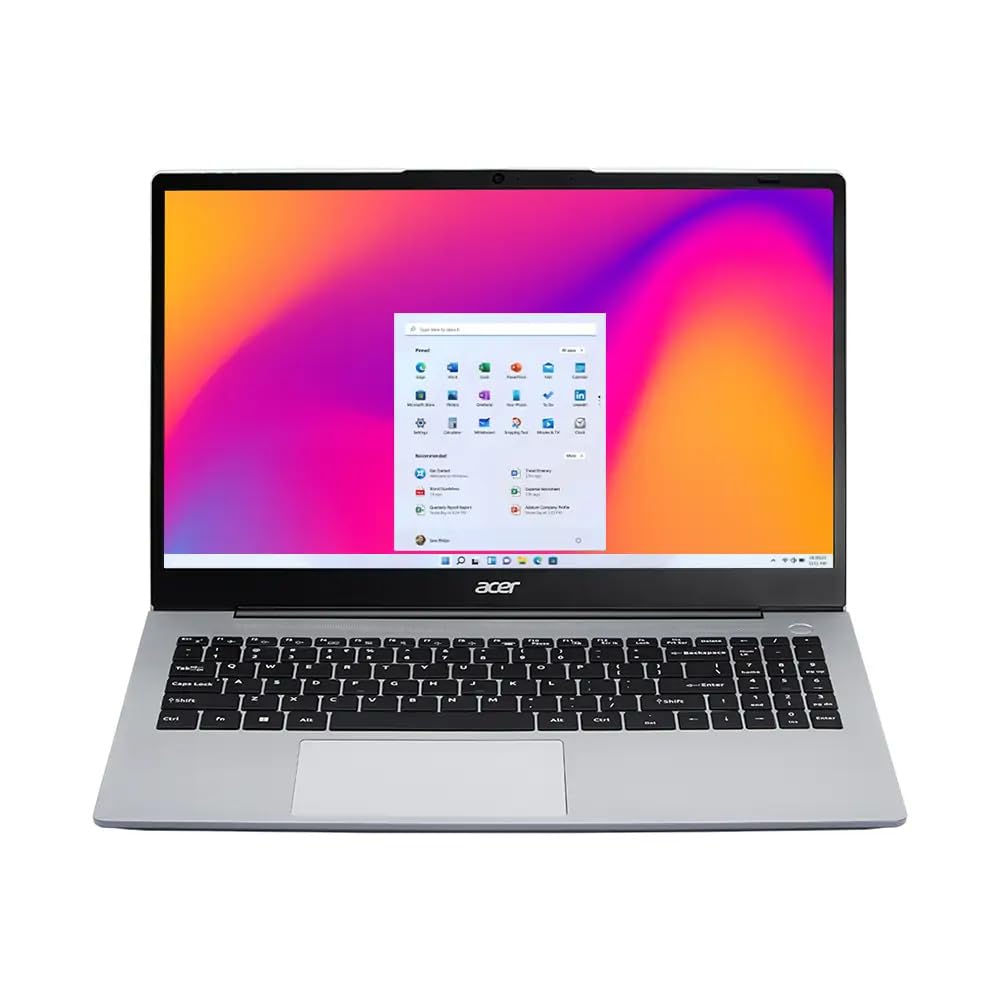
Afbeelding: The Acer Aspire 3 laptop in an open position, showcasing its display and keyboard. This image illustrates the general appearance of the laptop during initial setup.
Gebruiksaanwijzing
1. Weergavefuncties
Your laptop features a 15.6-inch Full HD (1920 x 1080) display with anti-glare properties and ComfyView technology for reduced eye strain. The display also supports a 180-degree hinge, allowing for versatile viewhoeken.

Afbeelding: The laptop display showcasing vibrant, high-definition visuals, highlighting the Full HD resolution and ComfyView functies.

Afbeelding: The Acer Aspire 3 laptop demonstrating its 180-degree hinge, allowing the screen to lay flat for various viewing and sharing scenarios.
2. Toetsenbord en touchpad
The laptop is equipped with a full-size backlit keyboard, including a Numpad for enhanced productivity. The integrated touchpad supports multi-touch gestures for navigation.
3. Connectiviteit
The Acer Aspire 3 supports Realtek Wi-Fi 6 (802.11ax) for fast wireless internet access and Bluetooth 5.1 for connecting wireless peripherals.
Afbeelding: A visual representation of the laptop's fast and reliable wireless connectivity, indicating Wi-Fi 6 and Bluetooth 5.1 capabilities.
4. Ports and External Connections
The laptop provides a variety of ports for connecting external devices:
- 2x USB-C 3.2 Gen 2 (10 Gbps)
- 2x USB 3.2 Gen 1 (5Gbps)
- 1x USB 2.0
- 1x HDMI v1.4
- 1x hoofdtelefoon/microfoon combo-aansluiting
5. Camera and Audio
The integrated 1080p FHD Camera with a privacy shutter, along with two built-in digital microphones and stereo speakers, ensures clear audio and video for conferencing and communication.

Afbeelding: The laptop screen showing a video conferencing application with multiple participants, illustrating the clarity of audio and video features.
Onderhoud
1. Uw laptop schoonmaken
- Gebruik een zachte, pluisvrije doek om het scherm schoon te maken. Vermijd agressieve chemicaliën.
- For the keyboard and chassis, use a slightly damp cloth. Ensure no liquid enters the device.
- Regularly clean the ventilation openings to prevent dust buildup, which can affect performance.
2. Software-updates
Keep your Windows 10 Pro operating system and drivers updated to ensure optimal performance and security. Check for updates regularly through Windows Update.
3. Batterijverzorging
To prolong battery life, avoid extreme temperatures and do not leave the laptop plugged in at 100% charge for extended periods. For long-term storage, charge the battery to about 50-60%.
4. Opslagbeheer
Periodiek opnieuwview en verwijder onnodige files to maintain sufficient free space on your 4TB SSD, which contributes to system performance.
Probleemoplossing
If you encounter issues with your Acer Aspire 3 laptop, consider the following common troubleshooting steps:
- Geen stroom: Zorg ervoor dat de netadapter goed is aangesloten op zowel de laptop als een werkend stopcontact. Probeer een ander stopcontact.
- Weergaveproblemen: If the screen is blank, try connecting an external monitor to check if the issue is with the laptop's display or graphics card. Adjust brightness settings.
- Wi-Fi-connectiviteit: Check if Wi-Fi is enabled in Windows settings. Restart your router and the laptop. Ensure drivers are updated.
- Trage prestaties: Close unnecessary applications. Check for malware. Ensure sufficient free storage space and update your operating system.
- Randapparatuur niet gedetecteerd: Probeer het randapparaat op een andere USB-poort aan te sluiten. Zorg ervoor dat de stuurprogramma's voor het randapparaat zijn geïnstalleerd.
Voor complexere problemen kunt u terecht bij de Acer-ondersteuning. webwebsite of neem contact op met de klantenservice.
Specificaties
| Functie | Detail |
|---|---|
| Modelnaam | Aspire 3 (A325-42) |
| Verwerker | AMD Ryzen 7 7730U (8-core, tot 4.5 GHz) |
| Grafisch | AMD Radeon Graphics (geïntegreerd) |
| Weergave | 15.6" FHD (1920 x 1080) 60Hz, Anti-glare, 250 nits, 45% NTSC, ComfyView |
| RAM | 32 GB DDR4 SDRAM 3200 MHz |
| Opslag | 4TB NVMe M.2 SSD |
| Besturingssysteem | Windows 10 Pro |
| Toetsenbord | Verlicht toetsenbord met numeriek toetsenblok |
| Draadloze connectiviteit | Realtek Wi-Fi 6 (2x2), Bluetooth 5.1 |
| Havens | 2x USB-C 3.2 Gen 2, 2x USB 3.2 Gen 1, 1x USB 2.0, 1x HDMI v1.4, 1x Headphone/Mic Combo |
| Webnokkenas | 1080p FHD-camera |
| Batterij | 55Wh lithium-ion (tot 6 uur) |
| Afmetingen (LxBxH) | 14.22 x 10 x 0.77 inch |
| Gewicht | 3.94 kg (1.79 lbs) |
| Kleur | Pure Silver |

Afbeelding: The Acer Aspire 3 laptop from various angles, highlighting its sleek design, thickness (19.3mm), and overall dimensions and weight (1.79 kg).
Garantie en ondersteuning
1. Productgarantie
Your Acer Aspire 3 laptop comes with a 12-month warranty. This warranty covers manufacturing defects and ensures your product functions as intended under normal use. For specific terms and conditions, please refer to the warranty card included with your product or visit the official Acer support webplaats.
2. Klantenservice
For technical assistance, troubleshooting, or warranty claims, please contact Acer customer support. You can find contact information and additional resources on the official Acer webplaats.
Online hulp: Bezoek www.acer.com/support for drivers, manuals, and FAQs.