
Macap MI40 Touch
Macap MI40 Touch Instant Burr Koffiemolen Gebruikershandleiding
Model: MI40 Touch
Brand: Macap
1. Product voorbijview
The Macap MI40 Touch Instant Burr Coffee Grinder is a high-performance appliance designed for precise and consistent coffee grinding. Featuring 65mm flat burrs, a responsive 3.5-inch touchscreen, and multiple operating modes, it is suitable for various brewing methods from espresso to cold brew. Its robust construction ensures quiet operation and stability.
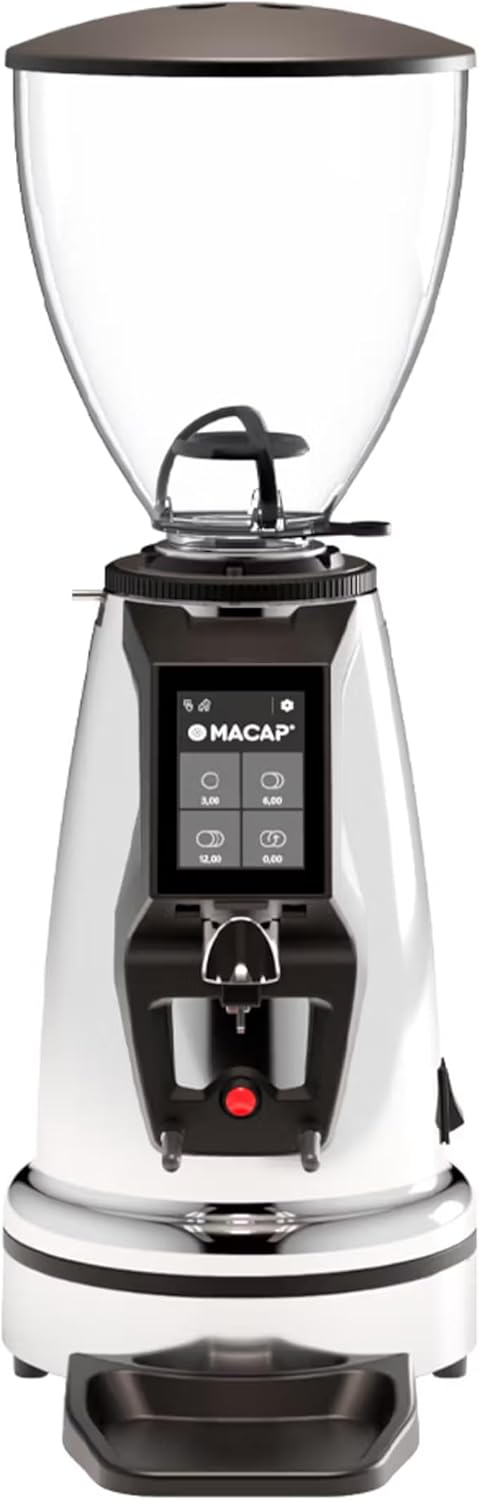
Voorkant view van de Macap MI40 Touch Instant Burr koffiemolen, demonstratieasing its sleek chrome finish and integrated touchscreen display.
2. Veiligheidsinformatie
Please read all safety instructions carefully before operating the grinder to prevent injury or damage.
- Always unplug the grinder from the power outlet before cleaning, maintenance, or if it will be left unattended.
- Dompel de slijpmachine, het netsnoer of de stekker niet onder in water of andere vloeistoffen.
- Keep hands and utensils out of the bean hopper and grind chute during operation.
- Ensure the bean hopper lid is securely in place before grinding.
- Dit apparaat is uitsluitend bedoeld voor het malen van hele gebrande koffiebonen. Maal geen andere stoffen.
- Gebruik de slijpmachine niet met een beschadigd snoer of stekker, of als het apparaat defect is of op enigerlei wijze beschadigd is.
- Houd het apparaat buiten bereik van kinderen.
3. Components
Maak uzelf vertrouwd met de belangrijkste onderdelen van uw MI40 Touch koffiemolen:
Bonentrechter: Transparent container for holding whole coffee beans. Capacity: 1.2 Kilograms.

3.5 inch touchscreen-display: Intuitive interface for controlling grind settings, dose programming, and operating modes.

Slijpafstelring: Stepless micrometric adjustment for precise control over grind particle size.

Portafilter Fork & Drip Tray: Adjustable fork to hold your portafilter for hands-free grinding, with a removable drip tray for easy cleaning.
4. Instellen
Follow these steps to set up your Macap MI40 Touch grinder:
- Uitpakken: Carefully remove the grinder and all accessories from the packaging. Retain the packaging for future transport or storage.
- Plaatsing: Place the grinder on a stable, flat, and dry surface. Ensure there is adequate ventilation around the unit.
- Hopperinstallatie: Place the bean hopper onto the grinder body, aligning the tabs. Rotate the hopper clockwise until it locks securely into place.
- Installatie van lekbak: Slide the removable drip tray into its designated slot at the base of the grinder.
- Stroomaansluiting: Sluit het netsnoer aan op een geaard stopcontact.
- Eerste reiniging: Veeg voor het eerste gebruik de buitenkant af met een vochtige doek.amp cloth. Ensure the burrs and grind chute are free of any packing debris.

Kant view of the Macap MI40 Touch grinder, illustrating its compact design and the placement of the bean hopper and drip tray.
5. Gebruiksaanwijzing
5.1. Afstelling van de slijpsteen
The MI40 Touch features stepless micrometric grind adjustment, allowing for precise control over particle size. To adjust the grind:
- Ensure the grinder is off or not actively grinding.
- Rotate the grind adjustment collar located below the bean hopper.
- Draaien rechtsom for a finer grind (e.g., for espresso).
- Draaien tegen de klok in for a coarser grind (e.g., for drip, French press, or cold brew).
- Make small adjustments and test the grind to achieve the desired consistency for your brewing method.
Van dichtbij view of the grind adjustment collar, showing the numerical markings for reference.
5.2. Touchscreeninterface
The 3.5-inch touchscreen allows for intuitive control and customization of your grinding experience. It features four programmable dose buttons and various settings.
The 3.5-inch touchscreen display showing the main interface with programmable dose buttons.
For a detailed demonstration of the touchscreen interface and its functionalities, please refer to the official video below:
This video demonstrates the various features and customization options of the 3.5-inch touchscreen interface on the Macap MI Series coffee grinders, including dose programming, color customization, and different operating modes.
5.3. Bedrijfsmodi:
The MI40 Touch offers three primary operating modes:
- Standaardmodus: Allows you to select a pre-programmed dose by pressing the corresponding button on the touchscreen. The grinder will dispense the set amount of coffee.
- Duw- en maalmodus: Grinding starts when the portafilter activates the button on the fork and stops when the portafilter is removed. This mode is ideal for manual control.
- Handsfree barista-modus: Similar to Push and Grind, but designed for continuous grinding as long as the portafilter is in place, allowing baristas to multitask.
6. Onderhoud en reiniging
Regular cleaning and maintenance will ensure optimal performance and longevity of your grinder.
6.1. Dagelijkse schoonmaak
- Grind Chute: Use a brush or vacuum to clear any residual coffee grounds from the grind chute after each use.
- Afdruiprek: Remove and empty the drip tray regularly. Wipe it clean with a damp doek en droog het grondig af.
- Buitenkant: Veeg de buitenkant van de koffiemolen af met een zachte, droge doek.amp doek. Gebruik geen schurende reinigingsmiddelen of oplosmiddelen.

The removable drip tray and portafilter fork area, designed for easy cleaning.
6.2. Deep Cleaning (Weekly/Bi-Weekly)
- Koppel de molen los.
- Bonencontainer verwijderen: Empty any remaining beans. Rotate the hopper counter-clockwise to unlock and remove it.
- Reinig de braam: Use a stiff brush or a specialized grinder brush to remove accumulated coffee oils and grounds from the burrs. You may need to remove the upper burr for thorough cleaning (refer to specific instructions in the full manual for burr removal).
- Clean Grind Chamber: Use a vacuum cleaner with a narrow attachment to remove grounds from the grind chamber.
- Opnieuw monteren: Reinstall the burrs (if removed) and the bean hopper securely.
7. Probleemoplossing
If you encounter issues with your MI40 Touch grinder, refer to the table below for common problems and solutions.
| Probleem | Mogelijke oorzaak | Oplossing |
|---|---|---|
| De molen gaat niet aan. | Niet aangesloten; schakelaar uit; stroomonderbreker geactiveerd. | Controleer de stroomaansluiting; zorg ervoor dat de stroomschakelaar aan staat; reset de stroomonderbreker. |
| Er wordt geen koffie geschonken. | Hopper empty; grind chute clogged; burrs jammed. | Fill hopper; clean grind chute; clear any foreign objects from burrs (unplug first). |
| Inconsistente slijping. | Burrs dirty or worn; grind setting too coarse/fine. | Clean burrs thoroughly; adjust grind setting incrementally. Consider burr replacement if worn. |
| Grinder is excessively noisy. | Vreemd voorwerp in bramen; losse onderdelen. | Unplug and inspect burrs for foreign objects; check for loose parts. If noise persists, contact support. |
| Touchscreen reageert niet. | Tijdelijke softwarefout; stroomprobleem. | Unplug the grinder for 30 seconds, then plug back in. If issue persists, contact support. |
8. Specificaties
Key technical specifications for the Macap MI40 Touch Instant Burr Coffee Grinder:
| Functie | Specificatie |
|---|---|
| Model | MI40 Touch |
| Braamtype | Platte klitten |
| Braamdiameter | 65 mm |
| Motorvermogen | 480W |
| Trechtercapaciteit | 1.2 kilogram |
| Maalaanpassing | Traploze micrometrische |
| Weergave | 3.5'' Touchscreen |
| Productafmetingen (L x B x H) | 12" x 7.63" x 22" |
| Artikelgewicht | 19.58 pond |
| Land van herkomst | Italië |
9. Garantie en ondersteuning
Macap products are manufactured to high standards and undergo rigorous quality control. For warranty information, technical support, or service inquiries, please refer to the warranty card included with your product or visit the official Macap website. Please have your model number (MI40 Touch) and purchase date available when contacting support.