
1. Inleiding
Thank you for choosing the Joymate Wireless Phone Charger Stand with Bluetooth Speaker. This device combines a wireless phone charger, an adjustable phone stand, and a Bluetooth speaker into one compact unit, designed to enhance your desk or living space. This manual provides detailed instructions for setup, operation, maintenance, and troubleshooting to ensure optimal performance and longevity of your product.
2. Wat zit er in de doos?
Controleer of alle artikelen in de verpakking aanwezig zijn:
- Joymate Wireless Phone Charger Stand with Bluetooth Speaker (Model L41)
- Type-C Data Cable with Wall Charger
- Gebruiksaanwijzing
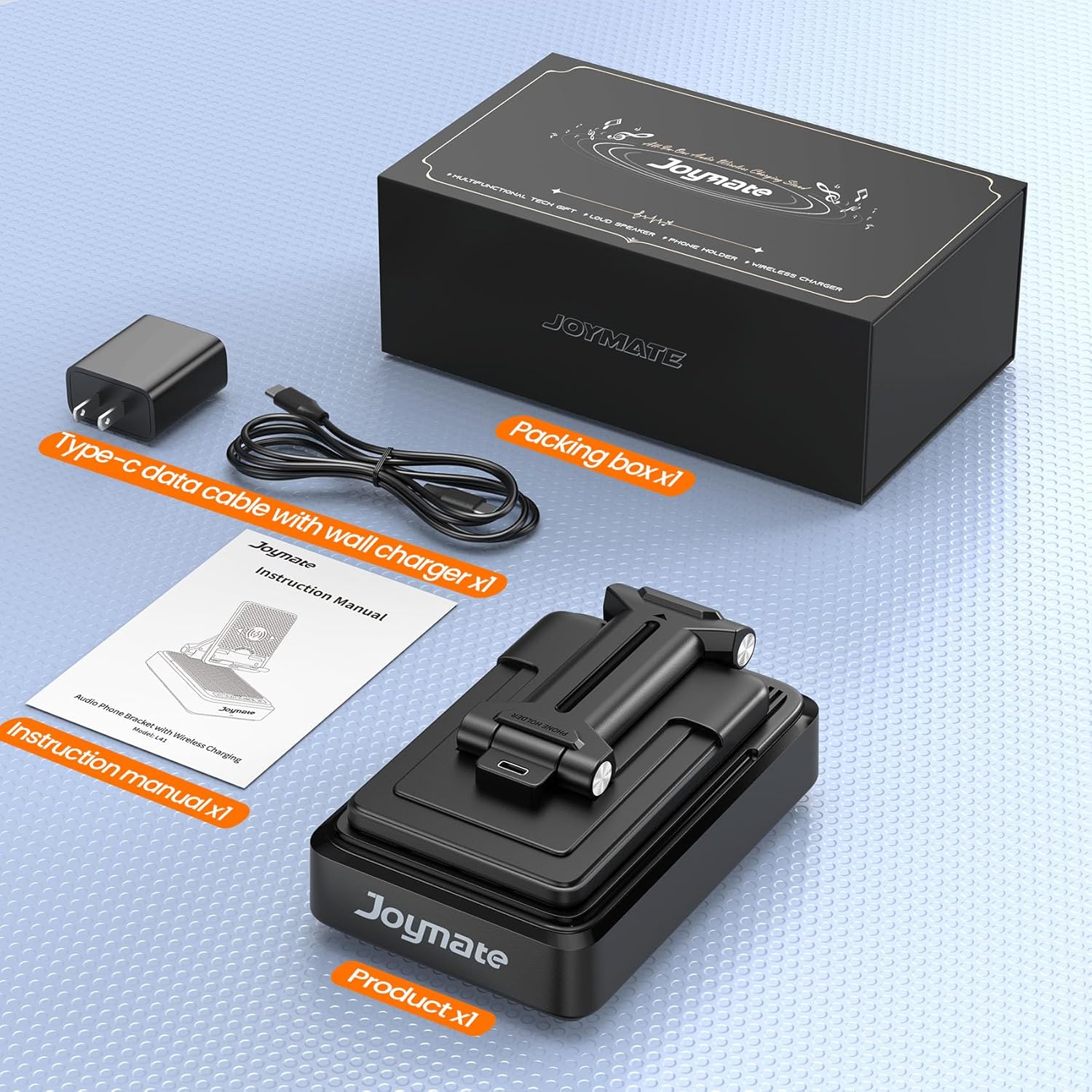
Figuur 2.1: Packaging contents including the main unit, charging cable, and manual.
3. Product voorbijview
Familiarize yourself with the components and controls of your Joymate device.
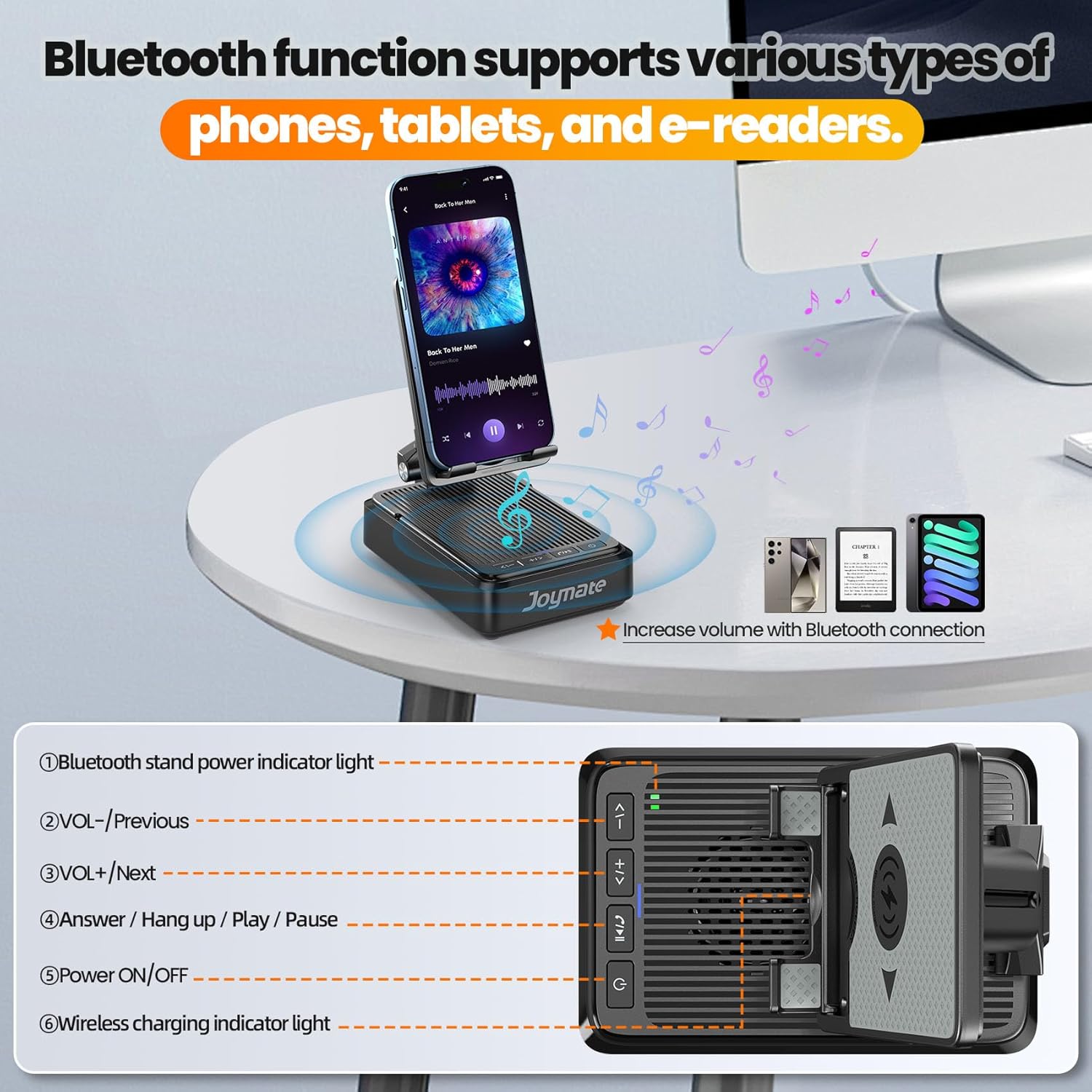
Figuur 3.1: Voorkant view of the Joymate L41 with control labels.
Bedieningsknoppen en indicatoren:
- Bluetooth Stand Power Indicator Light: Indicates the power status of the Bluetooth speaker.
- VOL- / Previous: Short press to decrease volume, long press to go to the previous track.
- VOL+ / Next: Short press to increase volume, long press to go to the next track.
- Answer / Hang up / Play / Pause: Press to answer or end calls, or to play/pause audio playback.
- Power ON/OFF / Mode: Long press to power on/off the device. Short press to switch modes (if applicable).
- Indicatielampje voor draadloos opladen: Illuminates when a device is wirelessly charging.
4. Installatie-instructies
Follow these steps to set up your Joymate device:
- Pak het apparaat uit: Carefully remove the Joymate Wireless Phone Charger Stand and all accessories from the packaging.
- Sluit stroom aan: Insert the Type-C end of the provided data cable into the charging port on the back of the Joymate stand. Plug the wall charger into a standard electrical outlet. The device will power on automatically or can be powered on by long-pressing the Power ON/OFF button.
- Pas de standaard aan: The phone stand is adjustable. Gently extend the arm and tilt the panel to your desired viewing angle. Ensure the stand is stable on a flat surface.

Figuur 4.1: Connecting the Joymate L41 to a power source.
5. Gebruiksaanwijzing
5.1. Draadloos opladen
The Joymate L41 supports wireless charging for compatible smartphones.
- Plaatsing: Place your wireless charging-compatible smartphone directly onto the charging pad of the stand. Ensure the phone is centered on the pad for optimal charging.
- Laadindicator: The Wireless Charging Indicator Light (6) will illuminate to confirm that charging has begun.
- Belangrijke opmerking: For best results, ensure your phone supports wireless charging. Thin phone cases (up to 0.62 inches) are generally compatible, but very thick cases or cases with metal attachments may interfere with charging. The device is not a power bank and requires continuous power input for charging functionality.
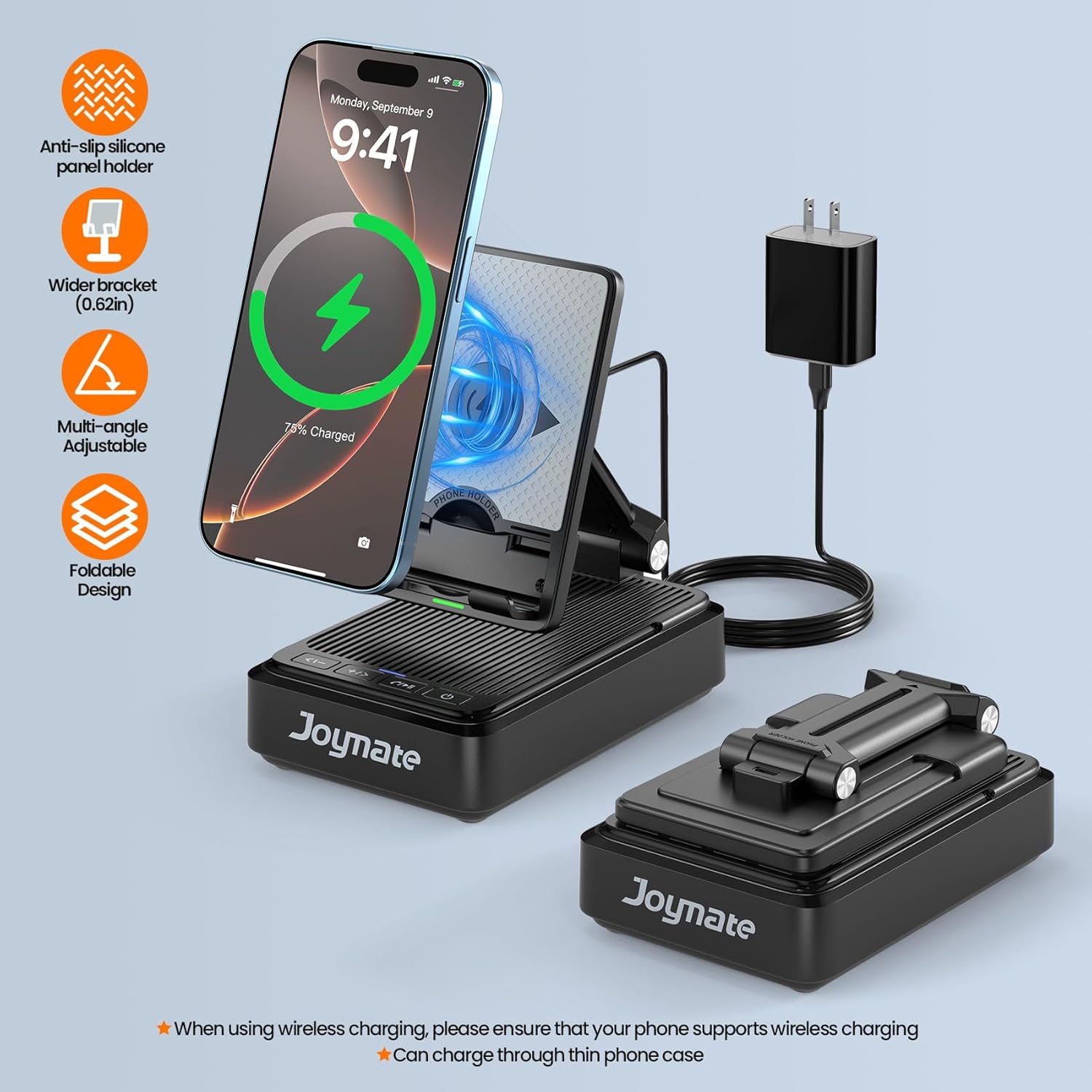
Figuur 5.1: Wireless charging a smartphone on the stand.
5.2. Bediening van de Bluetooth-luidspreker
Connect your device to the built-in Bluetooth speaker for audio playback.
- Inschakelen: Ensure the Joymate L41 is powered on. The Bluetooth Stand Power Indicator Light (1) will show its status.
- Koppelen: Navigeer op uw smartphone of ander Bluetooth-apparaat naar de Bluetooth-instellingen. Zoeken naar available devices and select "Joymate L41" to pair. A confirmation sound will indicate successful pairing.
- Audio afspelen: Once paired, audio from your connected device will play through the Joymate L41 speaker. Use the VOL- / Previous (2) and VOL+ / Next (3) buttons to adjust volume or skip tracks. The Answer / Hang up / Play / Pause (4) button controls playback.
- Handsfree bellen: The built-in microphone allows for hands-free calls. Press the Answer / Hang up / Play / Pause (4) button to answer or end a call.

Figuur 5.2: Connecting to the Bluetooth speaker for audio.
5.3. Adjustable Phone Holder
The integrated phone holder offers flexibility for viewind.
- Hoek aanpassen: The stand's panel can be adjusted to various angles. Gently pivot the phone support arm to achieve your preferred viewing position for watching videos, making calls, or browsing.
- Stabiliteit: The stand features a non-slip silicone surface to securely hold your device and reduce vibration. For tablets, adjust the panel angle to ensure stable placement.

Figuur 5.3: Demonstrating the adjustable arm and anti-slip panel.
6. Onderhoud
Proper care ensures the longevity of your Joymate L41.
- Schoonmaak: Use a soft, dry cloth to wipe the surface of the device. Avoid using abrasive cleaners or solvents, as these can damage the finish.
- Opslag: When not in use, store the device in a cool, dry place away from direct sunlight and extreme temperatures. The foldable design allows for compact storage.
- Vermijd vloeistoffen: Stel het apparaat niet bloot aan water of andere vloeistoffen.
7. Probleemoplossing
If you encounter issues with your Joymate L41, refer to the following common problems and solutions:
| Probleem | Mogelijke oorzaak | Oplossing |
|---|---|---|
| Apparaat gaat niet aan. | Geen stroomaansluiting of losse kabel. | Ensure the Type-C cable is securely connected to the device and the wall charger is plugged into a working outlet. Try a different outlet. |
| Draadloos opladen werkt niet. | Phone not compatible, misaligned, or thick case. | Verify your phone supports wireless charging. Re-position the phone to ensure it is centered on the charging pad. Remove thick phone cases or cases with metal. |
| De Bluetooth-luidspreker maakt geen verbinding. | Het apparaat bevindt zich niet in de koppelingsmodus of is al verbonden met een ander apparaat. | Ensure the Joymate L41 is powered on. Check your phone's Bluetooth settings to ensure it's searching for devices. Disconnect from other Bluetooth devices if necessary. |
| Phone becomes warm during wireless charging. | Normal operation, or potential misalignment. | Some warmth is normal during wireless charging. Ensure the phone is correctly aligned on the charging pad. If excessive heat is observed, discontinue use and contact support. |
| De geluidskwaliteit is slecht of vervormd. | Low battery, interference, or source audio quality. | Ensure the device is adequately powered. Move closer to the speaker to reduce interference. Check the quality of the audio source. |
8. Specificaties
| Functie | Detail |
|---|---|
| Modelnummer | L41 |
| Productafmetingen | 5.6 x 3.6 x 2.1 inch |
| Artikelgewicht | 13.1 ons |
| Bluetooth-versie | 5.3 |
| Bluetooth-bereik | Tot 32.8 voet (10 meter) |
| Energiebron | Type-C (wired connection required for charging) |
| Compatibele apparaten | Smartphones, Tablets, E-readers (with wireless charging capability for charging function) |
| Materiaal | High-quality ABS with non-slip silicone |
9. Garantie en ondersteuning
Joymate is committed to providing high-quality products and customer satisfaction. For any questions, concerns, or support needs regarding your Joymate L41, please refer to the following:
- Klantenservice: Joymate offers hassle-free customer service.
- Reactietijd: U kunt snelle reacties op uw vragen verwachten.
- Online hulp: 24-hour online service is available for assistance.
Please retain your purchase receipt for warranty purposes. For specific warranty terms and conditions, refer to the documentation provided with your purchase or contact Joymate customer support directly.